Introduction
Most L&D teams already run more than one learning system. There’s the LMS, obviously. Maybe a simulation platform for compliance or sales training. A mobile app for practice on the go. An assessment tool. Perhaps a coaching or performance-support tool that reps use on the job.
Each of those systems generates useful information about what learners are actually doing. The problem is that this information usually stays exactly where it was created. The LMS reports on the LMS. The simulation vendor’s dashboard reports on the simulation. Nothing talks to anything else.
So when someone in L&D asks a reasonable question — did the people who struggled in the simulation also perform worse in the assessment? — there’s no single place to even attempt an answer.
A Learning Record Store (LRS) is one part of the solution to that problem. This guide explains what an LRS actually does, how it relates to xAPI and your LMS, and — more importantly — how to work out whether your organisation needs one at all.
What Is a Learning Record Store?
A Learning Record Store (LRS) is a system that receives, stores and makes retrievable xAPI statements sent by learning applications and other systems to record learning experiences.
In plain English: it’s the place learning-experience data lands after another system has generated it, so it can be found again and used for something. It doesn’t create data on its own, and it doesn’t analyse anything by itself — that narrowness is deliberate, and it’s what the rest of this guide is really about.
What Is an Learning Record Store Used For?
An LRS is primarily used to centralise xAPI learning-experience records from multiple systems so those records can be retrieved for reporting, analytics, integration or other applications. In practice that means it:
- Centralises learning activity that would otherwise sit in separate platforms
- Connects data from multiple systems — LMS, simulation, mobile, performance support and more
- Supports downstream learning analytics work
- Preserves experience records outside the boundaries of any single LMS
- Provides data on request to other applications that need it
Everything below unpacks how it does that, and — just as importantly — when it’s actually worth doing.
LRS in One Minute
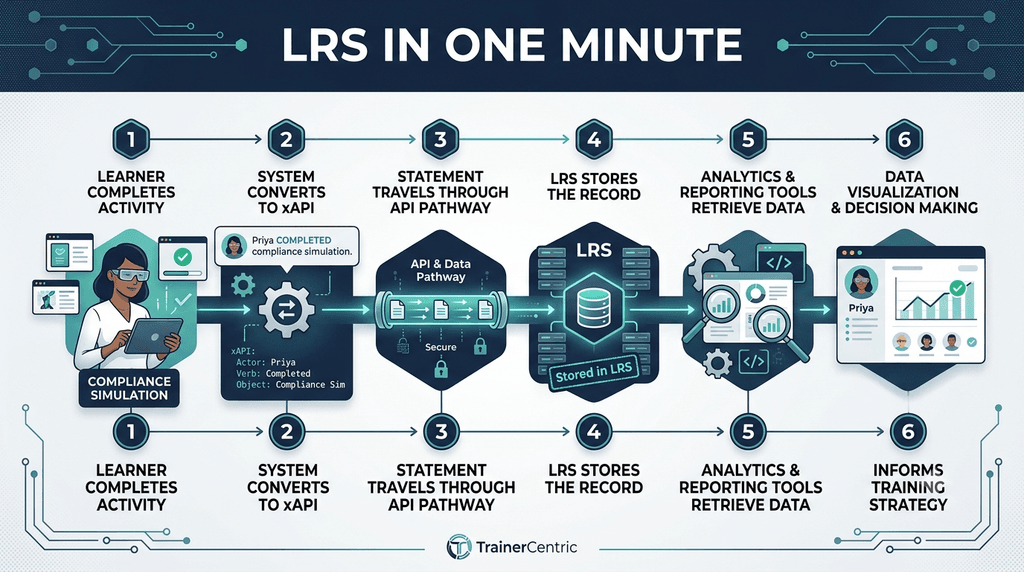
If you only take one mental model away from this article, make it this one.
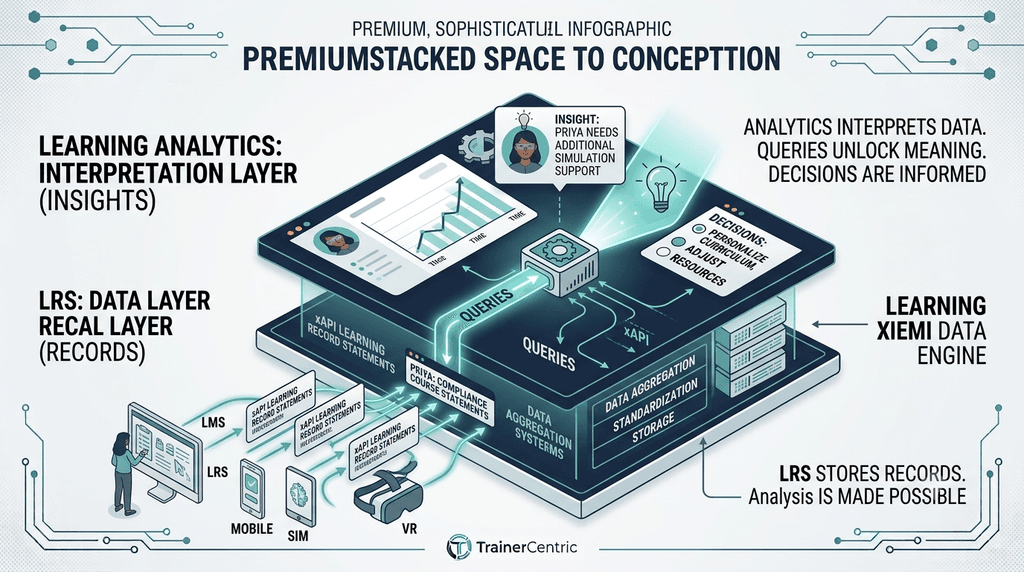
A learner does something. A system describes what they did as an xAPI statement — “Priya completed the compliance simulation.” That statement gets sent to the LRS, which stores it so it can be retrieved later. Analytics tools, dashboards or other applications then query the LRS to pull that record back out. Nothing here happens automatically at either end: something has to generate the statement, and something has to go looking for it afterward.
How Does an Learning Record Store Work?
Walking through the sequence end to end:
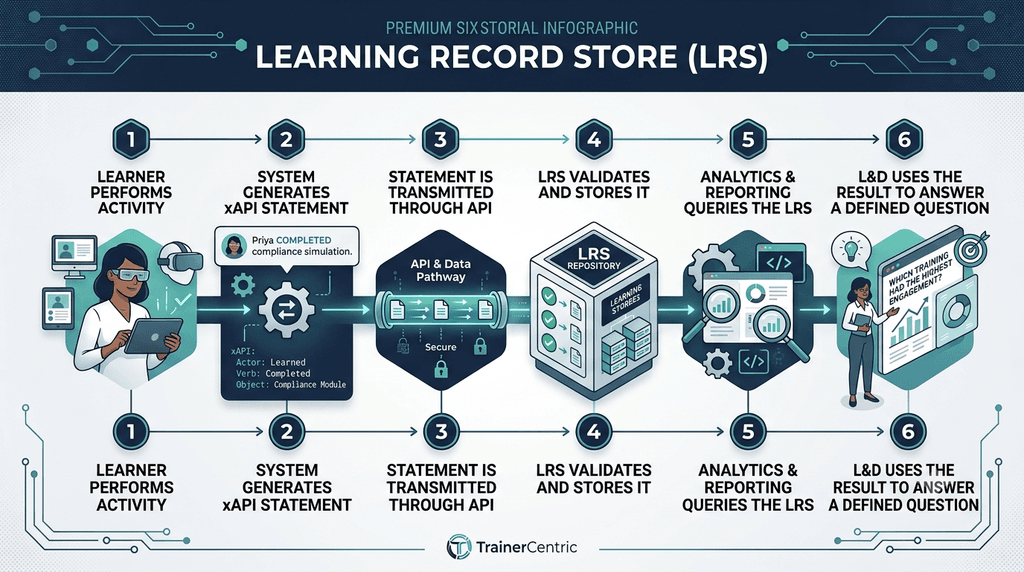
- A learner performs an activity — finishes a module, completes a simulation scenario, watches a video, gets coached, uses a job-aid.
- A system generates an xAPI statement describing that activity — who did what, to what, with what result.
- The statement is transmitted to the LRS, typically via an API call, at or shortly after the activity happens.
- The LRS validates and stores the record.
- Reporting or analytics systems query the LRS to pull out the statements relevant to a specific question.
- L&D uses the result to answer something defined.
The specification governing steps 2 and 3 — how a statement is structured and sent — is covered in depth in our xAPI guide. This article picks up from where that one leaves off: once the statement exists, what happens to it.
What Does an LRS Actually Store?
An LRS stores xAPI statements, and each one follows a consistent shape. Take a realistic example: Priya completed the compliance simulation with a score of 82%.
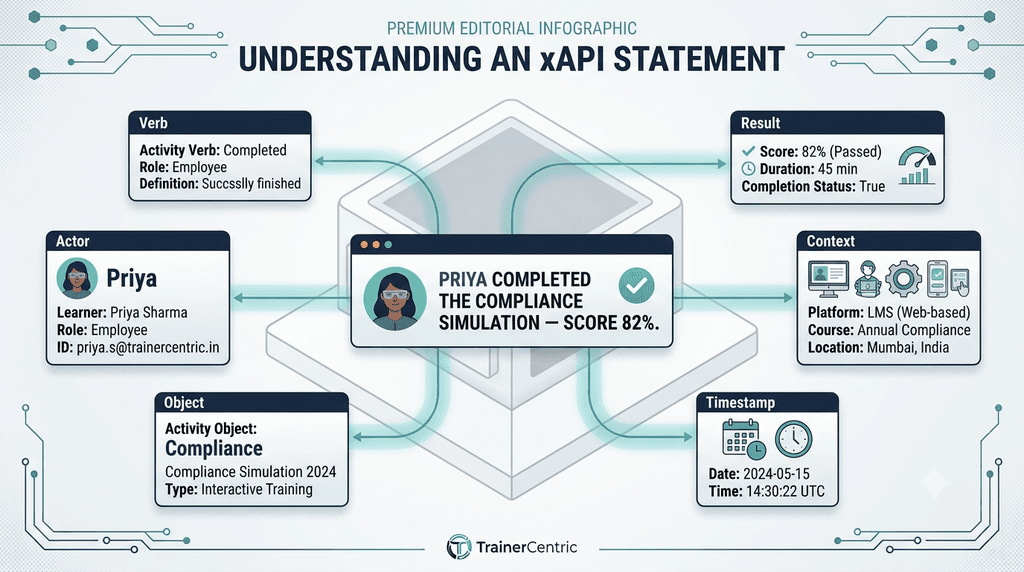
Translated into a stored xAPI statement, that breaks down roughly like this:
| Component | What it captures in Priya’s example |
| Actor | Priya (the learner) |
| Verb | Completed |
| Object | The compliance simulation |
| Result | Score of 82%, pass/fail status |
| Context | Which course this sat under, what platform, related activities |
| Timestamp | When the activity happened |
Multiply that across every learner and every connected system, and an LRS becomes genuinely valuable once activity spreads across more than one platform. This guide won’t go deeper into statement construction — that’s the xAPI article’s job.
LRS vs LMS: What’s the Difference?
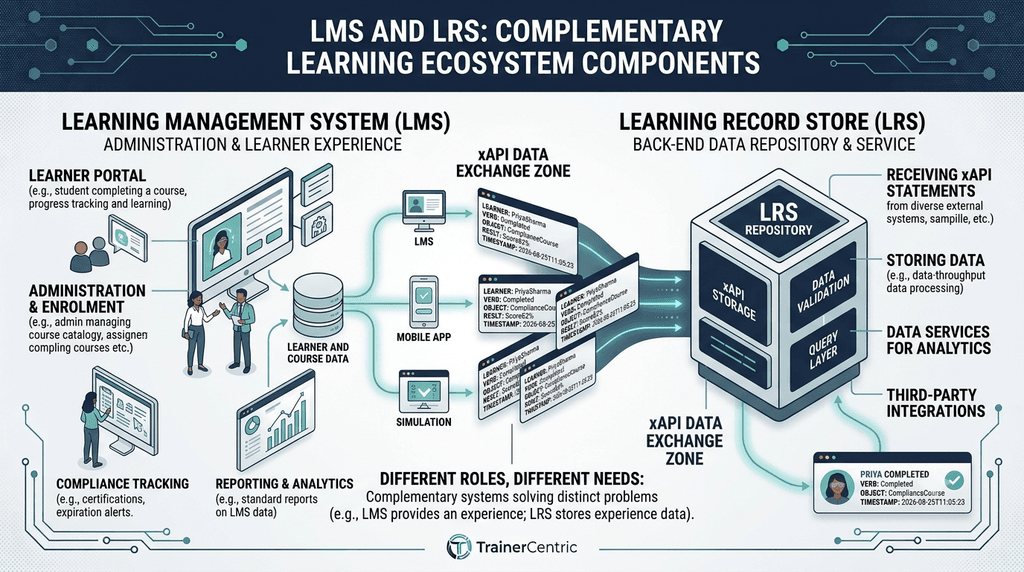
The short answer: an LMS manages and delivers learning; an LRS stores and makes retrievable records of learning experiences. They solve different problems, and neither replaces the other.
| LMS | LRS | |
| Primary purpose | Deliver, manage and administer courses | Receive, store and make xAPI statements retrievable |
| Manages courses | Yes | No |
| Tracks completion | Yes, for content it delivers | Can hold completion data if it arrives as a statement |
| Stores xAPI statements | Only if it has built-in LRS functionality | Yes — this is its core job |
| Centralising activity from systems beyond itself | Depends on the platform’s integrations — some LMSs ingest external data well, many don’t by default | Core use case — designed to receive statements from any compatible system |
| Learner administration | Yes — enrolments, roles, permissions | No |
| Reporting | Built-in reporting on LMS content | Provides data for external reporting/analytics tools |
| Can integrate with other systems | Sometimes, via APIs or plugins | Yes — designed to receive data from multiple systems |
| Primary users / consumers | Learners and learning administrators | Connected applications, analytics/reporting tools, technical administrators |
| Relationship to xAPI | May send xAPI statements out | Receives and stores xAPI statements |
Read that table as two different jobs, not two competing products. In real deployments, an LMS may send statements to a separate LRS, may contain Learning Record Store functionality and act as both, or may consume reporting built on data that lives in an external LRS. Which applies depends on the specific LMS and how it’s configured — which is why “does my LMS need an LRS” is an architecture question, not a yes/no one.
If you haven’t settled on an LMS yet, our guide on how to choose the right LMS is worth reading before deciding whether an LRS belongs in the stack.
LRS vs LMS vs LXP
One more system worth placing this against: the Learning Experience Platform (LXP).
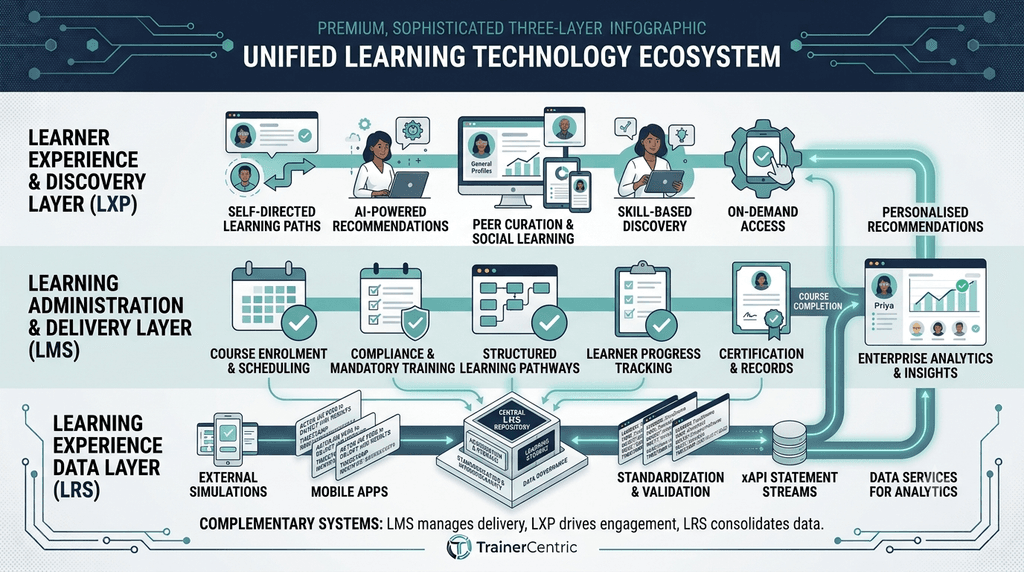
- LMS — learning administration and delivery. Enrolments, courses, completion, compliance tracking.
- LXP — learner experience, content discovery, curation and personalised access across many content sources.
- LRS — learning-experience data storage and retrieval, which can serve as a shared data layer alongside connected learning systems.
An LMS and an LXP are both learner-facing systems people use day to day. An LRS is typically a back-end data service rather than something learners interact with directly. For the fuller comparison, see our guide to what is an LXP.
What Can an Learning Record Store Help You Track?
An LRS can only store what other systems send it — it doesn’t independently decide what’s worth tracking. Once systems are configured to send statements, an LRS can hold records of course activity, simulations, assessments, mobile learning, video, games, performance-support usage, coaching interactions and other custom experiences.
The more useful question isn’t what can be tracked — almost anything can — it’s why L&D would want that data centralised: understanding learning journeys that span more than one system, spotting patterns across previously disconnected sources, connecting learning activity to other business data, and improving programme design based on what actually happened rather than just completion rates.
Worth holding onto as you read the rest of this guide: more data doesn’t automatically mean better learning measurement. An Learning Record Store full of statements nobody queries is just a more expensive way of doing nothing — a point we’ll come back to briefly, but only briefly, when it comes to implementation.
The Trainercentric 5-Question Learning Record Store Test
Rather than a generic pros-and-cons list, here’s a structured way to work through the decision. Answer each question in order — if you hit a “no,” that’s usually where to focus before moving forward.
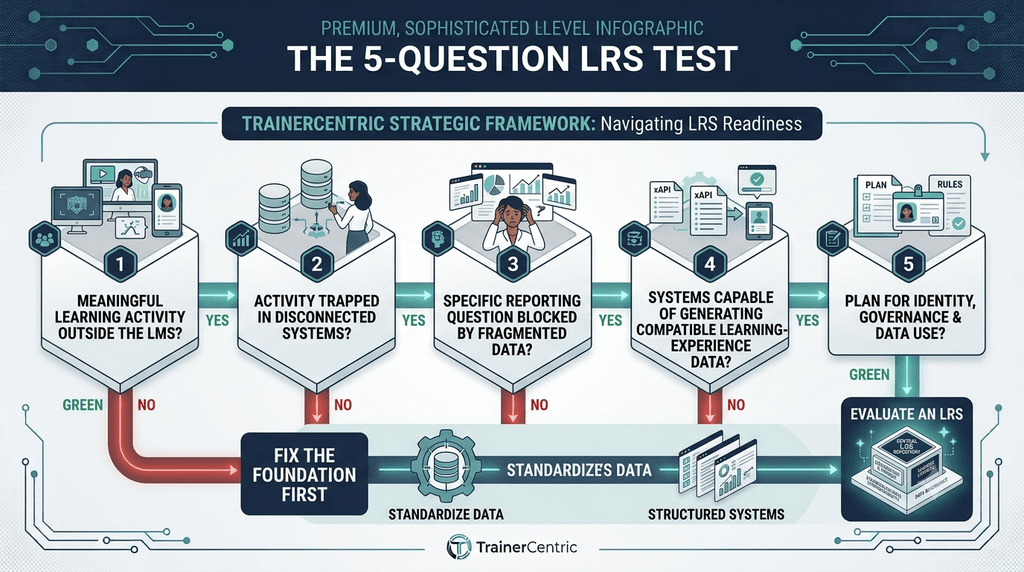
1. Is meaningful learning activity happening outside your LMS?
No → your existing LMS reporting may already be enough. Yes → continue.
2. Is that activity currently trapped in separate, disconnected systems?
No → investigate whether existing integrations already solve the problem. Yes → continue.
3. Do you have a specific question your current reporting can’t answer because the data is fragmented?
No → don’t implement an LRS yet — define the use case first. Yes → continue.
4. Can the relevant systems generate or send compatible learning-experience data?
No → solve the instrumentation and integration problem first. Yes → continue.
5. Do you have a plan for identity, governance and actually using the data?
No → build those foundations before implementation. Yes → an LRS is worth serious evaluation.
An Learning Record Store is worth considering when fragmented learning data is blocking a question you actually need answered. That’s the whole test, and it’s deliberately hard to satisfy on a “we should probably have one” impulse alone — which is the point.
Does an Learning Record Store Replace an LMS?
No. They solve different problems: one manages and delivers learning, the other stores records of learning experiences. Introducing an Learning Record Store doesn’t remove the need to enrol learners, deliver courses or administer compliance — that’s still the LMS’s job. In most deployments the two work together, with activity generated across systems captured as xAPI statements that flow into the LRS.
Can an LMS Have a Built-In LRS?
Some LMS platforms include LRS functionality, either built in or through additional components and integrations — this varies significantly by vendor and isn’t something to assume by default. Where it matters more than the yes/no is: where are the statements actually stored, can your analytics tools query that data directly rather than only through the LMS’s own dashboards, and does the historical data move with you if you ever change platforms?
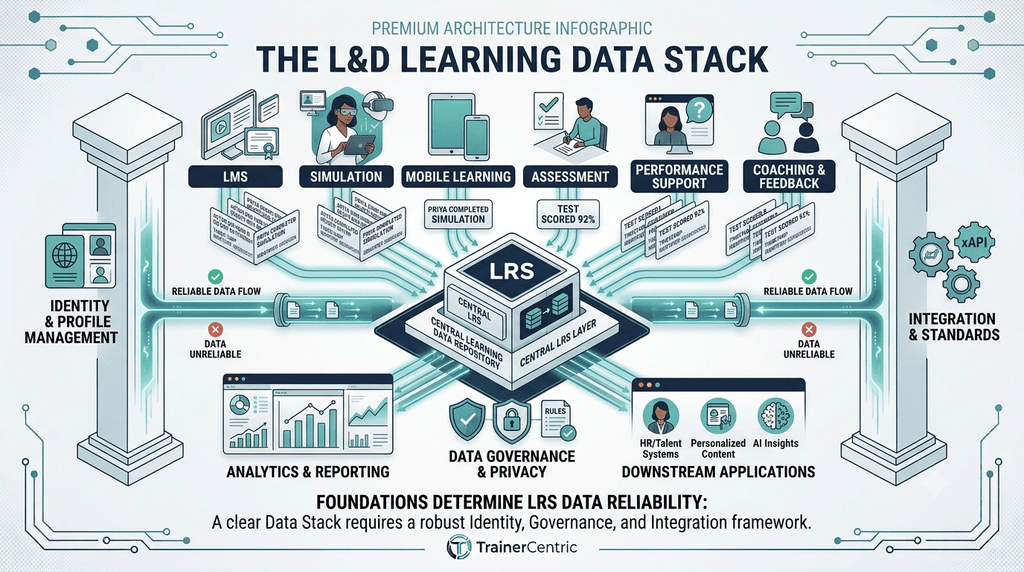
Learning Record Store Architecture: What Does a Typical Setup Look Like?
Keeping this at the level an L&D manager needs, not a systems diagram for developers:Underneath that diagram sit three things that have to actually work: identity (matching the same learner across systems), governance (who owns statement design, retention and access), and integration (each source system genuinely configured to send statements). Skip any of the three, and an LRS is just an empty or unreliable database wearing a nicer label.
If you’re weighing SCORM, xAPI and cmi5 as part of this architecture decision, our SCORM vs xAPI vs cmi5 comparison covers how the three standards differ.
What Should You Look for When Choosing an Learning Record Store?
Before any checklist, ask a vendor one thing directly: “Show us how our data gets in, how we get it back out, and what happens to it if we change vendors.” How they answer tells you more than a features list will.
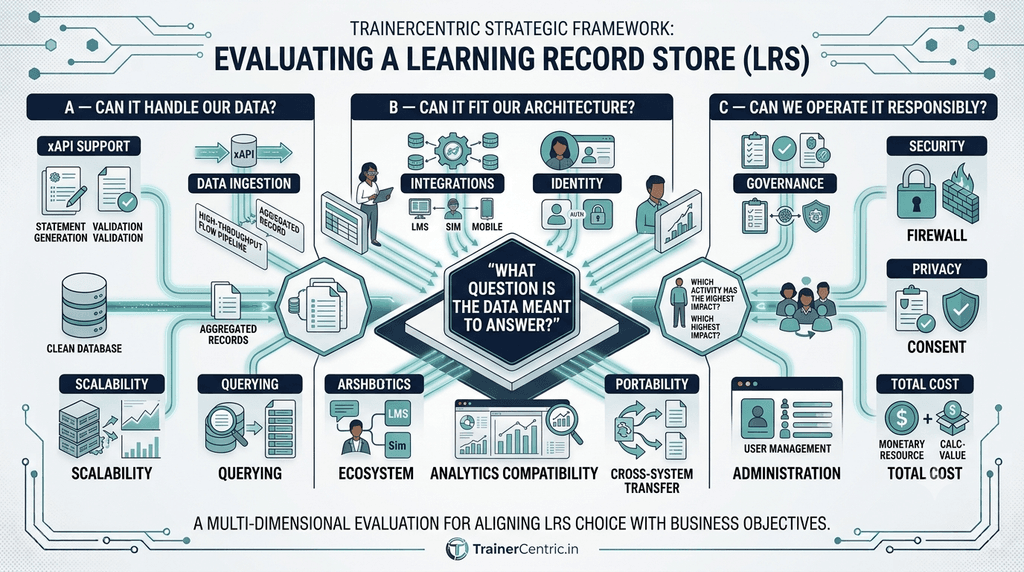
Beyond that, group your evaluation into three questions:
A. Can it handle our data?
xAPI specification support and version coverage · ingestion capacity from your actual source systems · scalability for realistic (not pilot) volume · how easily statements can be queried back out.
B. Can it fit our architecture?
Integration with the specific systems you use today · identity management across those systems · compatibility with the analytics/reporting tools you intend to use · data portability if you switch platforms later.
C. Can we operate it responsibly?
Governance — who owns statement design, retention and access · security and privacy controls for learner data · day-to-day administration effort · total cost once implementation, integration and ongoing maintenance are included, not just the licence fee.
A vendor can score well on any single item here and still be wrong for you if nobody has defined what question the data is meant to answer.
Learning Record Store Implementation: What Can Go Wrong?
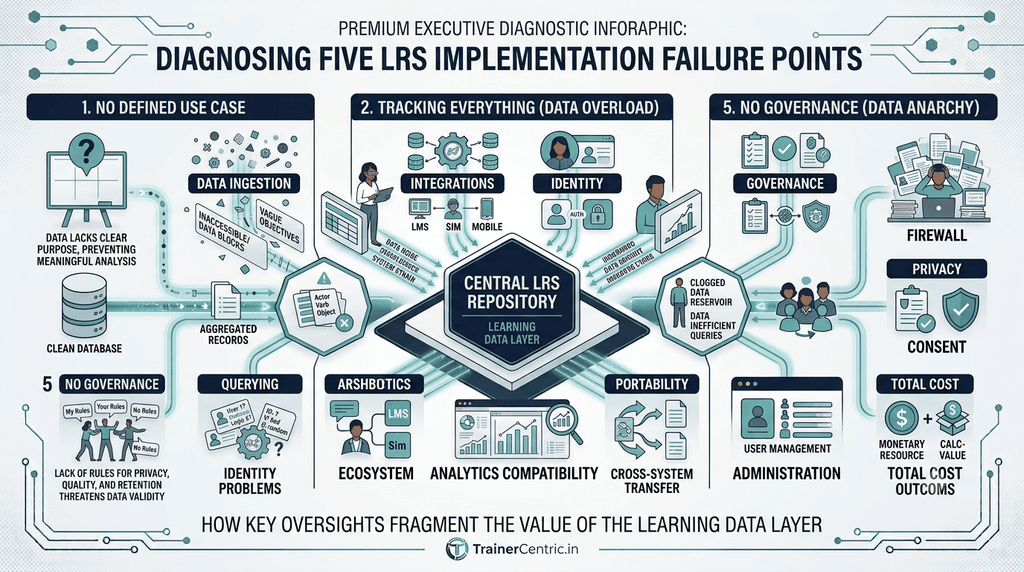
Most disappointing LRS implementations fail on groundwork, not technology:
- No defined use case or analytics plan — data collected, and a data layer built, because the capability exists rather than because a specific question needs answering.
- Tracking everything — more statements buried under noise nobody asked for.
- Poor statement design — technically valid xAPI that doesn’t map to anything worth analysing later.
- Identity problems — the same learner appears as a different person across systems, fragmenting the picture the LRS was meant to unify.
- No governance — nobody owns the data model, so it drifts inconsistently over time.
Learning Record Store and Learning Analytics
The LRS is the data layer — it receives and stores records. Analytics is the interpretation layer — turning those records into patterns, insight and decisions. Some LRS products bundle basic dashboards, but genuine learning analytics work is a separate discipline built on top of whatever the LRS makes available. For that deeper treatment, see our guide to learning analytics for L&D.
Real-World Example — What an Learning Record Store Changes for L&D
Take a familiar programme: an LMS-based module, a scenario simulation, mobile practice, a formal assessment, and a performance-support tool, all part of one customer-service training initiative.
Without an LRS:
- LMS module → its own completion report
- Simulation → the vendor’s own dashboard
- Mobile practice → separate app analytics
- Performance support → separate usage log
Four systems, four disconnected views. Answering “do reps who struggle in the simulation also underuse the performance-support tool afterward?” means manually exporting and reconciling four spreadsheets by hand — assuming that’s even possible with what each system exports.
With an Learning Record Store:
- All four systems send activity as standardised xAPI statements into one shared store
- Analysis is run against one queryable data layer instead of four incompatible exports
The Learning Record Store itself doesn’t spot the pattern or build the report. What it changes is that the analysis becomes possible in the first place — a precondition, not a finished insight, but one that four disconnected dashboards can’t offer no matter how good each individual dashboard is.
Frequently Asked Questions
What is an LRS?
A Learning Record Store is a system that receives, stores and makes retrievable xAPI statements describing learning experiences, so reporting and analytics tools can later query them.
What does LRS stand for?
Learning Record Store.
Is an Learning Record Store a database?
It’s built on one, but it’s more accurate to think of it as a purpose-built service for receiving, validating and retrieving xAPI statements specifically, with an API designed around that specification rather than a generic data store you’d build reporting on directly.
Does xAPI require an Learning Record Store?
Not necessarily a separate product. xAPI statements need an LRS endpoint or compatible LRS functionality to receive and persist them — but that capability may come from a standalone LRS, an LMS, an LXP or another platform, depending on the architecture.
Do I need a separate LRS?
It depends on whether activity is spread across systems, whether current reporting already answers your questions, and whether anyone has defined what the additional data would be used for — see the 5-Question LRS Test above.
Can an Learning Record Store store data other than xAPI statements?
An LRS is designed around xAPI statements — that’s the standardised role it plays. Individual products may offer additional storage, extensions or adjacent capabilities, but these shouldn’t be confused with what an LRS is standardly for. If a vendor describes broader data storage, ask what’s standard, what’s proprietary, and how that data can be retrieved.
How does an Learning Record Store support learning analytics?
It provides the underlying data layer that analytics tools then interpret. The LRS doesn’t perform the analysis itself; see our learning analytics guide for that side of the relationship.
Does an LRS replace an LMS?
No — they solve different problems and typically work together; see “Does an LRS Replace an LMS?” above.
Can an LMS have a built-in Learning Record Store?
Some can, depending on the platform; see “Can an LMS Have a Built-In LRS?” above for what actually matters beyond the yes/no.
The Bottom Line
An LRS is infrastructure, not an outcome. The question worth asking before implementing one isn’t “does xAPI exist” — it’s whether you have a learning-data problem worth solving, and whether you’ve defined in advance what it should help you answer.
Run it through the 5-Question Test above. If it passes, you’re in a much stronger position to evaluate an Learning Record Store— because you’re starting from a defined problem and data question, rather than a technology purchase.
Further Reading
- SCORM vs xAPI vs cmi5: The Complete Guide to Choosing the Right Learning Standard
- Learning Analytics for L&D Professionals: A Practical Beginner’s Guide
- How to Choose the Right LMS: A Complete Selection, Evaluation, and Implementation Guide
- What Is a Learning Experience Platform (LXP) and Do You Need One?
- Corporate eLearning Playbook: The Complete Guide to Designing, Delivering, and Scaling Digital Learning
- How to Measure Training Effectiveness Using the Kirkpatrick Model
References
- Advanced Distributed Learning (ADL) — xAPI / Learner Record Store
- IEEE Learning Technology Standards Committee — xAPI Standard
- 1EdTech Consortium — Caliper Analytics
- 1EdTech Consortium — Learning Data & Analytics Key Principles
- 1EdTech Consortium — Learning Data & Analytics Architecture
Author Details

Soumyadeep Sen is a Learning & Development professional with over 14 years of experience across training, coaching, quality, and performance improvement. Currently serving as Assistant Manager – Training at 24/7.ai, he specializes in designing practical learning solutions that drive employee performance and support business objectives. When he’s not designing learning programs, Soumyadeep enjoys exploring emerging trends in workplace learning, talent development, and instructional design. Reach out to him via Linkedin.