By the TrainerCentric L&D Strategy Team. Over the past 15 years, our consultants have worked with organizations ranging from regional healthcare systems to global IT services firms, helping L&D teams design digital learning ecosystems that improve onboarding speed, compliance accuracy, leadership bench strength, and frontline performance. This guide to corporate eLearning distills that field experience into a single reference — including the patterns we see go wrong far more often than the ones that make it into most industry articles.
Introduction
It’s 7:45 on a Tuesday morning, and Priya, an L&D manager at a 4,000-person logistics company, is staring at a dashboard that makes no sense. Completion rates for the new compliance course are at 38%. The sales enablement microlearning series she launched last quarter has a 91% completion rate but nobody can tie it to a single closed deal. Her CFO wants to know why the training budget grew 12% this year while “employee competence” — whatever that means to him — hasn’t visibly moved.
Priya isn’t failing. She’s doing what almost every L&D leader is doing right now: trying to build a modern digital learning function inside an organization that still thinks of “training” as a single event, a slide deck, or a mandatory video someone clicks through while eating lunch.
That gap — between what corporate eLearning could be and what it usually is — is what this guide is about, and it’s a gap we watch clients fall into and climb back out of constantly. By the end of this guide, you’ll know exactly why Priya’s dashboard showed what it did — and why most organizations misdiagnose the same problem long before they ever open an analytics tab.
Digital learning stopped being a “nice to have” HR initiative a long time ago. It is now a core business capability, as strategically important as sales enablement or product development, because the half-life of workplace skills keeps shrinking. The World Economic Forum’s Future of Jobs Report 2025 found that employers expect 39% of workers’ core skills to change by 2030, and that roughly 59 out of every 100 workers will need some form of reskilling by 2030, with 11 of them unlikely to receive it under current investment levels.
Meanwhile, LinkedIn’s 2025 Workplace Learning Report found that only 36% of organizations currently qualify as “career development champions,” and that group significantly outperforms the rest on profitability, retention, and talent attraction.
39% of core workplace skills are expected to change by 2030 — World Economic Forum, Future of Jobs Report 2025
This is built to be the resource you bookmark and come back to — not just an article you read once. Beyond the strategy and research, you’ll find four original TrainerCentric frameworks, decision tools for the questions you actually get asked in budget meetings, and a full toolkit of checklists, matrices, and downloadable templates. Here’s what’s ahead:
- A clear-eyed definition of corporate eLearning and the research-backed business case
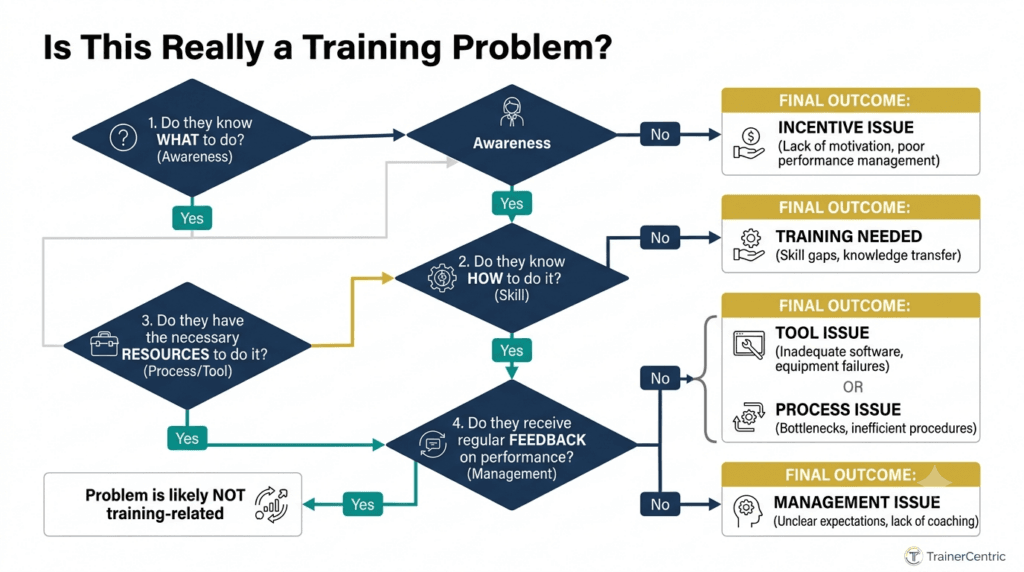
- The TrainerCentric Performance Diagnosis Framework™ — how to tell a training problem from a non-training problem before you build anything
- The TrainerCentric eLearning Decision Matrix™ — which modality to use, and when
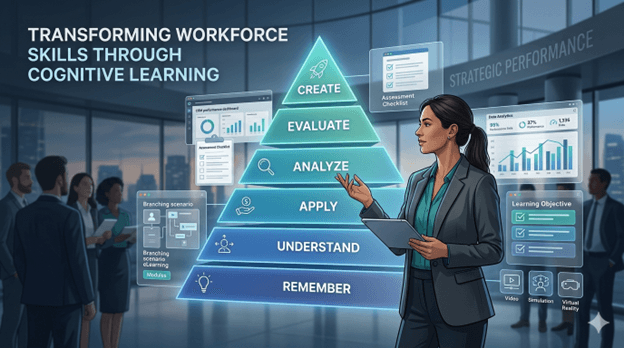
- The TrainerCentric Digital Learning Pyramid™ — the design framework behind every step
- A no-spin technology comparison, including a decision tool for whether you need an LMS at all
- SCORM vs. xAPI vs. cmi5, explained plainly, plus which authoring tools actually support each
- Where AI genuinely helps in L&D right now — and where it doesn’t
- Budget planning, team structure, and staffing ratios nobody else publishes
- The TrainerCentric Governance Framework™ for content ownership and lifecycle
- A full change management playbook, not just a checklist
- Rapid answers to the questions people actually type into Google
- A toolkit with 8 downloadable templates and 20 FAQs
Grab coffee. This is the long version — because the short version is exactly why so much corporate training fails.
Part 1: What Is Corporate eLearning?
Quick Answer: Corporate eLearning is the design, development, and delivery of structured and semi-structured learning experiences through digital technology, intended to build the knowledge, skills, and behaviors employees need to perform their jobs and advance organizational goals. It spans everything from self-paced compliance courses to AI-driven coaching delivered inside a workflow tool.
That’s the textbook version. The practitioner version is simpler: corporate eLearning is how organizations turn “we need people to know how to do X” into something people can actually access, absorb, and apply — without requiring everyone to be in the same room at the same time.
Notice what’s not in that definition: a specific tool, format, or delivery method. Corporate eLearning today includes self-paced SCORM courses in an LMS, yes — but it also includes a five-minute video pushed to a sales rep’s phone before a customer call, an AI chatbot answering a new hire’s benefits questions at 11 p.m., and a simulation where a supervisor practices a difficult conversation with a virtual employee before having the real one.
| TrainerCentric Insight We’re regularly asked to “just build a course” for something that isn’t a knowledge problem at all. A retail client once asked us for eLearning on a new returns policy; three weeks of interviews later, the real issue was that the POS system required seven clicks to process a return correctly, and staff were improvising. No course fixes a seven-click workflow. We built a two-minute job aid instead, and the “training project” budget went almost entirely unused — which was, frankly, the right outcome for the client, even if it wasn’t the outcome that got us the bigger invoice. |
A Brief Evolution
1960s–1980s: Computer-Based Training (CBT). Early corporate training moved onto mainframes and, later, floppy disks — rigid and expensive to update, but proof that digital delivery could scale beyond the classroom.
1990s–2000s: The LMS Era. SCORM (1999) standardized how content and systems talked to each other, letting one course reach thousands of employees with tracked completion data. This era optimized for compliance and completion, not necessarily learning — a bias many LMS reporting dashboards still haven’t shaken.
2010s: Mobile, Microlearning, and the LXP. Smartphones reset learner expectations toward short, searchable, on-demand content. The Learning Experience Platform emerged as the response.
2020–2023: The Remote-Work Acceleration. Distributed work forced overnight adoption of virtual instructor-led training, video-based learning, and asynchronous content.
2024–2026: The AI Inflection Point. Generative AI collapsed the cost and time of course production and introduced adaptive, conversational learning. LinkedIn’s 2025 data shows 71% of L&D professionals are now experimenting with or integrating AI into their work, while Microsoft’s Work Trend Index found a persistent readiness gap: 82% of leaders say AI skills are essential, but 60% of employees say they don’t have them.
71% of L&D professionals are already experimenting with or integrating AI into their work — LinkedIn, 2025 Workplace Learning Report
Did You Know? SCORM — still the most widely deployed content standard in corporate LMSs — was created by the U.S. Department of Defense’s Advanced Distributed Learning (ADL) Initiative to make military and government training content reusable across systems. Twenty-five years later, it’s still running inside a large share of the Fortune 500’s course catalogs.
Why Organizations Shifted Away from Classroom-Only Training
Five pressures drove the shift:
| Pressure | What Changed |
| Geography | Global workforces can’t gather in one room; digital removes travel cost and scheduling friction |
| Speed of change | Product updates and compliance rules move faster than a classroom calendar |
| Cost | Instructor time, travel, facilities, and lost productivity add up fast at scale |
| Consistency | Digital content delivers the same core experience every time; ten instructors teaching the same class won’t |
| Data | Physical classrooms generate almost no usable analytics; digital learning generates continuous data |
None of this means classroom training is dead. It means organizations now choose the right delivery method deliberately — a decision this guide gives you a real framework for in Part 3.
Our stance: most organizations still default to whatever format they used last time, not the format the objective actually calls for. If your last three programs all ended up as self-paced SCORM courses regardless of the underlying skill, that’s a process problem, not a coincidence.
The Modern Digital Learning Ecosystem
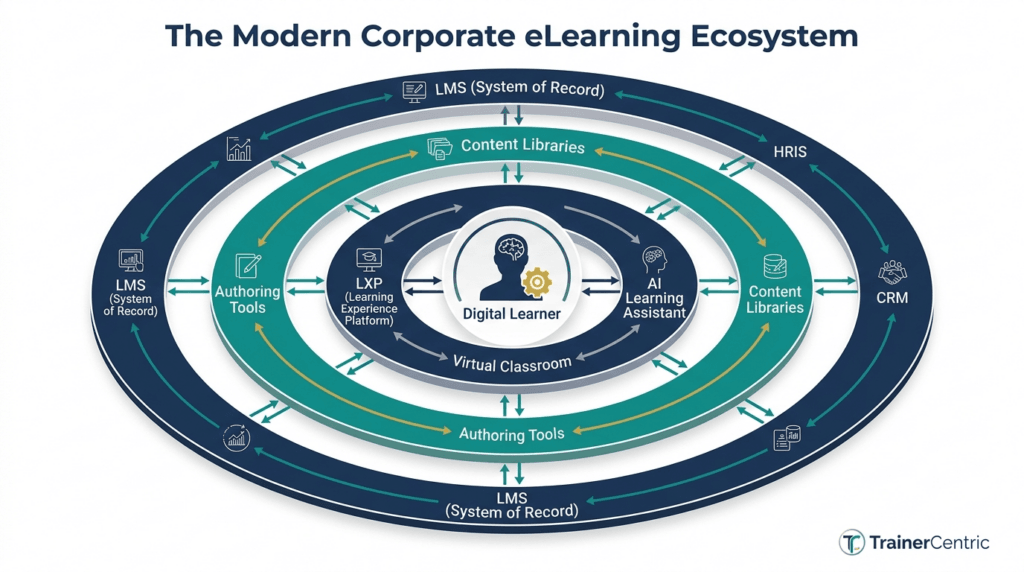
A mature corporate eLearning function typically includes a system of record (LMS), a system of engagement (LXP), authoring tools, content libraries, virtual classroom tools, video/simulation tools, AI copilots, and analytics and reporting infrastructure.
Real-World Examples
- A Fortune 100 financial institution we’ve worked alongside replaced a two-day in-person workshop on suspicious-transaction detection with a 90-minute scenario-based simulation, updated quarterly as regulations shift.
- A national retail chain pushes 3-minute mobile microlearning modules to store associates’ phones before each product launch, rather than relying on printed one-pagers nobody reads.
- A multinational manufacturing client pairs VR-based equipment training with traditional eLearning so new technicians can practice high-risk procedures safely before touching real machinery.
For the underlying design models referenced throughout this guide, see our full Instructional Design Model Playbook.
Part 2: Why Organizations Invest in Corporate eLearning
If you need to make the business case in a budget meeting, this is the section to bookmark. Every research figure below is cited to its original source, not marketing copy.
1. Scale and Reach
Digital learning lets one instructional design investment reach thousands of employees across geographies and time zones without proportional increases in delivery cost.
2. Cost Efficiency — With a Caveat
U.S. organizations spent an average of $874 per learner in 2025, and total U.S. corporate training expenditure reached $102.8 billion in 2025, up 4.9% from $98 billion in 2024. Notably, ATD’s most recent data shows a shift in how that money is spent: average direct expenditure per employee fell from $1,254 in 2024 to $846 in 2025, even as formal learning hours used per employee rose from 13.7 to 16.7 — a signal that organizations are getting more learning delivered per training dollar, largely through digital and AI-assisted methods.
$102.8B total U.S. corporate training expenditure in 2025, up 4.9% year-over-year — ATD, 2025 State of the Industry
| Expert Tip Don’t pitch eLearning purely on cost savings. CFOs have heard that pitch before. Pitch it on cost-per-outcome — time-to-competency, reduction in errors, reduction in compliance incidents — which is a harder number to argue with. |
Our stance: if your business case slide only has a cost-savings number on it, you will lose the budget conversation to whichever initiative has an outcome number instead. We’ve watched it happen in the same meeting, back to back.
3. Consistency of Message
A digitally delivered course ensures every learner receives the same core content and certification trail — often a legal requirement in regulated industries.
4. Compliance and Risk Reduction
ATD’s research confirms mandatory and compliance training remains one of the three most common content areas organizations invest in, alongside new-employee orientation and managerial/supervisory training.
5. Supporting Remote and Hybrid Work
Digital learning is now the default onboarding and development mechanism for distributed teams, simply because there’s no in-person alternative for a workforce that never shares a building.
6. Employee Engagement and Retention
LinkedIn’s data shows employees who actively use structured learning resources are 47% less likely to leave their company, and 68% of employees now agree that learning helps them adapt to change — up 4 percentage points year-over-year.
47% lower attrition risk among employees who actively use structured learning resources — LinkedIn, 2025 Workplace Learning Report
7. Closing the Skills Gap
WEF’s Future of Jobs Report 2025 found that if the global workforce were 100 people, 59 would need training by 2030 — 29 upskilled in their current role, 19 upskilled and redeployed, and 11 left at risk without adequate investment. Skill gaps were named the biggest barrier to business transformation by 63% of employers, and 85% of employers plan to prioritize upskilling their existing workforce.
85% of employers plan to prioritize upskilling their existing workforce — World Economic Forum, Future of Jobs Report 2025
8. Performance Improvement Tied to AI Readiness
LinkedIn found that 42% of “career development champion” organizations are also AI adoption leaders, and that mature-program companies are far more likely to consider themselves frontrunners in generative AI adoption (51% vs. 36%). Learning infrastructure and AI infrastructure are becoming the same infrastructure.
Business Benefits at a Glance
| Benefit | What the Research Shows | Source |
| Retention | Employees using structured learning are 47% less likely to leave | LinkedIn Learning, 2025 |
| Career mobility | 78% of learners report a career benefit within 6 months of course completion | LinkedIn Learning, 2025 |
| Spend efficiency | Formal learning hours rose from 13.7 to 16.7/employee while per-employee direct spend fell | ATD SOIR, 2025–2026 |
| Skills gap urgency | 39% of core skills expected to change by 2030 | WEF Future of Jobs, 2025 |
| AI readiness | 71% of L&D pros are integrating AI into their work | LinkedIn Learning, 2025 |
| Employer commitment | 85% of employers plan to prioritize workforce upskilling | WEF Future of Jobs, 2025 |
Common Mistake Building the business case around activity metrics (“we delivered 10,000 hours of training”) instead of outcome metrics (“time-to-productivity for new hires dropped by three weeks”). Executives fund outcomes, not activity.
Ready to build the full argument, not just the stats? See our guide on how to write a learning and development strategy, our step-by-step on how to calculate training ROI, and the Kirkpatrick Model and Phillips ROI Model explained in depth.
Part 3: How to Choose the Right Type of Corporate eLearning
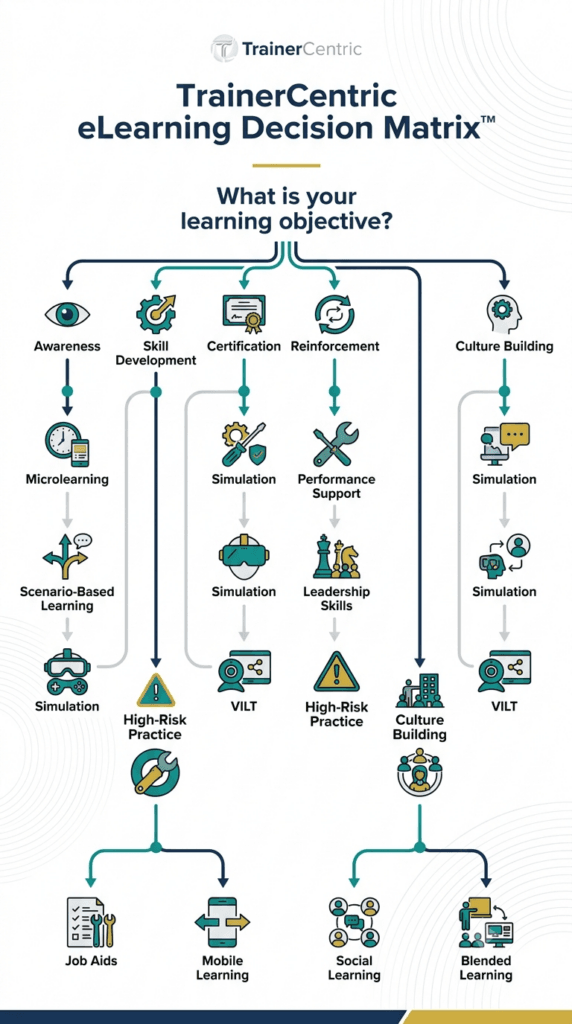
The TrainerCentric eLearning Decision Matrix™
Most guides list eLearning formats and describe each one. That’s useful, but it doesn’t answer the question you actually have: which one do I use, right now, for this specific problem?
That’s what this framework is for.
The TrainerCentric eLearning Decision Matrix™
| Your need is… | Use this modality | Why |
| Awareness — people need to know something exists or changed | Microlearning, video | Fast to produce, fast to consume, low cognitive load |
| Skill — people need to practice judgment or a procedure | Scenario-based or simulation-based learning | Builds decision-making, not just recall |
| Certification — you need an auditable, standardized record | Self-paced eLearning via SCORM in an LMS | Reliable tracking, consistent assessment |
| Performance in the moment — people need help while doing the task | Performance support, just-in-time learning | Delivered exactly when needed, not “someday” |
| Reinforcement — people learned it once and are forgetting it | Mobile microlearning, spaced repetition | Fights the forgetting curve without a full re-course |
| Interpersonal or leadership skill — the skill requires live nuance | VILT, blended learning, coaching | Human interaction can’t be fully replicated asynchronously |
| High-risk or high-cost task practice | Simulation-based learning, XR/VR | Safe repetition without real-world consequences |
| Culture or peer knowledge transfer | Social learning, communities of practice | Taps into how most workplace learning already happens informally |
| TrainerCentric Insight Most organizations misuse microlearning. We regularly see teams try to compress a genuinely complex skill — negotiation, difficult feedback conversations, root-cause diagnosis — into a five-minute video, then wonder why behavior doesn’t change. Microlearning is excellent for reinforcement and awareness. It is one of the worst formats for teaching judgment or interpersonal skill, because those require practice and feedback loops a five-minute video structurally cannot provide. |
Every Modality, in Depth
Self-Paced Learning. Learners move through content on their own schedule. Pros: scalable, cost-effective, easy to track. Cons: lower engagement without strong design; weak for interpersonal skills. Best for: compliance training, product knowledge, onboarding fundamentals.
Virtual Instructor-Led Training (VILT). Live, facilitator-led sessions via video conferencing. Pros: retains human interaction; adapts in real time. Cons: hard to schedule across time zones; “Zoom fatigue.” Best for: leadership development, change-management conversations, role-play skills. See our guide on handling difficult participants and questioning techniques that translate directly into strong VILT facilitation.
Blended Learning. A deliberate mix of self-paced content, live sessions, and on-the-job application, often grounded in Kolb’s experiential learning cycle. Pros: combines scalability with depth; consistently outperforms pure classroom or pure eLearning on retention. Cons: more complex to schedule and manage. Best for: manager development, sales onboarding, technical certifications.
Microlearning. Short, focused units (3–10 minutes) targeting a single objective. Pros: fits the flow of work, strong completion rates, easy to update. Cons: insufficient alone for deep skill-building. Best for: sales enablement, product updates, reinforcement.
Mobile Learning. Content designed specifically for phones and tablets. Pros: reaches frontline and deskless workers. Cons: requires genuine mobile-first design discipline, not shrunk desktop content. Best for: retail, field service, manufacturing, healthcare frontline staff.
Adaptive Learning. Content that adjusts in real time based on performance. Pros: reduces time on content learners already know; boosts relevance. Cons: requires more sophisticated authoring and data infrastructure. Best for: certifications with wide skill-level variance, compliance refreshers.
Scenario-Based Learning. Branching decision points based on realistic workplace situations. Pros: builds judgment, not just recall; highly engaging. Cons: time-intensive to design well. Best for: ethics, customer service, sales conversations, people-management scenarios. Full walkthrough: Scenario-Based Learning: How to Write Branching Scenarios for Corporate Training.
Simulation-Based Learning. A realistic, interactive digital environment mimicking real equipment, software, or situations. Pros: enables safe practice of high-risk tasks; strong transfer to real performance. Cons: expensive and complex to build and maintain. Best for: equipment operation, software training, safety-critical procedures.
Game-Based Learning. Points, levels, and competition drive engagement. Pros: strong motivator for repetitive content. Cons: poorly designed gamification feels gimmicky and doesn’t move retention. Best for: product knowledge reinforcement, onboarding, compliance refreshers.
Social Learning. Learning through peer interaction — discussion boards, mentoring, communities of practice. Pros: taps into how most workplace learning already happens. Cons: harder to standardize quality. Best for: onboarding culture-building, cross-functional knowledge sharing.
Video-Based Learning. Instructional content delivered primarily through video. Pros: high engagement, familiar format. Cons: passive without interaction or assessment layered in. Best for: software walkthroughs, leadership messaging, skills demonstration.
Performance Support / Job Aids. Lightweight resources available at the exact moment of need — not a formal course. Pros: extremely high relevance. Cons: doesn’t build deep understanding alone. Best for: complex, infrequent, multi-step processes.
Just-in-Time Learning. Learning delivered at the precise moment it’s needed, often triggered inside a workflow tool. Pros: maximizes relevance, minimizes forgetting-curve loss. Cons: requires tight integration with the tools people actually use. Best for: software adoption, process changes, frontline troubleshooting.
Quick Checklist: Picking a Modality –
- [ ] What is the actual performance gap, not just the knowledge gap?
- [ ] How much time will the audience realistically give this?
- [ ] Does the skill require practice, or just awareness?
- [ ] What device will they access this on?
- [ ] How often will this content need to be updated?
- [ ] Is this a one-time need or an ongoing capability to build?
Part 4: How to Design Corporate eLearning — The TrainerCentric Digital Learning Pyramid™
Quick Answer: The TrainerCentric Digital Learning Pyramid™ is a six-layer framework — Business Goal, Performance Gap, Learning Experience, Technology, Measurement, Continuous Improvement — that sequences eLearning design decisions in the order they should actually be made, rather than the order most organizations make them (technology first, everything else after).
Great eLearning doesn’t start with a course outline. It starts with a business problem. We map that flow with a framework we use across every TrainerCentric engagement:
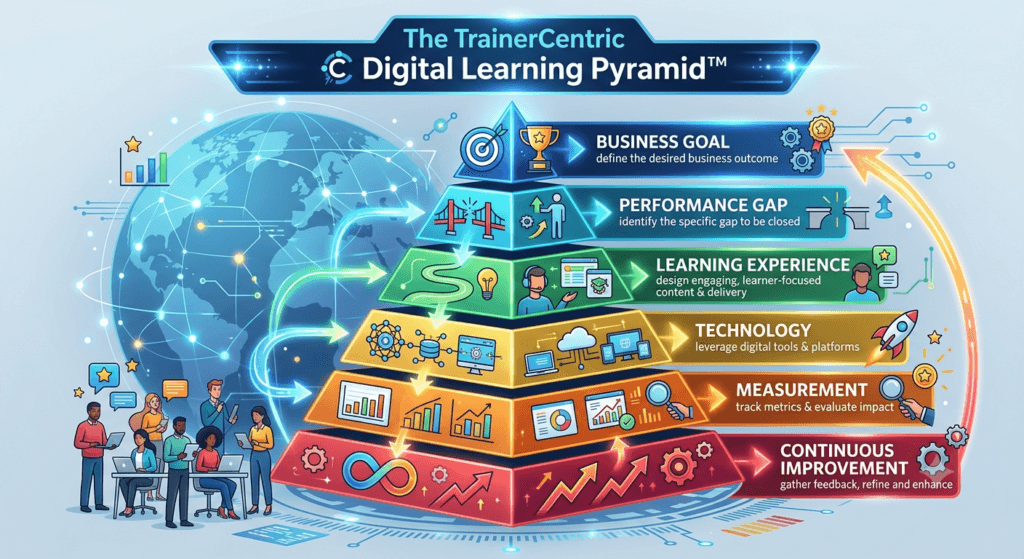
Each layer depends on the one above it. Our stance: technology chosen before the learning experience is designed is the single most common root cause of eLearning that fails to move a business metric — and it’s the mistake we’re called in to fix more than any other. Most failed programs skipped straight from “Business Goal” to “Technology,” inventing the middle layers after the fact, usually because a vendor demo happened before a needs analysis did.
Step 1: Needs Analysis — The TrainerCentric Performance Diagnosis Framework™
Quick Answer: The TrainerCentric Performance Diagnosis Framework™ is a four-question filter — Can they already do it? Do they know they’re supposed to? Would they do it under different conditions? Is the barrier a skill, or something else? — used to separate a genuine training problem from a non-training problem before any course gets commissioned.
Separate a training problem from a non-training problem before building anything. If salespeople aren’t hitting quota because the CRM is broken, no course will fix that. This is the diagnostic filter we run before agreeing to build anything for a client:
| Diagnostic Question | If “Yes” | If “No” |
| Can the person already do this under the right conditions (e.g., when a manager is watching)? | It’s not a skill gap — look at incentives, workload, or accountability | Continue to next question |
| Do they clearly know they’re expected to do this? | It’s not a knowledge gap — look at communication and expectation-setting | Continue to next question |
| Would they do it correctly if their job depended on it tomorrow? | It’s likely a motivation/consequence issue, not a training issue | Continue to next question |
| Is the remaining barrier specifically a lack of knowledge or practiced skill? | This is a genuine training problem — proceed to eLearning design | Re-route to process, tooling, or management intervention |
Answering “no” to the first three questions and “yes” to the fourth is the actual definition of a training problem. Most course requests we receive never make it past question one — which is precisely what was missing from Priya’s dashboard in the opening of this guide. Her compliance course wasn’t underperforming because the content was weak; nobody had confirmed it was a training problem in the first place.
Our full needs analysis process is in How to Conduct a Training Needs Analysis in Five Steps, and if the framework above points you away from training entirely, read Performance Consulting: When Training Is NOT the Answer before you build anything.
Common Mistake Skipping needs analysis because a stakeholder said “we need a course on X.” Stakeholders are often right about the symptom and wrong about the cure. Ask what specifically people are doing wrong or failing to do — not what topic they think is missing.
| TrainerCentric Insight A recurring pattern across client engagements: organizations spend months selecting an LMS while investing only a few hours defining learning objectives. In practice, the reverse allocation delivers better results — clarify the performance problem first, then choose technology that supports the solution, not the other way around. |
Our free Training Needs Analysis Template and TNA Checklist are built for exactly this step, and The 3 Levels of Training Needs Analysis explains how to separate organization-, task-, and person-level gaps. If you need to run structured interviews, see Focus Groups and Interviews for TNA, and once you have findings, How to Present TNA Results to Senior Stakeholders covers how to land them.
Step 2: Learning Objectives
Translate the performance gap into specific, measurable objectives — what the learner should be able to do differently, not just know. Bloom’s Taxonomy: How to Write Learning Objectives That Actually Work earns its keep here: objectives that only target “remember” and “understand” rarely change behavior.
Step 3: Audience Analysis
Understand prior knowledge, device access, language, time constraints, motivation, and cultural context before designing anything. If your audience is largely working adults balancing competing priorities, Adult Learning Theory (Andragogy) is the model worth grounding this step in.
Step 4: Content Curation vs. Creation
Ask whether the content already exists — internally or via a licensed library — before building original content. Reserve custom development for proprietary, compliance-critical, or competitively differentiating content. If your gap is really a skills-mapping problem rather than a content problem, Competency Mapping vs. Skills Gap Analysis and Skills Gap Analysis vs. Training Needs Analysis are worth reading before you commission anything.
Step 5: Storyboarding
Map the experience screen by screen before development begins — the cheapest point to catch structural problems.
| TrainerCentric Insight One client insisted on skipping the storyboard stage to save a week of calendar time. Development began directly from a bullet-point outline. Two weeks in, the SME flagged that an entire module’s sequencing didn’t match how the actual workflow happened on the floor — a mismatch a storyboard review would have caught in an afternoon. Rebuilding the affected screens after development had already started cost roughly four times what the storyboard review would have cost. We haven’t skipped a storyboard review since, no matter how tight the timeline looks. |
Step 6: Instructional Design
Apply a model appropriate to the content and constraints. This is where most guides recommend one model. We won’t — because in 15 years of client work, we’ve never seen a program that should have used exactly one.
| Model | Best For |
| ADDIE Model Explained Step by Step | High-stakes or regulated content where rigor matters more than speed |
| SAM Model: Build Training Faster Without Sacrificing Quality | Agile teams, content that will change quickly |
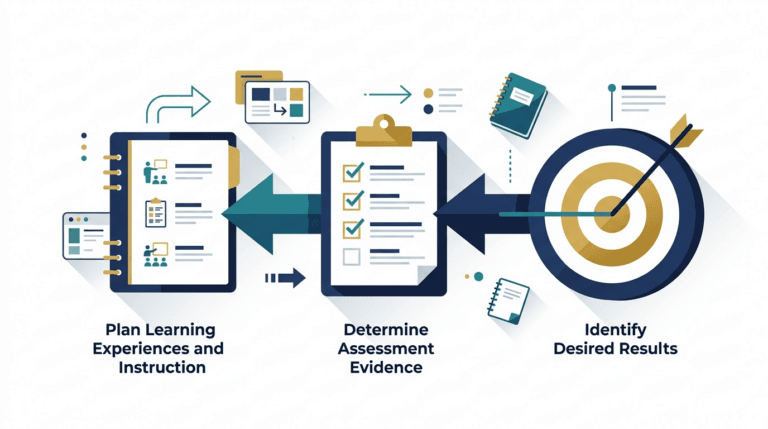
| Backward Design (UbD) | Programs where tight alignment to assessment matters most |
| Merrill’s Principles of Instruction | Content built around real-world problem-solving |
| Gagné’s Nine Events of Instruction | Sequencing structure within a single module |
| Keller’s ARCS Model | Motivational design layered on top of any of the above |
| Dick and Carey Model | Highly systematic, component-based design for large curricula |
| Action Mapping (Cathy Moore) | Cutting content ruthlessly down to what actually drives the target behavior |
Not sure which one fits your situation? Our direct comparison, ADDIE vs. SAM: Which Instructional Design Model Should You Use?, walks through the trade-off in detail.
TrainerCentric Original Comparison: Instructional Design Models at a Glance
| Model | Speed | Rigor | Best Fit | Weakness |
| ADDIE | Slow | Very High | Regulated, high-stakes content | Can feel bureaucratic for small projects |
| SAM | Fast | Moderate | Agile teams, iterative content | Requires disciplined stakeholder availability |
| Gagné’s Nine Events | N/A (module-level) | High | Sequencing a single module or lesson | Doesn’t address program-level governance |
| Merrill’s First Principles | Moderate | High | Real-world, problem-centered training | Needs strong SME access to real scenarios |
| Backward Design | Moderate | High | Assessment-critical programs | Requires clarity on outcomes before content exists |
| Action Mapping | Fast | Moderate | Cutting bloated content down to essentials | Less suited to purely knowledge-based compliance content |
This comparison reflects TrainerCentric’s practitioner assessment based on client engagements across these models, not a formal published study — useful for directional decision-making, not academic citation.
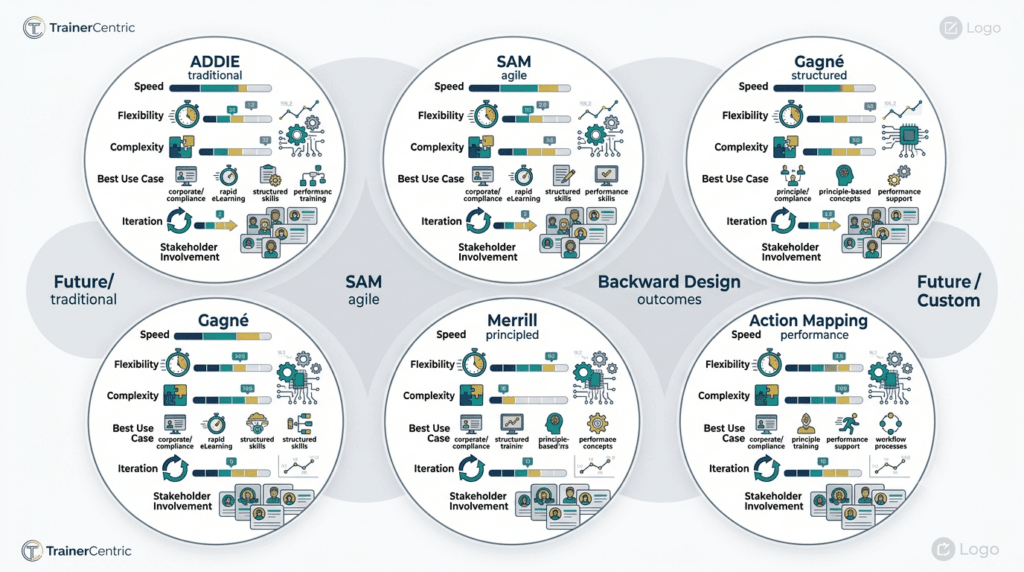
| Expert Tip Don’t marry one model. Most senior instructional designers blend frameworks — ADDIE for program-level governance, Gagné for module-level sequencing, ARCS as a motivational check at the end. |
Step 7: Development
Build the content, with accessibility designed in from the start (see Part 8), not patched on later. Mind cognitive load at this stage specifically — it’s the single most common reason a technically well-produced course still fails to teach anything.
Step 8: Review
Run structured reviews with SMEs (accuracy), instructional designers (pedagogy), and a plain end-user reviewer representing the actual audience.
Step 9: Pilot Testing
Deploy to a small representative group first. Watch completion time vs. estimate, confusion points, cross-device issues, and whether the assessment actually discriminates between learners who understood the content and those who didn’t.
Step 10: Deployment
Roll out with a communication plan and manager enablement (see Part 13 for the full playbook) — employees complete and apply training far more reliably when their manager visibly reinforces its importance.
Step 11: Evaluation
Use the Kirkpatrick Model and Phillips ROI Model rather than gut feel.
Step 12: Continuous Improvement
Treat the course as a living asset. Schedule content reviews, monitor analytics for drop-off, and refresh examples before they go stale (see the Governance Framework in Part 12).
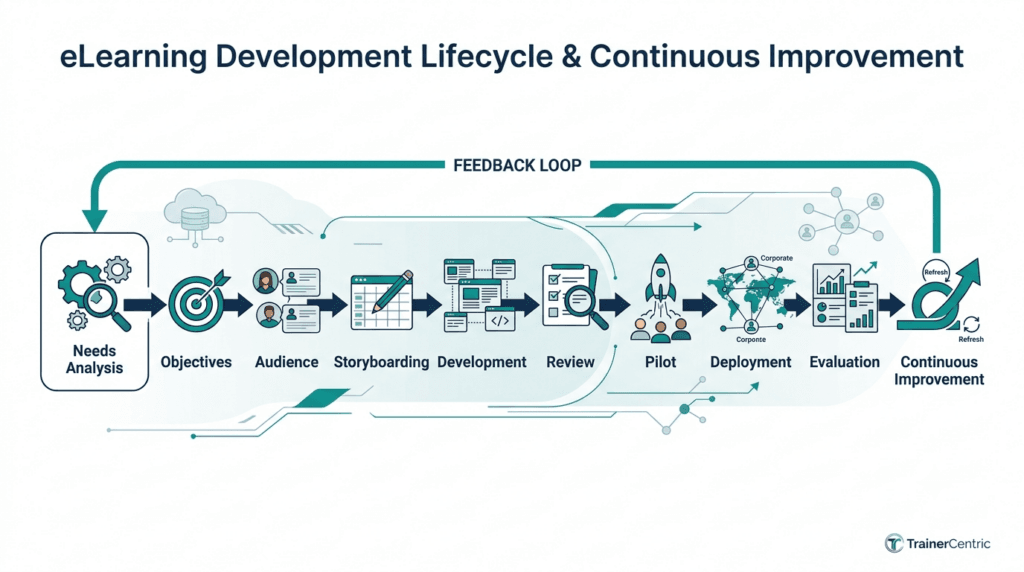
For the full program-level version of this process, see How to Design a Learning Programme From Scratch.
Part 5: Choosing the Right Technology Stack
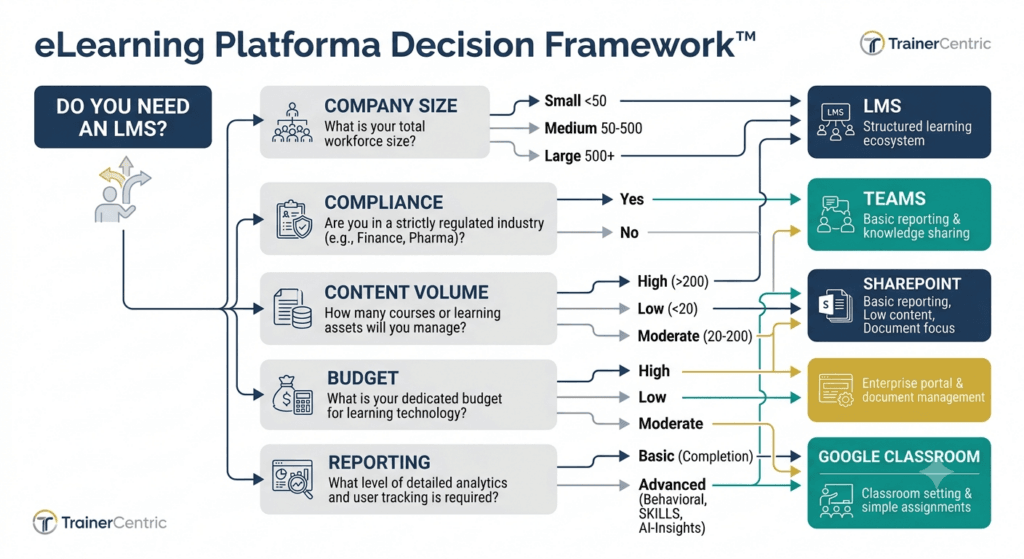
How to Decide if You Need an LMS
This is the question we get asked more than any other, and “it depends” isn’t a useful answer. Here’s the actual decision logic.
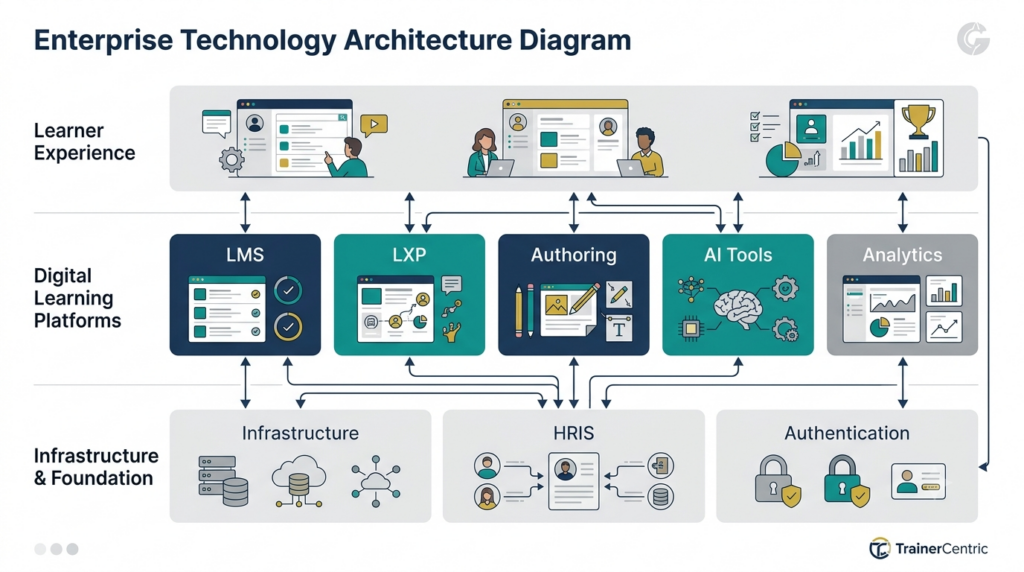
Our stance: most companies buy an LMS about two years too early. They buy it because a vendor made a compelling pitch, not because a needs analysis showed the organization had outgrown simpler tools. Buying learning technology before fixing learning strategy is, in our experience, the single most expensive mistake L&D teams make — expensive in dollars, and expensive in the two-to-three years it then takes to unwind a bad platform decision.
| Criterion | Points toward needing an LMS | Points toward an alternative |
| Company size | 200+ employees | Under 50 employees |
| Compliance requirements | Regulated industry, audit trail required | No formal compliance training obligation |
| Reporting needs | Need certification records, completion audits | Informal skill-sharing only |
| Content volume | Growing catalog of structured courses | A handful of ad hoc resources |
| Budget | Dedicated L&D budget line | Learning is a side responsibility, not a funded function |
| IT resources | Can support integration and maintenance | No internal capacity for a new system |
| Integrations needed | HRIS, SSO, CRM data connections required | Standalone use is acceptable |
Quick Question: Should startups use an LMS? Usually not right away. Under roughly 50–75 employees with no regulatory compliance requirement, a lightweight combination of a shared drive, a video tool, and structured onboarding documents often outperforms an LMS on cost and simplicity. The trigger point is usually compliance obligations, a distributed workforce, or a catalog that’s become too large to manage informally.
Quick Question: Can SMEs use Google Classroom, Microsoft Teams, or SharePoint instead of an LMS? Partially, and with real limitations. Google Classroom and Teams can host content and track basic completion, but neither supports SCORM/xAPI tracking, certification expiration, or compliance-grade audit trails natively. SharePoint can store training documents but isn’t a learning system — no assessment engine, no completion logic, no learner records. These tools work as a bridge for very small, low-risk training needs, not as a long-term substitute once compliance or scale enters the picture.
Quick Question: Is Moodle still relevant? Yes, particularly for organizations that want an open-source, highly customizable, self-hosted system and have the IT capacity to maintain it. It remains widely used in education and by cost-conscious organizations, though it typically requires more internal technical investment than a modern SaaS LMS.
Quick Question: Should we buy or build an LMS? Buy, in the overwhelming majority of cases. Building a proprietary LMS made sense in the 2000s when few mature vendors existed; today’s SaaS LMS market covers nearly every use case, standard, and integration need at a fraction of the build-and-maintain cost. Building only makes sense when your learning delivery is a core, differentiated product experience rather than an internal support function.
This gives you enough to make a confident buy/no-buy call. A full vendor-by-vendor selection walkthrough — How to Choose the Right LMS for Your Organisation— is in TrainerCentric’s content pipeline for when you’re ready to run the actual RFP.
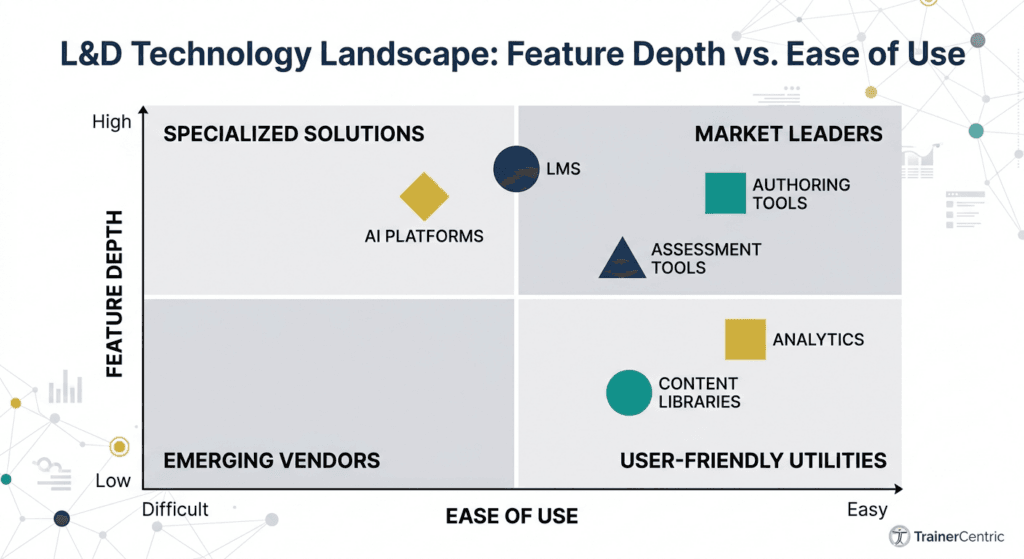
The Core Layers of a Learning Tech Stack
| Layer | Solves | Example Question It Answers |
| LMS | System of record | Who completed mandatory training, and when? |
| LXP | System of engagement | What should this employee explore next? |
| Authoring tools | Content creation | How do we build the actual course? |
| Video tools | Instructional video | How do we record and edit demonstrations? |
| Assessment tools | Verification | Did the learner actually retain this? |
| AI tools | Acceleration + personalization | How do we scale content production and relevance? |
| Analytics tools | Measurement | Is this working? |
| Content libraries | Generic-skill coverage | Why build what already exists well? |
| Virtual classroom | Live delivery | How do we run a synchronous session at scale? |
Authoring Tools Compared
| Tool | Best For | Learning Curve | Notable Strength |
| Articulate Storyline | Complex, highly interactive courses | Moderate–High | Deep customization, branching logic |
| Articulate Rise | Fast, responsive, mobile-friendly courses | Low | Speed of production, clean templates |
| Adobe Captivate | Software simulations, VR-capable content | Moderate–High | Strong simulation and responsive design tools |
| iSpring Suite | PowerPoint-native teams | Low | Familiar interface, fast for SMEs |
| Elucidat | Enterprise teams needing collaboration at scale | Moderate | Multi-author workflows, translation management |
| Easygenerator | SME-led, collaborative content creation | Low | Built for non-designers to co-author |
This comparison is enough to shortlist. A full feature-by-feature, pricing-included authoring tool evaluation — is in TrainerCentric’s content pipeline.
TrainerCentric Original Comparison: SCORM/xAPI/cmi5 Support by Authoring Tool
| Tool | SCORM | xAPI | cmi5 |
| Articulate Storyline | Full support | Full support | Supported |
| Articulate Rise | Full support | Full support | Supported |
| Adobe Captivate | Full support | Full support | Partial/plugin-dependent |
| iSpring Suite | Full support | Full support | Limited |
| Elucidat | Full support | Full support | Supported |
| Easygenerator | Full support | Partial | Limited |
Compiled from TrainerCentric’s hands-on tool evaluation as of 2026; always confirm current version support directly with the vendor before a purchase decision, since authoring tool roadmaps update quarterly.
TrainerCentric Original Comparison: Rapid Authoring vs. Custom Development
| Factor | Rapid Authoring (templated) | Custom Development |
| Typical timeline | Days to 2 weeks | 4–12+ weeks |
| Typical cost per finished hour | Lower | Higher, often significantly |
| Interactivity ceiling | Moderate | High |
| Best fit | Reinforcement, updates, high-volume content | Flagship, high-stakes, brand-critical content |
| Maintenance burden | Low | Higher — bespoke code/interactions age less gracefully |
For the full rapid-development workflow, see our Rapid eLearning Development Guide.
Supporting Production Tools
| Tool | Category | Used For |
| Camtasia | Video/screen recording | Software demos, tutorial capture and editing |
| Vyond | Animated video | Explainer videos, scenario dramatization |
| Canva | Visual design | Graphics, thumbnails, quick visual assets |
| Synthesia | AI video/avatars | Multilingual video without on-camera talent |
| ElevenLabs | AI voice | Realistic narration and localized voiceover |
AI Assistants in the Content Workflow
| Tool | Typical L&D Use |
| ChatGPT | Drafting scripts, generating quiz questions, brainstorming scenarios |
| Claude | Long-document analysis, structured content drafting, storyboard development |
| Gemini | Integrated research and drafting within Google Workspace |
| Microsoft Copilot | In-workflow drafting inside PowerPoint, Word, and Teams |
| Notion AI | Knowledge-base summarization and internal documentation |
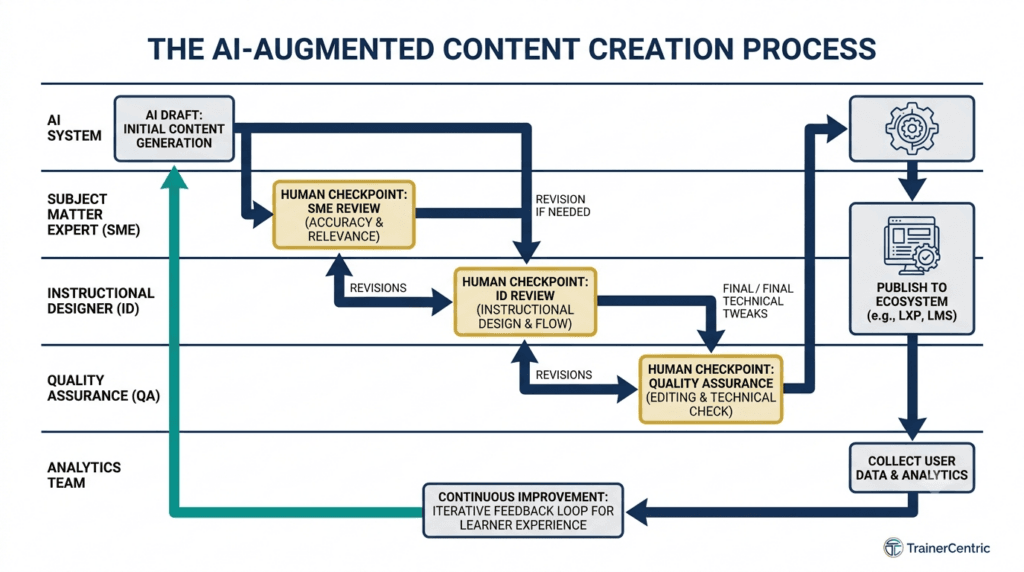
Best Practice Treat AI tools as accelerants for the drafting stage, not replacements for instructional design judgment or subject-matter accuracy review. AI-generated content still needs an SME accuracy pass and an ID pedagogy pass before it ships.
Part 6: SCORM vs. xAPI vs. cmi5
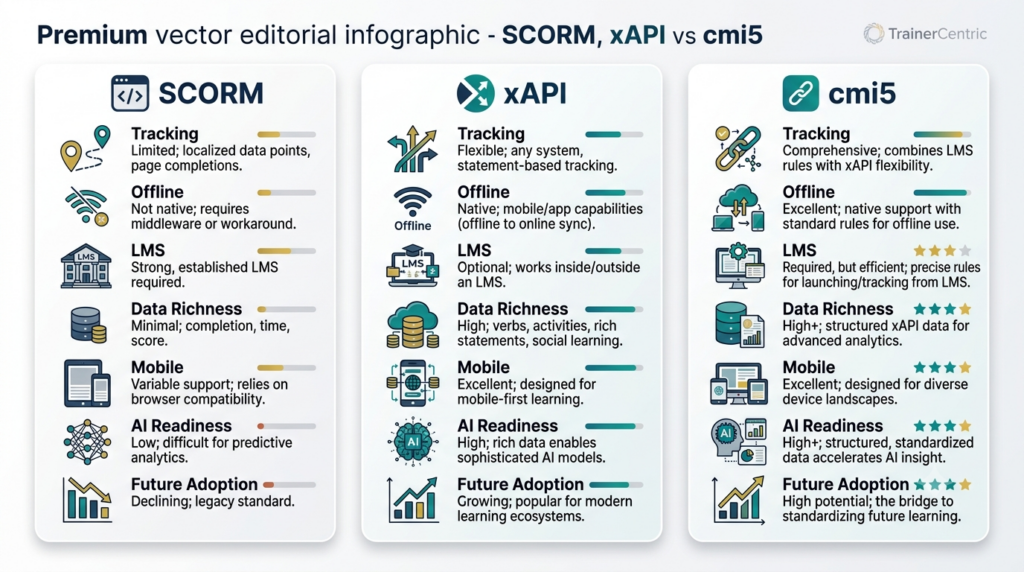
SCORM (Sharable Content Object Reference Model)
Quick Answer: SCORM is a packaging and communication standard, created by the U.S. Department of Defense’s ADL Initiative, that lets content built in one authoring tool run inside any SCORM-conformant LMS and report basic tracking data — completion, score, and time spent.
Advantages: nearly universal LMS support; simple to implement; well understood by every authoring tool on the market.
Disadvantages: requires a live browser session with the LMS; can’t track learning outside that session (mobile apps, simulations, video platforms, real-world practice); limited data depth.
When to use it: standard self-paced courses tracked in a traditional LMS, especially for compliance reporting where completion status and a score are genuinely sufficient.
Practitioner note: we rarely recommend migrating legacy SCORM content to a newer standard unless there’s a measurable business benefit on the other side — new analytics use case, a mobile/offline requirement, or an AI-personalization initiative that actually needs the richer data. Migrating for its own sake burns budget that’s almost always better spent on content quality.
xAPI (Experience API, “Tin Can”)
Quick Answer: xAPI is a data specification that records learning “statements” in an actor–verb–object format (e.g., “Maria completed Simulation Module 3”), sent to a Learning Record Store rather than requiring a live LMS connection — enabling tracking across multiple platforms and offline experiences.
Advantages: tracks learning across systems; captures richer behavioral data than SCORM; supports mobile, simulation, and blended experiences.
Disadvantages: more complex to implement; requires a Learning Record Store; less universally standardized across vendors.
When to use it: blended, multi-platform learning experiences, simulations, and mobile apps where you want behavioral data beyond “did they finish.”
Practitioner note: most organizations overestimate how much xAPI they actually need. We’ve seen teams commission a full Learning Record Store implementation to capture behavioral data nobody on the team had a concrete plan to act on. Before investing in xAPI infrastructure, be able to name the specific decision the richer data will change — if you can’t, SCORM is probably still the right call for now.
cmi5
Quick Answer: cmi5 is a profile of xAPI that combines SCORM’s LMS-friendly launch structure with xAPI’s richer tracking depth, increasingly seen as the long-term successor to SCORM.
Advantages: standardized LMS launch behavior plus xAPI-level tracking depth.
Disadvantages: adoption still growing; not every LMS or authoring tool supports it yet.
When to use it: new programs being built today, where future-proofed tracking matters and a multi-year technology investment is planned.
Comparison at a Glance
| SCORM | xAPI | cmi5 | |
| Data richness | Low (completion, score) | High (any statement type) | High |
| Requires LMS session | Yes | No | Yes (launch), no (tracking) |
| Tracks offline/mobile activity | No | Yes | Yes |
| Setup complexity | Low | Moderate–High | Moderate |
| Best fit | Simple compliance courses | Blended, multi-platform, simulations | New builds wanting structure + depth |
| Requires a Learning Record Store | No | Yes | Yes |
Our stance: if you’re building new, high-value content today and your LMS supports it, build for cmi5 from day one. Retrofitting tracking depth onto existing SCORM content later is far more expensive than designing for it up front — a lesson most organizations learn only after they’ve tried to layer AI-driven personalization onto a course catalog that was never built to generate the behavioral data that personalization needs.
Expect cmi5 adoption to keep growing as LMS vendors modernize their tracking infrastructure, and expect the Learning Record Store to become more central to AI-driven personalization, since adaptive engines depend far more on xAPI/cmi5-level behavioral data than on SCORM’s completion flag.
This section covers what you need to make a confident SCORM/xAPI/cmi5 decision today. Here is a practical guide on SCORM vs xAPI vs cmi5: Migration Guide for Legacy Content for the full build-out and What Is a Learning Record Store (LRS)?
Part 7: AI in Corporate eLearning
LinkedIn’s research shows 71% of L&D professionals are experimenting with or integrating AI into their work, and ATD found 55% of organizations already provide AI technical skills training, with 64% expecting to increase that investment.
55% of organizations already provide AI technical skills training — ATD, 2025 State of the Industry.
Current Applications
| Application | What It Actually Does | Human Review Still Required? |
| Course creation | Drafts scripts, storyboards, quiz questions from source material | Yes — SME accuracy + ID pedagogy pass |
| Assessment | Generates question banks, evaluates open-ended responses | Yes — bias and validity check |
| Translation | Near-real-time localization | Yes — cultural/context review |
| Voiceover | Natural-sounding narration in multiple languages | Light — pronunciation/tone check |
| Video generation | AI avatars, synthetic presenter-led video | Yes — brand and accuracy check |
| Learning analytics | Surfaces patterns in xAPI/cmi5 behavioral data | No — this is AI’s core strength |
| Adaptive learning | Adjusts sequencing/difficulty in real time | Periodic model performance review |
Can ChatGPT Replace Instructional Designers?
Quick Answer: No — it replaces the slowest part of an instructional designer’s job (first-draft production), not the judgment-heavy parts: needs analysis, stakeholder negotiation, pedagogical structure, and quality assurance. Teams that treat AI as a drafting accelerant see real productivity gains. Teams that treat it as a replacement for instructional design judgment tend to publish confidently wrong or pedagogically hollow content.
| TrainerCentric Insight A pharmaceutical client’s L&D team used an AI tool to draft an entire compliance module unsupervised, including scenario branches. The content read fluently and was almost entirely approved on a fast first review — until a second, closer SME pass caught that two of the “correct” answer branches in a regulatory scenario were factually backwards. Nothing in the writing quality would have flagged it; the error only surfaced because a genuine subject-matter expert checked the substance, not just the prose. That’s the review gate AI-assisted content cannot skip. |
Prompt Engineering for L&D
- Provide the actual learning objective, not just the topic (“build a scenario that tests whether a manager can distinguish performance from behavior issues” beats “write something about performance management”).
- Specify audience context — role, experience level, industry.
- Ask for multiple variations of scenarios or assessment items, then curate, rather than accepting the first output.
- Always follow generation with a dedicated SME accuracy review and an ID pedagogy review before publishing.
| Expert Tip The biggest AI risk in L&D right now isn’t job displacement — it’s unreviewed output going live. AI can confidently generate plausible-sounding but factually wrong compliance content. Build a mandatory human review gate into your workflow before anything AI-assisted ships. |
Ethics and Governance
- Data privacy — what learner data feeds into AI systems, and where it’s stored
- Bias review — checking AI-generated scenarios and assessment content for stereotyping
- Transparency — disclosing when learners are interacting with an AI coach or avatar
- Accuracy accountability — a clear owner for verifying AI-assisted content before publication
- Vendor AI policies — understanding how third-party tools use learner data to train their own models
Future Trends
Expect AI to move from a content-production tool into a persistent presence inside the learning experience itself — real-time coaching during simulations, conversational role-play practice, and continuous, adaptive skill assessment. Microsoft’s research on the emerging “Frontier Firm” model describes organizations already restructuring around hybrid human-AI teams, which will increasingly extend into how those teams are trained.
This section is the strategic overview of where AI fits in L&D today. A dedicated deep-dive — AI in L&D: What Corporate Trainers Need to Know Right Now— is in TrainerCentric’s content pipeline and will go much further into tool-by-tool evaluation and prompt libraries.
Part 8: Accessibility and Inclusive Learning
Quick Answer: Accessible eLearning design follows WCAG (Web Content Accessibility Guidelines) and Universal Design for Learning principles to ensure content is usable by people with visual, auditory, motor, and cognitive differences — and, in practice, improves the experience for every learner, not just those with disabilities.
WCAG (Web Content Accessibility Guidelines)
Built around four principles: content should be Perceivable, Operable, Understandable, and Robust (POUR). In practice: sufficient color contrast, keyboard navigability, captions and transcripts, and screen-reader-compatible structure.
Neurodiversity
Clear, consistent navigation; learner control over pacing; minimal unnecessary animation; content chunked into manageable pieces.
Universal Design for Learning (UDL)
Multiple means of engagement, multiple means of representation, and multiple means of action and expression.
Mobile Accessibility
Large enough touch targets, legible text without zooming, no reliance on hover states that don’t exist on touchscreens.
Language and Cultural Accessibility
Plain-language writing benefits every learner. Pair with AI-assisted translation (Part 7) to extend reach without sacrificing clarity, and localize examples and imagery thoughtfully for a global, culturally diverse workforce.
Quick Checklist: Accessibility Review Before Launch
- [ ] All video has accurate captions and a transcript
- [ ] Color contrast meets WCAG AA minimum
- [ ] Every interactive element is keyboard-navigable
- [ ] Content works with a screen reader
- [ ] No content relies solely on color to convey meaning
- [ ] Text is written in plain, jargon-light language
- [ ] Mobile layout tested on an actual small screen, not just resized desktop
Part 9: Measuring Success
Learning Analytics Layers
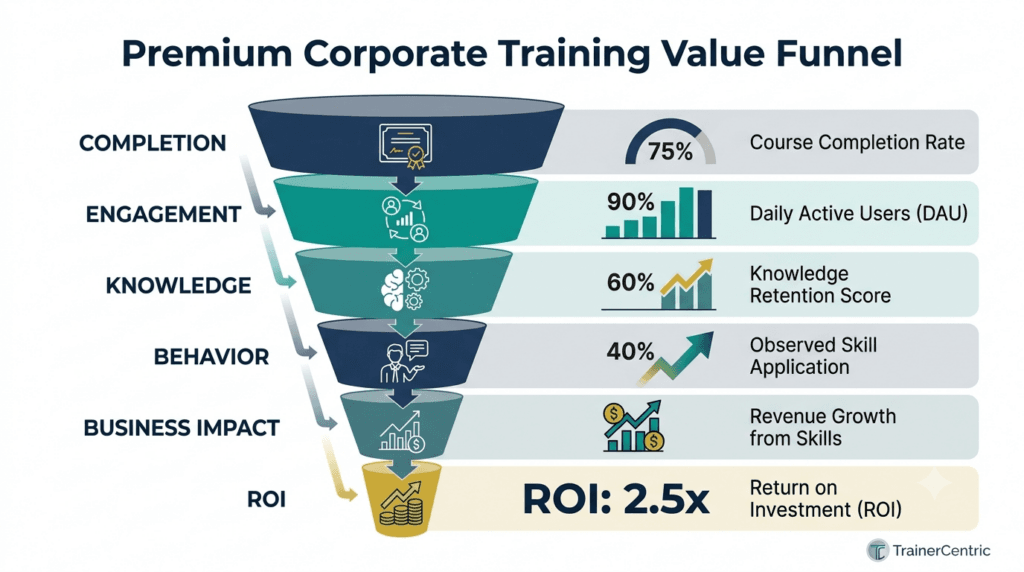
| Layer | What It Measures |
| Completion | Who started, who finished, how long it took |
| Engagement | Time on task, interaction rates, drop-off points |
| Knowledge checks | Assessment performance against defined objectives |
| Behavior change | Whether people do something differently on the job |
| Business impact | Reduced errors, faster time-to-competency, improved conversion |
| ROI | Training’s isolated financial contribution |
The Kirkpatrick–Phillips Stack in Practice
| Level | Question It Answers | Example Metric |
| Reaction | Did learners find it valuable? | Post-course satisfaction score |
| Learning | Did they acquire the knowledge/skill? | Assessment score, pre/post comparison |
| Behavior | Are they applying it on the job? | Manager observation, 90-day survey |
| Results | Did it move a business metric? | Error rate, sales conversion, retention |
| ROI (Phillips) | Was the financial return positive? | (Program benefits − Program costs) / Program costs |
Full breakdowns: Kirkpatrick Model and Phillips ROI Model.
How to Estimate eLearning ROI: A Simple Worked Example
- Isolate the effect. Compare a trained group to a comparable untrained or not-yet-trained group where possible, or use a pre/post baseline.
- Convert the business result to a dollar value. Example: a 5% reduction in customer service escalations, valued using the average cost per escalation.
- Subtract fully loaded program cost. Development, tooling, facilitator time, and learner time-away-from-work.
- Apply the ROI formula: (Program Benefits − Program Costs) ÷ Program Costs × 100.
- Report a range, not a false-precision single number. Business stakeholders trust a defensible range more than a suspiciously exact figure.
Full walkthrough: How to Calculate Training ROI and Present It to the Business.
Dashboards and KPIs Worth Tracking
- Completion rate (segmented by audience, not just aggregate)
- Time-to-completion vs. estimated time
- Assessment pass rate on first attempt
- Content engagement (drop-off points, replay rate)
- Manager-reported behavior change
- Correlation between training completion and performance data
- Learner satisfaction trend over time
Common Mistake Reporting completion rate as if it were the outcome. Completion tells you whether the course was accessible and required — not whether it worked. Pair it with at least one behavior or business-impact metric for every program that matters.
| TrainerCentric Insight We once inherited a program with a proudly reported 96% completion rate and a quietly ignored 11% first-attempt assessment pass rate. The LMS dashboard led with the number that looked good. Nobody in leadership had asked about the number that mattered. Completion and mastery are different metrics, and reporting only the flattering one is how “successful” training programs get cut in the next budget cycle when someone finally asks the harder question. |
Read our definitive guide if you are looking for How to Convert Classroom Training to eLearning Without Losing Impact.
Part 10: Budget Planning for Corporate eLearning
This is the section most guides skip entirely — and the one you’ll actually be asked about by finance.
How Much Does an LMS Cost?
Quick Answer: SaaS LMS pricing typically ranges from roughly $2–$15+ per user per month depending on scale, feature depth, and vendor, with many enterprise vendors moving to custom annual contracts above a few thousand users. Expect additional cost for implementation, integrations, and content migration — often underestimated by 20–40% in initial budgeting.
TrainerCentric Original Comparison: LMS Pricing Bands by Organization Size
| Organization Size | Typical Pricing Model | Directional Monthly Range* |
| Under 100 employees | Per-user SaaS, often with a small-business tier | $2–$6/user |
| 100–1,000 employees | Per-user or tiered SaaS | $3–$10/user |
| 1,000–10,000 employees | Custom enterprise contract | $2–$8/user (volume-discounted) |
| 10,000+ employees | Fully custom enterprise agreement | Negotiated, often flat annual fee |
*Directional ranges compiled from publicly available vendor pricing patterns as of 2026, not a formal pricing study. Always request current, quote-based pricing directly from shortlisted vendors — published price bands shift frequently and rarely reflect final negotiated enterprise rates.
How Long Does It Take to Build an eLearning Course?
Quick Answer: As a rough industry benchmark, one hour of moderately interactive self-paced eLearning typically takes somewhere between 40 and 120 development hours, depending on interactivity level, media production, SME availability, and review cycles. Simple, template-based microlearning can be built far faster; simulation-based or highly branched scenario content takes considerably longer.
TrainerCentric Original Comparison: Development Hours per Finished Hour of Content
| Content Type | Typical Dev Hours per Finished Hour |
| Basic self-paced (text/graphics, light interactivity) | 40–60 |
| Moderate interactivity (branching, quizzes, video) | 60–90 |
| High interactivity (scenario/simulation-based) | 90–150 |
| Full custom simulation or VR module | 150–300+ |
Directional planning ranges based on TrainerCentric project experience; actual hours vary significantly with SME availability, review cycle count, and localization requirements.
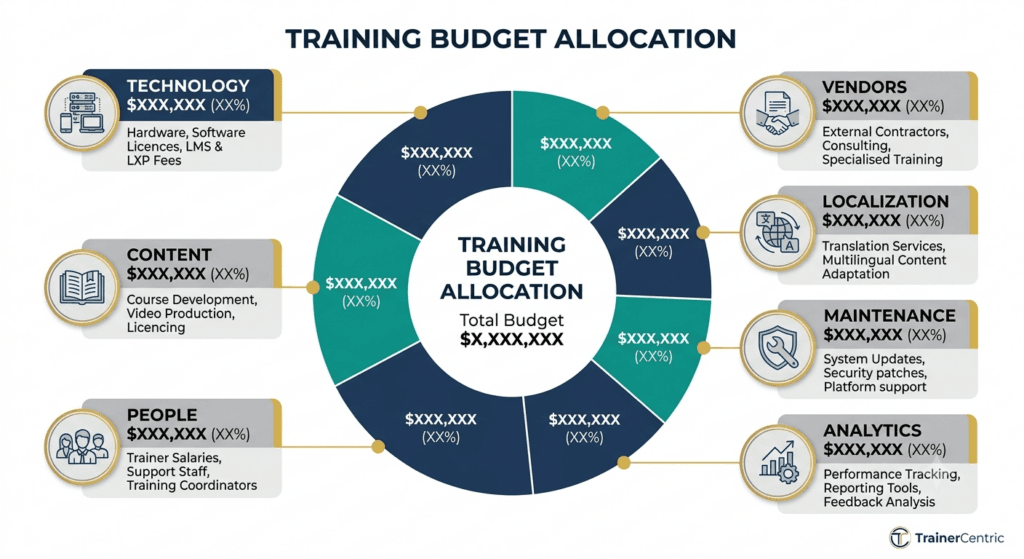
Typical L&D Budget Allocation
| Category | Typical Share of Budget | Notes |
| Technology (LMS/LXP/authoring/AI tools) | 20–30% | Rises if consolidating multiple legacy systems |
| Content development | 25–35% | Higher for custom-heavy programs, lower if curating |
| People (internal ID/dev/admin headcount) | 25–35% | Largest single line for mature internal teams |
| Vendors/agencies | 10–20% | Varies heavily with build-vs-outsource strategy |
| Translation/localization | 3–8% | Scales with number of markets served |
| Maintenance/content refresh | 5–10% | Chronically underfunded in most organizations |
| Analytics/measurement tooling | 2–5% | Often the first thing cut, which undermines everything above it |
Best Practice Budget maintenance and measurement as fixed line items from year one, not as “whatever’s left over.” Programs that skip a maintenance budget degrade within 12–18 months as content goes stale, and programs that skip a measurement budget can never prove their own value in the next budget cycle.
Part 11: Team Structure and Staffing
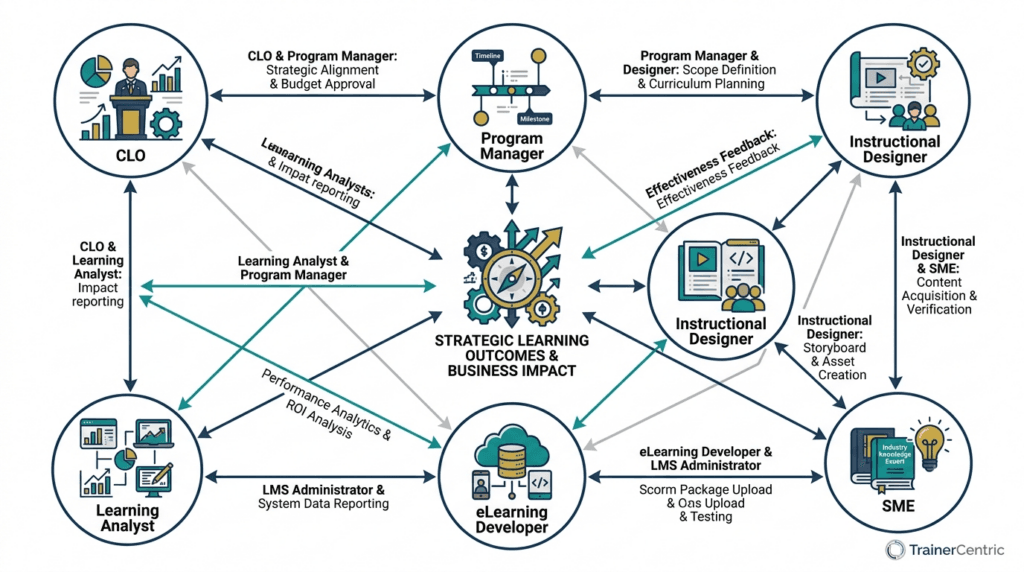
How Many Instructional Designers Do I Need?
Quick Answer: There’s no universal ratio, but a commonly used planning benchmark is roughly one full-time instructional designer per 500–1,500 employees for steady-state maintenance and moderate new-content demand, scaling down (more IDs needed per employee) during major transformation initiatives, new product launches, or large-scale compliance overhauls. Organizations with heavy compliance obligations or fast-changing product lines typically need a denser ratio than this range suggests.
Typical Roles on a Corporate L&D Team
| Role | Core Responsibility | When You Need It |
| Instructional Designer (ID) | Learning objectives, structure, pedagogy | Any team building original content |
| eLearning Developer | Builds content in authoring tools | Once content volume exceeds what an ID can build solo |
| Subject Matter Expert (SME) | Accuracy of technical/functional content | Every project, usually borrowed from the business, not dedicated headcount |
| LMS Administrator | Platform configuration, reporting, user management | Any organization running a formal LMS |
| L&D Program Manager | Cross-project coordination, stakeholder management | Teams running multiple concurrent initiatives |
| Facilitator/Trainer | Live delivery (VILT or in-person) | Programs with a blended or classroom component |
| Learning Analyst | Data, dashboards, ROI reporting | Mature teams moving beyond completion-rate reporting |
| L&D/CLO Leadership | Strategy, budget, executive alignment | Any organization treating L&D as a strategic function |
For the facilitator-specific skill set, see our Complete Guide to Facilitation Skills for Corporate Trainers and 25 Facilitation Techniques Every Corporate Trainer Should Know.
When to Hire In-House vs. Outsource
| Factor | Favors In-House | Favors Agency/Freelance |
| Content is proprietary or sensitive | ✓ | |
| Ongoing, steady content demand | ✓ | |
| One-time or highly seasonal project | ✓ | |
| Requires niche expertise (e.g., VR development) | ✓ | |
| Speed-to-launch is critical and internal capacity is maxed | ✓ | |
| Deep institutional/product knowledge required | ✓ | |
| Budget favors variable over fixed cost | ✓ |
| TrainerCentric Insight The organizations that regret their build-vs-outsource decision most often aren’t the ones who chose wrong once — they’re the ones who never revisited the decision as their content volume changed. A team that correctly outsourced everything at 3 courses a year often keeps outsourcing everything at 40 courses a year, well past the point where an in-house hire would have paid for itself. |
What Skills Does an eLearning Developer Need?
Quick Answer: Core technical fluency in at least one authoring tool (Storyline, Rise, Captivate, or similar), working knowledge of HTML/CSS/JavaScript for custom interactions, understanding of SCORM/xAPI packaging, basic graphic and audio/video editing skill, and — increasingly — fluency prompting and evaluating AI-generated content. The instructional design judgment typically sits with the ID role, while the eLearning developer executes it technically, though in smaller teams one person often does both.
Part 12: Governance — The TrainerCentric Governance Framework™
This is the section that separates a mature L&D function from a course catalog that quietly rots.
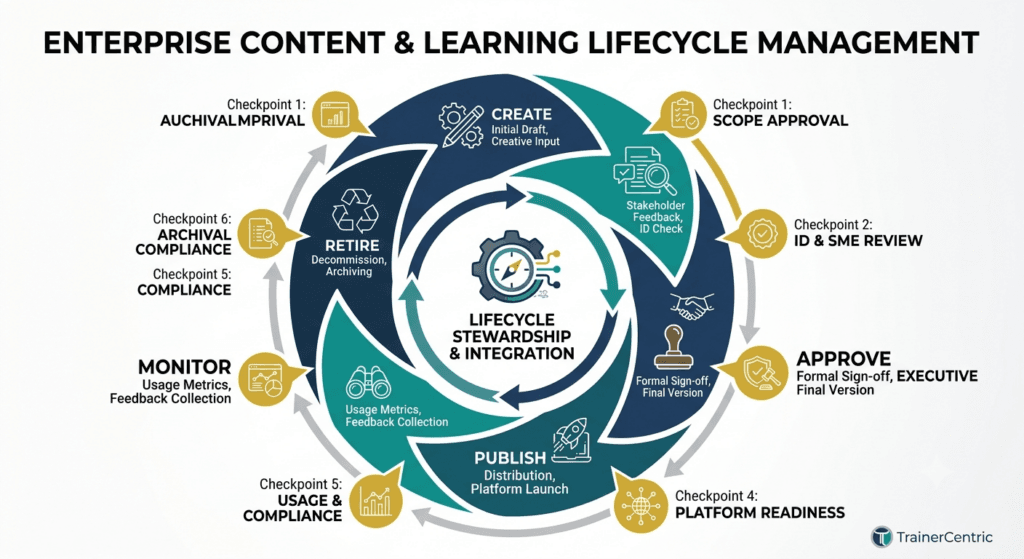
The TrainerCentric Governance Framework™
| Governance Question | What Good Practice Looks Like |
| Who owns content? | Every course has a named business owner (not just an ID), accountable for accuracy over its lifetime |
| Review cycles | Compliance content reviewed at minimum annually; product/process content reviewed on a change-triggered basis |
| Approval workflow | Defined sign-off chain (SME → ID → Legal/Compliance where relevant → Publish), documented and repeatable |
| Compliance reviews | Regulated content has a dedicated compliance/legal checkpoint before every publish or republish |
| Version control | Every published version is archived with a change log; learners always see the current version |
| Retirement strategy | Content is formally retired (not just abandoned) when it’s outdated, superseded, or no longer relevant, with completion records preserved for audit purposes |
Common Mistake Building governance as a one-time project rather than an operating rhythm. A governance policy that isn’t tied to a recurring calendar and a named owner decays within a year — exactly like the content it was meant to protect.
| TrainerCentric Insight We audited one client’s LMS catalog and found 22% of “active” courses hadn’t been opened by a learner in over 18 months, and a further 9% referenced a software interface that had since been replaced. Nobody owned the decision to retire them because nobody had ever been assigned that decision. Governance failures rarely look dramatic in the moment — they look like a catalog that’s quietly 30% dead weight by the time anyone audits it. |
AI Governance Checklist
- ☐ Defined owner for reviewing AI-generated content before publication
- ☐ Documented policy on what learner/company data can be shared with AI tools
- ☐ Bias review step built into the content approval workflow
- ☐ Disclosure policy for learner-facing AI coaches or avatars
- ☐ Periodic audit of AI-assisted content for continued accuracy
Part 13: Change Management — Getting the Organization to Actually Adopt This
A brilliant course nobody uses isn’t a training success. It’s a governance failure with good production values. Change management is the difference.
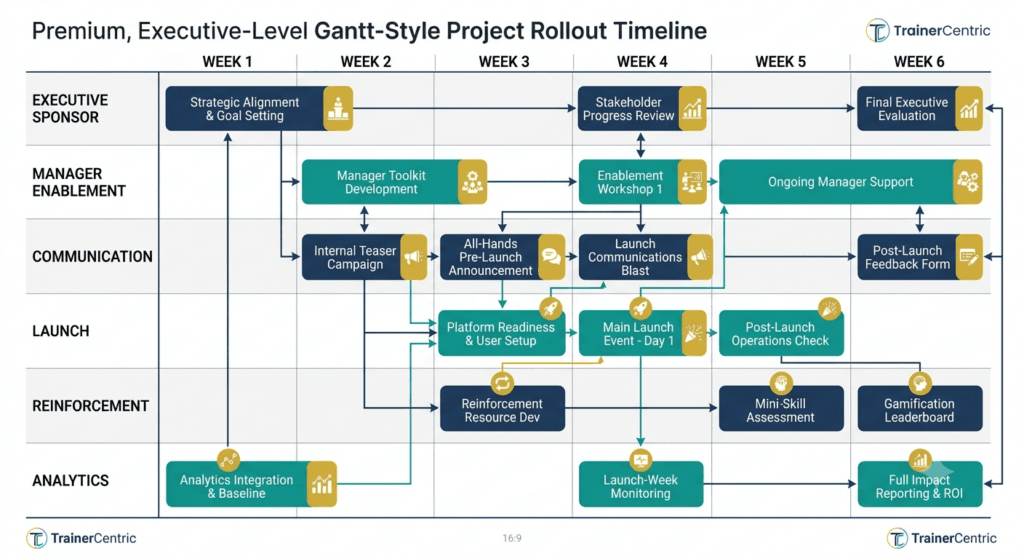
Executive Sponsorship
Identify a visible senior sponsor — ideally someone the target audience already respects — who communicates why the initiative matters before launch, not just an HR email announcing it exists.
Communication Planning
| Audience | What They Need to Hear | Channel |
| Executives | Business rationale, expected outcomes, timeline | Leadership briefing, dashboard preview |
| Managers | What’s changing for their team, how to reinforce it | Manager toolkit, live briefing |
| Employees | What’s in it for them, what’s required, by when | Email, intranet, team meetings, manager cascade |
| IT/Support | Technical rollout plan, support escalation path | Runbook, direct briefing |
Launch Campaigns
Treat a major eLearning launch like a product launch, not an announcement: a countdown, a clear first-week call to action, visible leadership participation, and early-win stories shared back to the organization within the first two weeks.
Manager Enablement
Managers are the single biggest lever for completion and application. Give them a short, specific script: what the training is, why it matters to their team’s performance, and what they should ask their team about it afterward.
| TrainerCentric Insight In our experience, the single highest-leverage, lowest-cost change-management action available to an L&D team is a two-line manager talking point sent a week before the learner-facing launch email. It costs almost nothing to produce and consistently outperforms expensive launch campaigns run without manager involvement — because employees take their cues about whether something “matters” from their direct manager, not from the LMS notification. |
Best Practice Build a two-line manager talking point for every major launch and send it a week before the learner-facing communication goes out. This single habit fixes more adoption problems than almost any content improvement.
Part 14: Common Challenges (and Actionable Solutions)
| Challenge | Why It Happens | Solution |
| Low completion rates | Content too long, poorly promoted, unclear relevance | Break into microlearning; secure manager reinforcement; lead with “why this matters to you” |
| Low engagement | Passive content, generic one-size-fits-all design | Apply scenario-based/interactive design; personalize where possible |
| Poor SME collaboration | SMEs are busy or feel ownership threatened | Time-boxed checkpoints, structured capture templates, early involvement in objective-setting |
| Budget constraints | L&D often first cut when budgets tighten | Prioritize custom build only for proprietary/high-stakes content; report in outcome language; use AI to reduce per-course cost |
| Technology resistance | Past rollouts poorly change-managed | Involve end-users in pilots; invest in communication as seriously as the tool itself |
| Leadership buy-in | Seen as cost center, not performance lever | Use frameworks from Parts 2 and 9; secure a visible executive sponsor |
| Content maintenance | Built once, forgotten | Assign named owners with scheduled review cadence (see Part 12) |
| Change management | Rolled out as an IT/HR project, not a change initiative | Apply the full playbook in Part 13 |
Our stance: every one of these challenges is preventable with process, not more budget. We’ve watched well-funded programs fail from missing governance and under-funded programs succeed because the fundamentals — needs analysis, manager enablement, named content ownership — were in place. Money buys production value. It doesn’t buy adoption.
Part 15: The Future of Corporate eLearning
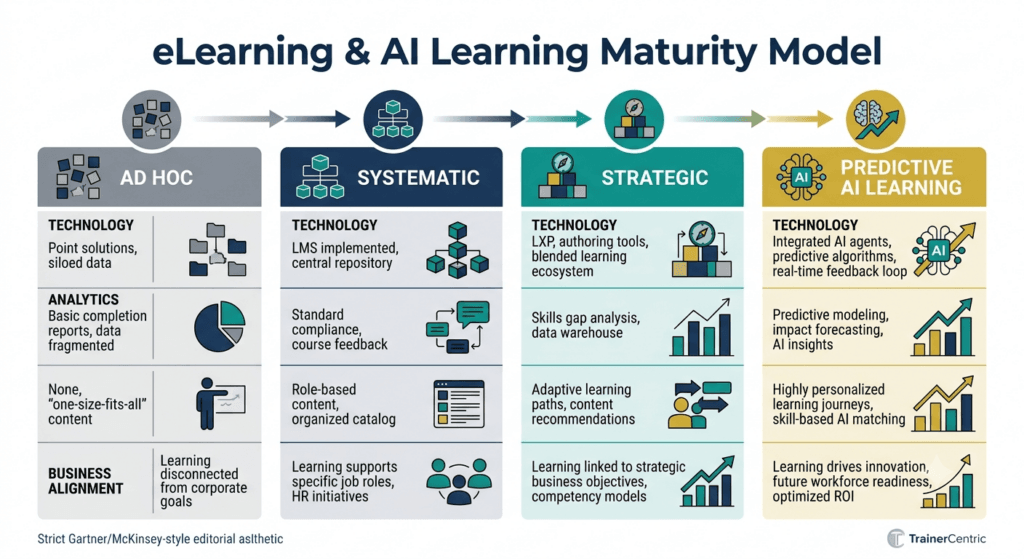
AI as Infrastructure, Not a Feature
By 2030, AI won’t be a “module” inside the learning stack — it will be the connective layer across content creation, personalization, coaching, and analytics. LinkedIn’s data shows AI adoption leadership and career-development maturity reinforce each other, and Microsoft’s research on the emerging “Frontier Firm” model describes organizations already restructuring around hybrid human-AI teams.
Extended Reality (XR, AR, VR)
Simulation-based practice for high-risk, high-cost, or hard-to-replicate scenarios will keep expanding as hardware costs fall.
Digital Coaches
Conversational AI coaches — available on demand, in the learner’s own language, at the exact moment of need — are likely to become a standard performance-support layer.
Skills Intelligence
Organizations are moving from job-based to skills-based workforce planning, requiring learning systems that map, track, and recommend development against a living skills taxonomy.
Personalized Learning at Scale
Adaptive engines will increasingly tailor not just content sequencing but modality itself.
Learning in the Flow of Work
Expect continued movement toward learning embedded directly inside the tools people already use, reducing the context-switch cost that kills engagement.
Learning Ecosystems Over Learning Systems
The future isn’t a single LMS doing everything — it’s an interoperable ecosystem connected through standards like xAPI and cmi5, unified by shared learner and skills data.
Predictions for 2030
- Skills-based talent management becomes the default operating model in large enterprises.
- AI-assisted content production compresses typical development timelines, shifting L&D capacity toward strategy, curation, and quality assurance.
- Learning and performance data converge into unified people-analytics platforms.
- Human facilitation and coaching become more valued, not less, as AI absorbs repetitive content-delivery work.
Our stance: the organizations treating AI purely as a cost-cutting tool for content production will be outcompeted, within a few years, by the organizations that used the time AI freed up to invest in exactly the things this section predicts get more valuable — facilitation, coaching, and genuinely strategic L&D work. Headcount reduction is the least interesting thing AI does for this field, and treating it as the main event is a short-term read on a long-term shift.
Practical Toolkit
Corporate eLearning Readiness Checklist
- ☐ We have documented business goals this learning initiative is meant to support
- ☐ We’ve conducted a genuine needs analysis, not just accepted a stakeholder’s course request at face value (TNA Checklist)
- ☐ We know our audience’s devices, time constraints, and prior knowledge level
- ☐ We have a defined technology stack that fits our scale (see Part 5’s LMS decision matrix)
- ☐ We have a content governance plan — ownership, review cadence, retirement criteria (see Part 12)
- ☐ We’ve defined success metrics beyond completion rate
- ☐ We have executive sponsorship and manager-level reinforcement planned (see Part 13)
- ☐ We’ve built accessibility requirements into the design brief from day one
- ☐ We have a plan for measuring behavior change and business impact
- ☐ We have a governance policy for AI-assisted content review
Corporate eLearning Project Plan (High-Level Template)
- Define business problem and success metrics
- Conduct needs and audience analysis (TNA five-step process)
- Draft learning objectives (Bloom’s Taxonomy)
- Choose modality (TrainerCentric eLearning Decision Matrix™) and instructional design model
- Storyboard and get stakeholder sign-off
- Develop content
- Conduct SME and ID review
- Pilot with representative group
- Revise based on pilot feedback
- Deploy with communication and manager-enablement plan
- Evaluate at Kirkpatrick Levels 1–4 (and ROI where warranted)
- Schedule ongoing maintenance review
Course Development Workflow (Team RACI Snapshot)
| Task | Instructional Designer | SME | Project Sponsor | Developer |
| Needs analysis | Responsible | Consulted | Accountable | — |
| Objectives | Responsible | Consulted | Approves | — |
| Storyboard | Responsible | Reviews | Approves | Consulted |
| Development | Consulted | Reviews accuracy | Informed | Responsible |
| Pilot | Responsible | Consulted | Informed | Consulted |
| Evaluation | Responsible | Informed | Accountable | — |
Technology Selection Matrix (Sample Criteria)
| Criterion | Weight | Vendor A | Vendor B | Vendor C |
| Compliance/reporting depth | High | |||
| Content authoring compatibility | High | |||
| xAPI/cmi5 support | Medium | |||
| Mobile experience | High | |||
| AI features | Medium | |||
| Total cost of ownership | High | |||
| Accessibility conformance | High | |||
| Vendor support/SLA | Medium |
Launch Checklist
- ☐ Final accessibility review complete
- ☐ Tested across required devices and browsers
- ☐ Tracking/reporting confirmed working end-to-end
- ☐ Manager communication sent (see Part 13)
- ☐ Learner communication scheduled
- ☐ Support/FAQ resource published
- ☐ Rollback or hotfix plan in place for launch-day issues
Post-Launch Evaluation Checklist
- ☐ Completion and engagement data reviewed at 2 weeks, 30, 60, 90 days
- ☐ Learner feedback collected and reviewed
- ☐ Manager feedback on observed behavior change collected
- ☐ Business-impact metric checked against pre-training baseline
- ☐ Content issues logged and prioritized for the next governance review cycle
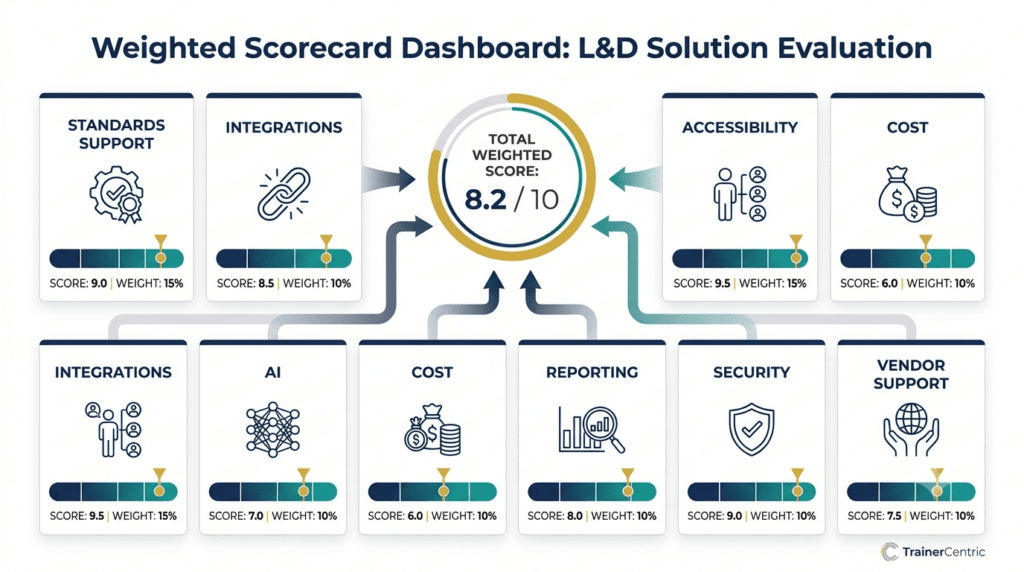
Vendor RFP / Evaluation Scorecard (Sample)
| Category | Questions to Ask |
| Standards support | Does it support SCORM, xAPI, and cmi5 natively? |
| Data ownership | Who owns learner data, and how is it used in AI training? |
| Accessibility | Is the platform itself WCAG-conformant, not just the content it hosts? |
| Scalability | What’s the largest deployment they support, and what does performance look like at that scale? |
| Integration | Does it integrate with our HRIS, CRM, and communication tools? |
| AI governance | What controls exist for reviewing AI-generated or AI-recommended content? |
Frequently Asked Questions
What is corporate eLearning?
Corporate eLearning is the design and delivery of workplace training through digital technology — from self-paced courses to AI-driven coaching — aimed at building the skills employees need to perform and grow.
What’s the difference between an LMS and an LXP?
An LMS is a system of record built around compliance, formal assignment, and tracking. An LXP is a system of engagement built around content discovery and self-directed learning.
Is corporate eLearning cheaper than classroom training?
Often cheaper at scale per learner, but not free — U.S. training spend reached $102.8 billion in 2025. The better comparison is cost-per-outcome, not cost alone.
What is SCORM and is it still relevant?
Yes — it’s a decades-old but still widely supported content and tracking standard, best suited to straightforward, LMS-tracked compliance courses.
What is the difference between xAPI and SCORM?
SCORM requires a live LMS session and tracks limited data. xAPI tracks activity across multiple platforms, including offline and mobile, via a Learning Record Store.
How long should a microlearning module be?
Typically 3–10 minutes, focused on a single objective. See our full guide on Microlearning.
What instructional design model should I use?
Depends on constraints: ADDIE for rigor, SAM for speed, Backward Design for assessment alignment. Most experienced designers blend elements of several — see our full ADDIE vs. SAM comparison.
How do I measure the ROI of eLearning?
Use Kirkpatrick for reaction/learning/behavior/results, then Phillips ROI to isolate financial contribution — see the worked example in Part 9.
What role does AI play in corporate eLearning today?
Drafting, quiz generation, translation, voiceover, video production, adaptive personalization, and analytics — with human SME and ID review still required.
What is adaptive learning?
Content that adjusts difficulty, pacing, or sequencing in real time based on individual performance.
Why do employees not complete online training?
Content too long, unclear relevance, lack of manager reinforcement, passive design — see Part 14.
What is blended learning?
A deliberate combination of self-paced, live, and on-the-job learning, generally outperforming pure classroom or pure eLearning for complex skills.
How do I make eLearning accessible?
Follow WCAG, apply Universal Design for Learning, and test on mobile — see Part 8’s full checklist.
What is a Learning Record Store (LRS)?
A system storing xAPI statements about learning activity, independent of a traditional LMS session.
How much should a company budget for training per employee?
Recent U.S. benchmarks range roughly $846–$1,254 per employee annually depending on year and methodology, with significant industry variation.
What’s the difference between microlearning and just-in-time learning?
Microlearning refers to length/format; just-in-time refers to timing. They often overlap but aren’t identical.
Should we build custom eLearning content or license a library?
Build custom for proprietary or compliance-critical content; license for generic, widely applicable skills.
What is cmi5 and why does it matter?
A profile of xAPI combining SCORM’s launch structure with xAPI’s tracking depth — the likely long-term successor to SCORM.
How do you keep eLearning content from going stale?
Named ownership, scheduled review cadence, and a formal retirement process — see the Governance Framework in Part 12.
What skills will corporate learning teams need most by 2030?
AI literacy, data-driven decision-making, and human-centered skills like resilience and collaboration, alongside enduring instructional design fundamentals.
Conclusion: From Course Catalog to Strategic Capability
Corporate eLearning isn’t about picking the shiniest authoring tool or chasing the newest AI feature. It’s about closing a real gap between what your people can do today and what your business needs them to do tomorrow — and doing it in a way you can actually measure.
The organizations pulling ahead right now aren’t the ones with the biggest course libraries. They’re the ones running the full pyramid: business goal down through continuous improvement, technology chosen deliberately rather than by default, governance that prevents content rot, and change management that gets the organization to actually show up.
So here’s the answer we promised at the start: Priya’s dashboard showed exactly what it should have, given what happened upstream of it. Nobody had run the compliance course through anything like the Performance Diagnosis Framework in Part 4 — so a 38% completion rate might have been telling her the course was badly designed, or that the audience was disengaged, or that the deadline communication failed, or that it was never really a training gap at all. The dashboard couldn’t tell her which, because the diagnosis that would have told her which was never done. That’s the pattern we see behind almost every “the numbers don’t make sense” conversation we get pulled into: the data isn’t confusing, it’s just answering a question nobody deliberately asked.
If Priya took one thing from everything above, it would be this: her dashboard problem wasn’t a data problem. It was a design problem, upstream of the data — objectives that weren’t tied to performance, modalities chosen out of habit, and success metrics never defined before launch.
That’s fixable, and this guide is built to be the reference you return to while fixing it — not a one-time read.
Where to go next
- Download the toolkit: the full Corporate eLearning Readiness Checklist, LMS Evaluation Matrix, and Vendor RFP Scorecard as standalone templates.
- Assess your maturity: score your program against the Corporate eLearning Maturity Model in Part 15.
- Go deeper on strategy: How to Write a Learning and Development Strategy, How to Design a Learning Programme From Scratch, Andragogy vs Pedagogy: What’s the Difference
- Go deeper on design: Instructional Design Model Playbook, ADDIE Model Explained, SAM Model, Bloom’s Taxonomy, Cognitive Load Theory
- Go deeper on needs analysis: Training Needs Analysis Hub, How to Conduct a TNA in Five Steps
- Go deeper on measurement: Kirkpatrick Model, Phillips ROI Model, How to Calculate Training ROI
- Go deeper on delivery: Microlearning: What It Is, When to Use It, and How to Design It, Facilitation Skills for Corporate Trainers, Rapid eLearning Development Guide, How to Convert Classroom Training to eLearning Without Losing Impact.
- Learn about the latest trends: AI in Learning and Development, AI Prompt Library for Trainers, WCAG 2.1 Guide to eLearning Accessibility
- Dig Deeper on Tools and Technique: How to Choose eLearning Authoring Tool, How to choose the Right LMS for your organization, Learning Experience Platform (LXP): Features, Benefits, Examples and Whether You Need One, SCORM vs xAPI vs cmi5: The Complete Guide, What Is xAPI?, What is LRS?
This page will keep expanding as TrainerCentric publishes new research and new cluster content — bookmark it, and check back.
References
- e-Learning and the Science of Instruction: Proven Guidelines for Consumers and Designers of Multimedia Learning || 5th Edition || Ruth C. Clark & Richard E. Mayer || Wiley || 2023
- Design for How People Learn || 2nd Edition || Julie Dirksen || New Riders || 2015
- Map It: The Hands-On Guide to Strategic Training Design || 1st Edition || Cathy Moore || ATD Press || 2017
- The Accidental Instructional Designer || 3rd Edition || Cammy Bean || ATD Press || 2021
- The Non-Designer’s Design Book || 4th Edition || Robin Williams || Peachpit Press || 2014
- Telling Ain’t Training || 2nd Edition || Harold D. Stolovitch & Erica J. Keeps || ATD Press || 2011
- Evidence-Informed Learning Design: Creating Training to Improve Performance || 1st Edition || Mirjam Neelen & Paul A. Kirschner || Kogan Page || 2020
- Leaving ADDIE for SAM: An Agile Model for Developing the Best Learning Experiences || 2nd Edition || Michael W. Allen || ATD Press || 2012
- The Successful Virtual Classroom: How to Design and Facilitate Interactive and Engaging Live Online Learning || 2nd Edition || Darlene Christopher || AMACOM || 2021
- E-Learning by Design || 2nd Edition || William Horton || Pfeiffer (Wiley) || 2011
Author Details

Sumit is a writer, facilitator and a workspace learning enthusiast who explores the intersections of human behaviour, performance, and professional growth. With extensive experience in corporate environments, he brings a grounded, real-world perspective to the challenges professionals face every day. You can reach out to him at sumit@trainercentric.in