Most LMS dashboards can tell you that 2,847 employees completed a compliance program. They can’t tell you whether that activity happened anywhere else, or whether it meant anything. That gap — between “completed” and “actually useful” — is the reason xAPI exists.
What Is xAPI?
xAPI, or the Experience API, is a technical standard for recording and sharing learning and performance experiences between systems. Unlike SCORM, which is built around a single LMS-hosted course, xAPI can capture activity anywhere — simulations, mobile apps, performance support tools, coaching sessions, video platforms — as long as the system generating that activity is built or configured to report it. Records are typically stored in a Learning Record Store, or LRS.
In plain English: SCORM largely tells you what happened inside a course. xAPI gives you a way to record what happened across a wider learning ecosystem.
xAPI is governed by IEEE as IEEE 9274.1.1-2023 — commonly called xAPI 2.0 — which standardises and tightens the earlier 1.0.3 version rather than replacing it. Because many existing tools and LMSs were built around 1.0.3, organisations may encounter both 1.0.3 and 2.0-era implementations during migration or integration — worth checking with a vendor rather than assuming either way.
You may also see xAPI referred to as Tin Can API — that’s the name of the ADL research initiative it grew out of before IEEE standardised it. If you’ve run into “Tin Can” in older LMS or authoring-tool documentation, it’s the same thing.
xAPI in One Minute
If you only take one mental model away from this page, make it this one:
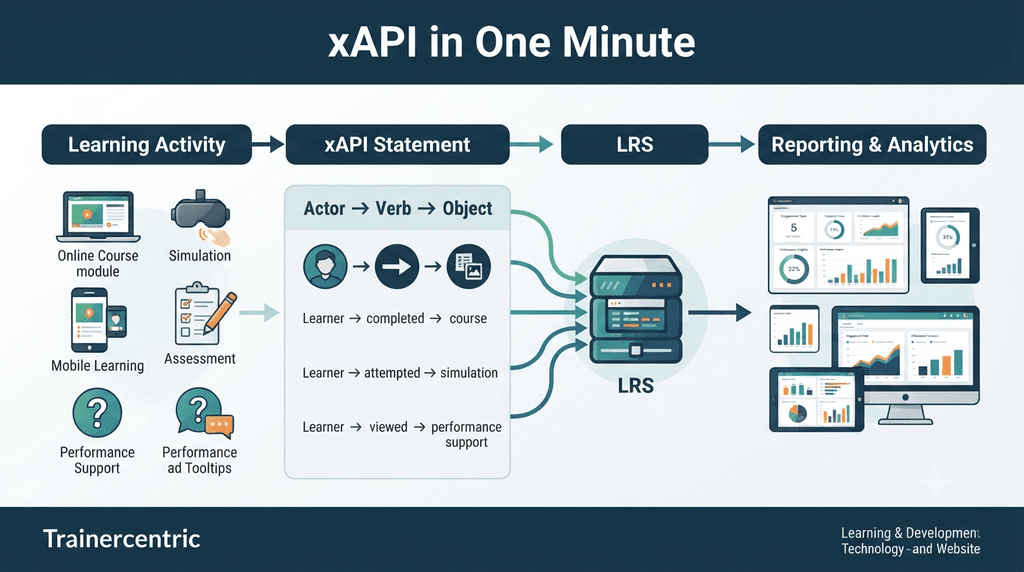
Activity → xAPI statement → LRS → reporting or analytics
xAPI records who did what, to which activity, when — and optionally, with what result or in what context. A statement follows a simple pattern: Actor → Verb → Object. For example: Priya completed the pricing simulation.
And here’s how the three standards in this space relate to each other:
- SCORM — course/LMS-centric tracking.
- xAPI — experience/data-centric tracking, works anywhere.
- cmi5 — a standardised way of using xAPI specifically for LMS-launched courses.
Is xAPI Relevant to Your L&D Team?
You probably need xAPI if:
- Learning happens outside your LMS (apps, simulations, performance support, coaching).
- You need to connect activity data across more than one system.
- Completion data isn’t answering the questions stakeholders are actually asking.
- You have a specific analytics question and the technical support to pursue it.
You probably don’t need it yet if:
- Everything happens inside one LMS and completion/score reporting is genuinely enough.
- You don’t yet have a defined question the data is meant to answer.
- Nobody has been assigned to own the resulting data.
- Your systems can’t consistently identify the same learner across tools.
How Does xAPI Work?
The flow is straightforward: Learning activity → xAPI statement → LRS → reporting, analytics or another application.
The activity generating the statement doesn’t have to be a traditional LMS course — it could be a module, a branching simulation, a mobile app, a video platform, or a performance support tool. But xAPI doesn’t “watch” a learner and automatically know what happened; something has to be built or configured to generate the statement first. xAPI defines how that statement is structured and transmitted — it doesn’t invent the data out of nowhere.
What Is an xAPI Statement?
A statement is the structured record that says something happened: Actor + Verb + Object, optionally extended with a result (score, success, duration) and a context (platform, related activity, other metadata), plus a timestamp.
Realistic L&D examples: a learner completed a module; attempted an assessment; passed an assessment; viewed a resource; participated in a workshop activity.
Statement design is a decision, not a technical afterthought. Someone in L&D needs to decide what “attempted,” “passed” or “practised” actually means for a given activity before a developer builds it — otherwise you end up with technically valid statements that don’t say anything useful.
xAPI Examples: What Can It Track?
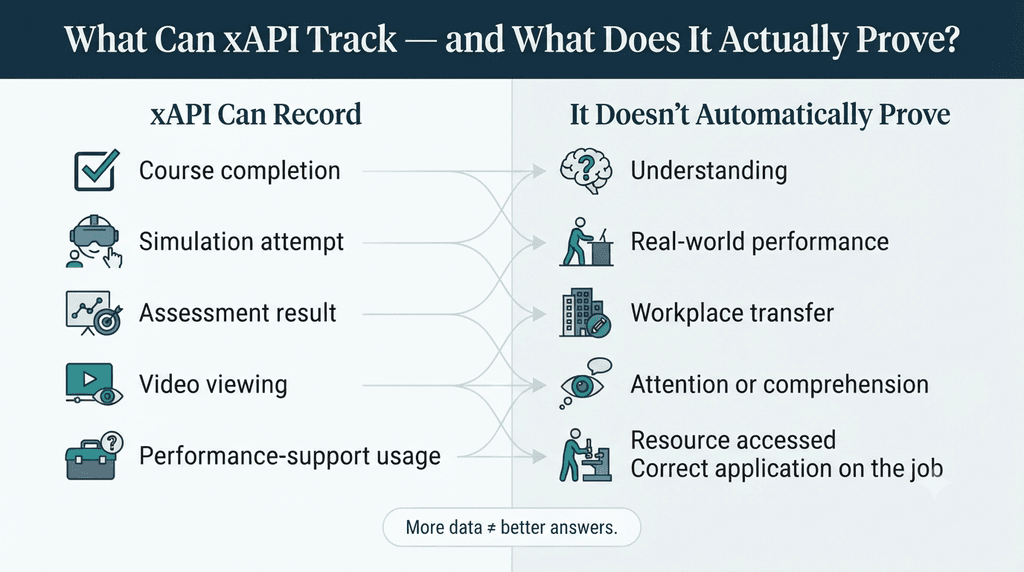
| Experience | Example xAPI statement | Why L&D might care | What it doesn’t prove |
| Course | Priya completed Module 3 | Completion | Whether she understood it |
| Simulation | Priya attempted the pricing scenario | Practice, and how much it took | Real-world performance under pressure |
| Assessment | Priya passed the knowledge check | Mastery | Transfer to the actual job |
| Video | Priya watched section 4 | Engagement | Attention or comprehension |
| Mobile practice | Priya completed 5 scenario questions | Reinforcement | Retention beyond the moment |
| Performance support | Priya viewed the pricing guide | Use in the flow of work | Whether the answer was applied correctly |
| Coaching | Priya participated in a coaching session | Development outside formal learning | Behaviour change afterward |
Across all of these, one of xAPI’s most useful applications is connecting activity that would otherwise sit in separate silos. xAPI itself doesn’t do the connecting — it’s the LRS and the analytics layered on top that assemble those statements into a fuller picture, once everything reports to the same store.
How xAPI Works Outside the LMS
This is where xAPI earns its reputation. Mobile learning, simulations and games run outside a course wrapper, external applications, performance support tool usage — any of it can send statements to an LRS, provided it’s been configured to do so. That’s the core answer to one of the most common questions people bring to this topic: can xAPI track learning outside an LMS? Yes — it’s one of xAPI’s primary use cases, not an edge case.
Worth flagging early: capturing an experience isn’t the same as proving learning. xAPI supplies the raw material for that question – — what it does and doesn’t prove is covered in full further down, in What xAPI Actually Does — and Doesn’t.
What Is an LRS?
An LRS is a system that receives, validates and stores xAPI statements, making them available for later retrieval by reporting tools, dashboards or other applications. Some LRSs are standalone products; some LMSs and LXPs include a built-in one; some organisations run more than one.
Why this matters to L&D: the LRS is the central place that collects activity from systems that don’t normally report into your LMS at all — the mobile app, the simulation, the performance support tool.
The right LRS architecture depends on your use case and existing systems, and it’s a bigger topic than fits here. Learning Record Store (LRS) — dedicated guide on what you needs to know about Learning Record Store.
xAPI vs SCORM vs cmi5
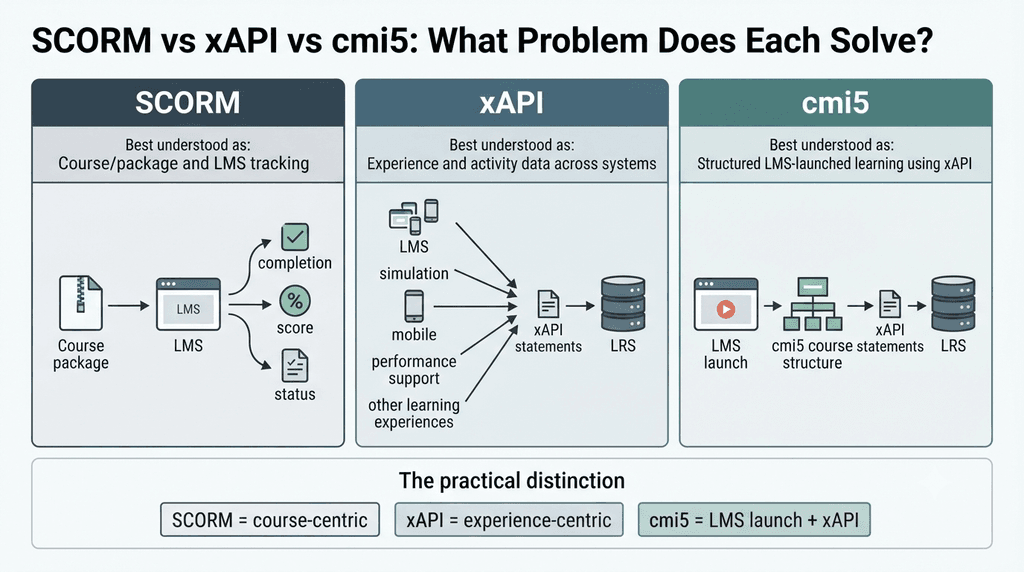
The short version: SCORM tracks course delivery and reporting inside a single LMS. xAPI records broader experiences, anywhere. cmi5 adds standardised rules for launching and tracking LMS-based courses on top of xAPI.
| SCORM | xAPI | cmi5 | |
| Main purpose | LMS course delivery and tracking | Experience data, any activity | Standardised LMS launch built on xAPI |
| Works beyond the LMS | Limited | Yes | Primarily LMS-connected |
| Needs an LRS | Not central | Central | Uses xAPI/LRS architecture |
| Best suited for | Traditional, self-contained eLearning | A broader learning ecosystem | LMS-launched content needing xAPI’s flexibility with SCORM-like consistency |
That’s the summary you need to keep reading this page. For the full technical and practical comparison — including migration questions and which standard to choose — see SCORM vs xAPI vs cmi5.
xAPI and Your LMS
xAPI isn’t a piece of software you install, like an LMS — it’s a specification for how data should be structured and transmitted. An LMS can support xAPI by sending statements to an external LRS, by including its own built-in LRS, or by consuming xAPI data to enrich its own reporting. What your setup should look like depends on your broader stack — see How to Choose the Right LMS for Your Organisation and, if you’re running one, What Is a Learning Experience Platform (LXP)?
Real-World Example: Priya’s Learning Journey
Take Priya, a customer service agent, going through the rollout of a new product.
Monday, she completes the LMS-hosted product knowledge module. That afternoon she works through the branching product simulation, getting the pricing scenario wrong on her first attempt before passing on the second. Tuesday, on her commute, she runs through a short mobile practice activity. Wednesday she passes the formal knowledge check. Thursday, mid-call with a customer asking an unusual pricing question, she opens the performance support tool rather than guessing.

Left alone, most of this is invisible to L&D — the LMS shows completion, the simulation vendor’s own dashboard (if anyone checks it) shows a second-attempt pass, and the mobile app and performance support tool likely report nothing back at all.
Configured to send xAPI statements to a shared LRS, all five moments become one connected record for Priya — and, at scale, for every agent going through the same rollout. That connected view lets an L&D professional ask sharper questions: did agents who used the mobile practice more perform better in the simulation? Did performance support usage spike after launch and then drop off — and does that mean the tool isn’t discoverable, or that agents simply stopped needing it?
What this example doesn’t show is business impact — linking this activity data to resolution times, satisfaction scores or escalation rates still takes separate analysis, covered next.
What xAPI Actually Does — and Doesn’t
What it does well: broader data capture, as activity outside the LMS finally becomes visible; interoperability, as different tools describe experiences in a common structured format; flexibility across a course, a simulation, a mobile app or a workplace tool; and richer analytics potential, since result and context data go well beyond completion and score.
What it doesn’t do: xAPI does not automatically improve instructional design. It doesn’t create learning analytics — it creates the data that analytics could be built from, if someone builds them well. It doesn’t prove behaviour change or ROI. It can’t tell you whether a learner actually understood something, only whether an activity associated with understanding occurred. It won’t fix poor data governance — weak governance becomes a bigger liability once more data is flowing.
More statements are not the same as better answers. A well-designed handful of statements tied to a real question beats a flood of untargeted ones every time.
If a vendor presents xAPI as a solution to a problem you haven’t clearly defined yet, that’s worth pausing on before you sign anything.
What it costs to get there: getting multiple systems to send consistent, well-structured statements takes genuine technical and instructional design work. Data governance gets harder as more sources mean more decisions about ownership, retention and access. Identity management — recognising the same person consistently across systems — is a genuinely hard problem in practice. And inconsistent statement design, where different teams use different verbs for the same action, quietly wrecks reporting consistency.
None of this is a reason to avoid xAPI — most of it just means going in with realistic expectations about the work involved.
Do You Actually Need xAPI? A Decision Framework
The first question worth asking isn’t whether your LMS supports xAPI. It’s what you actually need to know that your current reporting can’t tell you.
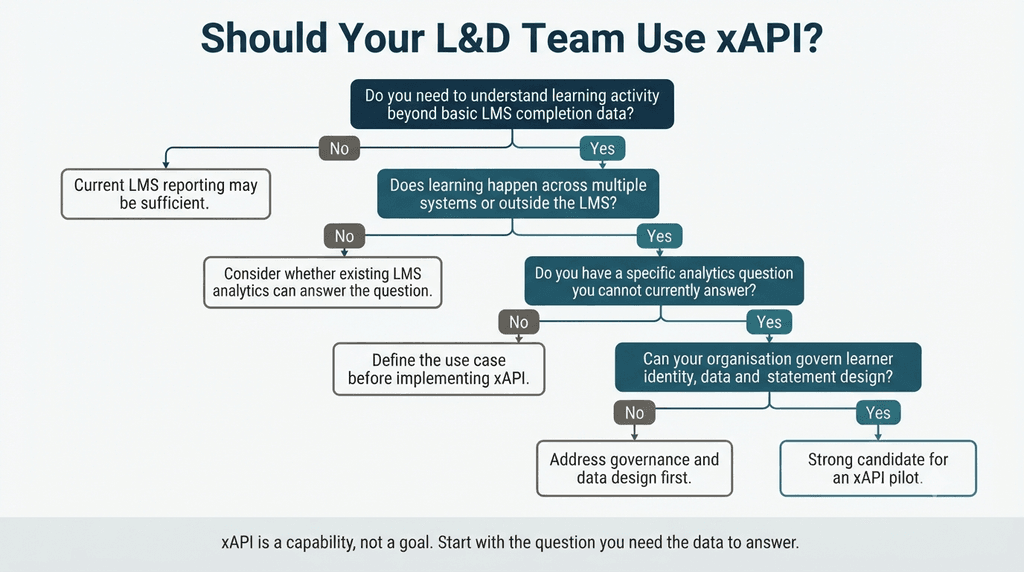
A quick self-check
Rather than a scored quiz, run your situation against these seven questions honestly:
- Do you have more than one system generating learning activity worth tracking?
- Does meaningful learning happen outside your LMS?
- Do you have a specific analytics question you can’t currently answer?
- Does someone own data governance for this — retention, access, ownership?
- Can your systems reliably identify the same learner across tools?
- Do you have the technical capability to implement and maintain it?
- Have you defined, concretely, what “success” looks like for the data you’d collect?
Mostly yes: xAPI is likely worth a focused pilot. Mostly no, but you answered yes on 2–3: worth revisiting once those gaps close. Mostly no: basic LMS reporting is probably still the right tool for where you are — and that’s a perfectly reasonable place to be.
If you’re moving forward, the sequence
- Define the business or learning question you’re actually trying to answer.
- Identify which experiences genuinely matter to that question.
- Decide, specifically, what needs to be captured from each one.
- Identify which systems will produce that data, and where the records will be stored.
- Establish data standards and governance before data starts flowing.
- Define the reporting questions the data needs to support.
- Test with one small, well-scoped use case before going wider.
- Validate data quality — check statements actually say what you think they say.
- Scale only once the small use case has demonstrated real value.
L&D’s job in this sequence isn’t to write the code. It’s to define what the data means — which verbs matter, what “success” looks like for a given activity, and what question each report needs to answer. Leaving that entirely to IT or a vendor is one of the more common ways these projects go sideways. If you’re also evaluating authoring tools as part of this shift, check early which platforms support clean xAPI output — see eLearning authoring tools.
Red flags to watch for
- No defined use case — implementing xAPI because it’s available, not because there’s a question it needs to answer.
- Trying to track everything the specification technically allows, instead of what the use case actually needs.
- No data governance plan — nobody has decided who owns the data, how long it’s kept, or who can access it.
- Inconsistent verbs and statement design across tools and vendors, which quietly wrecks reporting.
- Instructional designers left out of the conversation about what should actually be tracked.
xAPI Terminology Cheat Sheet
Worth bookmarking — a quick reference for the terms that come up constantly once you start researching xAPI.
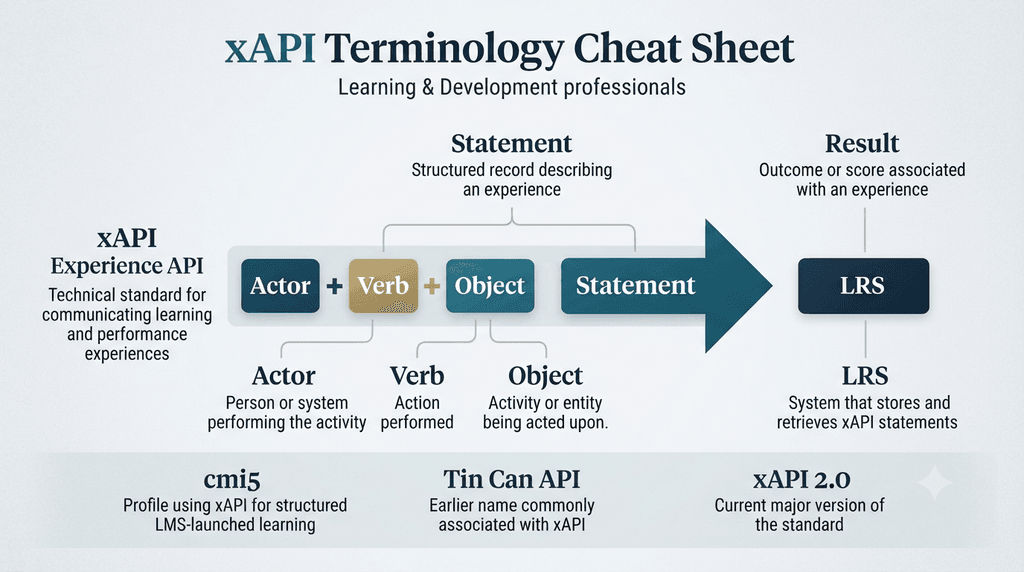
| Term | Meaning |
| xAPI | Standard for communicating experience data between systems |
| Statement | A structured record of an experience — Actor, Verb, Object |
| Actor | The person (or system) performing the activity |
| Verb | The action performed — completed, attempted, passed |
| Object | The activity being acted upon |
| Result | Optional detail — score, success, duration |
| Context | Optional detail — platform, related activity, other metadata |
| LRS | Learning Record Store — the system that stores and retrieves statements |
| cmi5 | An xAPI Profile with standardised rules for LMS-launched courses |
| Tin Can API | An earlier name for xAPI, from the ADL research project it grew out of |
| xAPI 2.0 | IEEE 9274.1.1-2023 — the current governing standard, building on 1.0.3 |
Frequently Asked Questions
What does xAPI stand for?
Experience API — a standard for recording and sharing learning and performance experiences between systems.
Is xAPI the same as Tin Can API?
Yes. Tin Can API was the original name from the ADL research project xAPI grew out of, before IEEE standardised it.
Can xAPI track activity outside an LMS?
Yes — this is one of xAPI’s primary use cases, not an edge case. Mobile apps, simulations, performance support tools and other systems outside the LMS can all send statements to the same LRS, provided they’re configured to generate them.
Is xAPI a software product or a standard?
A standard — a specification for how data should be structured and transmitted. It isn’t something you install; an LRS or LMS is the software that implements it.
Does xAPI require an LRS?
Yes, functionally — statements need somewhere to be stored and queried. Whether that LRS is a standalone product or built into your LMS is a separate question, covered below.
What is an xAPI statement?
The structured record that says something happened — built around Actor + Verb + Object (for example, “Priya completed the pricing simulation”), optionally extended with a result and context. It’s the basic unit xAPI uses to describe any experience.
What does an xAPI statement look like?
Behind the scenes, a statement is structured data (JSON) sent to an LRS. Conceptually, it’s simple: an actor (“Priya”), a verb (“completed”), an object (“the pricing simulation”), and optionally a result (“passed,” “82%”) and context (which system, when). L&D teams generally don’t need to read the raw data to use xAPI effectively — that’s the authoring tool’s or LRS’s job.
Can an LMS use xAPI without a separate external LRS?
Often, yes — some LMSs include built-in LRS functionality. The question worth asking your vendor isn’t “do I need an LRS” but where the statements will actually be stored and how they’ll be accessed for reporting.
Does xAPI replace SCORM?
Not automatically. SCORM remains suitable for many LMS-hosted courses; xAPI addresses a broader set of use cases without managing course packaging or launch the way SCORM does.
What’s the difference between xAPI and cmi5?
xAPI is the broad specification; cmi5 is a profile with tighter, standardised rules for launching and tracking courses within an LMS.
Conclusion
xAPI isn’t valuable because it lets an organisation collect more learning data — plenty have tried that and ended up with a large, expensive, mostly unused LRS to show for it. It’s valuable when it helps you collect the right data across a learning ecosystem that has already spread well beyond your LMS.
Before evaluating LRS vendors or asking your authoring tool whether it “does xAPI,” sit with the question this whole guide has been circling: what do you actually need to know about your learners that your current reporting can’t tell you? Answer that first, and the technology decision tends to follow naturally from it.
Further Readings
- SCORM vs xAPI vs cmi5
- How to Choose the Right LMS for Your Organisation
- What Is a Learning Experience Platform (LXP)?
- How to Choose eLearning Authoring Tools
- Learning Record Store (LRS) — dedicated guide
- Learning Analytics for L&D Professionals
References
- IEEE — direct standard record for IEEE 9274.1.1-2023 / xAPI 2.0
- ADL — Total Learning Architecture / xAPI service definitions
- ADL — official xAPI specification repository (Tin Can origin)
- The cmi5 Project (AICC/ADL working group) — official cmi5 specification
Author Details

Tulip Ghosh is a Learning and Development professional who designs impactful, learner-centric experiences rooted in behavioral insight and real-world application. She is passionate about improving learner engagement and translating complex ideas into practical training solutions. A thoughtful writer at heart and with experience of a decade in Learning and Development domain, she brings a simple, grounded perspective to the evolving world of workplace learning. Reach out to her on her Linkedin Profile from here.