Introduction – AI in Learning and Development
It’s Monday morning, and an L&D manager gets a message from leadership: the new hire onboarding program needs to be ready in three weeks instead of the usual eight. The reason given is simple and, by now, familiar — “just use AI, it should speed things up.”
If you work in corporate training, you’ve probably lived some version of this moment. Maybe it wasn’t onboarding. Maybe it was a compliance course, a leadership development track, or a product launch training that needed to go from zero to “learner-ready” faster than your instructional design process was ever built to support.
AI in L&D has moved from a conference buzzword to a daily reality in a very short time. According to LinkedIn’s Workplace Learning Report, a large majority of L&D professionals are now exploring, experimenting with, or actively integrating AI into their work. That’s a lot of activity — but activity isn’t the same as clarity. Most trainers we talk to are dealing with three things at once: pressure from leadership to “do more with AI,” genuine curiosity about what these tools can actually do, and a nagging worry that speed might come at the cost of quality, accuracy, or learner trust.
This guide is written to cut through that noise. It won’t tell you AI is going to replace trainers, because that’s not what’s happening on the ground. What is happening is more interesting and more useful: AI is changing how instructional design work gets done, compressing some of the slowest parts of the process, and creating new failure modes that didn’t exist five years ago.
By the end of this article, you’ll understand:
- What AI, machine learning, and generative AI actually mean in an L&D context
- Where your organization sits on the TrainerCentric AI Adoption Pyramid — and what that means practically
- Why corporate learning is changing right now, and what’s driving it
- Where AI genuinely helps trainers and instructional designers — and where it falls short
- How AI tools compare when grouped by function, so this stays useful as specific products change
- A practical, phase-by-phase workflow for using AI in training design
- Where human expertise remains non-negotiable
- Common mistakes to avoid, and a 30-day plan to start adopting AI without those mistakes
- Five prompts worth bookmarking right now
- Where this is all heading over the next few years

What Does AI Mean in Learning & Development?
Before going further, it’s worth untangling three terms that get used almost interchangeably in L&D conversations, even though they mean different things.
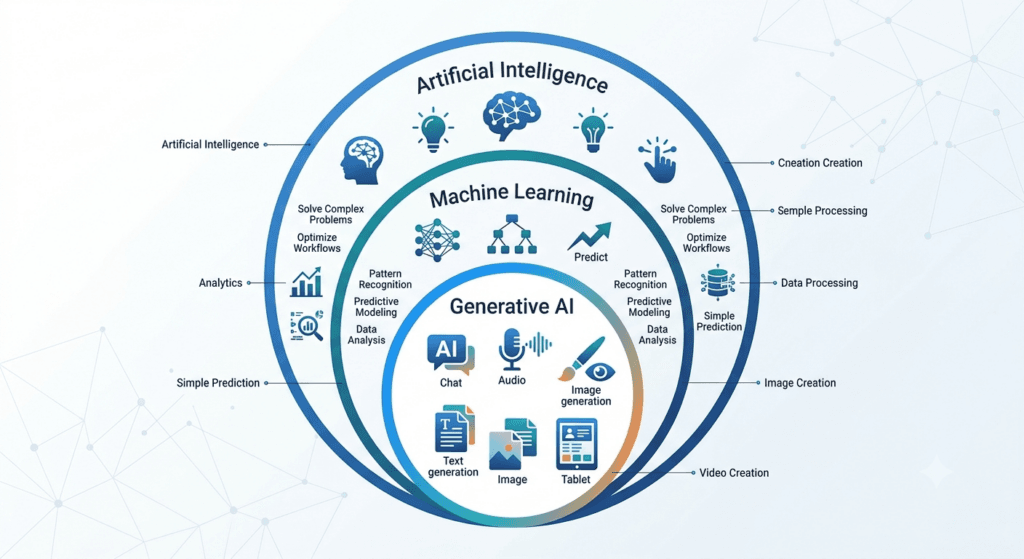
Artificial Intelligence (AI) is the broad field of building systems that can perform tasks normally requiring human intelligence — recognizing patterns, making decisions, understanding language. In L&D, this shows up in things like adaptive learning platforms that adjust content difficulty based on learner performance.
Machine Learning (ML) is a subset of AI where systems learn patterns from data rather than following rules a person wrote out explicitly. A learning analytics dashboard that predicts which employees are likely to disengage from a course, based on past completion patterns, is using machine learning.
Generative AI (GenAI) is a further subset that creates new content — text, images, audio, video — based on patterns learned from large amounts of existing content. This is the category most trainers mean when they say “AI” today. Text, voice, and video generation tools fall into this bucket.
| Trainer Tip: When leadership says “let’s use AI,” ask what they actually mean. Most of the time, they mean generative AI for content creation — not predictive analytics or adaptive platforms. Getting specific early avoids a lot of wasted effort later. |
AI vs. Machine Learning vs. Generative AI
| Concept | What It Does | L&D Example | Analogy |
| Artificial Intelligence | Broad umbrella for machine-driven “intelligent” behavior | Chatbot answering learner FAQs | The entire field of “smart” computing |
| Machine Learning | Learns patterns from data to predict or classify | Predicting which learners are at risk of dropping a course | A system that gets better with more examples |
| Generative AI | Creates new content from learned patterns | Drafting a scenario-based case study or quiz questions | A collaborator that drafts, not decides |
The TrainerCentric AI Adoption Pyramid
Most articles on this topic describe AI in L&D as a single, flat category — you either “use AI” or you don’t. In our work with training teams, that framing doesn’t hold up.
This framework emerged from recurring patterns we’ve observed across AI-assisted instructional design projects and conversations with L&D professionals navigating their own adoption journeys. While every organization progresses differently, and not always in a straight line, these six stages provide a practical way to assess where a team actually is with AI — as opposed to where its tool list suggests it is. We call it the TrainerCentric AI Adoption Pyramid.
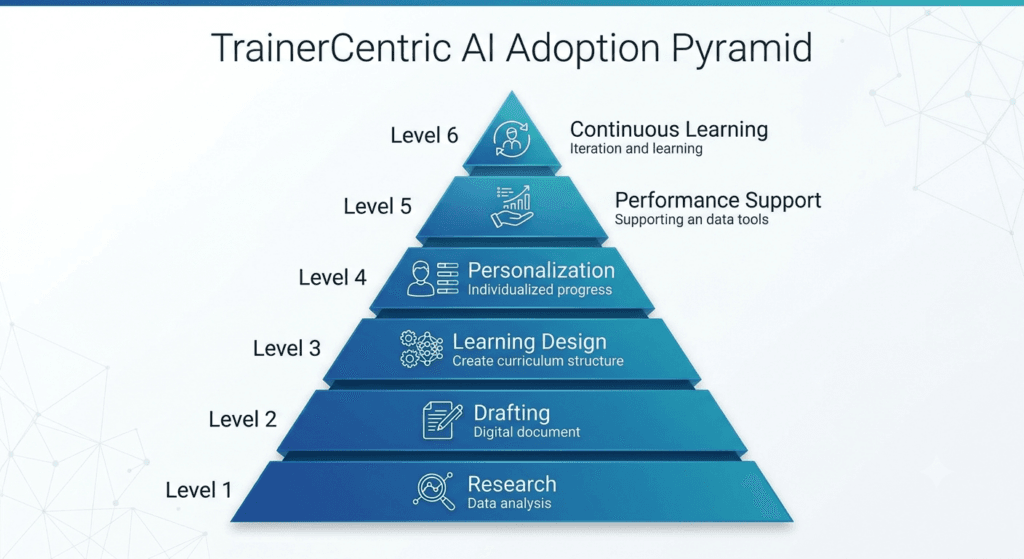
- Level 1 — Research. AI is used to speed up needs analysis, trend research, and competitive scanning. Low risk, low disruption. Most teams start here without realizing it’s a distinct stage.
- Level 2 — Drafting. AI produces first-pass text: objectives, outlines, scripts, quiz items. This is where most L&D teams are today, and where most of the mistakes covered later in this guide happen — because drafting feels finished when it isn’t.
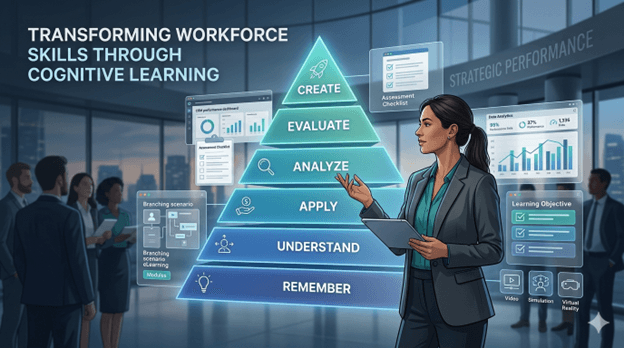
- Level 3 — Learning Design. AI is used deliberately within an instructional design framework — applying Bloom’s Taxonomy, structuring practice activities, building branching scenarios — rather than just producing generic text.
- Level 4 — Personalization. Content adapts to role, level, or performance data, at a scale that would be too expensive to build manually for every learner segment.
- Level 5 — Performance Support. AI shows up inside the workflow itself — job aids, in-the-moment prompts, knowledge assistants — extending learning beyond the course into the day-to-day job.
- Level 6 — Continuous Learning. AI-informed skills data, learning recommendations, and coaching touchpoints operate as an ongoing system rather than a series of one-off courses.
| Trainer Tip: Don’t try to skip levels. A team still doing most of its work at Level 2 (drafting) that tries to jump straight to Level 4 (personalization) usually ends up with content that’s technically adaptive but instructionally weak — because the underlying design discipline from Level 3 was never built. Move up one level at a time. |
Which Level Are You? A Quick Self-Assessment
Read the statements below and pick the one that best describes how your team uses AI today:
- We mostly use AI for research and background reading → Level 1: Research
- We use AI mainly to produce first drafts of content → Level 2: Drafting
- AI actively supports instructional design decisions like structuring objectives and activities → Level 3: Learning Design
- Learning content adapts based on learner role, level, or performance data → Level 4: Personalization
- AI is embedded directly into employees’ daily workflow, not just into course creation → Level 5: Performance Support
- AI continuously recommends learning and development actions based on ongoing skills and performance data → Level 6: Continuous Learning
Most teams reading this guide will land somewhere between Level 1 and Level 3. That’s not a shortfall — it’s simply where most of the industry is right now. The value of the self-assessment is knowing your actual starting point before deciding what to invest in next.
Why AI Is Changing Corporate Learning
AI adoption in L&D isn’t happening in a vacuum. Several pressures are converging at once, and understanding them helps explain why this shift feels different from previous “new tech in training” cycles.
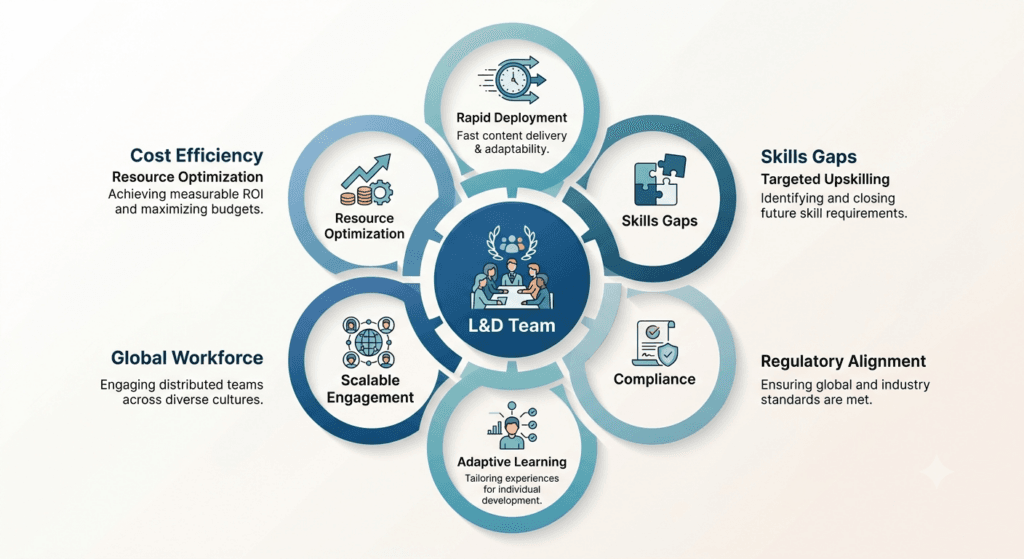
Faster content creation demands. Business cycles have compressed. Product launches, policy changes, and org restructures now happen on timelines that traditional ADDIE-based design struggles to match. AI-assisted drafting shortens the time between “we need training on this” and “here’s a working draft.”
Real-World Example: During a compliance rollout project, our team cut storyboard creation time from nearly three days down to a few hours by using AI-generated first drafts of each scene. The time saved didn’t come from skipping instructional design — it came from spending less time staring at a blank page and more time in the room with SMEs, refining scenarios until they actually reflected how frontline staff talk and behave.
Skills shortages and reskilling pressure. The World Economic Forum’s Future of Jobs Report estimates that a substantial share of workers’ core skills will be outdated by the end of the decade — a slight improvement from a few years earlier, but still a significant reskilling burden across most industries. L&D teams are being asked to close these gaps with the same or smaller headcount.
Personalized learning at scale. Employees increasingly expect learning experiences tailored to their role, level, and pace — something that was cost-prohibitive to build manually for every audience segment. AI-assisted content variation makes limited personalization achievable without multiplying production time.
Compliance and regulatory training volume. Regulated industries are dealing with more frequent policy updates, and AI helps draft first versions of updated compliance content faster, provided legal and SME review remains firmly in place.
Multilingual and global workforces. Translation and localization used to be one of the most expensive parts of rolling out global training. AI-assisted translation has meaningfully lowered that cost and turnaround time, though quality still varies by language pair and content sensitivity.
Remote and hybrid learning. With more learning happening asynchronously, there’s more demand for self-paced content, quick-reference job aids, and searchable knowledge assistants — all areas where AI tools contribute directly.
Cost and headcount pressure. Many L&D teams are being asked to produce more content with flat or shrinking budgets. AI doesn’t eliminate this pressure, but it changes where time gets spent — less on first drafts, more on review, validation, and facilitation.
Where AI Helps Corporate Trainers
This is the core of practical AI adoption in L&D — knowing specifically where these tools add value, and where they need close supervision.
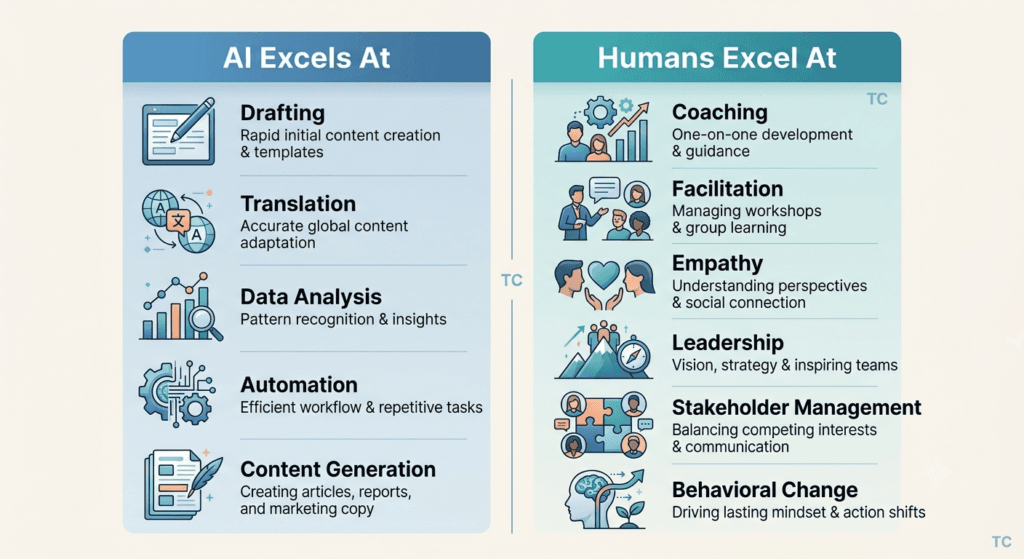
TrainerCentric Analysis: Looking across the instructional design tasks covered in this guide, a clear pattern emerges. AI’s productivity impact is highest in tasks that are primarily about producing content — drafting, localization, translation, and repurposing existing material into new formats.
Its impact drops sharply in tasks that are primarily about judgment and relationship — facilitation, coaching, stakeholder alignment, and driving behavioral change. This isn’t a numerical study; it’s a qualitative pattern we’d encourage any L&D team to test against their own project data. But it’s a useful lens for deciding where to focus AI adoption effort first: start where the task is mostly production, and be far more cautious where the task is mostly judgment.
Creating Learning Objectives
AI is genuinely useful for drafting initial learning objectives once you give it context about the audience, business goal, and performance gap. It’s fast at applying frameworks like Bloom’s Taxonomy to generate objective statements at the right cognitive level.
Limitation: AI doesn’t know your organization’s actual performance data or the specific behavior gap you’re trying to close. Objectives generated without that context tend to be generic.
Best Practice: Feed the AI your needs analysis findings, not just a topic. “Write learning objectives for a course on conflict resolution” produces generic output. “Write objectives for frontline managers who are avoiding difficult conversations with underperforming employees, based on this needs analysis summary” produces something usable.
Designing Courses and Outlines
AI can generate a full course outline in minutes — modules, sequencing, estimated time per section. This is one of the fastest wins in the entire design process.
Limitation: AI-generated outlines often default to a lecture-heavy structure unless you explicitly ask for activity-based or scenario-based design.
Corporate Example: An instructional designer prompted an AI tool to outline a five-module leadership course, then specifically asked it to rebuild the outline around 70% practice activities and 30% content delivery, in line with a 70-20-10 learning philosophy. The second draft was dramatically more usable than the first.
Writing Assessments
Generating multiple-choice questions, scenario-based assessment items, and rubrics is one of AI’s strongest use cases — it’s fast, and quiz-writing is genuinely tedious work.
Limitation: AI-generated assessment questions frequently test recall rather than application, and answer options can be poorly distributed (obviously wrong distractors).
Common Mistake: Publishing AI-generated quiz questions without checking whether the “correct” answer is actually correct. Generative AI tools can confidently produce wrong answers.
Scenario-Based Learning and Storyboarding
AI is well-suited to drafting branching scenarios, dialogue for role-play exercises, and storyboard shot-by-shot descriptions — tasks that used to consume days of writing time, as in the compliance example above.
Best Practice: Give AI a realistic workplace conflict or decision point pulled from actual manager feedback or SME interviews, not a hypothetical. Authentic scenarios train better than invented ones.
Script Writing and Video Creation
AI tools can draft narration scripts, and AI video platforms can turn those scripts into avatar-led videos without a camera crew — useful for fast-turnaround explainer content.
Limitation: AI avatars still read as noticeably synthetic to many learners, which can undermine trust for sensitive topics like harassment training or leadership communication.
Voice-Over Generation
AI voice tools produce natural-sounding narration in multiple languages and tones, cutting voice-over turnaround from weeks to hours.
Limitation: Pronunciation of brand names, technical terms, or acronyms often needs manual correction. Budget review time for this.
Translation and Course Localization
This is one of the highest-value, lowest-risk use cases for AI in global L&D.
Limitation: Cultural localization is not the same as translation. Idioms, examples, and even color/imagery choices that work in one market can fall flat or cause offense in another. AI translation needs in-region human review, not just a language check.
Quiz Generation and Question Banks
Beyond single assessments, AI can rapidly develop a course or build large item banks for certification programs or spaced-repetition learning, which is traditionally slow, manual work.
Best Practice: Have SMEs validate a sample of AI-generated questions before scaling to the full bank — don’t wait until launch to discover a systemic error pattern.
Learner Support Chatbots
AI-powered chatbots that answer learner questions about course logistics, policy lookups, or “how do I do X” performance support queries reduce load on facilitators and support desks.
Limitation: Chatbots trained on outdated or incomplete internal documentation will confidently give wrong answers. This is a governance problem, not just a technology problem.
Performance Support
AI-generated job aids, quick-reference guides, Microlearning and “in the moment” prompts embedded in workflow tools help reinforce training after the formal session ends — arguably one of the most underused applications of AI in L&D, and the entry point into Level 5 of the Adoption Pyramid above.
Learning Analytics
AI-enhanced analytics can flag completion patterns, predict disengagement, and surface which content sections learners struggle with most.
Limitation: Analytics tell you what is happening, not why. A spike in drop-off at Module 3 might mean the content is too hard, too boring, or simply scheduled at a bad time. Human interpretation is still required.
Skills Mapping
AI can help match job descriptions and competency frameworks to available learning content, accelerating skills-gap analysis across large workforces.
Limitation: Skills taxonomies still need human calibration to your organization’s actual role definitions — off-the-shelf mappings rarely fit perfectly.
Quick Checklist — Is This Task a Good Fit for AI?
- ☐ Is this a first-draft or repetitive task (not a final decision)?
- ☐ Do I have a human reviewer with subject-matter expertise for this content?
- ☐ Is the content non-confidential, or am I using an approved enterprise AI tool?
- ☐ Will I be able to catch factual errors before this reaches learners?
- ☐ Does this task benefit from speed more than from deep contextual judgment?
If you answered “no” to any of these, proceed with extra caution — or don’t use AI for that specific task yet.
AI Tools Every L&D Professional Should Know — Grouped by Function
Naming specific products in an “AI tools” list is a losing game — the market moves fast enough that a brand-by-brand comparison is outdated within months. Instead, here’s how to think about tool categories, so this framework stays useful regardless of which specific product you’re using next year.
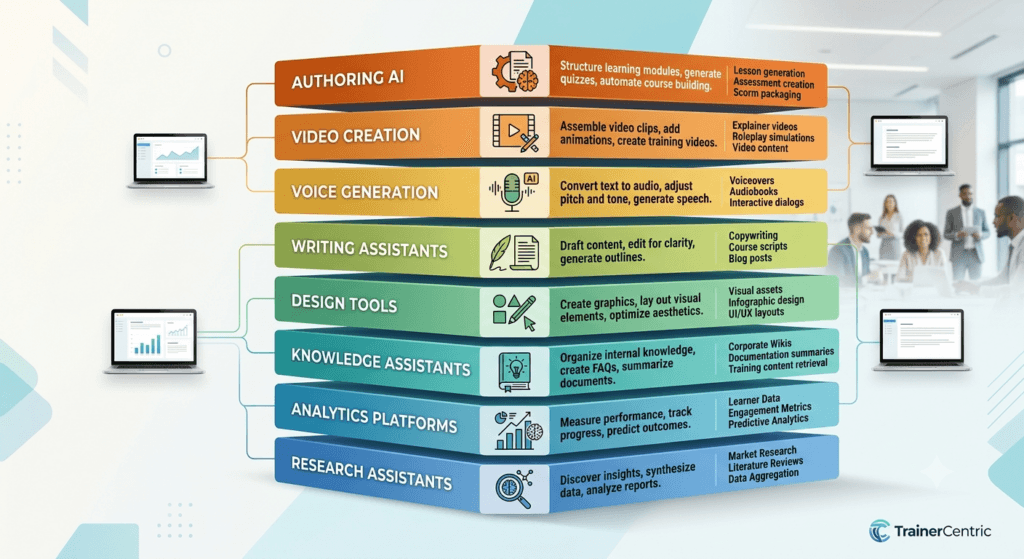
| Function | What It’s For | What to Look For | Where It Fits on the Pyramid |
| Research assistants | Needs analysis, trend scanning, fact-finding with source citations | Ability to cite sources; accuracy on current information | Level 1 — Research |
| Writing assistants | Drafting objectives, outlines, scenarios, facilitator/learner guides | Ability to follow detailed instructions; consistency across long documents | Level 2–3 — Drafting, Learning Design |
| Video generators | Avatar-led explainer videos, process walkthroughs | Multilingual support; realism appropriate to content sensitivity | Level 2–3 |
| Voice tools | Narration, audio microlearning | Natural pronunciation; multilingual and tone control | Level 2–3 |
| Presentation and design tools | Turning outlines into decks, visuals, infographics, job aids | Speed; ease of use for non-designers | Level 2–5 |
| Authoring-integrated AI | AI features built into existing e-learning authoring platforms | Native integration with your existing course output/SCORM pipeline | Level 3 |
| Analytics and skills platforms | Learning analytics, skills mapping, adaptive personalization engines | Data integration with your LMS/HRIS; transparency in how predictions are made | Level 4–6 |
| Chatbot/knowledge assistants | Learner support, performance support in the flow of work | Grounding in your actual internal documentation (not general web knowledge) | Level 5–6 |
Common Mistake: Choosing a tool based on what’s trending on LinkedIn rather than what your organization’s data policy actually permits. Always confirm with IT/security which tools are approved for use with internal or learner data before adopting them into your workflow — regardless of category.
| Trainer Tip: Build your tool stack around the function categories above, not around brand loyalty. When a specific product changes its pricing, features, or shuts down (which happens often in this space), you’ll be able to swap in a replacement within the same category without rethinking your whole workflow. |
The TrainerCentric AI Learning Design Workflow
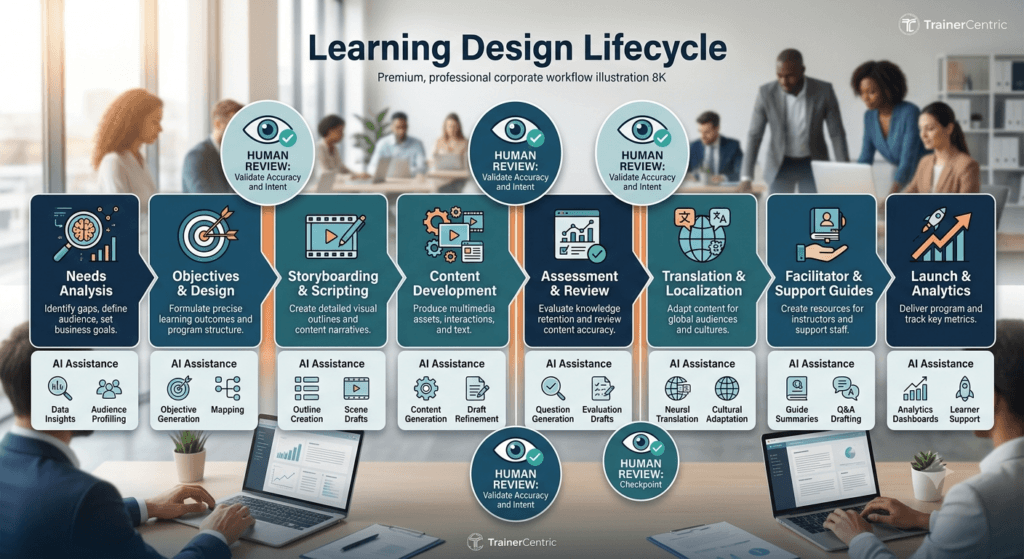
Here’s a realistic, phase-by-phase view of where AI fits into a typical training design lifecycle — and where it should step back.
Needs Analysis → Learning Objectives → Outline → Storyboards → Activities → Case Studies → Assessments → Facilitator Guide → Learner Guide → Translations → Review → Pilot → Launch
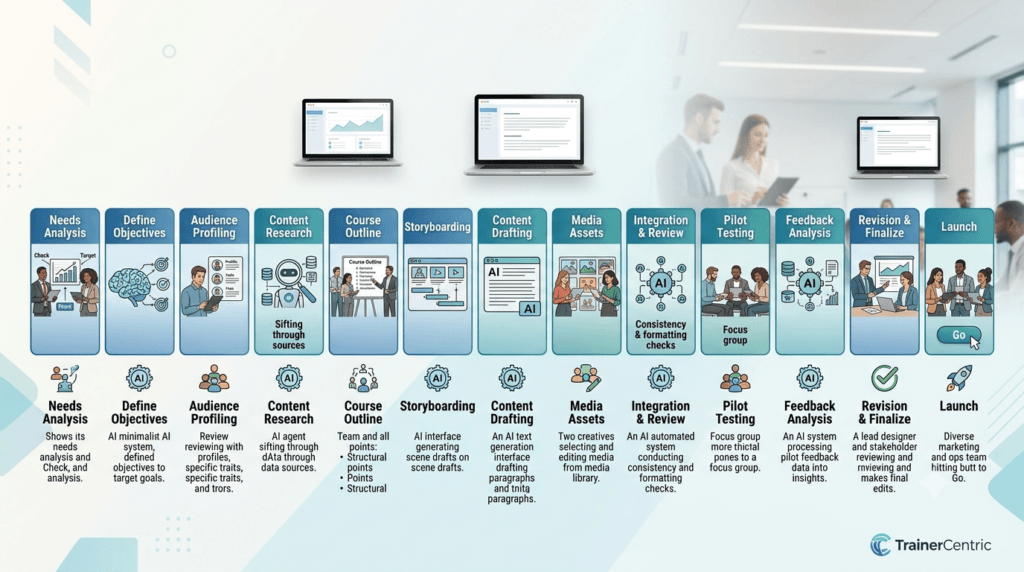
| Phase | Where AI Helps | Where Human Judgment Is Essential |
| Needs Analysis | Summarizing interview notes, surveys, and existing documentation | Interpreting political/organizational context, reading between the lines in stakeholder interviews |
| Learning Objectives | Drafting objective statements at the right Bloom’s level | Confirming objectives actually map to the real performance gap |
| Outline | Generating structure and sequencing options quickly | Deciding pedagogical approach (70-20-10, spaced practice, etc.) |
| Storyboards | Drafting scene-by-scene descriptions and dialogue | Ensuring scenarios reflect authentic workplace situations |
| Activities | Suggesting activity formats and instructions | Designing activities that fit the specific audience and culture |
| Case Studies | Drafting case narratives from real inputs | Validating accuracy and organizational relevance with SMEs |
| Assessments | Generating question banks and rubrics | Verifying correctness and eliminating bias in questions |
| Facilitator Guide | Drafting talking points and timing notes | Adding facilitation nuance, anticipated questions, room management tips |
| Learner Guide | Formatting and summarizing content | Ensuring tone matches organizational voice and learner needs |
| Translations | First-pass machine translation | In-region cultural and linguistic review |
| Review | Flagging inconsistencies or gaps across documents | Final SME and stakeholder sign-off |
| Pilot | Analyzing pilot feedback data patterns | Interpreting qualitative feedback and making design calls |
| Launch | Drafting communications/reminders | Change management, stakeholder relationships, go-live decisions |
To make the time impact concrete, here’s a directional comparison based on patterns we’ve seen across AI-assisted design projects. These are illustrative ranges, not audited benchmarks — your own numbers will vary by project complexity, tool, and team experience — but they give a realistic sense of where time gets saved, and where it doesn’t.
Traditional vs. AI-Assisted Workflow (Illustrative)
| Task | Traditional Timeline | AI-Assisted Timeline | Where the Time Actually Goes |
| Needs analysis | Roughly 1–2 days | Roughly half to a full day | AI speeds up summarizing notes; interpreting stakeholder context still takes human time |
| Outline development | Several hours | Under an hour for a first draft | Structure comes fast; sequencing decisions still need review |
| Quiz/assessment drafting | Half a day or more | Well under an hour for a first pass | Drafting is fast; validating correctness still takes real review time |
| Storyboard creation | Two to three days | A matter of hours for a first draft | Matches the compliance project example earlier in this guide |
| Translation (first pass) | One to two weeks | A few days | Human in-region review remains essential regardless of speed |
Trainer Tip: Treat every AI output in this workflow as a first draft from a fast, well-read, occasionally overconfident junior colleague — helpful, but not someone you’d let sign off on content unsupervised.
Five AI Prompts Every Corporate Trainer Should Bookmark

Readers exploring AI in L&D usually want more than concepts — they want something they can paste into a tool today. Here are five prompts worth keeping on hand, one for each of the most common instructional design tasks covered above.
- Turning SME notes into objectives: “Here are raw notes from an SME interview on [topic]. Turn the key points into 3–5 measurable learning objectives using Bloom’s Taxonomy, written for [audience].”
- Building a facilitator guide from an outline: “Using this course outline, draft a facilitator guide with talking points, suggested timing per section, and two anticipated questions per module, with brief suggested answers.”
- Simplifying compliance language: “Rewrite this compliance policy into plain language suitable for a frontline employee with no legal background, without changing its meaning or removing any required disclosures.”
- Generating scenario-based questions: “Create three scenario-based assessment questions for frontline managers based on this real workplace situation: [describe scenario]. Each question should test application, not recall.”
- Auditing a course outline: “Review this course outline against Bloom’s Taxonomy and flag any sections that only test recall-level thinking. Suggest one application-level or analysis-level activity for each flagged section.”
| Best Practice: Save these as prompt templates in a shared team document, with placeholders for audience, topic, and context. A well-kept prompt library saves far more time than any single AI tool subscription. |
Anatomy of a Good AI Prompt
Notice that each prompt above includes the same underlying components. When a prompt isn’t producing useful output, it’s usually missing one of these:
- Role — who should the AI act as? (“Act as an instructional designer…”)
- Context — what’s the background or source material? (SME notes, an existing outline, a policy document)
- Audience — who is this content for? (frontline managers, new hires, technical specialists)
- Desired output — what specific format or deliverable do you want? (objectives, a facilitator guide, three questions)
- Constraints — what should the AI avoid or preserve? (tone, required disclosures, reading level, length)
Missing the audience or constraints is the most common reason AI output feels generic. Add them back in, and quality improves immediately — no special tool required.
Where Human Expertise Still Matters
None of the above changes a basic fact: training is fundamentally a human discipline. AI is genuinely good at producing drafts, variations, and first passes. It is not good at the things that make training actually change behavior.
Empathy and reading a room. A facilitator adjusts pacing and tone in real time based on visible discomfort, confusion, or resistance in a room. No AI tool does this.
Coaching. Helping a manager work through a specific, personal leadership challenge requires context, trust, and follow-up that generic AI coaching tools can’t replicate at the depth a real coaching relationship provides.
Facilitation. Managing group dynamics, difficult questions, and unplanned tangents in a live session is a skill built over years, not something a script — AI-written or otherwise — can fully anticipate.
Organizational context. AI doesn’t know your company’s history, politics, recent layoffs, or the specific manager who’s going to push back on this content in week two of rollout. That contextual radar is a human skill.
Stakeholder management. Negotiating scope, timeline, and expectations with executives who think “AI should make this take a week” requires relationship skills AI can’t substitute for.
Leadership development. Deep behavioral change in leaders — the kind that shows up in how they handle a real conflict six months later — is built through sustained human relationship and feedback, not a generated module.
Behavioral change. Training that changes what people actually do on the job depends on reinforcement, accountability, and manager follow-through — all human-driven.
Ethics and cultural sensitivity. Judging whether a scenario, example, or image is appropriate for a specific audience and culture requires lived experience and sensitivity that AI systems, trained largely on aggregated internet content, don’t reliably have.
Real-World Example: In one leadership program rollout, an AI-drafted scenario for a “difficult feedback conversation” module used language that read as generic and slightly Western-corporate in tone for the regional audience it was intended for. It took a facilitator who’d actually run these conversations in that market — not another prompt — to rewrite it into something that felt authentic to the participants who sat through it.
| Best Practice: Use AI to buy back time on production tasks, then reinvest that time in the human-only parts of your job — facilitation prep, stakeholder conversations, coaching, and quality review. AI should change your time allocation, not your job description. |
Common Mistakes When Using AI in Learning and Development
- Copy-pasting AI output directly into learner-facing materials. The single most common mistake. AI drafts need editing for accuracy, tone, and organizational voice every time.
- Ignoring instructional design principles. AI will happily generate a wall of text with a quiz bolted onto the end if you let it. Good instructional design still requires deliberate structure — chunking, spaced practice, active recall — that AI won’t apply unless you explicitly ask for it.
- Skipping SME validation. Especially in technical, medical, legal, or safety-critical content, unvalidated AI output can introduce real risk. SME review isn’t optional in these domains.
- Using confidential company information in public AI tools. Pasting internal financials, unreleased product details, or personal employee data into a consumer-facing AI tool can create serious data privacy and security exposure. Use enterprise-approved, contractually protected tools for anything sensitive.
- Poor prompting. Vague prompts produce vague, generic output. Specific prompts — with audience, context, tone, and constraints — produce dramatically better results, as shown in the bookmarkable prompts above.
- Hallucinated facts. Generative AI can produce statistics, case studies, and citations that sound plausible but are fabricated. Never publish an AI-generated statistic or quote without independently verifying it.
- Bias in generated content. AI models can reflect biases present in their training data — in examples used, names chosen, or assumptions made about roles and demographics. Review content specifically for this.
- Accessibility issues. AI-generated video and audio content isn’t automatically accessible. Captions, alt text, and screen-reader compatibility still need to be checked and added.
- Weak assessments. As covered earlier, AI-generated quiz questions often test recall rather than application unless specifically prompted otherwise — and even then, need human review.
- One-size-fits-all learning, ironically. Despite AI’s personalization potential, teams under time pressure often use it to mass-produce generic content faster, rather than to personalize more effectively. Speed without intent just produces more of the same problem, faster.
Your 30-Day AI Adoption Plan
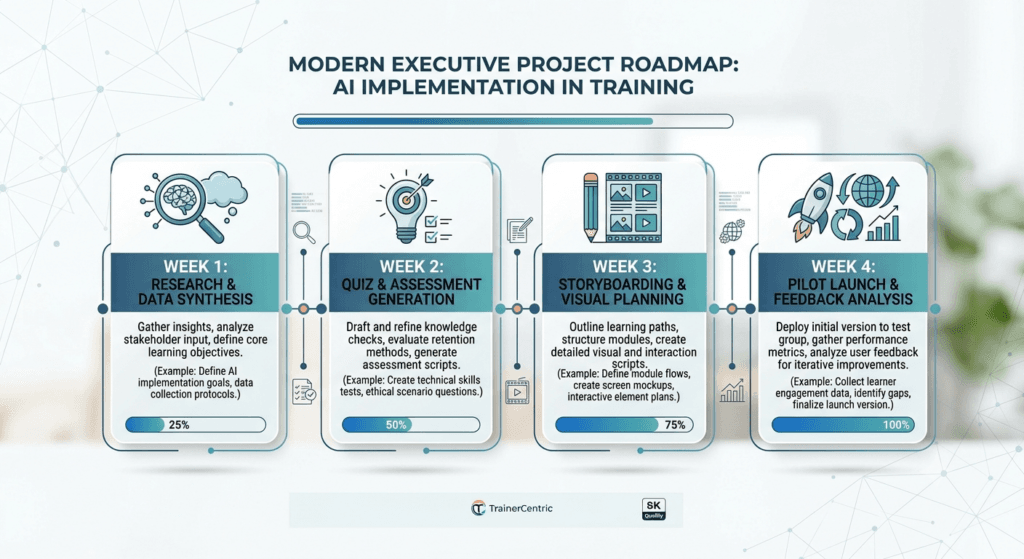
If you’re not sure where to start, don’t try to overhaul your entire design process in one go. This four-week plan mirrors the lower levels of the TrainerCentric AI Adoption Pyramid and is designed to build confidence before you expand scope.
| Week | Goal | What to Do |
| Week 1 | Use AI for research and brainstorming | Pick one upcoming project. Use an AI research assistant to summarize needs-analysis notes and generate an initial list of learning objectives. Review everything against your own judgment before using any of it. |
| Week 2 | Generate and validate quiz questions | Use AI to draft a question bank for an existing course. Have an SME check a sample for accuracy before you consider expanding the practice further. |
| Week 3 | Draft storyboards or scenarios | Use AI to produce a first-draft storyboard or branching scenario from a real workplace situation. Time how long the draft takes versus your usual process, and route it through SME review. |
| Week 4 | Pilot one AI-assisted module | Combine what you’ve learned into a single small pilot module — objectives, content, and assessment all AI-drafted, then fully reviewed and refined by your team. Gather feedback before scaling the approach to a full course. |
| Trainer Tip: The goal of this plan isn’t speed for its own sake — it’s building the judgment to know, task by task, where AI genuinely helps and where it doesn’t. That judgment is the actual skill worth developing. |
Responsible AI Guidelines for Corporate Trainers
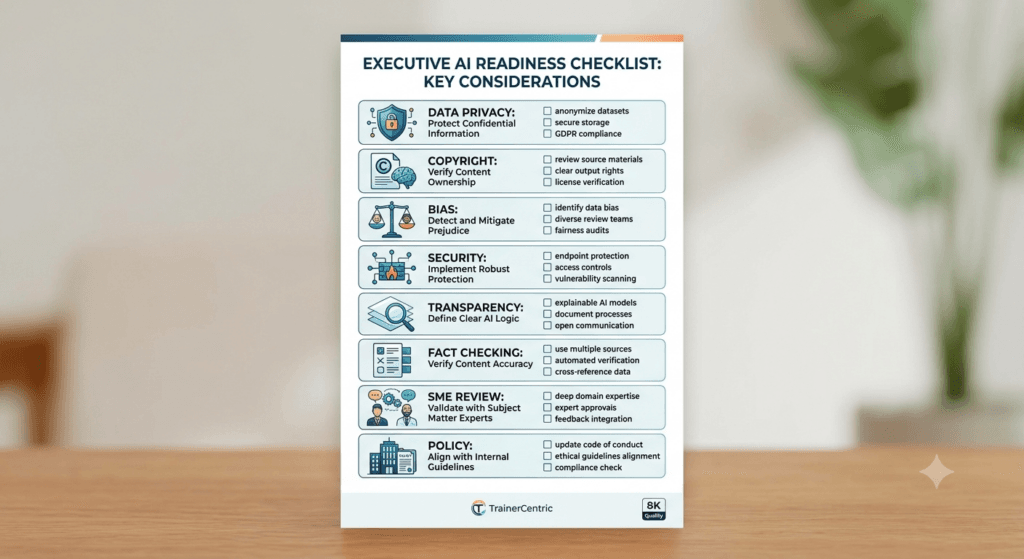
- Data privacy. Know what data classification your organization applies to learning content and learner records, and only use AI tools cleared for that classification level.
- Copyright. Be cautious about AI-generated images, music, or video that may resemble copyrighted material, and about feeding copyrighted third-party content into AI tools without a license that permits it.
- Bias. Build a habit of reviewing AI output specifically for representation — who’s shown as the manager, who’s shown as the employee needing correction, whose names and examples get used.
- Security. Confirm which AI tools are sanctioned by your IT/security team before using them for any work-related content, even drafts.
- Transparency. Consider disclosing to learners when video narration, images, or avatars are AI-generated, particularly for people-facing content like leadership or culture training.
- Fact-checking. Treat every factual claim, statistic, or citation from an AI tool as unverified until you’ve checked it against a primary source.
- SME review. Build a mandatory SME sign-off step into your process for any AI-assisted content touching technical accuracy, compliance, or safety.
- Organizational AI policies. Know your company’s formal AI usage policy and follow it — don’t assume “if the tool is available, it’s approved.”
- Ethical considerations. Consider the downstream effect of AI-generated content on learners — are you creating training that respects their time, dignity, and intelligence, or just producing volume?
Future Trends
Based on where the technology and workplace research currently point, here’s what’s realistic to expect over the next three to five years — without overpromising.
- Adaptive learning at greater scale. Content that adjusts in real time to individual learner performance will become more common and more affordable, moving beyond the largest enterprises into mid-sized organizations.
- AI coaches. Conversational AI tools that support ongoing reflection, goal-setting, and check-ins between formal coaching sessions are likely to become a standard complement to (not replacement for) human coaching.
- Digital avatars. AI video avatars will keep improving in realism and will likely become standard for high-volume, low-sensitivity content like process training, while human-led video will remain preferred for sensitive or culture-defining topics.
- Learning analytics and skills intelligence. Expect deeper integration between skills data, performance data, and learning content recommendations — helping L&D move from “who completed the course” to “who can actually do the job.”
- Agentic AI. AI systems that can carry out multi-step tasks with less direct prompting (for example, drafting an entire first-pass course package from a single needs-analysis brief) are an emerging area to watch, though most organizations are still in early experimentation here.
- Human-AI collaboration models. The clearest trend across current workplace research is that AI literacy — knowing when and how to use these tools critically — is becoming as important a skill for L&D professionals as instructional design itself. LinkedIn’s Workplace Learning Report data shows a large majority of L&D professionals already experimenting with AI in some capacity, but converting that experimentation into consistent, measurable outcomes remains the harder, still-unsolved part for most teams.
| Trainer Tip: Don’t try to predict exactly which tool wins. Build your team’s underlying AI literacy — prompting, critical evaluation, data judgment — and you’ll be able to adapt as specific tools change. |
Frequently Asked Questions
Will AI replace trainers?
No credible evidence points to this. AI is changing which tasks trainers spend time on — shifting effort away from first-draft content production and toward facilitation, coaching, review, and stakeholder work. The role is changing, not disappearing.
Can AI build complete courses on its own?
AI can produce a full draft — outline, content, assessments, even narration — but “complete” and “launch-ready” are different things. Every AI-drafted course still needs instructional design review, SME validation, and accessibility checks before it’s ready for learners.
Which AI tool is best for L&D?
There isn’t a single best tool — it depends on the task (research, writing, video, voice, analytics) and your organization’s approved tool list. Most L&D teams end up using a handful of tools across different function categories rather than one all-purpose tool.
How accurate is AI-generated content?
Variable, and not reliably self-aware about its own errors. AI tools can generate confident-sounding but incorrect facts, statistics, and citations. Treat all factual claims as unverified until checked.
Can AI create SCORM-compliant courses?
Some authoring tools with built-in AI features can help produce SCORM-packaged output, but the AI is assisting within an existing authoring tool — it’s not independently generating SCORM packages from scratch in most workflows.
Is AI safe for confidential learning content?
Only if you’re using an enterprise-approved tool with appropriate data protection terms. Public, consumer-facing AI tools generally should not be used for confidential, proprietary, or personally identifiable learner data.
How should beginners start using AI in L&D?
Start with one low-risk task — drafting a first-pass outline or generating quiz question variations — rather than trying to automate an entire course. The 30-day plan above is a reasonable starting structure.
What skills should L&D professionals develop for an AI-enabled workplace?
Prompt writing, critical evaluation of AI output, basic data literacy, and a stronger grasp of instructional design fundamentals — ironically, AI makes strong ID skills more valuable, not less, because someone needs to catch what the AI gets wrong.
Does using AI reduce training costs?
It can reduce time spent on production tasks like drafting, translation, and voice-over, which often translates to cost savings — but review, validation, and human facilitation costs don’t disappear, and shouldn’t be cut to fund AI adoption.
What’s the biggest risk of adopting AI too quickly in L&D?
Skipping validation steps under time pressure — publishing AI-drafted content to learners without SME review, fact-checking, or accessibility checks, which can introduce compliance risk, factual errors, or reputational damage.
Conclusion
AI hasn’t changed what good training requires — clear objectives, sound instructional design, authentic practice, and skilled facilitation. What it has changed is how quickly the production side of that work can move, and where trainers should be spending their time as a result.

Key takeaways:
- AI, machine learning, and generative AI are related but distinct — know which one you’re actually talking about.
- Where your team sits on the AI Adoption Pyramid — Research, Drafting, Learning Design, Personalization, Performance Support, or Continuous Learning — should determine what you invest in next, not what’s trending.
- AI adds real value in drafting, translation, voice-over, assessment generation, and analytics — but every output needs human review before it reaches learners.
- The parts of L&D that depend on empathy, facilitation, coaching, and organizational judgment remain firmly human, and are becoming more valuable, not less.
- Most costly mistakes come from skipping validation steps, not from using AI itself.
- The 30-day plan and bookmarkable prompts above are a low-risk way to start building real judgment, not just familiarity with a tool.
Twenty years ago, the competitive advantage of an L&D professional was knowing how to design great learning experiences. Today, that remains true — but the professionals who can combine instructional design expertise with responsible AI use will shape the next generation of workplace learning.
Further Reading
- Corporate eLearning Playbook: The Complete Guide to Designing, Delivering, and Scaling Digital Learning
- Rapid eLearning Development: Tools, Tips, and Best Practices
- Microlearning: What It Is, When to Use It, and How to Design It
- How to Choose the Right LMS for Your Organisation
- How to Write a Learning and Development Strategy
- How to Design a Learning Programme From Scratch
- Instructional Design Model Playbook,
- Training Needs Analysis Hub
- How to Calculate Training ROI
- Facilitation Skills for Corporate Trainers
- AI Prompt Library for Trainers
- How to Choose eLearning Authoring Tool
- Learning Experience Platform (LXP): Features, Benefits, Examples and Whether You Need One
- A practical WCAG 2.1 Guide to eLearning Accessibility
References
- Artificial Intelligence for Learning: How to Use AI to Support Employee Development || 1st Edition || Donald H. Taylor & Thomas Matcham || Kogan Page || 2020
- Design for How People Learn || 2nd Edition || Julie Dirksen || New Riders || 2015
- Map It: The Hands-On Guide to Strategic Training Design || 2nd Edition || Cathy Moore || Two Waves Books || 2017
- Telling Ain’t Training || 2nd Edition || Harold D. Stolovitch & Erica J. Keeps || Association for Talent Development (ATD Press) || 2011
- The Modern Learning Ecosystem: A New L&D Mindset for the Ever-Changing Workplace || 1st Edition || J. D. Dillon & Michelle Ockers || Association for Talent Development (ATD Press) || 2023
- Learning Science for Instructional Designers: From Cognition to Application || 1st Edition || Clark N. Quinn || Association for Talent Development (ATD Press) || 2021
Author Details

Ankita Roy is an accomplished HR leader with over 9 years of experience driving people strategy across the telecom, logistics, and retail sectors. As Head of Human Resources at AGWANI FASHIONS, she specializes in talent management, organizational development, performance management, employee engagement, and HR transformation. Ankita has successfully led workforce planning, career framework design, succession planning, and culture-building initiatives for high-growth organizations. You can reach out to her via her linkedin Profile: https://www.linkedin.com/in/ankita-roy-398708105/