Picture this: it’s 9 a.m. on a Tuesday, and forty sales reps have just logged into a two-hour compliance module they were told to “complete by end of week.” By the fifteen-minute mark, half of them have a second browser tab open. By the forty-minute mark, several are just clicking “Next” to get through the slides. By the time the certificate of completion lands in their inbox, almost nobody remembers what they just sat through.
This isn’t a training failure caused by bad facilitators or lazy learners. It’s a design problem. We’ve been asking adult brains, in the middle of a busy workday, to absorb hours of content in one sitting — and then acting surprised when retention is poor and completion rates limp along at 60%.
Microlearning didn’t emerge as a buzzword. It emerged as a response to this exact problem. It asks a simple but powerful question: what if, instead of forcing learning into long blocks, we designed it in small, focused pieces that fit into the natural rhythm of work?
This guide is built for L&D professionals, instructional designers, training managers, and people leaders who want more than a surface-level definition. By the end, you’ll understand what microlearning actually is (and isn’t), a practical framework for designing it, the learning science behind it, when to use it and when to avoid it, how it compares to traditional training and adjacent learning models, over two dozen real workplace examples, why most corporate microlearning initiatives quietly fail, how AI is reshaping the format, and how to build the business case for it.
Let’s start with the fundamentals.
What is Microlearning?
| Quick answer: Microlearning is a learning design approach that delivers training content in short, focused units — typically 3 to 10 minutes — each built around a single learning objective, designed to be completed independently and often on a mobile device, in the flow of work. |
Microlearning is a learning design approach that delivers content in short, focused units — typically 3 to 10 minutes — each built around a single learning objective. Rather than covering an entire topic in one long session, microlearning breaks that topic into standalone pieces that a learner can complete independently, often on a mobile device, in the flow of work.
That’s the textbook definition. But if you’ve been in L&D for any length of time, you’ve probably seen “microlearning” used as a label for almost anything short — a chopped-up video, a five-slide PDF, a random tip emailed on a Monday. That’s where most organisations get it wrong.
Microlearning is not just “shorter content”
Here’s the distinction that matters most: cutting a 60-minute course into six 10-minute clips is not microlearning. It’s just shorter traditional training.
True microlearning is built differently from the ground up. It isn’t a slice of something bigger — it’s a complete, self-contained learning experience in miniature. Each unit:
- Has one clear learning objective, not a fragment of several
- Can be understood without needing the previous or next module for context
- Leads to a specific, observable outcome — a skill practiced, a decision made correctly, a piece of knowledge recalled and applied
- Is designed for the moment of need, often when someone is searching for an answer, not sitting through a scheduled session
Think of the difference between a chapter torn out of a novel and a complete short story. Both are “short,” but only one stands on its own.
Core principles of effective microlearning
- Single objective focus — one module, one skill or fact, no exceptions. If you find yourself writing “learners will understand X, Y, and Z,” you have three modules, not one.
- Brevity with purpose — short because the content is distilled to its essential core, not because material was rushed or cut.
- Contextual relevance — tied to a real task the learner is doing or about to do.
- Active engagement — includes some form of interaction, decision, or retrieval, not passive scrolling.
- Accessibility on demand — available on mobile, searchable, and usable in under 10 minutes, ideally in a single sitting.
- Reinforcement-oriented — designed to be revisited, not a one-time watch.
Examples of microlearning done right
- A 2-minute video showing a customer service rep exactly how to handle a refund request in the new CRM system, filmed from the rep’s own screen.
- A flashcard deck that sales reps swipe through each morning to memorise updated product pricing tiers.
- A 90-second scenario quiz where a new manager picks how to respond to an underperforming team member, with immediate feedback on the choice.
- A one-page job aid stored in a QR-code-accessible library on the warehouse floor, showing the correct lifting technique for heavy pallets.
- A podcast-style 5-minute audio clip a field engineer listens to in the van on the way to a client site, covering one new safety protocol.
Each of these stands completely on its own. None require “part 1” to make sense of “part 2.” That independence is the real signature of microlearning — and it’s the detail most organisations miss when they simply slice up existing courses and call it a strategy.
Getting this distinction right also matters for how microlearning fits into your broader Instructional Design approach and your overall Learning Programme Design — microlearning is a delivery strategy that should be chosen deliberately, not a default.
The M.I.C.R.O. Framework™: A Practical Model for Designing Microlearning That Works
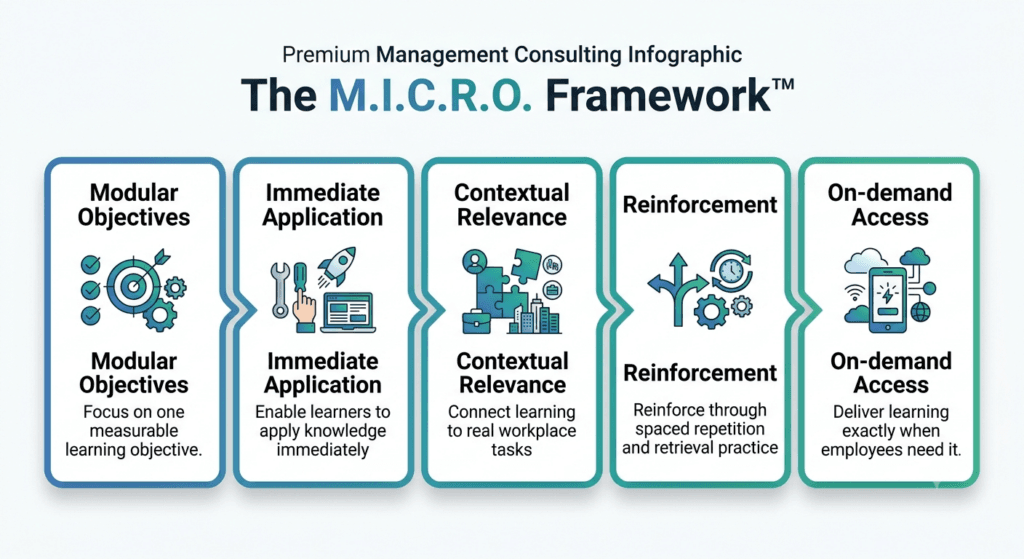
Most articles on microlearning stop at listing benefits and formats. But knowing that microlearning “works” doesn’t tell you how to build it well. Over years of designing corporate learning content, we’ve distilled the discipline into five conditions that separate microlearning that actually changes behaviour from microlearning that just looks short. We call it the M.I.C.R.O. Framework™.
M — Modular objectives. Every module is built around exactly one learning objective, written as an observable outcome, not a topic. “Understanding onboarding policy” is a topic. “Correctly complete a new-hire’s Day 1 checklist without missing a mandatory field” is a modular objective. If a module’s objective needs an “and” to describe it, it isn’t modular yet — split it.
I — Immediate application. The content connects to something the learner can do in the next few minutes or the next task, not “someday.” Microlearning that can’t be applied almost immediately loses its core advantage over longer-form training, which is relevance to a live need.
C — Contextual relevance. The module reflects the learner’s actual role, tools, and environment — the real CRM screen, the real product line, the real escalation path — not a generic stand-in. Generic content is instantly recognisable to employees, and it erodes trust in the whole library.
R — Reinforcement built in. No module stands alone forever. Every piece of microlearning has a planned second and third touchpoint — a spaced quiz, a manager conversation prompt, a follow-up scenario — designed at the same time as the original content, not bolted on afterward. Here is a prompt library for trainers that will help you create one.
O — On-demand access. The module is tagged, searchable, and retrievable the moment a learner needs it again — not buried three folders deep in an LMS. If nobody can find it in under 30 seconds when they need it, it isn’t really performance support.
Why this matters more than a definition: A module can technically be “short” and still fail every one of these five conditions — multiple objectives crammed in, generic stock content, no plan to reinforce it, impossible to find later. The M.I.C.R.O. Framework™ is the quality bar we apply before any module is considered finished, and we’ll refer back to it throughout this guide, particularly in the design process and the “why microlearning fails” section later on.
Why Microlearning Works
Microlearning isn’t popular because it’s trendy — it’s popular because it aligns with how the brain actually processes, stores, and retrieves information. If you want to defend a microlearning strategy to a sceptical stakeholder (and you will need to, at some point), this is the section to lean on.
Cognitive Load Theory
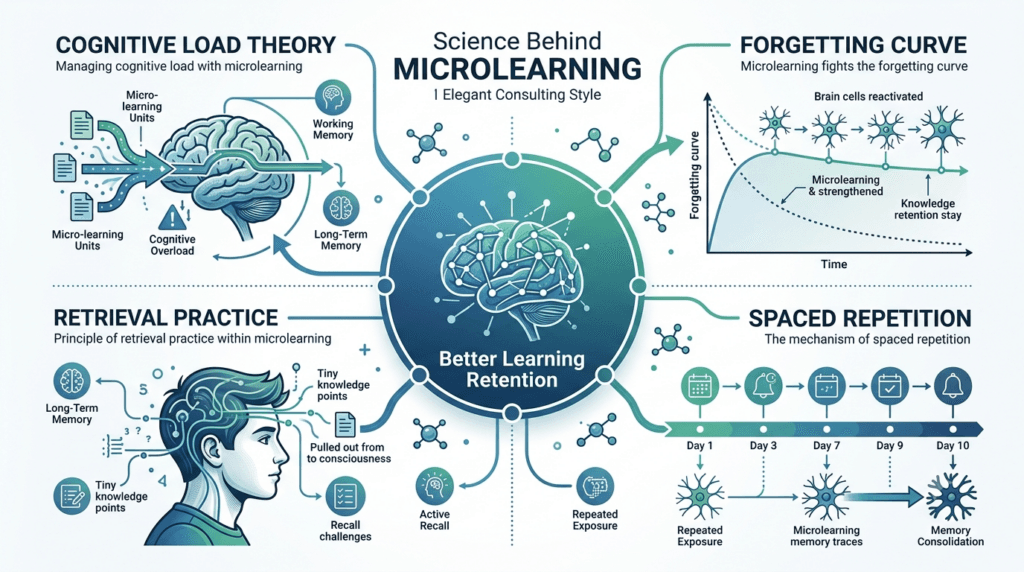
Cognitive Load Theory, developed by educational psychologist John Sweller, explains that working memory — the mental “workspace” we use to process new information — has a very limited capacity. When we overload it with too much new information at once, learners stop absorbing and start merely coping.
Traditional training often violates this without meaning to: dense slides, back-to-back concepts, long narration, and multiple objectives packed into a single session. The learner’s working memory hits capacity, and everything after that point barely registers.
Bite-sized learning respects this ceiling by design. A single objective per module (the “M” in the M.I.C.R.O. Framework™ above) means the learner’s cognitive resources go toward genuinely processing one idea, rather than being split across five.
| Did You Know? Working memory can typically hold only about 4 new pieces of information at a time before it starts to drop earlier ones to make room. A 45-minute lecture covering 12 concepts is, cognitively speaking, set up to fail before it even begins. |
The Forgetting Curve
Hermann Ebbinghaus’s forgetting curve research, over a century old, still holds up: without reinforcement, we forget the majority of new information within days. This is precisely why a single, long training event — no matter how well delivered — rarely produces lasting behaviour change on its own. Microlearning combats the forgetting curve by design, because short modules are cheap and fast to revisit, making spaced reinforcement practical rather than aspirational.
Spaced Repetition
Spaced repetition is the practice of reviewing information at increasing intervals over time, rather than cramming it once. It’s one of the most well-supported findings in cognitive psychology for improving long-term retention.
Microlearning is the natural delivery vehicle for spacing. A single concept delivered today, reinforced with a quick quiz three days later, and revisited again two weeks later, builds durable memory far more effectively than one long session ever could — because each short encounter forces the brain to retrieve and re-strengthen the memory trace.
Retrieval Practice
Retrieval practice — actively recalling information rather than simply re-reading or re-watching it — is consistently shown to produce stronger, longer-lasting learning than passive review. This is sometimes called the “testing effect.”
Well-designed microlearning builds retrieval directly into the experience: a quick multiple-choice check, a scenario decision, a “what would you do next” prompt. This is a major reason why microlearning modules that include even one interactive question outperform those that are purely passive video-watching.
Attention Span and the Reality of Modern Work
It’s become fashionable to cite (often exaggerated) statistics about attention spans shrinking to “shorter than a goldfish.” You don’t need those numbers to make the case. The real issue isn’t that people can’t concentrate — it’s that modern work constantly interrupts concentration. Employees are pulled between emails, meetings, Slack messages, and deadlines. Asking them to protect a two-hour block for training is asking them to fight their entire day.
Microlearning works with this reality instead of against it. A 5-minute module can be completed between meetings, during a commute, or while waiting for a client call to start — something a 90-minute workshop simply cannot do.
Performance Support
Finally, microlearning aligns closely with the concept of performance support — giving people the exact information they need, exactly when they need it, inside their workflow. This is sometimes called “learning in the flow of work.” When an employee has a question mid-task, they don’t want a course. They want an answer, in under two minutes. Microlearning, especially in job-aid and searchable-library formats, is built for exactly this moment.
Microlearning by the Numbers
A quick note on sourcing before the numbers: the microlearning statistics circulating online are, frankly, a mess. A large share of frequently-repeated figures (some suspiciously precise, like “72% recall content six months later” or “145% more retention”) trace back to marketing blogs citing one another in a loop rather than to a single, checkable primary study. We’re not going to hand you numbers we can’t stand behind. Below are the figures that show genuine convergence across multiple independent industry write-ups, along with what’s actually attributable to a named report.
- Completion rates: Short, single-objective modules consistently show completion rates in the 70–85% range, compared to roughly 20–30% for long-form e-learning courses — this gap shows up consistently across independent L&D industry sources, not just one outlier study.
- Retention improvement: Multiple independent write-ups on workplace learning converge on a 25–60% improvement in knowledge retention for microlearning versus single-session, long-form training — a wide range, but a consistently reported direction.
- Development speed and cost: Microlearning modules are widely reported to take a fraction of the time and budget of full e-learning courses to produce, largely because scope and review cycles are smaller — consistent with what most production teams experience directly, even without a single definitive percentage.
- AI adoption in learning: LinkedIn’s 2025 Workplace Learning Report highlights a substantial shift toward AI-driven, personalised learning technology and notes that organisations further along in this shift (“career development champions”) are meaningfully more likely to be leading adopters of generative AI more broadly — a trend directly relevant to where microlearning delivery is heading (see the AI section below).
- Preference for shorter formats: Multiple industry surveys (though methodologies vary and aren’t always disclosed) report large majorities of L&D professionals saying learners prefer shorter, more frequent learning experiences over long single sessions — directionally consistent with what most trainers observe anecdotally in completion data.
| Trainercentric Best Practice: Treat any microlearning statistic you see quoted online — including some of the ranges above — as directional, not gospel, unless you can trace it to a named, methodologically transparent report. For internal business cases, your own completion and assessment data will always be more persuasive to your stakeholders than an unverifiable stat from a blog. |
Benefits of Microlearning
Quick answer: The core benefits of microlearning are stronger knowledge retention through spaced reinforcement, higher completion rates than long-form courses, faster and cheaper development, mobile accessibility for frontline and hybrid teams, and effective just-in-time performance support at the moment of need.
The learning science explains why microlearning works. Here’s what it delivers in practice — the outcomes that matter to L&D leaders, business stakeholders, and finance teams alike. Independent industry write-ups consistently converge on completion rates in the 70–85% range for short, single-objective modules, against roughly 20–30% for long-form e-learning — a gap wide enough that it shows up almost regardless of which source is reporting it.
| Trainercentric Field Note: During one software rollout we supported, the original plan called for a two-hour classroom refresher repeated across every regional office. We replaced it with a series of five-minute workflow videos and a searchable job-aid library instead. Support ticket volume for that specific system fell noticeably within the first month — not because the content was flashier, but because employees could find the exact answer they needed at the exact moment they got stuck, instead of trying to recall a session from weeks earlier. |
- Better knowledge retention: Because microlearning naturally supports spaced repetition and retrieval practice, learners retain more of what they learn over longer periods, compared to single long-form sessions where knowledge decays rapidly after the event.
Example: A telecom company replaced its quarterly two-hour product-update webinar with weekly 5-minute video refreshers. Post-training assessment scores three months later were noticeably higher than under the old model, because the content had been touched repeatedly instead of once.
- Higher completion rates: Long courses suffer from drop-off — learners start strong and abandon the module halfway through. Short, focused modules are far easier to finish in a single sitting, which drives completion rates up significantly, especially in self-paced or optional learning contexts.
- Faster deployment: A single microlearning module can be storyboarded, built, and published in days rather than the weeks or months a full course requires. This matters enormously when a policy changes overnight, a product launches next week, or a compliance requirement shifts with little notice.
- Lower development costs: Shorter, single-objective content requires less scripting, less production complexity, and fewer review cycles. Many organisations find they can produce several microlearning assets for the cost and time of one traditional e-learning course.
- Mobile accessibility: Microlearning formats are naturally suited to smartphones — the device most employees, especially frontline and deskless workers, actually have in hand throughout their day. This makes mobile learning genuinely practical rather than a checkbox feature bolted onto a desktop-first LMS.
- Improved learner engagement: Shorter, more relevant content simply gets consumed more willingly. Employees are far more likely to complete a 4-minute video on their own time than block out an hour for an e-learning module they’ve been “assigned.”
- Supports hybrid and distributed work: For hybrid and remote teams spread across time zones and shift patterns, scheduling a synchronous long-form session is often logistically painful. Microlearning removes that constraint — it’s asynchronous by nature and fits into whatever hours an employee is actually working.
- Easier content updates: When a process, price list, or policy changes, updating one 3-minute module is far faster and cheaper than reworking an entire 90-minute course and re-editing every downstream reference to the old information. This keeps content accurate and trustworthy — a huge factor in whether employees actually use a learning library or abandon it.
| Trainercentric Tip: When you’re pitching microlearning to a budget-conscious stakeholder, lead with development cost and speed-to-deployment. When you’re pitching it to a Chief Learning Officer, lead with retention and completion data. Same strategy, different value lens. |
When Should You Use Microlearning?
Quick answer: Use microlearning when the learning need is narrow, time-sensitive, or tied to a specific task — product updates, compliance refreshers, sales enablement, software adoption, safety reminders, and just-in-time performance support are the strongest use cases.
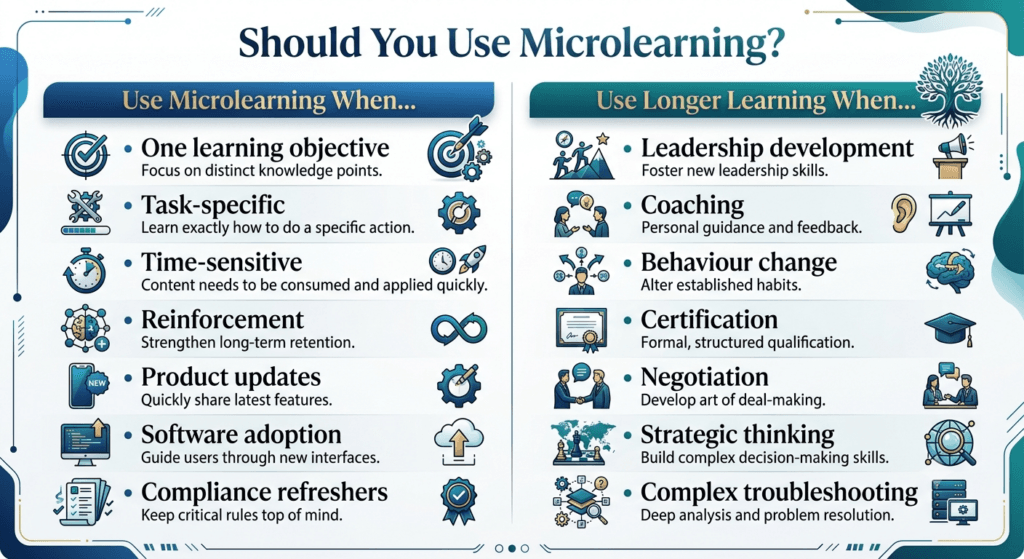
Microlearning shines brightest when the learning need is narrow, time-sensitive, or tied directly to a task. Here’s where it consistently delivers strong results.
- Product training: When a retail chain launches a new product line, sales associates don’t need a half-day workshop — they need to know key features, pricing, and objection-handling in the next ten minutes before a customer walks in. Short videos and quick-reference cards work far better here than a formal course.
- Compliance refreshers: Annual compliance training is notorious for low engagement and even lower retention. Replacing (or supplementing) the yearly marathon session with short, quarterly refreshers on specific policies — data privacy, anti-harassment, anti-bribery — keeps the material top of mind without the dread of a multi-hour re-certification.
- Sales enablement: Sales teams operate in fast-moving environments where pricing, competitive positioning, and messaging shift constantly. Microlearning — battle cards, 2-minute objection-handling videos, quick quizzes on new positioning — keeps reps current without pulling them off the phones for hours.
- Software adoption: When a company rolls out a new CRM, ERP, or internal tool, employees rarely need to understand the entire system on day one. They need to complete specific tasks: log a ticket, generate a report, update a record. Short, task-specific walkthroughs dramatically outperform one long system-training session that tries to cover everything at once.
- Leadership tips: While deep leadership development requires sustained coaching (more on this shortly), bite-sized reinforcement — a 3-minute video on giving difficult feedback, a scenario-based decision on delegation — helps managers apply concepts they learned in a longer programme back on the job.
- Customer service: Handling a specific type of complaint, following a new refund policy, or using a new phrase in a chat script are all perfect microlearning candidates — narrow, task-specific, and needed in the moment.
- Safety reminders: Manufacturing and warehouse environments often use microlearning for safety reinforcement: a 90-second video reminder before a shift, a quiz on updated PPE requirements, a checklist posted at a workstation.
- Process reinforcement: When a process has already been trained but compliance is slipping (a common issue three to six months after a rollout), a short refresher module targeting the specific breakdown point is far more efficient than repeating the entire original training.
- Just-in-time learning: This is arguably microlearning’s signature use case: giving someone exactly the information they need, at the exact moment they need it — a searchable job-aid library, an in-app tooltip, a quick help video linked from an error message.
When Microlearning Does NOT Work
Microlearning is powerful, but it is not a universal replacement for longer-form learning. Using it where it doesn’t fit is one of the fastest ways to damage its credibility inside an organisation. Here’s where longer, more structured experiences remain essential.
- Leadership development : Leadership growth requires sustained practice, feedback, reflection, and often coaching over months. A 5-minute video on “active listening” cannot build the judgment a manager needs to navigate a genuinely difficult conversation. Microlearning can reinforce leadership concepts, but it cannot build leadership capability on its own.
- Complex problem solving: Skills that require synthesising multiple variables, weighing trade-offs, and practising judgment over time — like financial modelling, systems troubleshooting, or strategic analysis — need depth, worked examples, and extended practice that short modules simply can’t hold.
- Coaching: Coaching is inherently relational and adaptive. It responds to the specific person, in the specific moment, with follow-up questions and tailored guidance. No pre-built micro-module can replace a real coaching conversation.
- Behaviour change: Genuine behaviour change (not just awareness) typically requires repeated practice, feedback loops, social reinforcement, and often accountability structures — well beyond what any single short module, or even a series of them, can deliver alone.
- Strategic thinking: Developing the ability to think several steps ahead, connect disparate information, and make high-stakes trade-off decisions is a capability built over years of experience and mentorship, not minutes of content.
- Certification programmes: Formal certifications — technical, medical, financial, safety-critical — often require structured curricula, assessed practice, and regulatory rigor that microlearning formats are not built to satisfy on their own, even if microlearning supports parts of the journey.
- Negotiation skills: Negotiation is a live, adaptive skill built through practising real back-and-forth exchanges, reading the other party’s responses, and adjusting tactics in real time. A short video on “negotiation tips” can prime awareness, but the skill itself only develops through repeated, coached practice — role play, feedback, and iteration — none of which fits inside a standalone module.
- Executive decision-making: Senior leaders making high-stakes, ambiguous calls need to weigh incomplete information, competing stakeholder interests, and long time horizons — a capability built through case-based discussion, mentorship, and lived experience across many decisions, not a single-objective module. Microlearning can reinforce a specific decision-making framework, but it cannot substitute for the judgment that comes from making (and reviewing) real decisions.
- Complex troubleshooting: Diagnosing an unfamiliar fault in a complex system — a machine, a piece of software, a process breakdown — often requires holding multiple hypotheses in mind simultaneously and testing them iteratively. This kind of extended reasoning genuinely exceeds what a 5-minute module can support; it needs guided practice on real (or realistically complex) problems over time.
- Innovation workshops: Generating and stress-testing new ideas is inherently collaborative, exploratory, and often deliberately unstructured — qualities that work against the tight, single-objective, individually-completed nature of microlearning. Innovation capability is built through facilitated group sessions, not short solo modules.
- Emotional intelligence: Skills like reading a room, managing one’s own reactions under pressure, or responding with genuine empathy in a difficult conversation develop through repeated real (or realistically simulated) interpersonal practice with feedback — not through watching a short video about what emotional intelligence is. Awareness can be built in minutes; the skill itself cannot.
- Team facilitation: Facilitating a group — reading dynamics, managing conflict, keeping a room engaged — is a live, responsive skill that depends on practising with real groups and receiving structured feedback on judgment calls made in the moment. It has more in common with an apprenticeship than with any single-objective learning format.
| Trainercentric Best Practice: Use microlearning to reinforce what’s learned in these longer programmes — not to replace the programme itself. A leadership course followed by weekly 3-minute reinforcement prompts is a genuinely strong combination; a leadership course replaced entirely by 3-minute videos is not. |
Microlearning vs Traditional Training
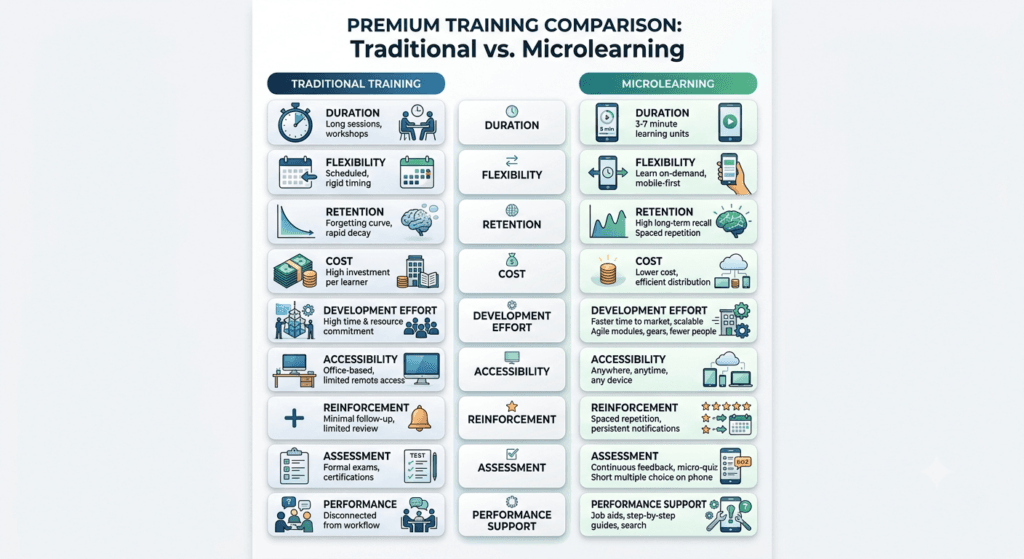
Neither approach is universally “better” — they solve different problems. The strongest Learning and Development Strategy {internal link} blends both deliberately, choosing the right tool for the right objective rather than picking a side.
| Dimension | Microlearning | Traditional Training |
| Length | 3–10 minutes per unit | 1–8+ hours per session |
| Learning objectives | One per module | Multiple, often interconnected |
| Retention | Strong, when reinforced over time | Weak without follow-up; steep forgetting curve |
| Cost to develop | Lower per asset; scales well | Higher; heavier production and review cycles |
| Development effort | Days to build one module | Weeks to months for a full course |
| Flexibility | High — mobile, on-demand, asynchronous | Lower — often scheduled, sometimes synchronous |
| Assessment | Quick checks, scenario decisions | Formal assessments, capstones, certifications |
| Engagement | Generally high due to brevity and relevance | Can drop sharply mid-session |
| Technology | Mobile-first, LMS/LXP, chat, SMS, email | LMS, classroom, virtual classroom |
| Performance support | Excellent — designed for in-the-moment need | Poor — not built for quick reference |
The conclusion most experienced L&D teams reach is simple: microlearning and traditional training aren’t competitors — they’re complementary tools in the same toolkit. Use traditional, structured programmes to build deep capability and foundational knowledge; use microlearning to reinforce, refresh, and support that knowledge on the job.
Microlearning vs Related Learning Models
“Microlearning” often gets used loosely alongside several adjacent terms. Here’s how they actually differ, since the distinctions matter when you’re choosing a strategy — not just a vocabulary word.
| Model | What It Actually Means | How It Relates to Microlearning |
| Nano learning | Even shorter than microlearning — often under 2 minutes, sometimes a single fact or tip | A subset of microlearning at the extreme end of brevity; useful for reminders, not full skill-building |
| Macro learning | Long-form, comprehensive training covering multiple objectives in one structured programme | The traditional-training counterpart microlearning is usually compared against |
| Spaced learning | A instructional technique of repeating content at deliberately increasing intervals | A reinforcement mechanism that microlearning is well-suited to deliver, not a competing format |
| Adaptive learning | Content and pacing that adjusts based on the learner’s performance or responses | A personalisation layer that can be applied on top of microlearning modules, especially with AI (see below) |
| Mobile learning | Any learning content delivered via mobile device, regardless of length | A delivery channel; microlearning is simply the format best suited to that channel |
| Performance support | Just-in-time reference tools used during task performance, not before it | Microlearning in its most applied form — job aids, checklists, decision trees |
| Trainercentric Best Practice: Don’t treat these as competing strategies to choose between. In a mature learning ecosystem, they layer: macro learning builds the foundation, microlearning reinforces and supports it, spaced and adaptive techniques control the timing and personalisation, and mobile is simply the channel carrying it all to the learner. |
Types of Microlearning
Microlearning isn’t a single format — it’s a category of formats, each suited to different objectives, audiences, and constraints.
- Videos : The most recognisable microlearning format. Best for demonstrating a process, showing a physical technique, or walking through a software task. Keep them under 3 minutes wherever possible — attention drops sharply beyond that point.
- Interactive PDFs: Clickable, navigable documents that let learners choose their own path through content — useful for reference guides, decision support tools, and job aids that benefit from a printable option.
- Infographics: Ideal for communicating a process, statistic, or comparison visually in a single glance — a strong format for policy summaries or quick-reference visuals.
- Podcasts: Audio-only micro-content is perfect for field-based or driving employees — sales reps between client visits, delivery drivers, technicians travelling between sites.
- Flashcards: Excellent for memorisation-heavy content: product names, pricing tiers, terminology, compliance definitions. Naturally supports spaced repetition when built into a rotating deck.
- Scenario-based learning: Presents a realistic workplace situation and asks the learner to choose a response, with feedback on the outcome. Strong for judgment-based skills like customer service, ethics, and people management — in small doses.
- Quizzes: Short, low-stakes knowledge checks that build retrieval practice directly into the learning experience. Best used after content delivery, not as a replacement for it.
- Job aids: One-page reference tools — checklists, flowcharts, quick-reference tables — designed to be consulted during task performance, not studied in advance. This is performance support in its purest form.
- Checklists: Simple, sequential lists that ensure a process is followed correctly and consistently — invaluable for safety procedures, quality checks, and onboarding tasks.
- Decision trees: Branching logic tools that guide a learner (or frontline employee) through a series of yes/no questions to reach the correct action — especially useful for troubleshooting and escalation scenarios.
- AI chat assistants: Increasingly common as a “learning on demand” format — an employee can ask a specific question and get an instant, contextual answer, rather than searching through a full course for it.
- Micro-simulations: Short, simplified simulations of a real task or system — practising a specific software workflow or a single sales conversation — without the time investment of a full simulation environment.
- Gamified learning: Points, badges, leaderboards, or streaks applied to short learning units to boost motivation and repeat engagement — particularly effective for voluntary or reinforcement-based learning.
- Email learning: Points, badges, leaderboards, or streaks applied to short learning units to boost motivation and repeat engagement — particularly effective for voluntary or reinforcement-based learning.
- Email learning: A drip campaign of short learning emails — one tip, one example, one question per message — is a low-cost, high-reach way to reinforce a topic over several weeks.
- SMS learning: For deskless or field workforces without regular computer access, SMS-based microlearning (a daily tip, a quick multiple-choice text) can achieve remarkably high engagement due to its sheer accessibility.
- Social learning: Short peer-shared tips, internal community posts, or manager-led “tip of the week” discussions in a team channel — informal, but a genuinely powerful reinforcement mechanism when structured well.
| Did You Know? The best microlearning libraries rarely rely on a single format. A strong programme mixes video for demonstration, job aids for reference, and quizzes for reinforcement — matched deliberately to each objective rather than defaulting to whatever the LMS makes easiest to upload. |
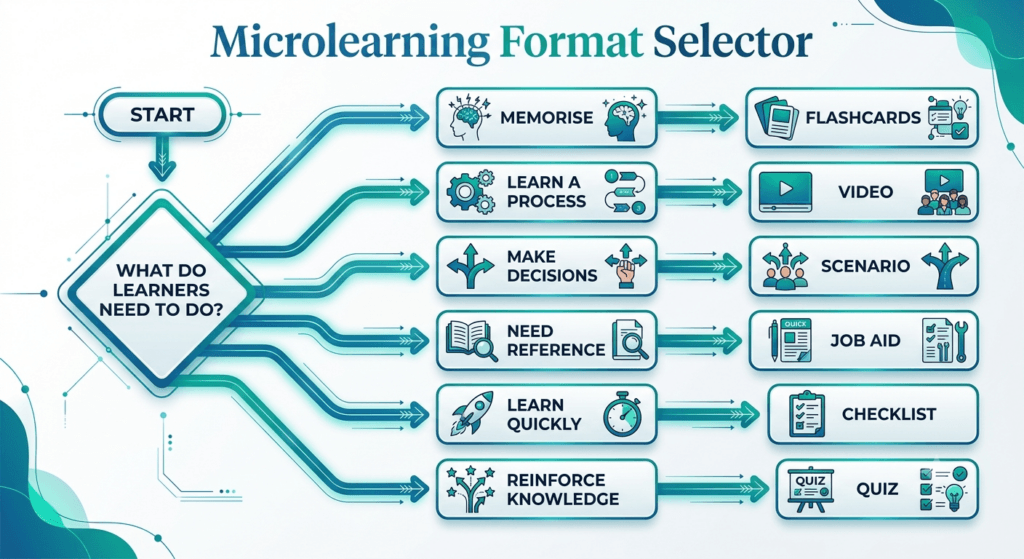
The Microlearning Format Selector
Choosing a format shouldn’t be a style preference — it should follow directly from what kind of skill you’re teaching.
| If the learner needs to… | Use… | Example |
| Memorise facts or terminology | Flashcards, quizzes | Product pricing tiers, compliance definitions |
| Change behaviour or exercise judgment | Scenario-based learning | Handling a difficult customer conversation |
| Learn a physical or software process | Video | Operating a machine, using a new CRM screen |
| Reference information during a task | Job aids, checklists | Lifting technique, escalation steps |
| Make a quick decision under pressure | Decision trees | Troubleshooting, safety incident response |
| Stay current on frequently changing information | Email or SMS drip | Weekly promotions, policy updates |
| Reinforce a concept over time | Spaced quizzes, gamified streaks | Post-workshop leadership reinforcement |
Before You Build Microlearning: A Readiness Checklist
Before opening an authoring tool, it’s worth confirming microlearning is actually the right call for this specific need — not just the fastest one to greenlight. Run the request through these questions first:
- ☐ Is there only one learning objective — or is this actually several objectives wearing a short-format disguise?
- ☐ Is the learner solving a real, current performance problem, or is this “nice to know” content nobody actually needs yet?
- ☐ Is microlearning genuinely the right solution — or does this need belong in the “When Microlearning Does NOT Work” list above?
- ☐ Does the learner already have the prerequisite knowledge this module assumes, or will it land on a gap it wasn’t designed to fill?
- ☐ Will reinforcement actually be provided — a spacing schedule, a manager touchpoint, a follow-up check — or will this be a one-and-done asset?
- ☐ Is there a plan to measure something beyond completion?
- ☐ Is there a named owner who will keep this content current?
If you can’t confidently answer “yes” to most of these, it’s worth pausing before building — a module built without this groundwork tends to become exactly the kind of disconnected content nugget covered later in this guide.
How to Design Effective Microlearning
Quick answer: To design effective microlearning, start with one observable learning objective, understand the learner’s real context, choose a format matched to the skill type, design mobile-first, build in a retrieval question with immediate feedback, and plan reinforcement and measurement before publishing.
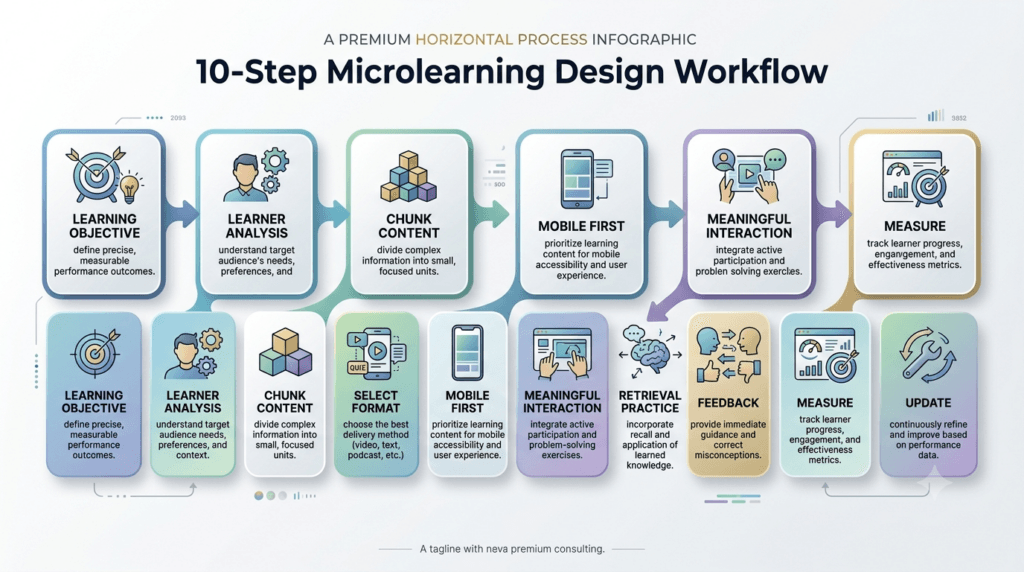
Designing genuinely effective microlearning is a discipline, not a shortcut. Skipping steps here is exactly how organisations end up with a library of disconnected videos that nobody uses. Here’s a step-by-step process, grounded in sound Instructional Design practice and checked against the M.I.C.R.O. Framework™.
Step 1: Identify one learning objective
Purpose: Every module must answer a single question: what should the learner be able to do differently after this? Not “understand,” not “be aware of” — do.
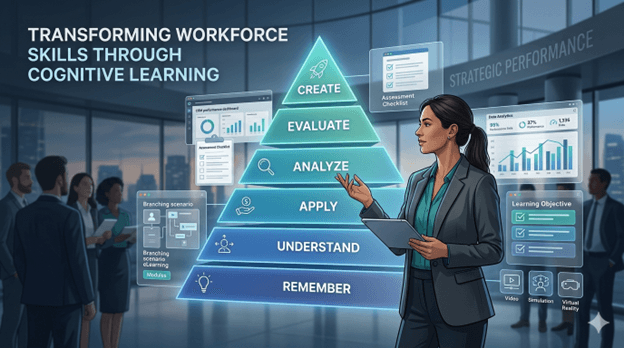
Best practices: Write the objective before you write any content. Use active, observable verbs (Bloom’s Taxonomy) is a genuinely useful reference here — “identify,” “apply,” “demonstrate” rather than “know” or “understand”). If your objective sentence has an “and” in it, split it into two modules.
Mistakes to avoid: Trying to “just add one more point” because it feels related. Related is not the same as necessary.
Corporate example: A bank redesigning its anti-money-laundering refresher discovered its old 40-minute module was actually trying to cover seven separate objectives. Splitting it into seven standalone 4-minute modules, each independently trackable, improved both completion and post-assessment scores.
Step 2: Understand learner needs
Purpose: Microlearning that ignores the learner’s actual context — device access, time pressure, existing knowledge — fails regardless of how well the content itself is written.
Best practices: Talk to a sample of the actual audience. Understand where and when they’ll access the content (on a warehouse floor? between sales calls? at a desk?). This should inform format choice as much as content.
Mistakes to avoid: Designing purely from a stakeholder’s assumption of what employees need, without validating it with the employees themselves.
Corporate example: An IT services company assumed its help-desk agents would prefer video walkthroughs. User interviews revealed agents actually wanted searchable text-based job aids they could scan mid-call — video required too much attention away from the customer conversation.
Step 3: Break content into logical chunks
Purpose: Even within a single topic, content needs a sensible internal structure so learners can find and revisit specific pieces later.
Best practices: Group content by task or decision point, not by “chapter” from an old course outline. Each chunk should be independently searchable and titled descriptively (not “Module 4” but “How to process a return without a receipt”).
Mistakes to avoid: Chunking by arbitrary time length rather than logical content boundaries — this produces awkward mid-thought cutoffs.
Step 4: Choose delivery format
Purpose: Format should follow function, not fashion. A video is not automatically better than a checklist; it depends entirely on the objective (see the Format Selector above).
Best practices: Match format to the type of skill using the selector table above as a starting point.
Mistakes to avoid: Defaulting to video for everything because it’s the most familiar format, even when a one-page job aid would serve the learner faster.
Step 5: Design for mobile first
Purpose: A large share of your workforce — especially frontline and field employees — will access this content on a phone, often with limited connectivity.
Best practices: Design vertically where possible, use large legible text, avoid tiny interactive hit-targets, and keep file sizes low for low-bandwidth environments.
Mistakes to avoid: Designing on a widescreen desktop template and assuming it will “just work” on mobile. It rarely does without dedicated design.
Step 6: Keep interactions meaningful
Purpose: Interaction should deepen learning, not just add clicks for the sake of “engagement.”
Best practices: Every interactive element should require a genuine decision or recall — not simply “click next to continue.” A well-placed scenario question does more than five decorative animations.
Mistakes to avoid: Interactivity theatre — drag-and-drop exercises or clickable hotspots that don’t actually test or reinforce anything meaningful.
Step 7: Include retrieval practice
Purpose: As covered in the science section, actively recalling information cements it far more effectively than passively reviewing it again.
Best practices: Add a short recall question at the end of nearly every module — even a single well-written multiple-choice question meaningfully improves retention versus none at all.
Mistakes to avoid: Treating the quiz as an afterthought, or writing questions that only test whether the learner was paying attention to the video, rather than whether they can apply the concept.
Step 8: Provide immediate feedback
Purpose: Feedback delivered right after a response — while the learner’s reasoning is still fresh — is dramatically more effective than delayed or generic feedback.
Best practices: Explain why an answer is right or wrong, not just whether it was correct. This turns a quiz question into an actual teaching moment.
Mistakes to avoid: Generic “Incorrect, try again” messages that give the learner no path to understanding their error.
Step 9: Measure effectiveness
Purpose: Without measurement, you can’t tell whether the microlearning is actually changing performance or simply generating completion statistics.
Best practices: Go beyond completion rates. Track quiz performance trends, on-the-job application (through manager observation or performance data), and — where possible — tie back to a business metric, echoing the logic of the Kirkpatrick Model and, for higher-stakes programmes, the Phillips ROI Model.
Mistakes to avoid: Reporting only “modules completed” as the success metric, which tells you almost nothing about actual learning transfer.
Step 10: Update regularly
Purpose: One of microlearning’s biggest advantages — fast, low-cost updates — is wasted if content is left stale for years.
Best practices: Assign content owners and review cycles (quarterly for fast-changing content like pricing or compliance; annually for more stable process content). Build updating into someone’s actual job description, not a “someday” task.
Mistakes to avoid: Publishing a microlearning library and never revisiting it, allowing outdated screenshots, prices, or policies to quietly erode learner trust in the whole system.
Where Microlearning Fits in the Bigger Learning Ecosystem
Microlearning doesn’t exist in isolation — it’s one stage in a larger chain that starts with identifying a real business need and ends with proving business impact. Seeing the full chain helps prevent the single biggest strategic mistake in this space: building microlearning content before anyone has confirmed it’s solving the right problem.
The flow typically looks like this:
Training Needs Analysis → Learning Objectives → Programme Design via the ADDIE Model (or SAM Model) → Format Decision (Microlearning vs. Macro Learning) → Microlearning Design and Reinforcement Planning → Delivery → Evaluation via the Kirkpatrick Model → Business Impact via the Phillips ROI Model
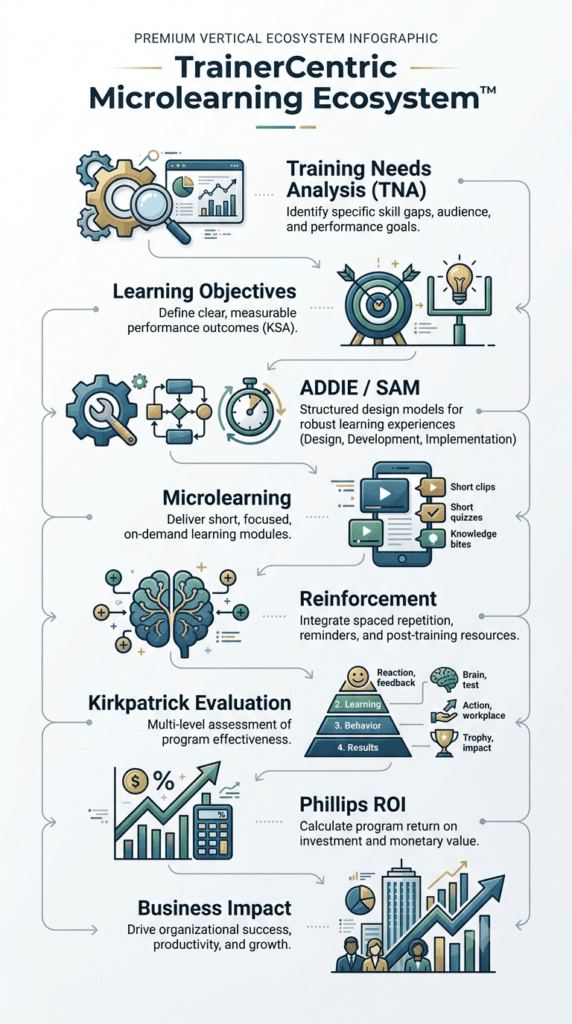
Microlearning sits firmly in the middle of this chain — a delivery and reinforcement mechanism, not a starting point. Skipping the earlier stages (jumping straight from “we need training” to “let’s make some short videos”) is exactly how organisations end up with libraries full of content that nobody asked for and nobody uses.
The Microlearning Design Canvas
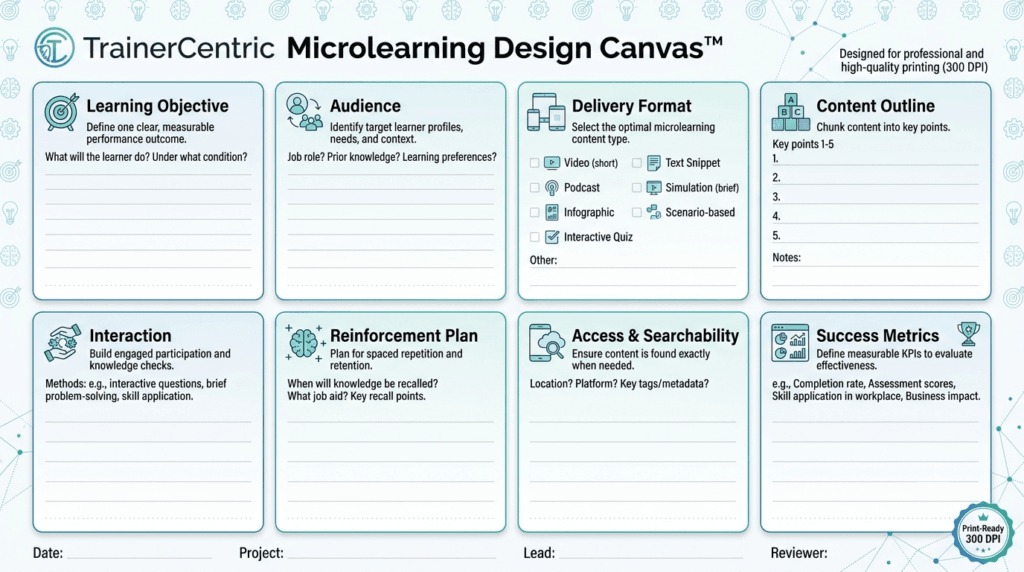
For teams who want a single working document to plan a module before building it, a one-page design canvas — similar in spirit to a Lean Canvas — captures every M.I.C.R.O. Framework™ element in one place:
- Objective box: the single, observable learning objective
- Audience box: who this is for, and their access context (device, location, time available)
- Format box: chosen format and why, referencing the Format Selector
- Content outline box: the core content, distilled to its essential points
- Interaction box: the retrieval or decision point built into the module
- Reinforcement plan box: what happens 3 days, 2 weeks, and 6 weeks later
- Access box: where this module lives and how it will be tagged/searchable
- Measurement box: what “success” looks like beyond completion
Filling out this canvas before opening an authoring tool forces the discipline that prevents most of the common mistakes covered later in this guide. Teams building a library of modules at scale often find a printable or fillable version of this canvas — alongside a supporting storyboard template — becomes one of the most-used documents in their entire design process.
A 90-Day Microlearning Rollout Plan
Knowing the design steps is one thing; sequencing an actual rollout is another. Teams launching microlearning for the first time — or relaunching after a false start — tend to succeed with a phased approach rather than trying to build and ship everything at once.
Weeks 1–2: Analyse performance gaps. Identify the specific, current performance problems microlearning is meant to solve, ideally grounded in a proper Training Needs Analysis rather than an assumption. This is also the point to run candidate topics through the “Before You Build” checklist above.
Weeks 3–4: Prioritise learning objectives. Not every gap identified in weeks 1–2 deserves a module. Rank objectives by frequency of need, business risk, and how quickly the underlying content is likely to change, and select a small pilot set — five to ten objectives is a realistic starting scope.
Month 2: Develop pilot modules. Build the prioritised set using the Design Canvas, applying the M.I.C.R.O. Framework™ and the ten-step design process as your quality bar. Resist the temptation to expand scope mid-build; a focused pilot is easier to evaluate honestly than a sprawling one.
Month 3: Launch, measure, refine. Release the pilot to a defined audience, track the measures established during design (not just completion), gather manager and learner feedback, and use that evidence to decide what to build next — and what, if anything, in the pilot needs to be redesigned before scaling further.
| Trainercentric Best Practice: Treat the 90 days as building the operating system for an ongoing programme, not a one-time project with an end date. The pilot’s real output isn’t just the modules themselves — it’s a working, tested process for building the next fifty. |
The TrainerCentric Microlearning Maturity Model™
Not every organisation is starting from the same place, and it helps to know honestly where you sit before setting expectations for what microlearning can deliver this year. The Microlearning Maturity Model™ describes five stages most learning functions pass through as their approach matures.
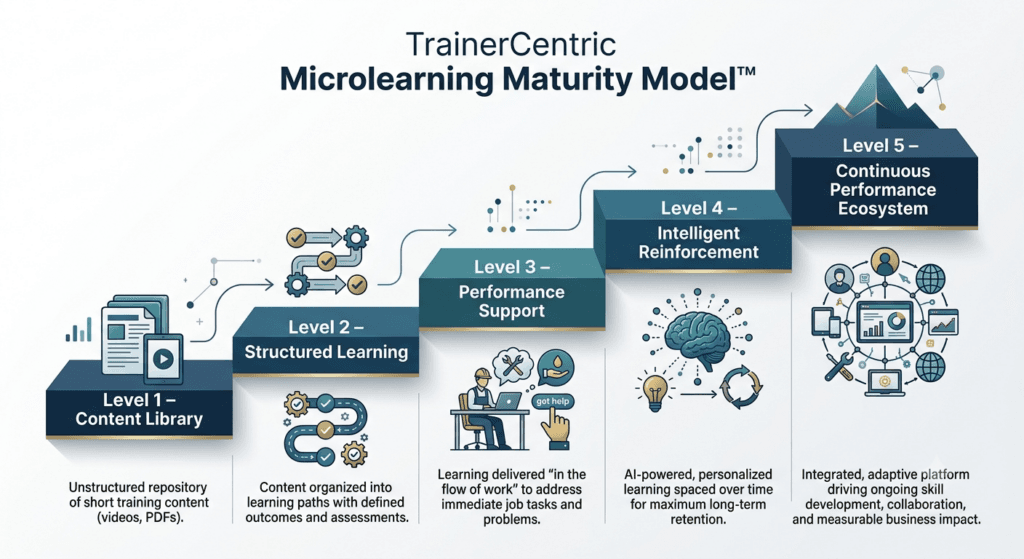
Level 1 — Content Library. Microlearning assets exist, but they were created ad hoc, without a shared taxonomy or clear ownership. Content is hard to find, and nobody is entirely sure what’s current.
Level 2 — Structured Learning. Objectives are clearly defined, content is sequenced logically, and modules follow a consistent design standard — but the library is still primarily consumed as scheduled “training” rather than searched as reference material.
Level 3 — Performance Support. Content is tagged, searchable, and genuinely usable in the flow of work. Employees find answers in the moment they need them, not only when assigned a module.
Level 4 — Intelligent Reinforcement. Spaced repetition schedules and manager reinforcement touchpoints are built into every rollout by design, not left to chance. Retrieval practice and follow-up are standard, not exceptional.
Level 5 — Continuous Performance Ecosystem. Content is data-driven and adaptive, informed by performance data and usage patterns, with a governance model that keeps material current and a measurement approach tied to real business outcomes, in the spirit of the Phillips ROI Model.
| Trainercentric Best Practice: Most organisations sit at Level 1 or 2 when they first ask “should we do microlearning?” — and that’s a perfectly reasonable place to start. The mistake isn’t being at Level 1; it’s building Level-4-style reinforcement expectations on top of Level-1 infrastructure and being surprised when it underdelivers. |
Why Most Corporate Microlearning Fails
Here’s an angle you won’t find in most microlearning guides: the format itself rarely fails. What fails is the implementation around it. After seeing the same patterns repeat across different organisations and industries, these eight failure modes account for the overwhelming majority of microlearning initiatives that quietly stall out after an enthusiastic launch.
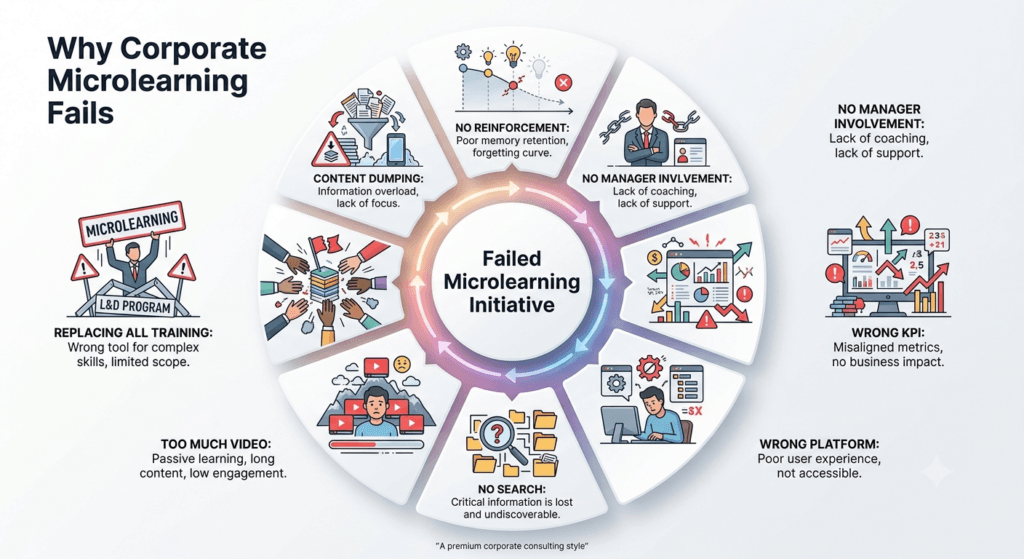
- Content dumping. Someone takes an existing 90-minute course, chops it into ten-minute segments, and calls it microlearning. It fails the “M” in the M.I.C.R.O. Framework™ immediately — each segment still tries to cover multiple objectives, because the underlying content was never redesigned, just resized.
- No reinforcement plan. A module gets published, promoted once, and then left to sit in the LMS. Without a spacing schedule, microlearning loses its single biggest retention advantage over traditional training — it becomes just a shorter version of the same one-and-done problem.
- No manager involvement. Employees rarely sustain new behaviours on the strength of an app notification alone. When managers never reference, reinforce, or ask about the content in team conversations, employees quickly deprioritise it, no matter how well it was designed.
- Wrong KPI. Measuring “modules completed” or “views” as the definition of success tells you nothing about whether behaviour actually changed. Teams that only report completion percentages to leadership are, often unknowingly, setting themselves up to lose budget the moment someone asks “so what did this actually improve?”
- Wrong platform. Publishing microlearning inside a clunky, desktop-only LMS that frontline employees can’t easily access from their phones defeats the format’s core advantage. If the platform creates friction, completion collapses regardless of content quality.
- No search function. A library of forty short modules with no tagging or search capability is functionally useless as performance support. Employees won’t scroll through a long list looking for the right five-minute video mid-task — they’ll give up and ask a colleague instead.
- Too much video, not enough variety. Video is the easiest format to greenlight and the hardest to keep short and current. Organisations that default to video for everything end up with expensive-to-update content when a job aid or checklist would have served the same objective for a fraction of the cost.
- No governance. Without a clear owner, review cadence, and retirement process, microlearning libraries accumulate outdated content indefinitely. Six-month-old screenshots of a discontinued software interface don’t just fail to help — they actively damage trust in the entire library going forward.
- Treating microlearning as a replacement for all training. Some organisations, having seen strong results in one area, quietly start replacing leadership programmes, coaching, and certification-level training with short modules to cut cost or time. This is the fastest way to lose the format’s credibility — it fails precisely in the scenarios covered in the “When Microlearning Does NOT Work” section above, and stakeholders remember the failure more than the earlier wins.
| Trainercentric Field Note: One organisation we worked with had, over about eighteen months, accumulated more than 200 microlearning videos across different teams, with no shared tagging system and three different naming conventions. Nobody — including the L&D team itself — could say with confidence which modules were current. The fix wasn’t more content; it was a two-week audit that retired roughly a third of the library and gave the rest a consistent taxonomy. Usage went up immediately, without a single new module being built. |
How AI Is Changing Microlearning
Artificial intelligence isn’t replacing instructional design judgment, but it is meaningfully changing how microlearning gets built, personalised, and delivered. Here’s what’s actually shifting, and where the caution flags still belong.
- Content drafting and scripting. Tools like Claude and ChatGPT are increasingly used to draft first-pass scripts, storyboards, and quiz questions for microlearning modules — compressing what used to take days of writing into an hour of drafting and several rounds of expert review. The judgment on objective-setting, accuracy, and instructional soundness still has to come from a human designer; AI accelerates production, it doesn’t replace instructional design expertise.
- Research and synthesis tools. Tools like NotebookLM are being used by L&D teams to quickly synthesise source material — policy documents, process manuals, subject-matter-expert interviews — into structured outlines that can then be shaped into individual microlearning objectives, speeding up the “understand the content” phase that used to eat up significant project time.
- AI-generated video and voice. AI video and voice generation tools are lowering the cost and turnaround time for producing short instructional videos, particularly for content that needs frequent updates (pricing, process steps, product features) where re-shooting with a human presenter every time was previously impractical.
- Adaptive learning paths. Rather than every employee receiving the identical sequence of modules, AI-driven adaptive learning systems can route learners to different reinforcement content based on their quiz performance or role — someone who aces a compliance check skips ahead, while someone who struggles gets additional targeted reinforcement automatically.
- AI coaching and chat-based support. AI chat assistants embedded into workflows are increasingly used as an always-available layer of performance support — answering a specific “how do I…” question in the moment, functioning as a conversational extension of a job-aid library rather than a replacement for it.
- Personalised reinforcement scheduling. Some platforms now use learner performance data to automatically adjust when a piece of content is resurfaced for review, applying spaced-repetition principles algorithmically rather than on a fixed manual calendar.
| The caution flag: AI can compress production time dramatically, but it cannot substitute for the upfront discipline of defining one clear objective, understanding real learner context, and validating accuracy with a genuine subject-matter expert. The organisations getting the most value from AI in microlearning are using it to speed up steps 1–10 of the design process above — not to skip any of them. |
Building the Business Case for Microlearning
Benefits are one conversation. Money is another. If you’re pitching microlearning to a budget holder, here’s the framing that tends to land, organised around costs the business already feels.
Development cost reduction. Because each module has a narrower scope, production time, scripting effort, and review cycles are all smaller per asset — meaning a given content budget typically stretches across meaningfully more coverage than the same budget spent on long-form courses.
Seat time reduction. Every hour an employee spends in training is an hour of lost productive time. Replacing an all-day workshop with a blend of core training plus short reinforcement modules directly reduces the seat-time cost per employee, which is a hard number finance teams can immediately relate to.
Speed to competence. Faster-to-produce content means new processes, products, or policies can be trained on days after a decision is made, rather than weeks — directly reducing the window in which employees are operating on outdated information.
Compliance risk reduction. Regularly reinforced, easy-to-update compliance microlearning reduces the risk of employees operating on stale policy knowledge, which matters enormously in regulated industries where the cost of a single compliance failure can dwarf an entire year’s training budget.
Productivity and error reduction. Just-in-time job aids and process reinforcement reduce the frequency of costly mistakes — a customer service error, a safety incident, a process rework — each of which typically carries a real, calculable cost to the business.
Manager time saved. When employees can self-serve answers through a searchable microlearning library instead of interrupting a manager or senior colleague, that reclaimed time is real, even if it rarely shows up on a training budget line.
Framing the ask: Rather than presenting microlearning as “cheaper training,” present it as a way to convert a fixed learning budget into more frequent, more targeted, more measurable interventions — tied to specific business metrics (error rates, ramp-up time, compliance incident counts) that a finance stakeholder already tracks. This is the same logic that underpins the Phillips ROI Model: connect the learning intervention to a number the business already cares about, not just a training-specific metric.
Real Workplace Examples of Microlearning
| Quick answer: Common microlearning examples include short instructional videos, flashcard decks, scenario-based quizzes, one-page job aids, checklists, decision trees, and brief audio clips — each built around one task or concept, used across retail, healthcare, banking, manufacturing, IT, sales, and compliance training. |
Theory is only useful once you see it applied. Below is a working set of examples across industries — enough to spark ideas for almost any context, organised so you can scan to your own sector quickly rather than read through unrelated ones.
Retail
- 2-minute “collection highlight” videos pushed to store associates’ phones the morning a new seasonal line launches.
- One-page quick-reference cards summarising key features and pricing for a new product range.
- Scenario-based modules training associates on handling a specific type of return dispute.
- Flashcard decks for memorising seasonal promotional pricing.
- QR-code-linked visual merchandising checklists posted in stockrooms.
Healthcare
- Scenario-based hand-hygiene and infection-control modules reinforcing protocol between annual certification cycles.
- Short video demonstrations of correct equipment setup for a specific device.
- Quick-reference checklists for shift-handover documentation.
- Micro-modules on updated medication administration protocols, released as policies change.
Banking
- Monthly 5-minute modules each covering one regulatory update or one common error flagged by internal audit.
- Scenario-based ethics modules built around real (anonymised) situations from the compliance hotline.
- Job aids summarising KYC documentation requirements at the teller counter.
Manufacturing
- QR-code-linked 90-second video job aids at individual workstations showing correct machine operation.
- Safety reminder videos played before shift start, tied to a specific recent near-miss pattern.
- Checklists for quality-control inspection steps posted at each station.
IT
- Searchable libraries of 60-second “how do I…” videos answering specific software questions during a system migration.
- Decision-tree job aids for common ticket-triage decisions.
- Short scenario modules on recognising phishing attempts, refreshed as new tactics emerge.
Customer Support
- Flashcard-style refreshers keeping agents current on frequently shifting promotional offers.
- Scripted-phrase micro-modules for handling a specific type of escalation.
- Quick quizzes reinforcing updated refund policy details.
Sales
- Short “battle card” videos addressing how to respond to one specific competitor objection.
- Flashcards for memorising updated pricing tiers or bundle configurations.
- Scenario-based modules practising a specific stage of a sales conversation, like discovery questioning.
Leadership Development
- Weekly 3-minute reinforcement prompts sent for twelve weeks after a formal leadership programme, each tied to a specific concept from the course.
- Scenario-based decision modules practising a single delegation or feedback conversation.
Compliance
- Quarterly scenario refreshers built around real (anonymised) situations flagged by an ethics hotline, replacing a single annual marathon session.
- Short modules explaining one specific regulatory change at a time, released as it takes effect.
| Trainercentric Best Practice: Notice that almost none of these examples are simply “shorter versions” of a longer course. Each one is built around a single, narrow objective tied to a real, current task — the same discipline covered in the M.I.C.R.O. Framework™ earlier in this guide. |
Common Mistakes
Beyond the strategic failure patterns covered earlier, these are the tactical, execution-level mistakes that show up inside individual modules — even in organisations that have the bigger picture right.
Making videos too long. A “microlearning” video that runs 15 minutes has missed the point entirely. Solution: Cap videos at 3–5 minutes; if the content doesn’t fit, it’s not one module.
Covering multiple objectives. Trying to squeeze several ideas into one module to “save time” undermines the entire cognitive-load advantage of microlearning. Solution: Split ruthlessly — one module, one objective, always.
Poor mobile design. Desktop-first layouts that don’t translate to a phone screen frustrate the exact audience microlearning is meant to serve. Solution: Design and test on mobile first, desktop second.
Ignoring reinforcement. Publishing a module once and never revisiting the concept squanders microlearning’s biggest retention advantage. Solution: Build a spaced-repetition schedule into the rollout plan from day one, not as an afterthought.
No assessment. Content without any retrieval component is just passive viewing, no matter how short. Solution: Add at least one meaningful recall question per module.
No performance support. Treating every microlearning asset as a “lesson” rather than sometimes as a searchable reference tool misses one of the format’s biggest strengths. Solution: Build a tagged, searchable library, not just a linear course.
Content overload. Producing dozens of disconnected micro-assets without an organising structure creates a confusing library rather than a coherent programme. Solution: Map assets to a clear taxonomy tied to roles, tasks, or competencies.
No analytics. Tracking only completion percentages tells you almost nothing about whether learning actually transferred to the job. Solution: Track quiz trends, search behaviour within the library, and — wherever feasible — on-the-job performance indicators.
Best Practices Checklist
Use this as a printable quality check before you publish any microlearning module.
- ☐ Module is built around exactly one learning objective
- ☐ Objective is written using an observable, active verb
- ☐ Content can be completed in 10 minutes or less
- ☐ Module makes sense as a standalone piece, without requiring prior modules
- ☐ Format matches the type of skill (procedural, memorisation, judgment, or reference)
- ☐ Design is mobile-first and tested on an actual phone screen
- ☐ At least one meaningful retrieval/recall question is included
- ☐ Feedback explains why an answer is right or wrong, not just whether it is
- ☐ Module is tagged and searchable within your learning library
- ☐ A reinforcement or spacing schedule exists beyond the initial launch
- ☐ A content owner and review cycle are assigned
- ☐ Success will be measured beyond simple completion rate
Want this as a working toolkit, not just a checklist? The full Microlearning Planning Toolkit — Design Canvas, storyboard template, learning-objective builder, and reinforcement planner in ready-to-use Word and Excel format — is available separately for teams who’d rather start from a built system than a blank page.
Frequently Asked Questions
What is microlearning?
Microlearning is training content delivered in short, focused units — typically 3 to 10 minutes — each built around a single learning objective and designed to be completed independently, often on a mobile device, in the flow of work.
What are the benefits of microlearning?
The main benefits are stronger knowledge retention through reinforcement, higher completion rates than long-form courses, faster and cheaper development, mobile accessibility, and effective just-in-time performance support.
When should you use microlearning?
Use microlearning for narrow, time-sensitive, or task-specific needs — product updates, compliance refreshers, software adoption, sales enablement, and process reinforcement — where one clear objective can be taught and applied quickly.
What are examples of microlearning?
Common examples include short instructional videos, flashcard decks, scenario-based quizzes, one-page job aids, checklists, decision trees, and brief podcast-style audio clips — each covering a single task or concept.
How do you design microlearning?
Start with one observable learning objective, understand the learner’s real context, choose a format that matches the skill type, design mobile-first, build in a retrieval question and immediate feedback, and plan reinforcement before you publish.
Is microlearning the same as e-learning?
No. E-learning is a broad category that includes long-form online courses as well as microlearning. Microlearning is a specific design approach within e-learning, defined by brevity, single-objective focus, and standalone structure.
What’s the difference between microlearning and traditional training?
Traditional training typically covers multiple objectives in a single extended session, often requiring scheduled time. Microlearning delivers one objective per short module, is usually self-paced, and is designed to be revisited over time for reinforcement.
Does microlearning actually improve retention?
Yes, when designed correctly and paired with spaced repetition and retrieval practice. A single short module watched once will not, on its own, guarantee better retention than a long session — the reinforcement schedule matters as much as the format.
Can microlearning replace all traditional training?
No. Microlearning is not well suited to leadership development, complex problem-solving, coaching, or certification programmes, all of which require sustained practice and deeper structure. The two approaches work best combined.
What is the difference between microlearning and nano learning?
Nano learning is an even shorter subset of microlearning, often under two minutes and limited to a single fact or reminder, whereas microlearning modules (3–10 minutes) can accommodate a full single-objective learning experience with practice and feedback.
Is microlearning suitable for compliance training?
Yes, particularly as a reinforcement layer between larger annual certification events, or as a full replacement for lower-stakes policy refreshers where a single objective per module is sufficient.
How much does microlearning cost to develop compared to traditional e-learning?
Costs vary by production quality, but per-module development time and cost are typically a fraction of a full traditional course, largely because each module is simpler in scope and requires fewer review cycles.
What is the ideal video length for microlearning?
Generally under 3 minutes for demonstration-style content, though some scenario-based videos can run slightly longer if a single realistic situation genuinely requires that time to establish context.
Final Thoughts
If there’s one idea to take away from this guide, it’s this: microlearning is not simply “short training.” It’s a deliberate design discipline grounded in how the brain actually manages attention, processes new information, and retains it over time — and, as the M.I.C.R.O. Framework™ makes explicit, brevity alone is never the point.
Used well — one objective per module, matched to the right format, reinforced on a spaced schedule, and measured against real performance outcomes rather than completion counts — microlearning becomes one of the most effective tools in an L&D team’s arsenal. Used carelessly — chopped-up courses, no reinforcement plan, no retrieval practice, no governance — it becomes just another underused library nobody trusts, for exactly the reasons covered in the “Why Most Corporate Microlearning Fails” section above.
The organisations getting the most value from microlearning today aren’t the ones producing the most videos. They’re the ones treating microlearning as one deliberate layer within a broader Learning and Development Strategy, working alongside longer-form programmes, strong Facilitation Skill, sound Adult Learning Principles, and a clear-eyed understanding of Learning Transfer and Corporate Training more broadly — using each format for what it does best, rather than forcing one format to do everything.
References
- Design for How People Learn || 3rd Edition || Julie Dirksen || New Riders || 2021
- Map It || 1st Edition || Cathy Moore || Association for Talent Development || 2017
- Telling Ain’t Training || 2nd Edition || Harold D. Stolovitch & Erica J. Keeps || Association for Talent Development || 2011
- Design for Modern Learning || 1st Edition || Crystal Kadakia & Lisa Owens || Association for Talent Development || 2020
- Microlearning: Short and Sweet || 1st Edition || Karl M. Kapp & Robyn A. Defelice || Association for Talent Development || 2019
- Make It Stick: The Science of Successful Learning || 1st Edition || Peter C. Brown, Henry L. Roediger III & Mark A. McDaniel || Belknap Press, Harvard University Press || 2014
Further Readings
- ADDIE Model Explained Step by Step with a Real Corporate Example
- SAM Model: How to Build Training Faster Without Sacrificing Quality
- Scenario-Based Learning: How to Write Branching Scenarios for Corporate Training
- Training Needs Analysis (Hub Guide)
- How to Measure Training Effectiveness Using the Kirkpatrick Model
- Rapid eLearning Development Guide
- Corporate eLearning Playbook: The Complete Guide to Designing, Delivering, and Scaling Digital Learning
- How to Choose the Right LMS: A Complete Selection, Evaluation, and Implementation Guide
- How to Convert Classroom Training to eLearning Without Losing Impact
- Learning Analytics for L&D Professionals
- What Is a Learning Record Store (LRS)?
- A practical WCAG 2.1 Guide to eLearning Accessibility
Author Details

Pankaj Nandi is a Technical Writer and Learning Content Specialist with experience creating complex technical and instructional content across software, technology, and enterprise environments. Having worked with organizations including Cisco, Rakuten India, and Newgen Software, he specializes in transforming complex concepts into clear, practical, and learner-friendly content. you can reach out to him at pankaj@trainercentric.in