Introduction – AI Prompt Library for Trainers
It’s 9 p.m. and you’re staring at a blank ChatGPT window, trying to remember the exact wording that got you a decent set of quiz questions last time. You know AI can help — you’ve seen colleagues talk about it, you’ve read the LinkedIn posts — but every session starts from scratch, and half your prompts come back generic enough that you end up rewriting them anyway.
That’s not an AI problem. It’s a prompt problem, and it’s the reason most trainers use maybe 10% of what these tools can actually do for them.
This isn’t a case for AI replacing your judgement as a facilitator, an instructional designer, or an L&D manager. AI doesn’t know your organisation’s politics, hasn’t sat in the room when a stakeholder pushed back, and won’t catch it when a generated statistic is simply wrong. What it’s genuinely good at is producing a fast, workable first draft — a starting point you shape, not a finished product you ship.
That’s what this library is for. Below you’ll find 60 prompts organised by the work you actually do — designing courses, facilitating sessions, writing assessments, running a TNA, coaching, and the communication and admin that surrounds all of it. We deliberately kept the number tight rather than padding it to a rounder headline figure. Every prompt here earns its place with four things: when to use it, why it’s built the way it is, the mistake most people make with it, and a follow-up prompt to refine a flat first draft into something usable. That’s more useful than another 90 prompts that are minor rewordings of the ones already here.
| Every prompt in this library was written to work across modern LLMs — ChatGPT, Claude, Gemini, Copilot, or Perplexity. The Prompt Canvas is a way of thinking about a request, not a syntax specific to one tool, so you’ll get comparable results wherever you paste it in. You may notice small differences in tone, formatting discipline, or how literally a tool follows a word count — Claude and ChatGPT tend to hold formatting instructions more precisely than Perplexity, for instance — but none of that changes which information you need to give the model in the first place. |
Why Every Trainer Needs an AI Prompt Library
AI adoption in L&D has moved fast — arguably faster than most teams’ confidence in using it well. ATD Research found that 80% of instructional designers now use AI tools while designing courses, and nearly all of them rely on generative AI rather than the older, narrower kind. Yet the same research shows a pattern worth noticing: designers reach for AI constantly to outline courses and draft learning objectives, but far less often for higher-judgement tasks like developing learner personas (used by only about a fifth of respondents) or analysing learner data.
That gap tells you something. Trainers aren’t under-using AI out of scepticism — they’re under-using it because the obvious, easy tasks are the ones with obvious prompts, and the harder, more valuable tasks don’t have one. Absorb Software’s Enterprise L&D in 2026 report found that 61% of organisations have adopted or are testing AI in their L&D strategy, but only 11% of leaders feel genuinely confident in their future skills-readiness. Access to the tool has outpaced skill in using it.
Here’s where we’ll take a position rather than hedge: the trainers most at risk from AI aren’t the ones ignoring it. They’re the ones whose entire value proposition was producing content — a slide deck, a quiz bank, a facilitator guide — with no diagnosis, facilitation, coaching, or stakeholder judgement layered on top.
That kind of output is exactly what these tools now do in minutes. Trainers who are strong at reading a room, diagnosing whether a request is really a training problem, coaching a struggling manager, or influencing a sceptical sponsor are likely to find AI expands what they can deliver, not threatens it. The content-production treadmill was never where the real expertise lived anyway — it was just where the hours went.
A prompt library closes the gap in the most direct way possible: by giving you working examples for the tasks you haven’t figured out a good prompt for yet, not just the ones you have. It also standardizes quality in much the same way a well-structured instructional design model keeps a multi-contributor project coherent — two instructional designers on the same team, using the same well-built prompt, get outputs in the same structure and tone, which matters more than it sounds like when you’re stitching together a multi-module curriculum with three contributors and one deadline.
None of this makes AI the author of your training. It makes it a fast collaborator that never gets tired of a first draft — which, if you’ve ever stared down a blank storyboard at 6 p.m., is not a small thing.
It’s also worth saying plainly: no prompt, however well built, replaces the performance consulting instinct of asking whether training is the right lever at all. AI can help you draft a training needs analysis interview guide or map a competency framework once you’ve decided training is the answer — it can’t tell you that the real fix is a process change or a tooling gap instead of a course. That judgement call still sits with you.
| TRAINER TIP · Don’t ask AI for answers. Ask AI for options — then use your judgement to choose. |
How to Get Better Results from AI
Most disappointing AI outputs trace back to one thing: an under-specified prompt. “Write me a training module on conflict resolution” will get you something — usually something generic enough that you’d have written a better outline yourself in the same ten minutes. The fix isn’t a magic phrase. It’s giving the model the same information you’d give a new instructional designer joining your team.
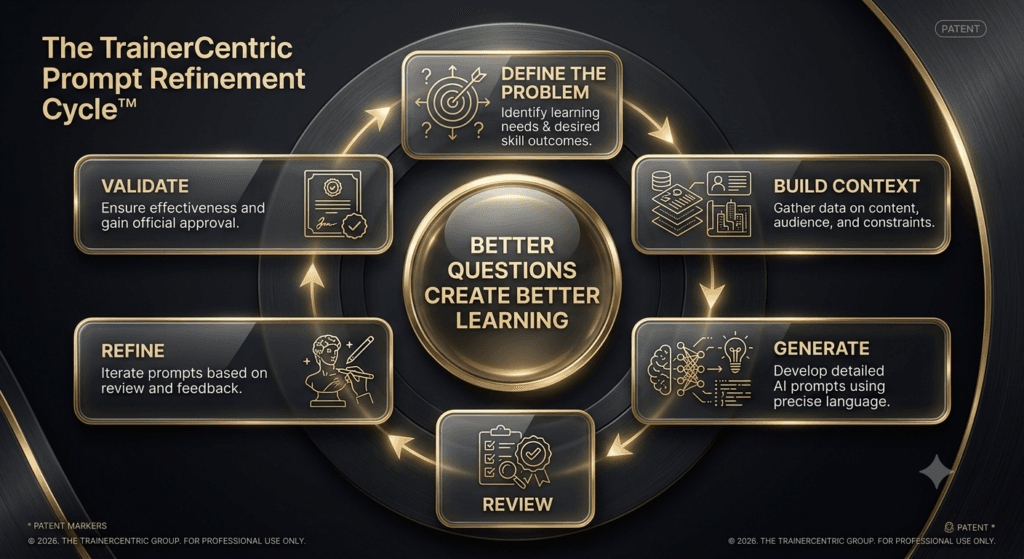
The TrainerCentric Prompt Canvas™
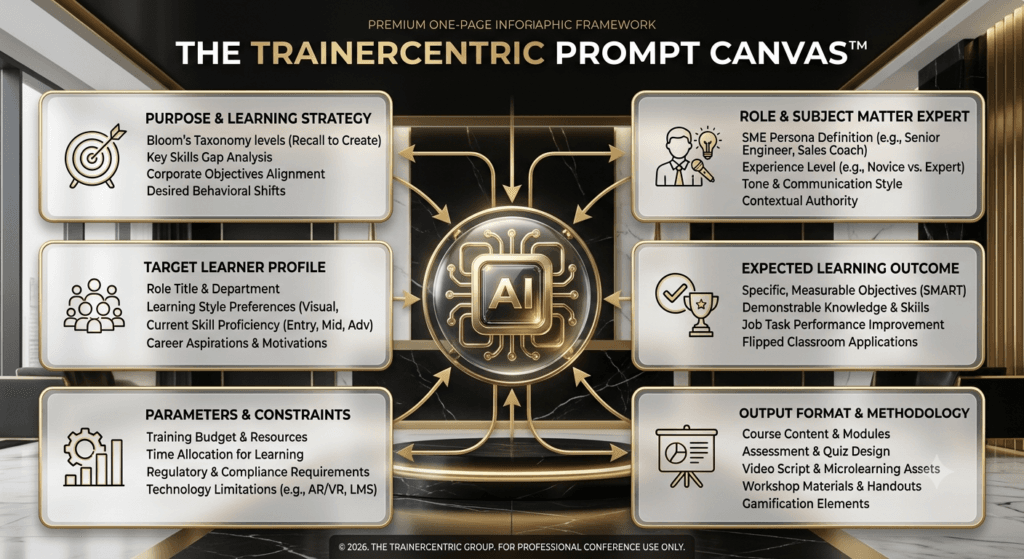
Rather than teach prompt engineering as a loose checklist, we built it into something you can sketch out before you type a single word — the same way a business model canvas forces you to think through a business on one page. The TrainerCentric Prompt Canvas™ has six blocks. Fill them in roughly, in any order, before you write the actual prompt.
1. Purpose. Why are you asking AI to do this? What decision or output do you actually need at the end — a first draft, a review, a set of options to choose from? Naming the purpose stops you (and the model) from wandering.
2. Audience. Who is the learner? Seniority, role, prior experience, and how they feel about the topic (curious, sceptical, compliance-fatigued). This is the block most trainers under-fill, and it’s the one that changes the output the most.
3. Context. Industry, delivery mode, organisational culture, and what’s already been decided or tried. Context is what turns a generic answer into one that fits your actual world.
4. Constraints. Word count, reading level, time available, tone restrictions, anything to avoid. Constraints are what keep a draft usable rather than something you have to cut down to size afterward.
5. Output. The exact shape you need back — a table, a checklist, a lesson plan, a quiz, an email with a subject line. Say the format explicitly or you’ll get a paragraph you have to manually restructure.
6. Review. How will you validate what comes back? Who checks it for accuracy — an SME, a compliance owner, your own judgement? Deciding this before you prompt keeps you from shipping an unreviewed draft under deadline pressure.
| Want a version of this you can fill in before you open any AI tool? We’ve turned the six blocks into a one-page TrainerCentric Prompt Canvas™ Worksheet — print it, sketch your Purpose, Audience, Context, Constraints, Output, and Review in the boxes, then turn it into a prompt in under two minutes. Download it below for free. |
Weak prompt vs. strong prompt
| Weak: “Write some interview questions for a training needs analysis.” Strong: “Act as an L&D consultant conducting a training needs analysis. I’m interviewing line managers in a mid-sized retail business about gaps in first-line supervisor communication skills. Write 5 open-ended interview questions that surface specific, observable performance gaps rather than general opinions. Keep each question under 20 words, and format as a numbered list I can read directly from during the interview.” |
That worked example happens to come from a training needs analysis interview — worth pairing with our step-by-step guide on structuring a training needs analysis properly if this stage of a project is new to you.
Before vs. After: See the Transformation
The gap between a flat AI output and a genuinely useful one usually isn’t the tool — it’s the prompt.
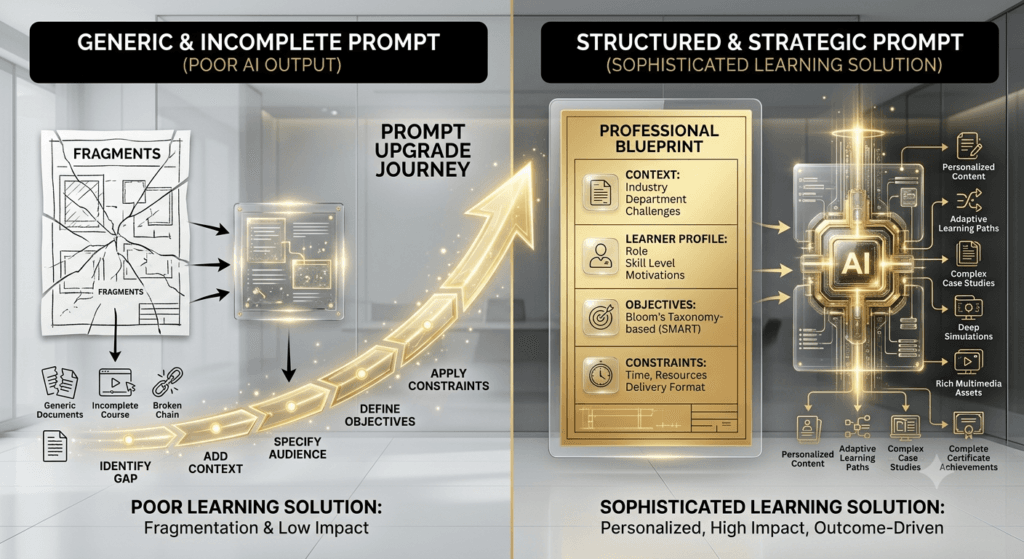
Here’s the same request, done badly and done well, side by side.
| Course design brief ❌ Bad: “Create a communication skills course.” Produces: A generic outline that could apply to any company, any audience, any industry — the kind of thing you’d have to rebuild from scratch anyway. ✅ Good: “Act as a senior instructional designer. Design a half-day communication skills course for mid-level managers at a manufacturing company who’ve had complaints about unclear delegation. Structure it around ADDIE, include one role-play activity, and keep total content to 3 hours excluding breaks.” Produces: A structured half-day outline built around your actual audience and problem, with a named model to anchor the design and a role-play activity already built in — a genuine starting point, not a template. |
| Assessment writing ❌ Bad: “Write leadership training quiz questions.” Produces: Generic true/false trivia that tests recall, not judgement — the kind of quiz nobody takes seriously. ✅ Good: “Write 5 scenario-based multiple-choice questions testing whether new team leaders can apply situational leadership at the Apply level of Bloom’s Taxonomy. Each question needs a realistic 3-sentence scenario, one correct answer, and 3 distractors based on common leadership mistakes.” Produces: Questions that actually test decision-making under realistic conditions, with distractors that reflect real mistakes rather than throwaway wrong answers. |
| Stakeholder communication ❌ Bad: “Write an email about our new training programme.” Produces: A flat announcement that reads like every other corporate training email — easy to skim past, easy to ignore. ✅ Good: “Write a training invitation email for a first-line supervisor communication programme, targeting retail store managers who’ve expressed scepticism about training taking them off the floor. Lead with the specific problem this solves for them, keep it under 120 words, and use a direct, non-corporate tone.” Produces: An invitation that acknowledges the real objection (time off the floor) and leads with relevance instead of logistics — the kind of email that actually gets read. |
Why short prompts fail, in general
Every failed prompt in this article traces back to the same pattern, whatever the topic:
| ❌ “Write leadership training.” Produces: generic content that could apply to any company, any audience, any industry. ✅ Instead, give the model: • Audience — who’s in the room, and their seniority • Industry — the sector and its specific pressures • Duration and delivery — how long, and in what format • Learning outcomes — what they should be able to do afterward • Tone and constraints — how it should sound, and what to avoid |
What AI Can (and Can’t) Do for You
A quick way to calibrate expectations before you start prompting: some L&D tasks are genuinely AI-friendly, some need AI plus a human check, and some are still squarely human work.
| Task | Better with AI | Requires Human Expertise |
| Draft learning objectives | ✓ | Review and business alignment |
| Generate quiz questions | ✓ | Validate accuracy and difficulty |
| Build a first-pass agenda | ✓ | Pacing judgement, room reading |
| Write a case study or scenario | ✓ | Industry accuracy, bias check |
| Facilitate a classroom discussion | ✗ | ✓ |
| Coach someone through a performance gap | ✗ | ✓ |
| Analyse stakeholder politics | Partial | ✓ |
| Diagnose whether training is the right fix | Partial | ✓ |
| Summarise raw feedback into themes | ✓ | Judge which themes signal design flaws |
| Decide certification pass/fail thresholds | ✗ | ✓ |
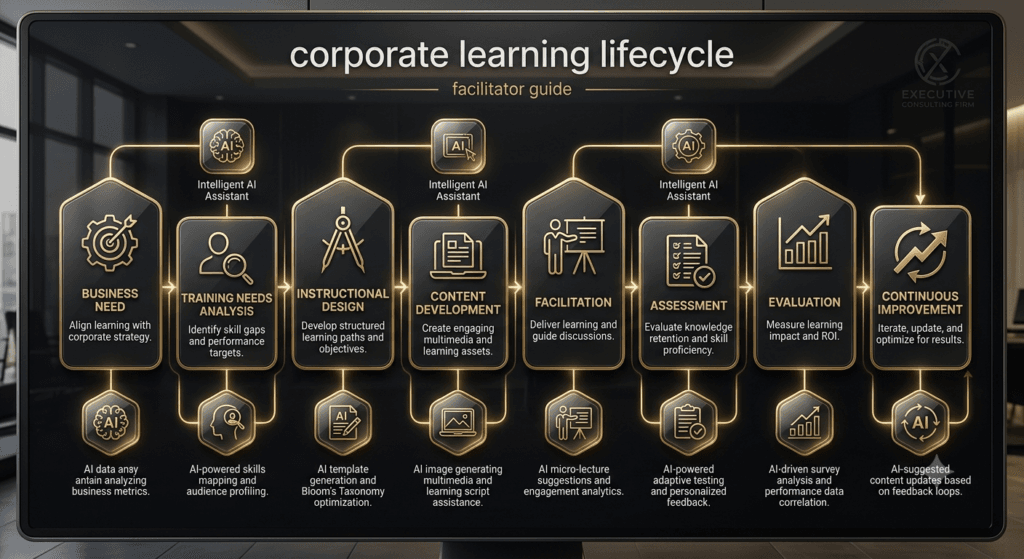
60 AI Prompts for Trainers
Each prompt below is built on the TrainerCentric Prompt Canvas™ explained above. Replace anything in [brackets] with your specifics, treat the output as a first draft to shape, and use the refinement line to push a flat first attempt further — that follow-up step is often where the real value shows up.
| TRAINER TIP · The fastest way to fix a flat AI draft isn’t a longer prompt — it’s a specific follow-up. “Make this more concise” beats rewriting the whole request from scratch. |
1. Course Design Prompts
The macro decisions — structure, model, and the objectives that hold a course together. Whether you’re following the ADDIE model, using SAM for a faster build, or mapping objectives against Bloom’s Taxonomy, these prompts speed up the parts of design that don’t need your full judgement yet.
| Prompt 1 · Draft an ADDIE analysis brief for a new programme. Copy this: Act as an instructional design consultant. I’m starting a training programme on [topic] for [audience, e.g. first-time people managers]. Using the ADDIE model, draft an Analysis phase brief covering: performance gap, target audience characteristics, constraints (time, budget, delivery mode), and success measures. Keep it to one page. Why it works: Naming the model (ADDIE) and the exact section headings stops the AI from writing a generic project summary — it forces the output into the analytical structure a sponsor will actually recognise. Common mistake: Pasting a vague performance gap (‘people need better skills’) instead of your actual TNA notes. The brief will only be as sharp as the input — AI can’t invent a gap you haven’t described. Refine it: “Now shorten this to 5 bullet points I could read out in a 3-minute stakeholder update.” |
| Prompt 2 · Build a rapid-prototype outline for a SAM design sprint. Copy this: Act as a SAM (Successive Approximation Model) facilitator. I need a Savvy Start outline for a one-day design sprint on [topic]. Suggest a 90-minute agenda for the Savvy Start session, three rough prototype directions we could sketch on flip charts, and two questions to ask stakeholders before we prototype further. Why it works: SAM lives or dies on speed and rough drafts — asking for ‘three directions’ rather than ‘the best approach’ keeps the output appropriately unfinished, matching how SAM actually works. Common mistake: Treating the AI’s three directions as final options to pick from, rather than raw material for the room to argue over and combine. Refine it: “Turn direction 2 into a one-paragraph pitch I can present to stakeholders for reaction.” |
| Prompt 3 · Convert a vague training request into measurable objectives. Copy this: A stakeholder has asked for training on ‘[vague request, e.g. better communication skills]’ for [audience]. Rewrite this into 3–4 measurable learning objectives using Bloom’s Taxonomy action verbs, following the format: ‘By the end of this session, learners will be able to [verb] + [object] + [condition/criteria].’ Why it works: Giving the AI the exact objective format (verb + object + condition) is what makes the difference between four assessable objectives and four restated aspirations. Common mistake: Accepting objectives that use verbs like ‘understand’ or ‘appreciate’ — these aren’t observable and can’t be assessed. If the AI slips one in, push back on it specifically. Refine it: “Objective 2 still isn’t measurable — rewrite it with a verb I could actually assess in a role-play or quiz.” |
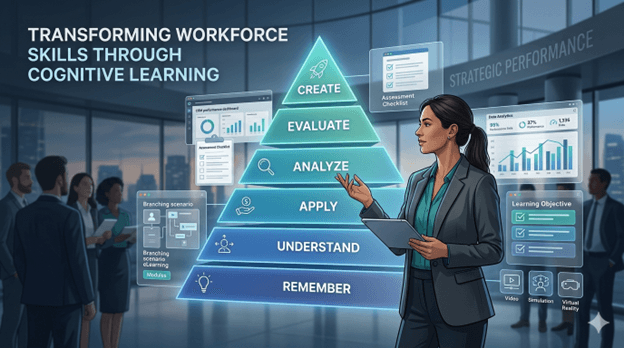
| Prompt 4 · Check draft objectives against Bloom’s cognitive levels. Copy this: Here are my draft learning objectives: [paste objectives]. For each one, identify which level of Bloom’s Taxonomy it targets (Remember, Understand, Apply, Analyse, Evaluate, Create), flag any that are still too vague to assess, and suggest a stronger verb where needed. Why it works: This works as a second pass, not a first draft — it uses AI as a QA reviewer against a named framework, which it’s genuinely good at, rather than asking it to invent objectives from nothing. Common mistake: Running this check once and moving on. Bloom-level mismatches often cluster — if one objective is too low-level, the surrounding ones written in the same pass usually are too. Refine it: “All of these sit at Understand or Remember — rewrite the whole set so at least two reach Apply or above.” |
| Prompt 5 · Build a full-day ILT agenda with time allocations. Copy this: Act as a senior facilitator designing a one-day (7-hour, including breaks) instructor-led session on [topic] for [audience, group size]. Produce a minute-by-minute agenda that follows a 70:20:10-informed mix of instruction, practice, and reflection. Include timing, activity type, and materials needed for each block. Why it works: Specifying the total hours and the 70:20:10 mix gives the AI a pacing constraint it would otherwise ignore — without it, you tend to get an agenda that’s 80% lecture with a token ‘discussion’ block bolted on. Common mistake: Not sanity-checking the timing against your own experience. AI-generated agendas routinely underestimate how long real discussions and debriefs take in the room. Refine it: “The 2pm block feels rushed for a group this size — stretch it by 15 minutes and cut time from somewhere less critical.” |
| Prompt 6 · Adapt a full-day agenda for virtual delivery. Copy this: Take this in-person agenda: [paste agenda] and adapt it for virtual delivery over three 90-minute sessions instead of one full day. Account for shorter attention spans on video calls, build in breakout room activities, and flag where I’ll need a producer/co-host. Why it works: Pasting your actual agenda in (rather than describing the topic again) means the AI is genuinely adapting your content and sequence, not inventing a new structure that happens to share a topic. Common mistake: Assuming the three-session split the AI suggests is the right one for your audience’s calendars. Ask it to show you two alternative splits before committing. Refine it: “Show me an alternative split across two 2-hour sessions instead of three 90-minute ones, and tell me the trade-off.” |
| Prompt 7 · Design a branching scenario for eLearning. Copy this: Design a 3-decision branching scenario for [topic, e.g. handling a customer complaint] set in [context]. For each decision point, give: the situation, three response options (one strong, one partial, one poor), and the consequence/feedback for each. End with a debrief question that ties back to the learning objective. Why it works: Requiring ‘one strong, one partial, one poor’ for every decision point is what prevents the lazy default of one obviously-right and two absurd options — a common failure mode in AI-generated scenarios. Common mistake: Not checking that the ‘partial’ option is genuinely plausible. AI often makes the middle option too close to the poor one, which flattens the decision into an easy binary. Refine it: “The partial option at decision 2 is too close to the poor one — rewrite it so a reasonable person could defend choosing it.” |
| Prompt 8 · Break a long topic into microlearning units. Copy this: I have a 60-minute training topic on [topic]. Break it into 5–7 standalone microlearning units of 3–5 minutes each, following the principle of one objective per unit. For each unit, give a working title and the single takeaway it should deliver. Why it works: ‘One objective per unit’ is the actual design principle behind good microlearning — stating it explicitly stops the AI from just chopping your 60 minutes into equal time-slices, which isn’t the same thing. Common mistake: Ending up with units that depend on each other in sequence, which defeats the point of microlearning being genuinely standalone. Check each unit still makes sense out of order. Refine it: “Unit 4 doesn’t make sense without unit 3 — rewrite it so it stands alone.” |

Best Practices for Using AI Responsibly
- Fact-check everything with a number, name, or claim attached. AI models generate plausible-sounding statistics and citations that don’t always exist — this is commonly called hallucination, and it happens even in confident, well-formatted answers. Gartner’s research on AI governance found that organisations conducting regular assessments and audits of AI system output are over three times more likely to get real value from GenAI, precisely because they catch errors before they reach a client or a classroom. Never cite a statistic an AI gave you without verifying it against the original source yourself.
- Never paste confidential company information into a public AI tool. Unreleased financial figures, internal strategy documents, real performance review content, or confidential stakeholder feedback shouldn’t go into a consumer-facing AI chat unless your organisation has an enterprise agreement with data protections in place. When in doubt, anonymise or summarise rather than paste the original document.
- Treat personally identifiable information with particular caution. Real employee names, contact details, appraisal scores, or health and disciplinary information should never be entered into a free-tier AI tool. Use a placeholder like [Employee A] instead — the pattern in this library’s prompts is deliberate; keep it even when you’re tempted to paste the real name for speed.

| TRAINER TIP · Paste in one real example of your own past work before asking AI to write something new. Nothing improves tone-matching faster. |
- Watch for bias in generated examples and personas. Left unprompted, AI models tend to default to certain names, job titles, and scenarios drawn from whatever dominated their training data. If you’re building case studies or role-play scenarios for a diverse workforce, explicitly ask for varied names, genders, and cultural contexts — and review the output with that lens before it goes into a deck.
- Understand the copyright and licensing grey areas. AI-generated text is generally usable in corporate training, but be careful asking a model to imitate a specific named author’s style closely, or to reproduce content resembling copyrighted material (song lyrics, published frameworks, branded assessment tools). If you’re building something you intend to sell or publish externally, run it past whoever owns IP policy in your organisation.
- Verify sources the way you’d verify a new hire’s references. If AI cites ‘a Harvard study’ or ‘research shows,’ ask it directly for the source, then check that the source actually says what’s claimed. A confident tone is not evidence of accuracy — it’s simply how these models write by default.
- Check whether your organisation already has an AI usage policy. Many organisations are drafting or have already published guidance on which tools are approved, what data can be shared, and what disclosure is expected. If one exists, it overrides any general advice here — check with IT, legal, or your L&D leadership before adopting any of these prompts at scale.
- Keep a human in the loop for anything assessed or certified. AI-generated exam questions, rubrics, or certification content should always go through a subject matter expert review before use. An AI can produce a plausible question; it can’t guarantee the answer key is still correct against your latest policy version.
Common Prompt Mistakes
- Asking for too much in one prompt.
- “Design a full training programme on leadership” will get you something shallow across everything rather than useful on anything. Break big asks into the smaller prompts in this library — objectives, then agenda, then activities — and build up.
- Skipping the context.
- The single most common mistake is treating AI like a search engine instead of a colleague who needs a briefing. Audience, seniority, delivery mode, and constraints aren’t optional extras — they’re the difference between a usable draft and one you’ll rewrite from scratch.
- Accepting the first draft as final.
- The best use of AI in L&D isn’t a single prompt — it’s a conversation. Ask for a first pass, then say “make this more concise” or “add a scenario for a remote team” and refine from there, the same way you’d redraft your own first attempt.
- Forgetting your own brand and voice.
- Generic AI output reads generic. If your organisation has a distinct tone — direct, warm, formal, playful — say so in the prompt, and better still, paste in a short example of your own past writing for the model to match.
- Using AI-generated content without SME or compliance review.
- This matters most for anything regulatory, safety-related, or tied to certification. A fluent, confident-sounding AI answer is not the same as a technically correct one.
| TRAINER TIP · Treat every AI-generated statistic as unverified until you’ve checked the original source yourself. |
Frequently Asked Questions
Can I use these prompts with any AI tool, or do they need ChatGPT specifically?
These prompts work with any major generative AI assistant — ChatGPT, Claude, Gemini, or Copilot. The structure (role, context, objective, constraints) is what does the work, not the specific tool. You may notice small differences in tone or formatting between tools, but the core output quality should be comparable.
Do I need a paid AI subscription to use these prompts effectively?
No. Free tiers of most major AI tools can handle everything in this library. A paid subscription tends to help more with longer context windows (useful if you’re pasting in long source documents) and faster response times, rather than being a requirement for prompt quality.
Is it safe to put real training content into ChatGPT?
Generic content — a topic outline, a public policy summary, a made-up scenario — is generally fine. Anything containing real employee data, confidential business information, or unreleased material should be anonymised first or run through an enterprise-grade tool with data protection terms, not a free consumer account.
Will AI replace instructional designers and trainers?
The evidence so far points the other way: toward AI changing which tasks get done manually, not eliminating the role. ATD Research shows instructional designers already using AI heavily for drafting and outlining, but far less for judgement-heavy work like learner analysis — the parts of the job that require organisational knowledge and human judgement remain squarely human.
How do I stop AI-generated content from sounding generic?
Give it more to work with: a specific audience, a real (anonymised) scenario, an example of your own writing to match, and explicit tone instructions. Generic prompts produce generic output; specific prompts produce usable drafts.
Can AI write a full course for me from a single prompt?
It can produce a rough shape, but a single prompt won’t get you a genuinely well-designed course. Better results come from breaking the work into stages — objectives, then structure, then content, then assessment — refining each stage before moving to the next, the same way you would design it yourself.
What’s the biggest mistake trainers make when prompting AI?
Under-specifying context. Most disappointing outputs trace back to a prompt that didn’t say who the audience was, what had already been decided, or what “good” looked like — not to any limitation of the AI tool itself.
Should I disclose to learners that content was AI-assisted?
There’s no universal rule, but many organisations are adopting the same principle they use for any outsourced or templated content: disclose when it materially affects how learners should interpret the content (for example, an AI-generated case study presented as a real event), and use professional judgement otherwise. Check your own organisation’s emerging AI policy if one exists.
How often should I update my prompt library?
Treat it like any other toolkit — revisit it every few months, retire prompts that consistently underperform, and add new ones as you discover a task you keep having to explain to AI from scratch. The prompts that stay useful are the ones you keep refining based on what actually worked.
Final Thoughts
AI won’t design your training programme for you, and it shouldn’t. What it can do — reliably, and starting today — is take the blank-page problem off your plate for the tasks that don’t need your full judgement: a first-pass agenda, a set of discussion questions, a rough storyboard, an email you’ve written fifty times before. That matters most as a session scales into a full corporate eLearning programme, where the same first-draft tasks repeat across dozens of modules instead of one.
AI won’t replace skilled trainers. It will amplify those who know how to ask better questions, apply sound instructional design principles, and exercise professional judgement. The prompts in this library are simply the starting point — the real value still comes from the trainer who knows what to do with what comes back. Bookmark this page, sketch your next request through the TrainerCentric Prompt Canvas™, and keep a shortlist of the prompts that work best for your context.
References
- Design for How People Learn | 2nd Edition | Julie Dirksen | New Riders | 2016
- Evaluating Training Programs: The Four Levels | 3rd Edition | Donald L. Kirkpatrick & James D. Kirkpatrick | Berrett-Koehler Publishers | 2006
- Preparing Instructional Objectives | 3rd Edition | Robert F. Mager | Center for Effective Performance | 1997
- The Adult Learner | 9th Edition | Malcolm S. Knowles, Elwood F. Holton III & Richard A. Swanson | Routledge | 2020
- Map It: The Hands-On Guide to Strategic Training Design | 1st Edition | Cathy Moore | Montesa Press | 2017
Where To Go Next
Not sure which internal resource to open first? Start with whichever line below matches what you’re working on today.
- → If you’re designing a course, start with our ADDIE Model guide.
- → If you’re conducting a TNA, read how to conduct a training needs analysis in five steps.
- → If you’re measuring impact, explore the Kirkpatrick Model explained.
- → If you’re creating assessments, see our guide to scenario-based learning.
- → If you’re planning facilitation, check our facilitation techniques guide.
- → If you’re building a business case, look at the Phillips ROI Model explained with examples.
Further Readings
- Corporate eLearning Playbook: The Complete Guide to Designing, Delivering, and Scaling Digital Learning (2026)
- Instructional Design Model Playbook
- Microlearning: What It Is, When to Use It, and How to Design It
- The Art of Questioning in Training: Techniques That Deepen Learning
- How to Choose eLearning Authoring Tools: A Framework for L&D Teams
- Select How to Convert Classroom Training to eLearning Without Losing Impact
- AI in Learning and Development: What Corporate Trainers Need to Know Right Now
- How to Choose the Right LMS: A Complete Selection, Evaluation, and Implementation Guide
- Learning Experience Platform (LXP): Features, Benefits, Examples and Whether You Need One
Author Details

Sumit is a writer, facilitator and a workspace learning enthusiast who explores the intersections of human behaviour, performance, and professional growth. With extensive experience in corporate environments, he brings a grounded, real-world perspective to the challenges professionals face every day. You can reach out to him at sumit@trainercentric.in