Introduction – How to Choose the Right LMS
Picture this — the names change, the pattern doesn’t: a manufacturer sinks close to half a million dollars into a new LMS. Eighteen months later, monthly active usage sits somewhere under one in five employees. Leadership blames the software and starts evaluating replacements. Nobody stops to ask whether the buying process was the actual problem — which means the next platform is on track to fail the same way, just with a different logo on the login screen. This is a composite of a pattern we’ve seen repeat across industries, not a single documented case — but if it feels familiar, that’s because it is.
Most organizations don’t fail at learning technology because they picked a bad product. They fail because they bought a good product that was wrong for them — chosen under deadline pressure, sold on a feature list, and never mapped back to what the business actually needed the platform to do.
An LMS doesn’t solve training problems. It amplifies your existing training strategy — good or bad. Buy one before that strategy is clear, and you’ve just made the wrong process faster.
I’ve sat on both sides of this table: inside procurement conversations where finance asked why the “cheap” LMS quietly doubled in cost by year two, and inside post-mortems where a six-figure enterprise platform sat half-configured, disliked by admins, and ignored by learners eighteen months after go-live. The pattern is almost never the software. It’s the process — or the absence of one — that got the organization to “yes.”
This guide is that process, written down. It is not a list of LMS features dressed up as advice. It’s how to choose the right LMS the way experienced buyers actually do it: starting from business goals, working through stakeholder politics, building real requirements, running a disciplined vendor evaluation, and planning an implementation that survives contact with real users.
If you’re building a broader digital learning strategy alongside this decision, this sits inside our Corporate eLearning Playbook: The Complete Guide to Designing, Delivering, and Scaling Digital Learning (2026) — read that for the wider picture, and use this article as your LMS selection guide specifically.
Scope note: This guide focuses specifically on LMS selection — the decision process, requirements, vendor evaluation, and implementation. If you’re building an end-to-end digital learning strategy, including content design, delivery models, learner engagement, and measurement, see our Corporate eLearning Playbook: The Complete Guide to Designing, Delivering, and Scaling Digital Learning (2026). Choosing the right platform is one part of that larger picture — this article is where you go deep on that one part.
Quick Checklist — Who This Guide Is For – L&D and Training Managers running or supporting an LMS selection – HR leaders sponsoring a learning technology investment – Instructional designers who need to influence platform requirements – IT and procurement teams evaluating security, integration, and vendor risk – Founders and operations leaders at growing companies buying their first LMS
A companion spreadsheet — the LMS Vendor Evaluation Toolkit — turns the checklist and scoring tools in this guide into a fillable workbook. Details at the end of this article.
What Is a Learning Management System?
A Learning Management System (LMS) is software used to administer, deliver, track, and report on training — course content, assessments, certifications, and compliance records — for a defined population of learners, whether employees, partners, or customers.
That’s the textbook definition. The enterprise reality is more specific: an LMS is a system of record for workforce capability. It’s the platform HR audits pull from, the system compliance officers point to in a regulatory review, and the tool that determines whether “we trained everyone on this” is a defensible statement or a guess.
Modern LMS vs. Learning Experience Platform (LXP)
The line between LMS and LXP has blurred, but the distinction still matters for buyers:
- An LMS is built around structured, assigned, and tracked learning — compliance courses, onboarding paths, certification programs — with an administrator deciding what learners are required to complete.
- An LXP is built around discovery and self-direction — content aggregation, recommendations, and informal learning — with the learner deciding what to consume.
Most enterprise buyers don’t need to choose one or the other; they need to know which capability matters more for their population, because it changes what you evaluate first. We cover this in more depth in What Is a Learning Experience Platform (LXP) and Do You Need One?.
Why Organizations Invest in LMS Platforms
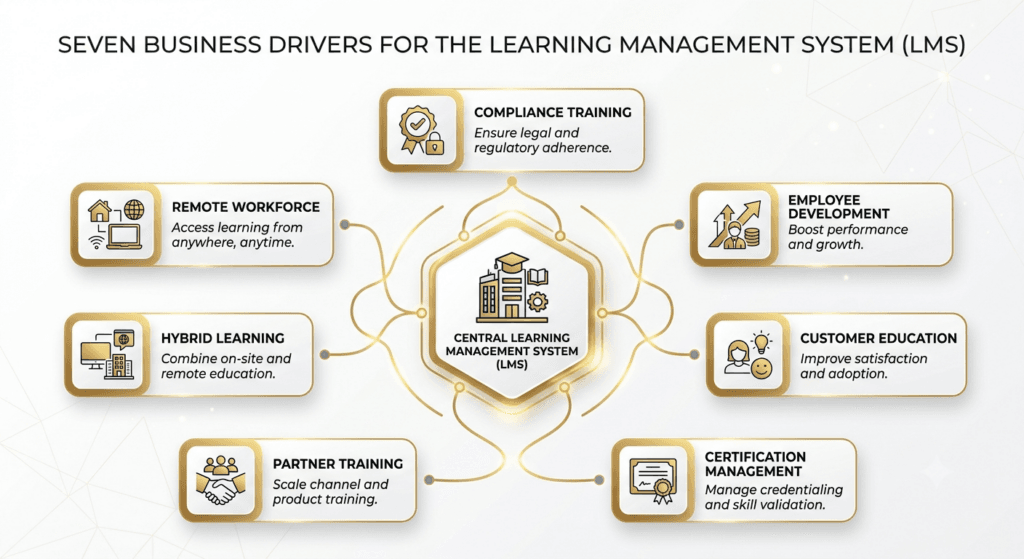
Every LMS purchase traces back to one or more of these business drivers. Naming yours precisely — not generically — is the first real step of the selection process, because it determines which features are non-negotiable and which are noise.
| Business Driver | What It Actually Demands From an LMS |
| Regulatory & compliance training | Audit trails, automated re-certification, immutable completion records |
| Remote / distributed workforce | Reliable mobile delivery, low-bandwidth performance, time-zone-aware scheduling |
| Hybrid learning delivery | Blended learning paths mixing ILT, virtual sessions, and self-paced content |
| Employee development & upskilling | Skills frameworks, career pathing, manager visibility into progress |
| Certification management | Expiry tracking, renewal workflows, credential issuance |
| Partner and channel training | Multi-tenant or portal architecture, external user management |
| Customer education | Public-facing catalogs, commerce/payment integration, branding flexibility |
| Expert Tip: If your primary driver is compliance, your evaluation should start with reporting and audit capability — not learner experience. If your primary driver is culture and development, the reverse is true. Buyers who evaluate every LMS against every driver equally end up with a platform that’s mediocre at the one thing that actually mattered. |
Signs Your Organization Needs a New LMS
Not every training problem is an LMS problem. Before you start a selection process, confirm the platform is actually the bottleneck.
Practical indicators it’s time to replace or add an LMS:
- Admins build workarounds in spreadsheets because the system can’t report what leadership asks for
- Learners routinely can’t access training on mobile, and mobile is how most of your workforce works
- You cannot produce an audit-ready compliance report without manual reconciliation
- Integration with your HRIS is manual (CSV uploads) instead of automated (API/SSO)
- You are paying for features you don’t use, while missing ones you need
- A merger, acquisition, or new business line has outgrown your current user-tier or industry fit
Decision checklist — should you replace your LMS or fix your current setup?
| Question | If Yes → Lean Toward |
| Is the core problem configuration, not capability? | Fix current setup |
| Has the vendor stopped shipping meaningful roadmap updates in 12+ months? | Replace |
| Would replacing cost less over 3 years than the workarounds you’re paying staff to maintain? | Replace |
| Is the issue isolated to one course type or one department? | Fix current setup |
| Are you the last department signed onto a system chosen for someone else’s needs? | Replace |
Step-by-Step LMS Selection Framework
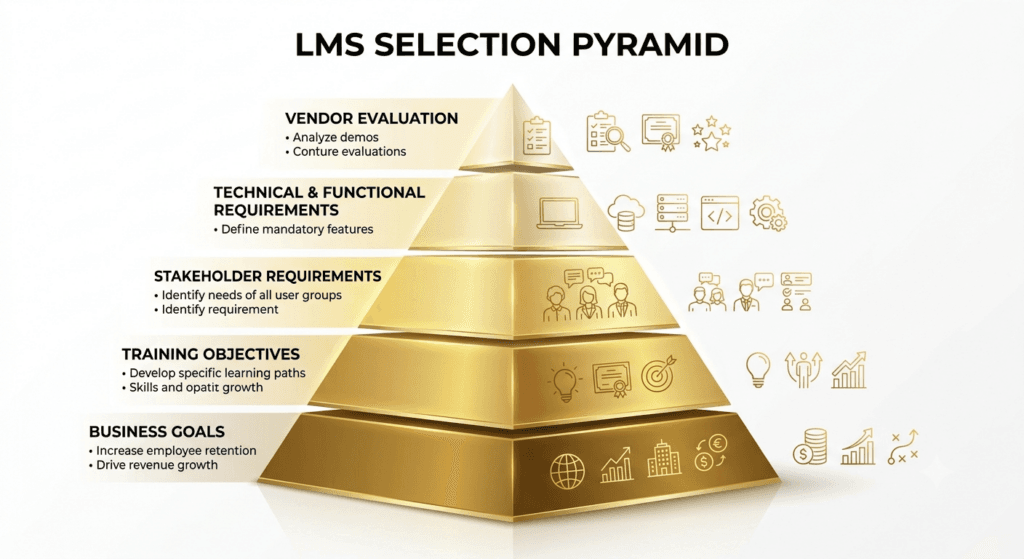
This is where most guides jump straight to feature lists. Don’t. The organizations that get this right run requirements before they run demos — every time. We call this sequencing the TrainerCentric LMS Selection Pyramid™.
The TrainerCentric LMS Selection Pyramid™
Picture five layers, built bottom-up. You cannot skip a layer without the ones above it collapsing later.
- Business Goals (the foundation) — What outcome is the business trying to achieve that training supports? Revenue growth from faster onboarding? Reduced compliance risk? Retention?
- Training Objectives — What must learners be able to do differently as a result of this platform existing?
- Stakeholder Requirements — What do the people who will use, administer, fund, and secure this platform actually need from it?
- Technical & Functional Requirements — Translate stakeholder needs into specific, testable requirements.
- Vendor Evaluation (the peak) — Only now do you start looking at specific products.
| Common Mistake: Building the pyramid upside down — starting with a shortlist of “popular” vendors, then reverse-engineering requirements to justify the one the CEO saw at a conference. This is how organizations end up defending a purchase instead of a decision. |
Here is a step by step process to select the best LMS for you.
1. Start With Business Goals, Not Technology
Before any requirements document, answer three questions in writing, with your sponsor’s sign-off:
1. What business metric is this LMS supposed to move (time-to-productivity, compliance pass rate, retention, revenue per rep)?
2. What happens if we do nothing? Is the current pain tolerable for another 12 months?
3. Who owns the outcome if the platform underperforms — L&D, HR, or IT?
If your instructional design team hasn’t yet assessed why training is being requested at all, do that first — a new LMS cannot fix a training program that was never the right intervention. See Performance Consulting Explained: When Training Is NOT the Answer.
2. Assess Training Maturity
An organization running a single onboarding course needs a fundamentally different LMS than one running blended global compliance programs across 12 languages.
Score yourself honestly against this scale before you evaluate vendors — and if you haven’t formally assessed where your skills gaps sit, do that first (see Skills Gap Analysis vs Training Needs Analysis: Understanding the Difference), because an LMS bought to close a gap that doesn’t exist is a wasted investment regardless of how well it scores on features. See the table below
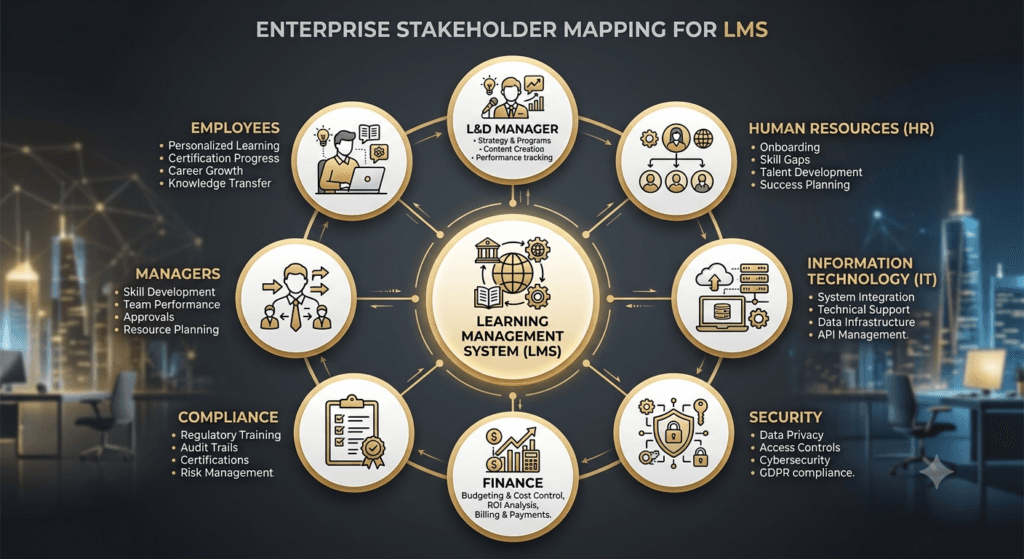
3. Map Your Stakeholders
LMS selection projects stall or get overturned post-purchase almost always for the same reason: someone whose sign-off mattered wasn’t consulted early. Map influence and interest before you write a single requirement.
For a deeper walkthrough of influence mapping specifically for L&D initiatives, see Stakeholder Mapping for L&D: Who to Influence and How.
4. Gather Requirements Systematically
Interview each stakeholder group separately using structured, open-ended questions before showing them any vendor options — options bias the answers. Capture current pain points, not just wishlists; “what breaks today” is more reliable data than “what would be nice.”
The interview discipline here is identical to the fieldwork behind a good training needs analysis — structured questions, neutral framing, separating symptoms from root causes. If your team hasn’t run this kind of exercise before, Focus Groups and Interviews for TNA: A Practical Field Guide and Job Task Analysis: How to Break Down Any Role for Training Design are useful starting templates you can adapt for LMS-specific stakeholder interviews.
5. Plan for Future Scalability
Buy for where the organization will be in 24–36 months, not just today. Ask: will headcount double? Will you add international users requiring localization? Will compliance requirements expand into new regulated markets? A platform that’s perfect for 500 users can become a bottleneck at 5,000.
| Maturity Level | Characteristics | LMS Implication |
| Ad hoc | Training is reactive, spreadsheet-tracked, no formal catalog | Simple, fast-to-deploy LMS; avoid over-buying enterprise complexity |
| Defined | Formal courses exist, some reporting, single department owns it | Mid-market LMS with solid reporting and content authoring |
| Managed | Cross-functional programs, compliance tracking, manager visibility | Enterprise LMS with integrations, RBAC, automation |
| Optimized | Skills-based, data-driven, tied to business KPIs, multiple audiences | Enterprise LMS or LXP-hybrid with analytics, AI, and skills infrastructure |
Putting the Framework Into Practice: A Worked Example
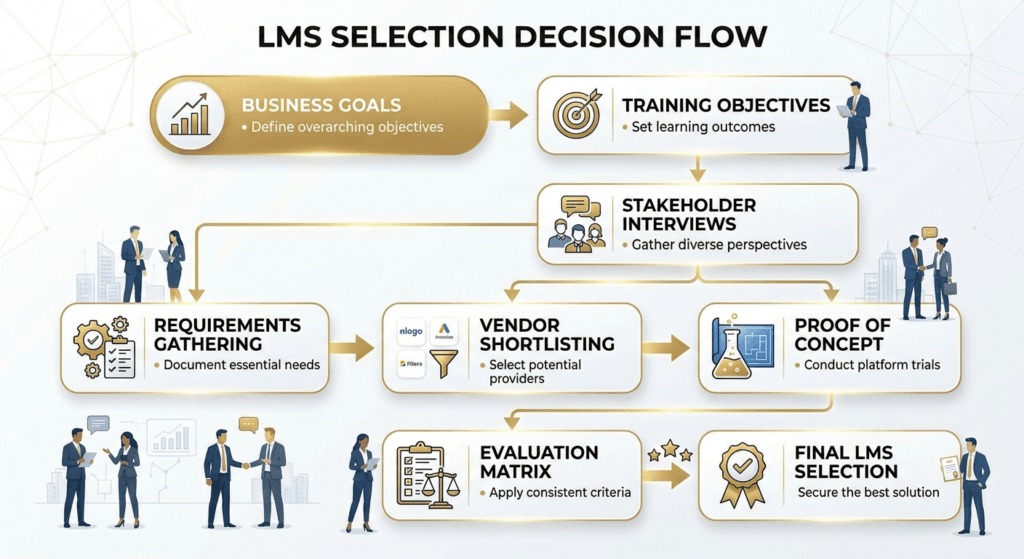
Frameworks are easier to trust once you’ve watched them run. Here’s how the Selection Pyramid plays out for a realistic buyer, start to finish.
The scenario: A 1,500-employee healthcare network with facilities in three states. Nursing staff turnover is high, mandatory compliance re-certifications are tracked manually in spreadsheets, and the last regulatory audit flagged a two-week delay producing a complete training record.
- Layer 1 — Business Goal. Leadership’s actual objective isn’t “get a better LMS.” It’s reduce audit risk and the staff hours spent proving compliance manually. That single sentence, agreed with the CFO and Chief Compliance Officer, becomes the filter every later decision gets tested against.
- Layer 2 — Training Objectives. Nursing and clinical staff must complete state-mandated re-certifications on time, with an audit-ready record produced in minutes, not weeks. Onboarding — a large share of headcount given turnover — needs to be fast enough that compliance training isn’t the bottleneck to a new nurse’s start date.
- Layer 3 — Stakeholders. Per the stakeholder map above: the Chief Compliance Officer (audit-readiness), IT security (data residency), clinical education (content and scheduling), HR (HRIS sync for 1,500 users), and frontline nurse managers (mobile access, since most staff aren’t at a desk).
- Layer 4 — Requirements. Applying the S.M.A.R.T. filter, the team marks automated re-certification tracking, one-click audit reporting, and mobile/offline access as non-negotiable must-haves. Gamification and a course marketplace are logged as nice-to-haves and explicitly told not to influence the final score.
- Layer 5 — Vendor Evaluation. Three vendors are shortlisted and run through a two-week POC using real re-certification content and a pilot group of working nurses, not just admins. Scored against the Vendor Fit Matrix™, the healthcare-industry-specific platform edges out a larger generalist enterprise LMS — not because it has more features, but because it scores highest on the two must-haves that trace directly back to the Layer 1 business goal: audit reporting speed and offline mobile reliability.
The decision. The organization signs with the narrower, industry-specific vendor, accepts that its gamification and marketplace features are weaker, and treats that as the correct trade-off — because those were never the requirements the business goal was built on in the first place.
That’s the whole point of building the Pyramid bottom-up: by the time you’re choosing between vendors, the decision has mostly already made itself.
Create Your LMS Requirements Checklist
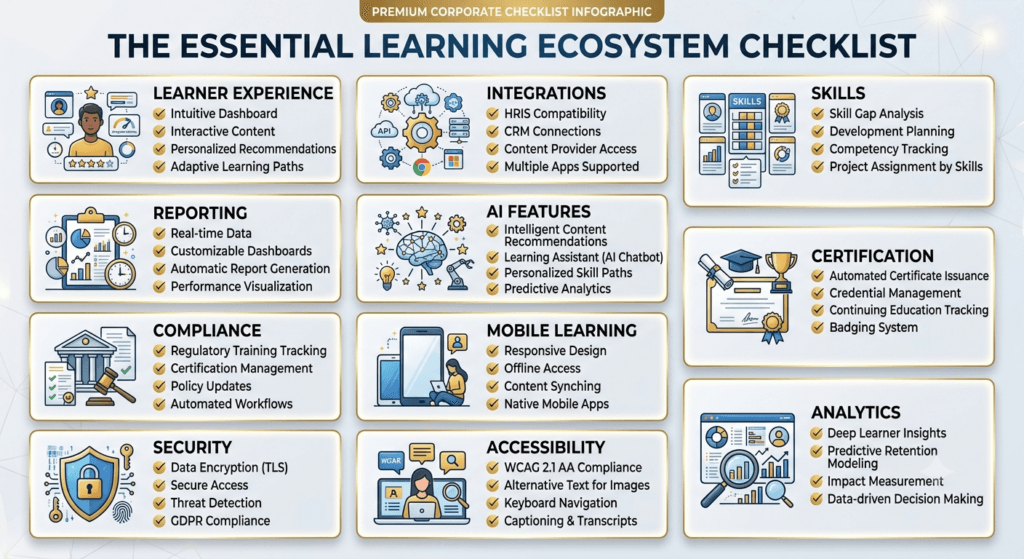
Requirements should eliminate vendors, not justify them. If a document survives every vendor conversation without ruling anyone out, it wasn’t a requirements list — it was a wishlist with a checkbox next to it.
Turn stakeholder input into a structured requirements document. Every requirement should be specific, measurable, aligned to a stakeholder, realistic for your maturity level, and time-bound to when you need it (launch vs. phase two) — a simple S.M.A.R.T. filter that keeps a requirements list from turning into an unweighted wishlist.
If your content strategy leans on shorter, more targeted modules rather than long-form courses, cross-check this checklist against Microlearning: What It Is, When to Use It, and How to Design It and Scenario-Based Learning: How to Write Branching Scenarios for Corporate Training — the format you’re designing for changes which authoring and delivery requirements actually matter.
Below is a starter framework across the categories that matter most. Use it as a downloadable-style checklist — copy it into your own RFP.
| Trainercentric Tip: Weight this checklist before you evaluate a single vendor. A requirement marked “must-have” by IT security should never be traded away because it scored well on learner experience. Unweighted checklists are how organizations rationalize the wrong choice. |
A weighted checklist only means something once you know what you’re weighting it against. Before you can score any vendor, you need to know which category of LMS you’re even shopping in — the requirements above translate very differently depending on whether you’re evaluating cloud, on-premise, or industry-specific platforms.
Types of LMS Platforms
| Type | Where It Excels | Where It Falls Short | Examples of Vendors Playing Here |
| Cloud/SaaS | Fast deployment, vendor-managed updates, lower upfront cost | Less control over infrastructure, data residency depends on vendor regions | TalentLMS, LearnUpon, Litmos |
| On-Premise | Full data control, deep customization, suits high-security/regulated environments | High IT overhead, slower updates, higher total cost of ownership | Moodle (self-hosted), SAP SuccessFactors |
| Open-Source | Full customization, no licensing fees, strong for orgs with dev resources | Hidden cost shifts to internal development and maintenance; support is community-dependent | Moodle |
| Industry-Specific (e.g., healthcare, manufacturing, financial services) | Pre-built compliance templates, regulatory alignment out of the box | Narrower feature set outside their niche; can be costly to extend | Absorb LMS, iSpring |
| LXP | Content discovery, informal learning, skills-based personalization | Weaker on structured compliance tracking and audit trails | Docebo |
This is a category map, not a ranking — the right fit depends entirely on the must-have requirements you weighted earlier, not on which vendor is best-known.
| Did You Know? A large share of enterprise LMS replacements are not driven by dissatisfaction with learning delivery — they’re driven by integration failure with HR systems. Platform-to-platform data flow is now as important a selection criterion as the authoring tools themselves. |
With the platform category narrowed down, the next question is which specific capabilities inside that category actually earn a place on your requirements document — and which ones are simply well-marketed.
Must-Have LMS Features
These aren’t a generic list — each one below is tied to why it matters and when it becomes a dealbreaker rather than a nice-to-have.
- Robust reporting and audit trails. The moment your organization is audited — by a regulator, a customer’s vendor-risk team, or internal compliance — your LMS report is the evidence. If it takes more than a few clicks to produce a defensible completion record, this is a must-have.
- SSO and HRIS integration. Manual user provisioning doesn’t scale past a few hundred users and creates security gaps (ex-employees retaining access) — essential the moment IT is a stakeholder, which, per the stakeholder mapping above, it always should be.
- Mobile access. Essential the moment any meaningful share of your workforce is frontline, field-based, or distributed. Irrelevant if everyone sits at a desk with company-managed laptops — don’t let a vendor upsell you on this if it doesn’t apply.
- Automated enrollment and re-certification. Essential the instant you manage any compliance training with expiry dates. Manually tracking renewal dates for more than a handful of learners is a guaranteed audit gap.
- Content format flexibility (SCORM/xAPI/cmi5). Essential if you have any existing content library or work with external content vendors — locking into a proprietary-only format creates vendor lock-in risk down the line.
- Scalable user architecture (multi-tenant if needed). Essential for organizations with multiple business units, franchises, or partner audiences that need separate branding and reporting but shared infrastructure.
- Accessibility compliance. Essential — not optional — for any organization with public sector contracts, EU/UK operations, or a general duty-of-care obligation. WCAG 2.1 AA should be a baseline requirement. See How to Make eLearning Accessible (WCAG 2.1 for L&D) for the practical checklist behind this requirement.
- Skills infrastructure. Becomes essential once your organization moves from course-completion tracking toward genuine capability planning. If this is a current priority, review Competency-Based Learning first, since “skills features” vary enormously in depth between vendors.
Everything above earns a place on your must-have list because it maps back to a real business driver from earlier in this guide. Everything below is worth having, but should never outweigh a must-have gap during scoring.
Nice-to-Have Features
These add value but shouldn’t override a must-have gap, and shouldn’t be weighted as heavily in your Vendor Fit Matrix™ (below).
Every unnecessary feature has a maintenance cost. Someone has to configure it, license it, secure it, and explain to an auditor why it’s there. “We might use it someday” isn’t a requirement — it’s a future problem you’re choosing to buy now.
- Gamification (points, badges, leaderboards) — valuable for voluntary development programs, largely irrelevant for mandatory compliance training; if you’re weighing this seriously, understand the distinction covered in Gamification vs. Game-Based Learning: What’s the Difference? before writing it into your requirements as a single line item
- Social/community learning features — valuable in culture-driven organizations, low-impact in highly regulated, low-discretion training environments
- AI content generation — genuinely useful for authoring speed, but should never be a primary selection driver over core reporting/integration capability
- Native course marketplace/content library — convenient, but a poor substitute for content built to your actual competency framework
- Advanced skills-mapping/AI recommendations — powerful for mature L&D functions, premature for organizations still building a basic course catalog
Warning: Vendors will often lead demos with the nice-to-have features because they’re the most visually impressive. Keep your evaluation team anchored to the weighted requirements document, not the demo highlight reel.
Questions to Ask LMS Vendors
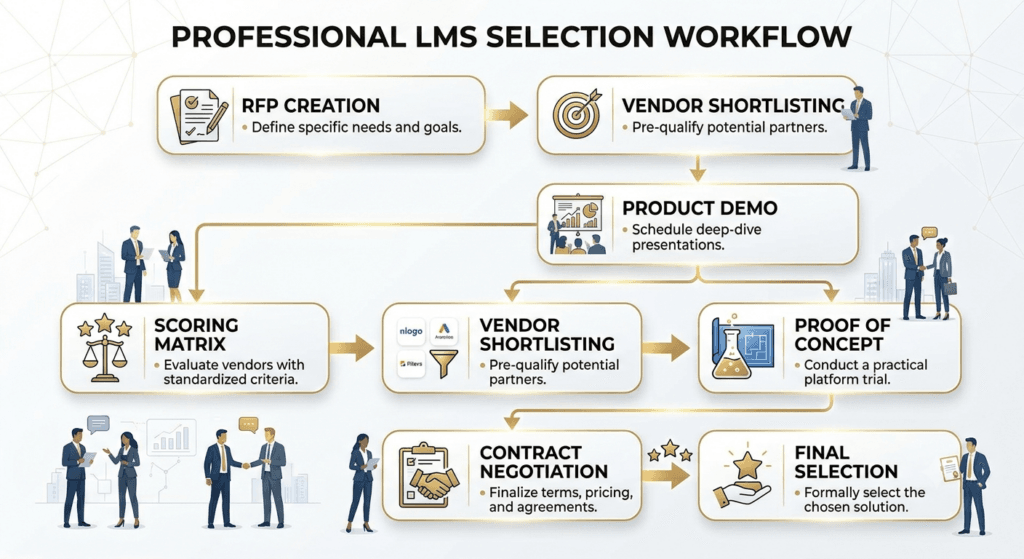
Use this list as your RFP question bank, organized by category. Aim to send a written questionnaire before live demos so you can compare answers on paper, not just impressions from a sales call.
LMS Pricing Explained
LMS pricing is one of the most poorly understood parts of the buying process, largely because vendors structure quotes to look simpler than the real cost.
Common licensing models:
- Per active user — you pay only for users who log in during the billing period; cheaper if usage is inconsistent, but harder to forecast
- Per registered user — flat fee per user regardless of activity; more predictable, often more expensive at scale
- Tiered/bundled — fixed pricing bands based on user-count ranges; simplest to budget, but can create “cliff” costs when you cross a tier
- Usage-based (e.g., per course completion or per GB of content storage) — less common, best suited to highly variable usage patterns
Hidden costs to budget for, not just license fees:
| Cost Category | Why It’s Often Missed |
| Data migration | Frequently quoted separately, and scoped narrowly (e.g., “user data only,” not historical completion records) |
| Implementation/configuration | Can be billed as professional services hours, uncapped if scope isn’t fixed |
| Integrations | API access or “premium integrations” are sometimes gated behind higher tiers |
| Customizations | Branding beyond basic theming, custom workflows, or custom reports often incur build fees |
| Ongoing admin training | Rarely included beyond initial onboarding; refresher training for new admins is often extra |
| Storage overages | Video-heavy content libraries can exceed included storage limits quickly |
| Support tier upgrades | Faster SLAs are frequently a paid add-on above the base support tier |
| Annual price escalators | Contracts often include automatic increases (commonly tied to a percentage or CPI) at renewal |
We won’t quote specific vendor prices here, since public pricing changes frequently and unverified figures do readers a disservice — but Gartner and Fosway Group both publish periodically updated market pricing benchmarks worth checking against any vendor quote you receive.
Whatever the final number, you’ll need to defend it in ROI terms to finance and leadership — How to Calculate Training ROI and Present It to the Business and Phillips ROI Model both give you a defensible framework for tying platform cost back to measurable business value, rather than justifying spend on adoption numbers alone.
| Common Mistake: Comparing vendor quotes purely on Year 1 price. Always model total cost of ownership across a 3-year term, including realistic estimates for the hidden costs above — the “cheaper” option on paper is frequently the more expensive one by year two. |
Common LMS Selection Mistakes
Almost every mistake below traces back to skipping a layer of the Selection Pyramid — moving to vendors before goals are clear, or to pricing before requirements are weighted. Read this list less as sixteen separate failure modes and more as sixteen ways of building the Pyramid upside down.
- Starting with a vendor shortlist instead of requirements. Requirements get retrofitted to justify a preference. Fix: complete the Selection Pyramid before any vendor conversation.
- Excluding IT/security from early conversations. Causes late-stage deal delays when security review happens post-signature. Fix: include IT in stakeholder mapping from day one.
- Under-scoping data migration. Historical completion records get lost — a serious problem for compliance-driven organizations. Fix: get a written migration scope, not a verbal assurance.
- Over-buying enterprise complexity for current maturity level. Leads to underused features and administrator burnout. Fix: score your training maturity honestly before evaluating platforms.
- Ignoring the learner experience in favor of admin/reporting features. Produces a system administrators love and learners avoid. Fix: include real learners in pilot testing, not just power users.
- Skipping a proof of concept or pilot. The first real-world stress test happens at full rollout, when failure is most expensive. Fix: insist on a POC with real content and real users before signing.
- Treating price as the primary decision criterion. Produces short-term savings and long-term hidden-cost surprises. Fix: model 3-year total cost of ownership, not Year 1 price.
- Not validating integration claims technically. “We integrate with Workday” can mean a real-time API or a manual CSV template. Fix: have your own IT team test the integration during POC.
- No clear internal owner post-launch. Leads to platform drift — nobody maintains content currency or chases low adoption. Fix: name a platform owner before go-live.
- Underestimating change management. A better system nobody was prepared for gets blamed for a change management failure. Fix: budget communication and training time into the implementation plan.
- Ignoring accessibility until a complaint or audit forces the issue. Creates legal exposure and costly retrofitting. Fix: make WCAG 2.1 AA a must-have requirement, not an afterthought.
- Letting one dominant stakeholder override the weighted requirements. Optimizes for one department at the expense of the wider organization. Fix: use a documented, weighted scoring process the whole evaluation team agrees to in advance.
- Failing to ask about vendor roadmap and product direction. Risks buying into a platform the vendor is quietly de-prioritizing. Fix: ask roadmap questions directly and check recent release history.
- No exit plan or data portability clause in the contract. Creates vendor lock-in that becomes expensive leverage at renewal. Fix: negotiate data export rights and format before signing.
- Rushing selection to hit an arbitrary deadline (e.g., fiscal year-end). Compresses due diligence and skips steps in this exact framework. Fix: start with enough runway — realistically 3-6 months for a mid-to-large organization.
- Assuming vendor-provided training will drive adoption on its own. Underestimates the need for internal champions and manager reinforcement. Fix: pair vendor training with an internal adoption/communication plan.
LMS Implementation Roadmap
Selection is only half the job. Structure the rollout around four phases — readiness, integration and migration, standup and pilot, and expansion and optimization — so nothing critical gets skipped under launch-date pressure.
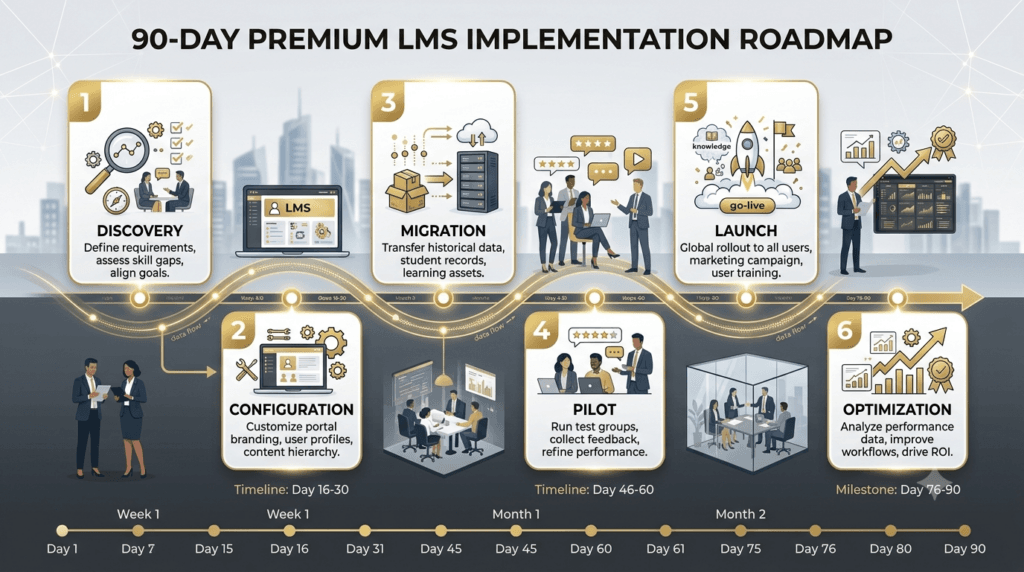
90-Day Roadmap
Days 1–15: Discovery & Planning (Readiness) – Confirm project team, roles, and RACI – Finalize technical architecture and integration scope – Set success metrics tied back to original business goals
Days 16–35: Configuration – Build org structure, roles, and permissions – Configure automated workflows and reporting templates – Set up branding and learner-facing UI
Days 36–55: Migration & Integration (Integration & Migration) – Migrate historical data and content – Connect SSO and HRIS integrations – Run data-integrity validation against source system
Days 56–70: Pilot (Standup & Pilot) – Launch with a representative user group, not just power users – Collect structured feedback (usability, gaps, technical issues) – Fix critical issues before full rollout
Days 71–85: Launch – Full rollout communication plan executed – Manager briefing on their role in reinforcement – Support channels live and staffed
Days 86–90+: Adoption & Optimization (Expansion & Optimization) – Monitor early adoption metrics against baseline – Address usability friction reported in first two weeks – Schedule a 90-day and 6-month review against original success metrics
Implementation Insight: The single highest-leverage moment in this entire roadmap is the pilot. Organizations that skip it, or run it with only enthusiastic early adopters, lose the chance to catch the usability and workflow problems that would otherwise surface at full-scale launch — when they’re far more expensive to fix.
The Launch and Adoption phases above are, functionally, a change management project wearing an implementation-roadmap label. Treat them as one. ADKAR Model for L&D: Managing Resistance to New Training gives you a structured way to plan the awareness-and-reinforcement work that determines whether your rollout communication actually lands, and How to Roll Out a New Learning Initiative Without Killing Morale is directly relevant to how you sequence the full-rollout communication plan in Days 71–85.
LMS Decision Matrix
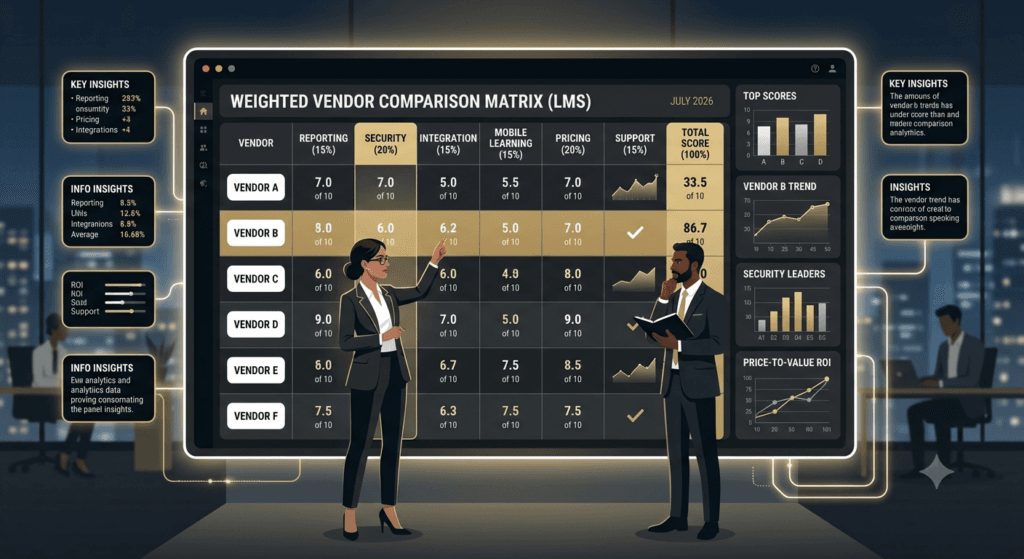
Once you’ve shortlisted 3–4 vendors from your requirements process, score them using a weighted matrix rather than a gut-feel ranking. This is the Vendor Fit Matrix™ — adapt the weights to your own must-have priorities from earlier in this guide.
| Criteria | Weight | Vendor A Score (1–5) | Vendor B Score (1–5) | Vendor C Score (1–5) |
| Core reporting/compliance | 20% | |||
| Integration capability (HRIS/SSO) | 15% | |||
| Security & certifications | 15% | |||
| Learner experience/mobile | 15% | |||
| Implementation support | 10% | |||
| Pricing/total cost of ownership | 10% | |||
| Vendor viability/roadmap | 10% | |||
| Accessibility compliance | 5% | |||
| Weighted Total | 100% |
Multiply each score by its weight and sum the column — the vendor with the highest weighted total is your data-backed recommendation, not just the one the room liked best in the demo.

Case Studies
Healthcare Compliance Training. A regional healthcare network needed a platform to manage mandatory clinical compliance training across multiple facilities, with strict audit-trail requirements and staff working rotating shifts with limited desk access. Their evaluation weighted security certifications and offline mobile access far above gamification — features that would have scored well generically but didn’t match their population. This is the profile where industry-specific and HRIS-integrated platforms, such as Absorb LMS or SAP SuccessFactors, tend to score highest.
Manufacturing Onboarding. A manufacturing company with high frontline turnover needed fast onboarding content delivery to shop-floor workers with limited computer access, prioritizing kiosk-mode delivery and short-form video over discussion forums built for desk-based, always-connected learners. Ease-of-setup platforms such as TalentLMS or iSpring are frequently evaluated for this exact profile.
Sales Enablement. A B2B software company needed an LMS tightly integrated with their CRM to trigger just-in-time training based on deal stage, prioritizing integration depth and content findability over deep compliance reporting, which was a minor requirement for their use case. Platforms with stronger AI-driven content discovery, such as Docebo, are commonly shortlisted here.
Growing SMB. A 200-person professional services firm buying its first formal LMS needed to avoid over-buying enterprise complexity, prioritizing fast time-to-launch, simple administration by a single part-time L&D admin, and predictable per-user pricing over advanced analytics they weren’t yet mature enough to use — the profile mid-market platforms like LearnUpon or self-hosted Moodle are often built around. This is the same maturity-matching principle behind How to Design a Learning Programme From Scratch — build for the stage you’re actually at, not the stage you aspire to reach.
Each of these organizations would have scored a different vendor as the “winner” on the same generic feature checklist. None of the vendor names above are recommendations in isolation; they’re illustrations of how category fit follows from business context — the entire argument of the Selection Pyramid.
Future Trends
- AI-powered learning. AI is moving from content generation assistance toward adaptive delivery — adjusting sequencing and difficulty based on individual learner performance in real time.
- Skills-based learning. Organizations are increasingly organizing learning around skills taxonomies rather than static course catalogs, tying training directly to internal mobility and capability planning.
- Adaptive learning. Platforms are beginning to personalize learning paths dynamically based on assessment performance rather than static, one-size-fits-all sequences.
- Learning analytics. Buyers are asking for analytics that connect learning activity to business outcomes, not just completion rates — a meaningfully higher bar than legacy LMS reporting.
- Learning Record Stores (LRS) and xAPI. As learning experiences spread across more tools, xAPI and LRS infrastructure allow organizations to capture learning data beyond the LMS itself — from simulations, on-the-job performance tools, and informal learning. See Learning Record Store (LRS) and xAPI Explained for deeper technical grounding.
- Learning in the flow of work. Demand is growing for training embedded directly inside the tools employees already use — CRM, support ticketing, collaboration platforms — rather than requiring a separate destination.

For organizations evaluating how AI specifically intersects with L&D decision-making right now, see AI in L&D: What Corporate Trainers Need to Know Right Now.
LMS Market in Numbers (2026)
📈 $24–31B global LMS market size in 2025–2026, growing at a sustained double-digit rate through the early 2030s (Grand View Research; Fortune Business Insights, 2025–2026)
☁️ Majority cloud — most LMS deployments are now cloud-based, and the share keeps climbing as organizations move off on-premise infrastructure (Coherent Market Insights, 2026)
🔁 88% of organizations are concerned about employee retention, and cite providing learning as their #1 retention strategy (LinkedIn 2025 Workplace Learning Report)
📚 91% of L&D professionals say continuous learning matters more to career success now than it used to (LinkedIn 2025 Workplace Learning Report)
🤖 49% of L&D leaders believe AI will improve talent development outcomes at their organization (Harvard Business Impact, 2025 Global Leadership Development Study)
Market-size figures vary between research firms depending on how they define “LMS” versus adjacent categories (LXP, broader learning technology) — treat any single number as directional, not exact. The growth trend across sources is the more reliable signal.
Frequently Asked Questions
1. How long does it take to choose and implement an LMS?
A disciplined selection process typically takes 8–12 weeks, plus another 60–90 days to implement for a mid-sized organization — faster for simple deployments, longer for complex integrations or multi-region rollouts.
2. What is the difference between an LMS and an LXP?
An LMS manages structured, assigned, tracked training with administrator control; an LXP centers on learner-driven content discovery. Many enterprise buyers now evaluate platforms that blend both.
3. How much does an LMS cost?
Cost depends on licensing model, implementation scope, and hidden costs like migration and support tier — always model 3-year total cost of ownership rather than comparing first-year quotes alone.
4. Should we buy cloud or on-premise?
Without a specific regulatory or data-control requirement for on-premise infrastructure, most organizations are better served by cloud/SaaS, given faster deployment and lower IT overhead.
5. What is a Learning Management System used for?
An LMS administers, delivers, tracks, and reports on training — serving as the system of record for what training was assigned, completed, and verified.
6. How many vendors should we shortlist for evaluation?
Three to four is typically enough to compare meaningfully without evaluation fatigue, provided each is scored against the same weighted requirements matrix.
7. Do we need IT involved in LMS selection?
Yes — involve IT and security from the earliest stakeholder mapping stage, not just before contract signature, to avoid late-stage security review delays.
8. What is the biggest mistake organizations make choosing an LMS?
Starting from a vendor shortlist instead of documented business goals, which leads to requirements being retrofitted to justify a preference.
9. Is SCORM still relevant, or should we require xAPI/cmi5?
SCORM remains widely supported for standard course tracking; xAPI and cmi5 offer more flexibility beyond the LMS. Requiring support for all three keeps content portable across future platform changes.
10. How do we know if our organization is ready for an LMS?
Readiness is less about size and more about whether you have defined training content, a way to identify your audience, and a stakeholder who owns the outcome.
11. What is a Proof of Concept (POC) in LMS selection?
A hands-on test of the shortlisted platform using real content and real users before signing, designed to surface usability and integration issues a scripted demo won’t reveal.
12. How important is mobile access for an LMS?
Critical for distributed, frontline, or field-based workforces; less critical for entirely desk-based populations — weight it based on your actual population, not a generic assumption.
Conclusion

Choosing the right LMS is not a software purchase — it’s a business transformation decision that happens to result in a software purchase. Remember the foundation of the Selection Pyramid: if your business goals aren’t clear, no feature checklist, vendor demo, or discount can rescue the decision. Everything in this guide — the requirements checklist, the vendor questions, the pricing breakdown, the roadmap — only works because it sits on top of that foundation.
If you take one thing from this guide, take the sequencing: goals, then people, then requirements, then vendors — never the reverse. Use the TrainerCentric LMS Selection Pyramid™ and the Vendor Fit Matrix™ as working documents, not just reference frameworks.
Choosing an LMS is only one part of building a successful digital learning ecosystem. Once your platform is selected, the next challenge is designing engaging eLearning experiences, creating content that scales, and measuring whether the training actually changes behavior — the ground our Corporate eLearning Playbook: The Complete Guide to Designing, Delivering, and Scaling Digital Learning (2026) covers in full.
Further Readings
- Corporate eLearning Playbook: The Complete Guide to Designing, Delivering, and Scaling Digital Learning (2026)
- Rapid eLearning Development: Tools, Tips, and Best Practices
- Microlearning: What It Is, When to Use It, and How to Design It
- How to Design a Learning Programme From Scratch
- How to Write a Learning and Development Strategy
- How to Calculate Training ROI and Present It to the Business
- How to Measure Training Effectiveness Using the Kirkpatrick Model.
- How to Convert Classroom Training to eLearning Without Losing Impact
- How to Choose eLearning Authoring Tool
- What Is xAPI? A Practical Free Guide to the Experience API for L&D
- What Is a Learning Record Store (LRS)?
References
- Learning Management Systems: The Ultimate Guide to Choosing, Implementing, and Driving Adoption || 1st Edition || Talal Abu-Ghazaleh || Kogan Page || 2021
- Design for How People Learn || 2nd Edition || Julie Dirksen || New Riders || 2015
- e-Learning and the Science of Instruction || 5th Edition || Ruth C. Clark & Richard E. Mayer || Wiley || 2023
- The Accidental Instructional Designer || 3rd Edition || Cammy Bean || ATD Press || 2020
- The Technology Fallacy: How People Are the Real Key to Digital Transformation || 1st Edition || Gerald C. Kane, Anh Nguyen Phillips, Jonathan R. Copulsky & Garth R. Andrus || MIT Press || 2019
- Leading Change || Revised Edition || John P. Kotter || Harvard Business Review Press || 2012
Author Details

Tulip Ghosh is a Learning and Development professional who designs impactful, learner-centric experiences rooted in behavioral insight and real-world application. She is passionate about improving learner engagement and translating complex ideas into practical training solutions. A thoughtful writer at heart and with experience of a decade in Learning and Development domain, she brings a simple, grounded perspective to the evolving world of workplace learning. Reach out to her on her Linkedin Profile from here.