SAM Model Phases, SAM vs ADDIE, Examples & Implementation Checklist | TrainerCentric
| Quick Definition |
| The Successive Approximation Model (SAM) is an agile instructional design framework developed by Michael Allen and Allen Interactions that uses rapid prototyping, continuous learner feedback, and iterative development to create effective training programs faster than traditional models such as ADDIE. |
What Is the SAM Model in Instructional Design?
The Successive Approximation Model is an iterative approach to instructional design developed by Michael Allen of Allen Interactions — first introduced in Allen’s 2012 book, Leaving ADDIE for SAM. It values rapid prototyping and continuous feedback over perfect planning, built on a simple principle:
Get something working quickly, test it with real learners, and refine based on what you learn.
SAM belongs to the broader family of agile learning design methodologies. It draws on principles from instructional systems design (ISD), design thinking, and human-centred learning — prioritising learner feedback over assumption-based planning. SAM is also closely associated with the concept of formative evaluation: assessing and improving training while it is still being built, not after the fact.
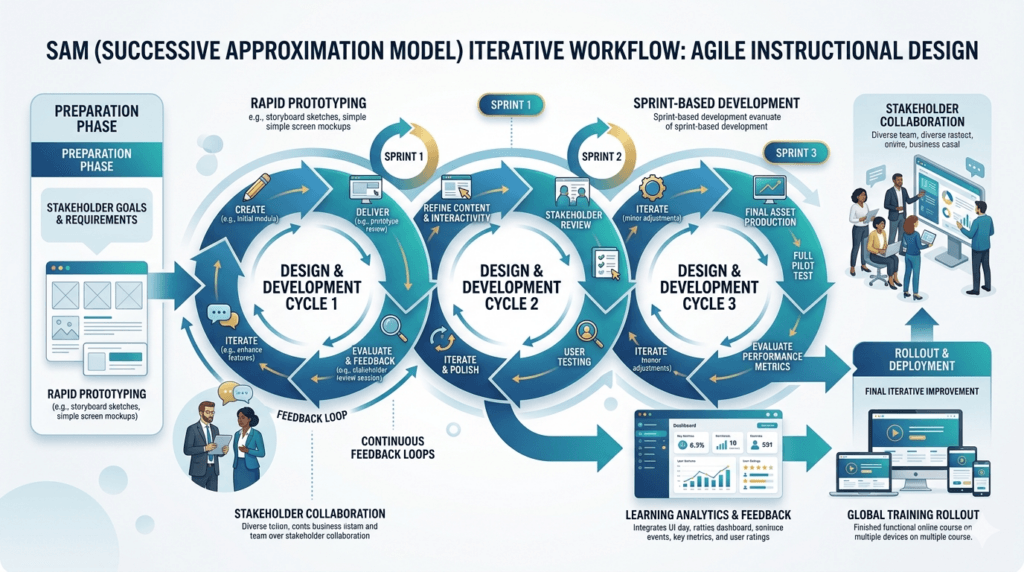
The Meridian Software Challenge: When Traditional Training Isn’t Fast Enough
It’s Monday morning at Meridian Software, a mid-sized SaaS company with 500+ employees. Their latest product release — a complete redesign of their core platform — launches in eight weeks. The training team gets the announcement: they have just 10 weeks to develop, test, and deploy comprehensive training to all users.
The traditional ADDIE model would take 16+ weeks if done perfectly. But Meridian cannot wait that long. They need training that is launch-ready — without cutting corners on quality. That is where the Successive Approximation Model (SAM) enters the game.
In this article, I will walk you through exactly how Meridian would use SAM to compress their timeline, maintain quality, and actually improve their training through real-world testing. If you have ever felt trapped between time pressure and quality standards, this guide will show you a proven way forward.
Where SAM Fits Among Instructional Design Models
SAM does not exist in isolation. It is one of several instructional design frameworks available to L&D practitioners — each suited to different contexts, constraints, and learning goals. Understanding where SAM sits in this ecosystem helps you make better decisions about when to use it.
| Model / Framework | Core Principle | Best Use Case | Relationship to SAM |
| ADDIE | Linear, sequential phases: Analysis, Design, Development, Implementation, Evaluation | Stable, well-defined content; compliance training | SAM’s primary alternative — both are ISD frameworks. SAM evolved as an agile response to ADDIE’s rigidity. |
| SAM (Successive Approximation Model) | Iterative prototyping, continuous learner feedback, rapid development cycles | Evolving requirements, tight timelines, performance improvement | The focus of this article. Agile alternative to ADDIE with built-in formative evaluation. |
| Bloom’s Taxonomy | Hierarchy of cognitive learning objectives: Remember → Understand → Apply → Analyse → Evaluate → Create | Writing measurable learning objectives at the right cognitive level | Informs the learning objectives phase of SAM’s Preparation stage. Bloom’s helps you define what ‘good’ looks like before you prototype. |
| Kolb’s Experiential Learning Cycle | Learning through experience: Concrete Experience → Reflection → Abstract Conceptualisation → Active Experimentation | Designing experiential learning activities, simulations, on-the-job training | SAM’s iterative loops mirror Kolb’s cycle — prototype, experience, reflect, refine. Both emphasise learning by doing. |
| Dick and Carey Model | Systematic instructional design with detailed task analysis and criterion-referenced testing | Complex technical training requiring rigorous task analysis | More detailed than ADDIE, less agile than SAM. Often used when learner performance must be precisely measurable. |
| Agile Learning Design (ALD) | Software-inspired sprints, backlogs, and retrospectives applied to L&D development | Large L&D teams with multiple concurrent projects; digital learning ecosystems | SAM is the most widely adopted agile L&D framework. ALD extends SAM’s principles with full Scrum/Kanban tooling. |
| 🎯 TrainerCentric Insight |
| In practice, experienced L&D professionals rarely use a single model in isolation. A common approach: use Bloom’s Taxonomy to write objectives during SAM’s Preparation phase, draw on Kolb’s cycle when designing practice activities during Iterative Development, and reference Dick and Carey when a task analysis reveals high-stakes performance requirements. SAM provides the project management structure; the other frameworks inform the design decisions within it. |
SAM vs ADDIE: A Detailed Comparison
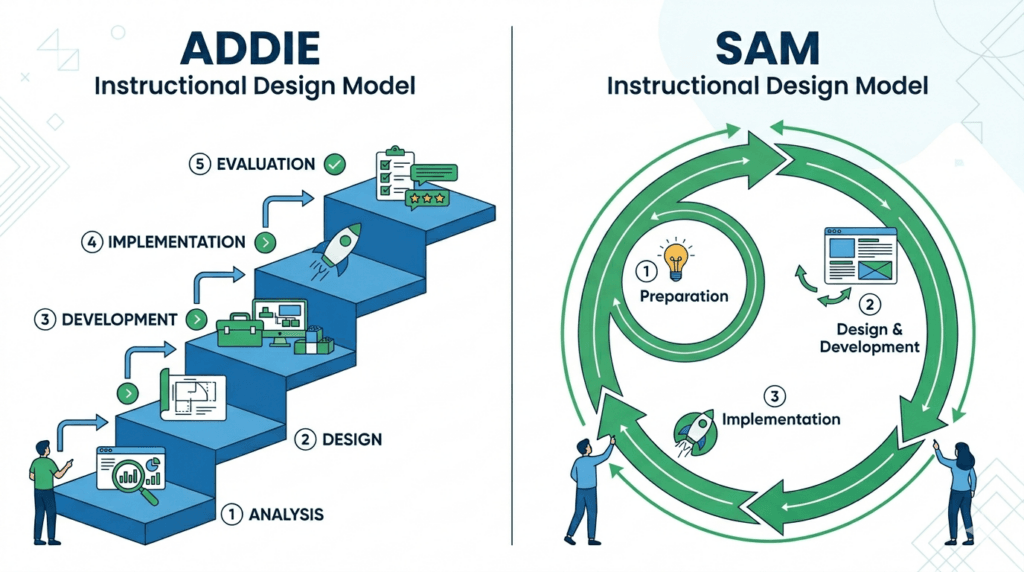
Both SAM and ADDIE are proven instructional design frameworks, but they serve very different contexts. Before committing to either, it helps to understand where each excels — and where it falls short.
| Aspect | ADDIE | SAM (Successive Approximation Model) |
| Approach | Linear, sequential — each phase must complete before the next begins | Iterative, cyclical — design, build, test, refine in rapid loops |
| Timeline | Longer upfront planning (16+ weeks typical) | Shorter cycles; 2–4 weeks per iteration |
| Testing / Evaluation | Formative evaluation happens after development completes | Prototype testing happens continuously throughout development |
| Stakeholder Involvement | Front-loaded; review happens at formal milestones | Continuous; stakeholders review rough prototypes in every sprint |
| Learner Feedback | Typically gathered post-launch | Gathered during iterative design via rapid prototyping with real users |
| Flexibility | Low — changes late in the process are costly | High — agile learning design accommodates evolving requirements |
| Documentation | Extensive; required for compliance trails | Lighter; focused on sprint outcomes and learner data |
| Best for | Stable, well-defined content; regulatory / compliance training | Evolving requirements, tight timelines, performance improvement initiatives |
| Risk Profile | Risk surfaces late — problems discovered after full build | Risk surfaces early — prototype testing catches issues before full build |
| 🎯 TrainerCentric Insight |
| Neither model is universally superior. ADDIE is your friend when requirements are locked and compliance documentation is non-negotiable. SAM is your friend when the organisation needs something working fast, requirements are evolving, or you are running a performance improvement initiative that demands real learner data. Most experienced L&D practitioners know both — and pick the right one for each context. |
SAM1 vs SAM2: Which Version Should You Use?
Michael Allen and Allen Interactions introduced SAM2 as an evolution of the original model. Here is what changed:
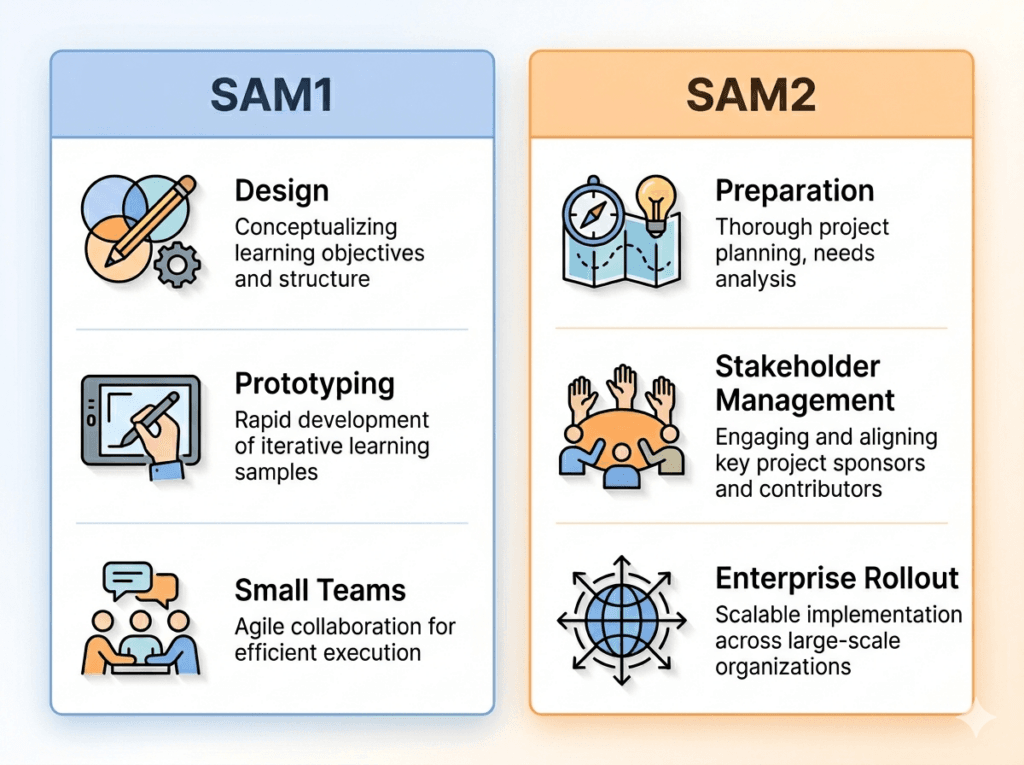
For Meridian’s use case, SAM2 is the better fit because they need to address stakeholder concerns, plan their rollout, and measure success beyond just the training module itself.
Why Iterative Design Works: What the Research Says
Before we walk through Meridian’s implementation, it is worth grounding SAM in evidence. The case for iterative, agile learning design is not just theoretical:
📊 Key Research & Data
Development efficiency: According to ATD’s 2023 State of the Industry Report (ATD, 2023), organisations that embed evaluation throughout training development — rather than only at the end — consistently report shorter revision cycles and higher stakeholder satisfaction. This aligns directly with SAM’s formative evaluation approach.
Agile in L&D: The Learning Guild’s research on agile learning design (The Learning Guild, 2022) found that L&D teams adopting iterative development practices reported reduced time-to-deployment and fewer post-launch content revisions compared to teams using linear models. Rapid prototyping was identified as the single biggest time-saver.
Learning retention: Research on learner-centred design published in the Journal of Applied Instructional Design (Vol. 11, No. 3, 2022) found that iterative, feedback-driven design approaches produced stronger learner performance outcomes than content designed without iterative testing — reinforcing the case for SAM’s continuous prototype testing cycles.
Prototype testing ROI: Michael Allen’s foundational work (Allen, 2012) cites that the cost of fixing a design flaw in the prototype stage is a fraction of the cost of fixing it post-production. This “fail fast, fix cheap” principle is the financial engine behind SAM’s agile approach.
The Three Phases of the SAM Model Explained
Whether you are using SAM1 or SAM2, the model is built around three core phases. Each phase has a distinct purpose — and understanding them before diving into an implementation example will make the Meridian walkthrough far clearer.
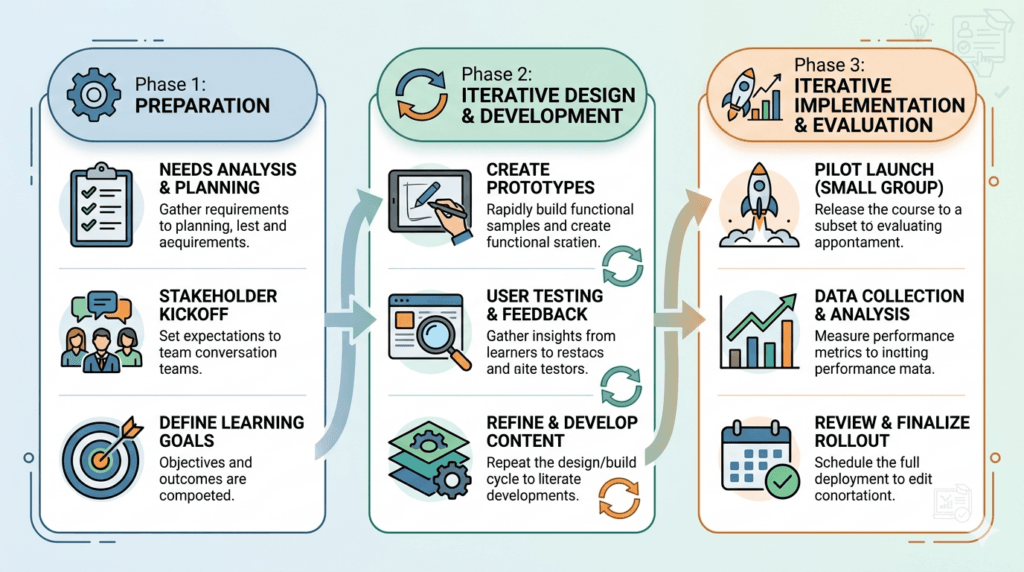
Phase 1: Preparation (Savvy Starts)
The Preparation phase is intentionally brief. Unlike ADDIE’s Analysis phase — which can run for weeks and produce detailed needs assessment documents — SAM’s Savvy Starts is a focused kickoff. The goal is to gather just enough information to begin prototyping: who are the learners, what must they be able to do, and what does success look like? A one-page learning brief is typically sufficient.
| 🎯 TrainerCentric Tips |
| The biggest mistake in Phase 1 is over-analysing. If your Preparation phase runs longer than two weeks, you are doing ADDIE with a SAM label. Timebox it firmly — the prototype stage will surface any gaps in your analysis far faster than any document will. |
Phase 2: Iterative Design & Development
This is where SAM earns its reputation. The iterative design and development phase runs in sprint cycles of one to two weeks each. Each sprint covers the same sequence: build a rough prototype, test it with real learners, analyse the feedback, and refine before release. The key word is rough — a prototype does not need to be polished. It needs to be testable. Early feedback on an imperfect prototype is worth far more than late feedback on a polished one.
Formative evaluation is the engine of this phase. Unlike summative evaluation (which measures outcomes after training is complete), formative evaluation catches design problems while they are still cheap to fix. This is why SAM consistently produces lower rework costs than linear development models — problems are identified in week two, not week sixteen.
Phase 3: Iterative Implementation & Evaluation
SAM does not end at launch. Phase 3 begins with a controlled pilot — a small group of early adopters who use the training under real conditions and provide structured feedback. Based on pilot findings, rapid fixes are made before full rollout. After full deployment, the improvement cycle continues: monthly sprints refine modules based on learner performance data, help desk ticket trends, and user feedback. This is what separates a SAM-built training programme from a traditional one — it gets better over time, by design.
How Meridian Software Uses SAM: The 3-Phase Walkthrough
Let us follow Meridian through their entire SAM journey, phase by phase. At each step, you will see exactly what they do, what templates they use, and how you can apply the same approach to your training initiatives.
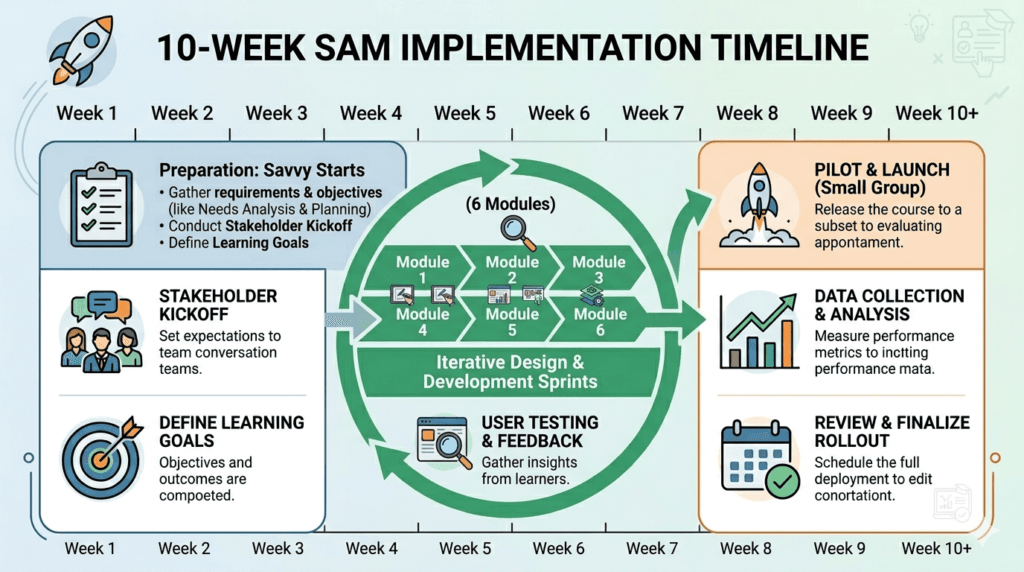
Phase 1: Preparation (Savvy Starts) — Weeks 1–2
Meridian does not jump straight into building. Instead, they invest two weeks in smart preparation. This is not the heavy analysis of ADDIE; it is lighter, faster, and focused on speed.
Step 1: Gather Requirements (Fast)
Meridian’s training team meets with product managers, customer success teams, and 5–10 power users to understand:
- What are the critical features users must know?
- What is causing confusion in beta testing?
- What is the biggest pain point users experience today?
- What can we skip without harming adoption?
They do not create a 50-page requirements document. Instead, they fill out a one-page summary: business goal, target audience, critical tasks, and initial timeline assumptions.
Step 2: Identify Your Iterative Teams
SAM works best with small, agile teams. Meridian forms:
- Core Team: 1 Instructional Designer, 1 SME (product manager), 1 Designer = 3 people
- Review Team: Customer success lead + 2–3 pilot users
- Stakeholder: Training manager (weekly check-ins, not daily)
| ⚠️ TrainerCentric Tip |
| SAM requires decision-makers who can say yes or no in real-time. If prototype approvals require sign-off from five people — or if stakeholders need more than 48 hours to review — SAM will lose much of its speed advantage. Establish decision authority before Sprint 1 begins. |
Step 3: Create Your Iterative Design Framework
Meridian’s core team maps out the major topics their training will cover using a modular topic map. Example: for the new platform, they identify 8 modules:
- Dashboard Navigation
- Creating Projects
- Team Collaboration Features
- Reporting & Analytics
- Integrations
- Account Settings
- Troubleshooting Common Issues
- Advanced Features (stretch goal — post-launch iteration)
Modules 1–6 are must-haves for launch. Module 7 is nice-to-have. Module 8 ships in a follow-up iteration.
Phase 2: Iterative Design & Development — Weeks 3–9
This is where SAM shows its magic. Meridian enters a two-week sprint cycle for each major module. Each cycle includes design, build, test, review, and refine — all happening in parallel, not sequentially.
Step 1: Build Your First Prototype (Week 3–4)
Meridian’s ID and designer spend three to four days creating a clickable prototype of Module 1 (Dashboard Navigation). It is rough — sketchy, incomplete in places, but functional enough for feedback. They use:
- A simple Figma prototype for the learning experience design (LXD)
- A Google Doc with interaction notes
- Screen recordings showing the flow (3–5 minutes total)
This prototype is intentionally incomplete. The goal is clarity, not perfection: Is this the right direction? Rough prototypes also make reviewers more comfortable suggesting changes — a polished design creates hesitation.
Step 2: Test with Real Learners (Day 5–6)
The Review Team — 2–3 power users and a customer success manager — test Module 1. They do not use a formal evaluation rubric. Instead, the core team watches them use the training and asks:
- What was confusing?
- What did you want to click but could not?
- Did this help you understand the feature?
- What should we change for the next version?
This is formative evaluation at its most practical: learner feedback informing design in real time.
Step 3: Iterate & Release (Day 7)
Based on feedback, Meridian’s core team spends one day refining the prototype. Example changes:
- Add a 30-second walkthrough video (users asked for this)
- Reorganise the module flow (users said steps were out of order)
- Simplify the language (SME realised the jargon was too technical)
Then Module 1 ships. Not perfect — but real and useful. And they have spent one week, not three, getting to a working product.
This cycle repeats: Weeks 5–6 (Module 2), Weeks 7–8 (Module 3), and so on. By week 9, Meridian has working training for 6+ modules.
Phase 3: Iterative Implementation & Evaluation — Weeks 10+
The product launches. The training launches. But SAM does not stop — it evolves. Meridian enters ongoing improvement cycles.
Step 1: Launch with a Pilot Group
Meridian does not deploy training to all 500+ users at once. Instead, they launch to a pilot group of 50 early adopters. These users are trained, monitored, and asked for feedback. Meridian tracks:
- Completion rates — are people finishing the training?
- Time spent — is it taking way longer than expected?
- Help desk tickets — are training-related questions increasing?
- User feedback — what is not working?
During the two-week pilot, they discover: users are getting stuck on Team Collaboration Features (Module 4). The training assumes knowledge they do not have.
Step 2: Quick Fix & Re-Test
Meridian’s core team spends three days revising Module 4. They add prerequisite content, restructure the flow, and test with the pilot group again. In one week, the module is significantly improved.
| 💡 TrainerCentric Insight |
| This is where SAM dramatically outperforms ADDIE. In a traditional linear model, discovering a module-level problem post-launch might mean weeks of rework, stakeholder re-approval, and re-deployment. In SAM, it is a three-day sprint. The ability to respond rapidly to learner feedback is not a nice-to-have — it is the entire point of iterative design. |
Step 3: Measure ROI & Plan Next Iterations
After the full launch, Meridian measures training effectiveness using these metrics:
- Adoption Rate: % of users completing training within two weeks (goal: 85%)
- Time-to-Competency: Average days until users are comfortable with the platform (goal: under 5 days)
- Support Cost Reduction: Help desk tickets per 100 users (pre- vs. post-training)
- User Confidence: Simple survey (1–5 scale) on comfort with the new platform
Illustrative Example Results (Actual results vary by organisation)
85% of users completed training. Average time-to-competency: 4.2 days. Help desk tickets dropped 40%. User confidence improved from 2.1 to 4.3 on a 5-point scale.
Meridian spent 10 weeks and approximately $25K on training development. Illustrative value calculation:
• Faster adoption = 2 weeks of extra productivity across 500 users ≈ $80K value
• Reduced support costs = 400 fewer help desk tickets at $20/ticket ≈ $8K saved
• Reduced training-related churn = 5 customers retained at $50K LTV ≈ $250K value
Illustrative total value: ~$330K on a ~$25K investment (≈1,220% illustrative ROI).
⚠ Illustrative example only. Actual results vary significantly by organisation, industry, and training context. Real training ROI calculation should use your own adoption, productivity, and retention data.
Advantages and Disadvantages of the SAM Model
Like any instructional design framework, SAM has genuine strengths and real limitations. Understanding both will help you decide when to use it — and when to reach for ADDIE or another model instead.
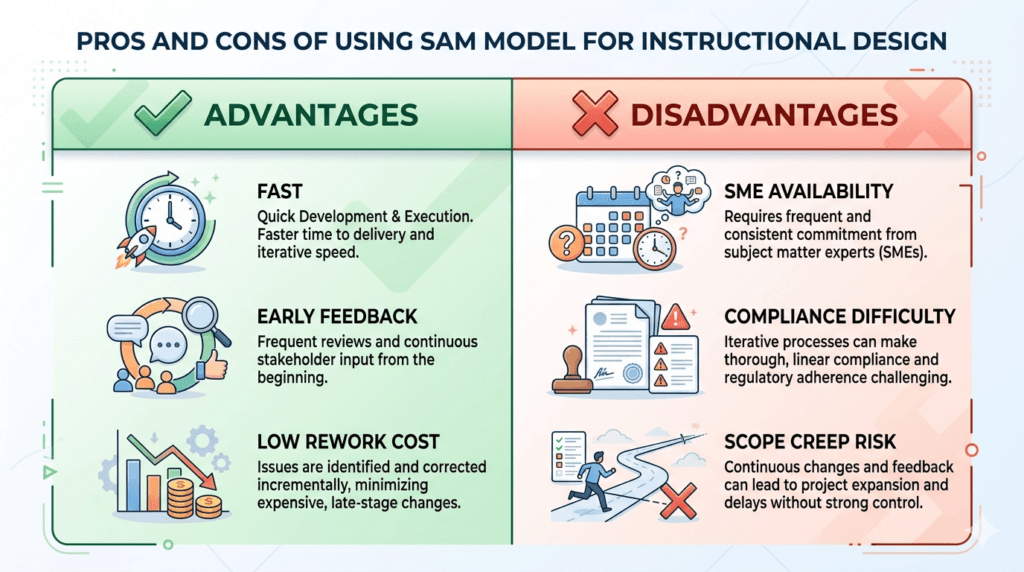
Advantages of SAM
- Faster development cycles: Rapid prototyping gets usable training into learners’ hands weeks earlier than linear methods.
- Early stakeholder feedback: Rough prototypes surface misaligned expectations before expensive production work begins.
- Lower rework costs: Formative evaluation throughout development catches problems early, when changes are cheap.
- Higher learner alignment: Continuous prototype testing with real users means the final product reflects actual learner needs, not assumptions.
- Better adaptation to change: Agile learning design handles evolving requirements gracefully — each sprint can absorb new information.
- Stronger learning experience design: Human-centred, feedback-driven iteration tends to produce more engaging, effective training interventions.
Disadvantages of SAM
- Requires SME availability: SAM depends on SMEs reviewing prototypes within 24–48 hours. If they are unavailable, sprints stall.
- Difficult in compliance-heavy environments: Regulatory training often requires pre-defined outcomes and documented approvals — which conflict with iterative flexibility.
- Risk of scope creep: Without strict sprint boundaries, each iteration can expand in scope, erasing the speed advantage.
- Demands rapid decision-making: SAM requires stakeholders who can make fast, binding decisions. Organisations with slow approval cultures struggle.
- Not ideal for stable content: If requirements are fixed and content is well-defined, the overhead of iterative design may not be worth it.
5 Common SAM Pitfalls (and How Meridian Avoided Them)
Pitfall 1: Confusing Rough with Incomplete
Some teams think SAM means you can ship training that is half-done. Wrong. Meridian’s prototypes were rough in style, but functionally complete. Each module worked end-to-end before user testing. The difference: a polished prototype that is 80% right takes three weeks to build. A rough prototype that is 80% right takes three days. SAM optimises for the latter.
Pitfall 2: Agile Does Not Mean No Planning
Meridian spent Weeks 1–2 on Savvy Starts because SAM requires clarity upfront: Who are the users? What are the success metrics? What is non-negotiable? If you skip this, you will iterate randomly, not smartly. The planning is lighter than ADDIE, but it is real.
Pitfall 3: Stakeholders Who Want Just One More Revision
SAM requires discipline. Meridian set a rule: each sprint has exactly one feedback cycle. After the Day 6 review, changes are locked. Everything else goes into the next iteration or post-launch improvement. Without this boundary, you will iterate forever and lose the speed advantage SAM offers.
| ⚠️ TrainerCentric Tip |
| This is where SAM dramatically outperforms ADDIE. In a traditional linear model, discovering a module-level problem post-launch might mean weeks of rework, stakeholder re-approval, and re-deployment. In SAM, it is a three-day sprint. The ability to respond rapidly to learner feedback is not a nice-to-have — it is the entire point of iterative design. |
Pitfall 4: Ignoring the SME
Rapid iteration without SME involvement leads to inaccurate training. Meridian’s SME (product manager) was embedded in the core team, not treated as a gatekeeper. They reviewed every prototype within 24 hours, not every two weeks. This kept accuracy high while maintaining speed.
Pitfall 5: Not Measuring Impact Per Iteration
The biggest mistake: building 10 modules with no idea which ones work. Meridian measured after every 2–3 modules: Is the training actually helping users? If a module was not moving the needle on time-to-competency, they cut it and invested effort elsewhere. SAM plus measurement equals strategic training — not just fast training.
SAM Implementation Checklist: Your Step-by-Step Roadmap
Use this checklist to ensure you are implementing SAM correctly. Adapt it for your specific project and organisational context.
| Phase | Checklist Item | Status |
| Preparation | Define learning objectives in 1-page summary | ☐ |
| Preparation | Identify core team members (ID, SME, Designer) | ☐ |
| Preparation | Establish decision-making authority (who can say yes/no?) | ☐ |
| Preparation | Create modular topic map with priorities | ☐ |
| Preparation | Set evaluation metrics before you start | ☐ |
| Iterative Dev | Build rough prototype for Module 1 | ☐ |
| Iterative Dev | Test with 2–3 real users within 24 hours | ☐ |
| Iterative Dev | Make changes based on feedback (same day) | ☐ |
| Iterative Dev | Release Module 1 (even if imperfect) | ☐ |
| Iterative Dev | Repeat cycle for Module 2, 3, 4… | ☐ |
| Iterative Dev | Track metrics after each module release | ☐ |
| Implementation | Launch with pilot group (not all users) | ☐ |
| Implementation | Monitor help desk tickets & user feedback | ☐ |
| Implementation | Make quick fixes within 3–5 days | ☐ |
| Implementation | Re-test fixes with pilot group | ☐ |
| Implementation | Full rollout after pilot validation | ☐ |
| Evaluation | Calculate training ROI (adoption, support cost, retention) | ☐ |
| Evaluation | Plan next iterations based on data | ☐ |
| Evaluation | Document lessons learned | ☐ |
| Ongoing | Schedule monthly improvement sprints | ☐ |
SAM Best Practices: 7 Things Meridian Does Right
| Best Practice | Why It Matters |
| Keep the core team small (3–4 people) | Decisions happen fast. Large teams create bottlenecks in iterative design cycles. |
| Set one decision deadline per sprint | Iteration is powerful, but unlimited revision kills the speed advantage SAM offers. |
| Test every iteration with real learners | Feedback from your target audience beats internal opinions every time. |
| Prioritise ruthlessly | You cannot build everything. Identify must-haves vs. nice-to-haves before each sprint. |
| Measure after every 2–3 modules | Data tells you what is working. Formative evaluation at each stage prevents wasted effort. |
| Launch with a pilot first | Early adopters surface problems before full rollout — a cornerstone of human-centred learning. |
| Plan post-launch iterations monthly | SAM does not end at launch. Continuous improvement is baked into the model. |
When NOT to Use SAM (and What to Do Instead)
Compliance Training
If your training must meet specific regulatory requirements (HIPAA, SOX, industry certifications), stick with ADDIE. Regulators want documented processes and pre-defined outcomes, not iterative prototyping. SAM’s speed comes from flexibility — which compliance training does not have.
Stable, Well-Defined Content
If the training need is clear, requirements are fixed, and you have adequate time, ADDIE is the right choice. SAM shines when things are uncertain. If they are not, you may be overengineering the solution.
No Access to Real Learners
SAM requires feedback from actual learners every 1–2 weeks. If your users are not available for prototype testing, SAM loses its main advantage. Find a way to get learners involved, or reconsider the approach.
The Bottom Line: Why Meridian’s Approach Works
Meridian compressed their training timeline from 16 weeks to 10. They did not sacrifice quality — they actually improved it by testing continuously. They did not guess what users needed — they asked them. And they did not ship training in a vacuum — they measured impact and iterated.
That is the power of SAM: it is not faster because it is sloppier. It is faster because it is smarter. Iterative design, rapid prototyping, and continuous learner feedback are not shortcuts — they are a more rigorous approach to learning and development.
If you are facing timeline pressure, evolving requirements, or the need to demonstrate training effectiveness, SAM is worth a serious look. Start with the checklist, follow the phases, and do not skip the feedback loops. Your training will be ready faster — and your organisation will adopt it better.
A Final Note from a Training Veteran
I have been in corporate training for 25+ years. I have watched instructional designers get paralysed by perfect planning, watched stakeholders demand just one more round of edits, and watched training launch with nobody using it because requirements changed mid-project.
SAM is not a magic fix. But it is a practical philosophy: move fast, listen to your learners, and improve continuously. Meridian’s story is not fictional — it is representative of real organisations using agile learning design to deliver better training, faster.
If you are tired of bloated timelines and training that misses the mark, give SAM a real shot. Your learners will thank you.
Ready to Build Training Faster? Here’s What to Do Next
- Download All SAM Templates: Use the download links throughout this article to grab the Learning Objectives Summary, Team Charter, Topic Map, Feedback Forms, Checklist, and ROI Calculator.
- Explore Related Articles: Dive deeper into ADDIE with our comprehensive guide, or browse our full Instructional Design Cluster for more training methodologies.
- Subscribe to the TrainerCentric Digest: Get practical training strategies, case studies, and templates delivered to your inbox every month.
Frequently Asked Questions: SAM Model
What does SAM stand for in instructional design?
SAM stands for Successive Approximation Model. It is an iterative instructional design framework developed by Michael Allen of Allen Interactions. The name refers to its core method: approaching a finished training product through successive approximations — each iteration getting closer to the ideal solution through rapid prototyping and continuous learner feedback.
Who created the SAM Model?
The SAM Model was created by Michael Allen, founder of Allen Interactions and a pioneer in e-learning and instructional design. Allen introduced SAM in his 2012 book Leaving ADDIE for SAM: An Agile Model for Developing the Best Learning Experiences, published by ASTD Press (now ATD Press). The model was developed as a practical alternative to ADDIE for organisations needing faster, more responsive training development.
What are the phases of the SAM Model?
The SAM Model has three phases:
Phase 1 — Preparation (Savvy Starts): Rapid information gathering to establish goals, audience, and success metrics.
Phase 2 — Iterative Design & Development: Sprint-based cycles of prototype → test → feedback → refine → release.
Phase 3 — Iterative Implementation & Evaluation: Pilot launch, rapid fixes, full rollout, and ongoing monthly improvement sprints.
What is the difference between SAM1 and SAM2?
SAM1 is the original model, focused on design and development iteration. It is best suited to medium-sized training projects. SAM2 is an evolved version that adds a more structured Preparation phase (Savvy Starts) and a formalised Implementation phase with stakeholder management. SAM2 is recommended for enterprise or large-scale deployments where multiple teams, stakeholders, and rollout phases are involved.
How long does a SAM project typically take?
A SAM project is scoped in sprints, not months. Phase 1 (Preparation) typically takes one to two weeks. Each module in Phase 2 takes one to two weeks per sprint cycle. A training programme with six modules could realistically be developed and piloted in eight to ten weeks — compared to sixteen or more weeks with a traditional ADDIE approach. Phase 3 (ongoing iteration) continues post-launch on a monthly cadence.
Does SAM work for compliance training?
Generally, no. Compliance training — HIPAA, SOX, industry certifications, and similar regulatory programmes — requires pre-defined outcomes, locked content, and documented approval trails. SAM’s flexibility and iterative nature are at odds with these requirements. For compliance training, ADDIE or a structured ISD approach with formal sign-off gates is the more appropriate choice.
What tools do you need to implement SAM?
SAM does not require specific software tools — it is a methodology, not a platform. However, the following tools are commonly used in SAM implementations:
1. Prototyping tools: Figma, PowerPoint, or even paper sketches for early-stage prototypes
2. Authoring tools: Articulate Storyline, Rise, Adobe Captivate for development sprints
3. Project management: Trello, Asana, or Jira for sprint tracking
4. Feedback collection: Google Forms, Typeform, or structured interview protocols
5. Analytics: Your LMS reporting, combined with help desk ticket data and user surveys
Can SAM be used for face-to-face or blended training, or only e-learning?
SAM works across all modalities. While it is most commonly associated with e-learning (partly because Allen Interactions is an e-learning company), the iterative prototyping and feedback principles apply equally to instructor-led training (ILT), virtual instructor-led training (VILT), blended learning programmes, and performance support tools. The sprint structure adapts well to any training format where you can test a prototype with real learners.
References
The following sources inform this article and support the SAM framework described above:
- Allen, M. W. (2012). Leaving ADDIE for SAM: An Agile Model for Developing the Best Learning Experiences. Alexandria, VA: ASTD Press (now ATD Press). ISBN: 978-1-56286-848-8.
- Allen Interactions. (n.d.). The Successive Approximation Model (SAM). Allen Interactions website. Retrieved from alleninteractions.com/sam-process
- Association for Talent Development (ATD). (2023). State of the Industry Report 2023. Alexandria, VA: ATD. Available at td.org/research
- The Learning Guild. (2022). Agile Learning Design: Research Report. The Learning Guild. Available at learningguild.com
- Journal of Applied Instructional Design. (2022). Vol. 11, No. 3. Peer-reviewed research on iterative instructional design and learner-centred approaches. Available at jaied.org
- Dick, W., Carey, L., & Carey, J. O. (2015). The Systematic Design of Instruction (8th ed.). Pearson. [Referenced in the instructional design ecosystem section]
- Bloom, B. S., et al. (1956). Taxonomy of Educational Objectives: The Classification of Educational Goals. Handbook I: Cognitive Domain. New York: David McKay. [Referenced in the instructional design ecosystem section]
| 📌 Note on ROI Figures |
| The ROI figures cited in the Meridian case study (1,220% ROI, $330K value) are illustrative examples designed to demonstrate the framework of training ROI calculation. They are not claimed as empirical data. Actual training ROI varies significantly based on industry, organisation size, learner population, and business context. Always calculate ROI using your own organisational data. |
Further Reads
- Bloom’s Taxonomy
- Instruction Designing Models
- ADDIE Model of Instructional Designing
- Merrill’s Principles of Instruction: Designing Skill-Based Training
- Kolb’s Learning Cycle: Using Experiential Learning in the Workplace
- Gagné’s 9 Events of Instruction: A Practical Guide for Trainers with Real Examples
- ADDIE vs SAM: Which Instructional Design Model Should You Use in 2026?
- ARCS Model of Motivation — The Complete Guide for Corporate Trainers [2026]
- Adult Learning Theory (Andragogy): Knowles’ 6 Principles Explained with Workplace Examples
- Cognitive Load Theory Explained: A Practical Guide for Trainers & Instructional Designers
- Kirkpatrick Model: How to Measure Training Effectiveness
- 12 Facilitation Skills for Corporate Trainers: The Complete Guide
- Scenario Based Learning: The Complete Guide to Designing Training
- Backward Design – The Complete Framework for Planning Learning
- Action Mapping: A Step-by-Step Guide with Examples
- Corporate eLearning Playbook: The Complete Guide to Designing, Delivering, and Scaling Digital Learning
- Story-Based Learning Design: A Practical 5-Step Framework
Author Details

Soumyadeep Sen is a Learning & Development professional with over 14 years of experience across training, coaching, quality, and performance improvement. Currently serving as Assistant Manager – Training at 24/7.ai, he specializes in designing practical learning solutions that drive employee performance and support business objectives. When he’s not designing learning programs, Soumyadeep enjoys exploring emerging trends in workplace learning, talent development, and instructional design. Reach out to him via Linkedin: https://www.linkedin.com/in/soumyadeep-sen-37515046/