Introduction: How to Convert Classroom Training to eLearning
A regional bank I consulted for a few years ago had a problem that will sound familiar to almost anyone in L&D right now. Their flagship leadership program — three intense days in a hotel conference room, built over a decade, beloved by facilitators — had to go digital. Travel budgets were cut. The workforce had gone hybrid. And the CLO’s brief was blunt: “Put it online, but don’t let it turn into a click-through snoozefest.”
That brief is the entire subject of this article.
Converting classroom training to eLearning is not a file format problem. It is not “record the slides and upload them.” Done badly, it produces exactly what that CLO feared — a digital shell of a once-effective program, with the energy, the facilitation, and the learning stripped out of it. Done well, it can outperform the original classroom session, because eLearning gives you things a room full of chairs never could: personalization, spaced practice, real-time data, and infinite scalability.
This guide is the resource we wish existed when we started doing this work. It walks through why organizations are converting instructor-led training (ILT) in the first place, when conversion is the wrong call, the mistakes that quietly kill good content, and a complete, original framework — the C.O.N.V.E.R.T. Framework — for turning classroom content into eLearning that actually works. You’ll also find tool comparisons, a real-world scenario, a conversion checklist, and answers to the questions L&D teams ask us most often.
Whether you’re converting a single workshop or migrating an entire curriculum, treat this as your working reference. Bookmark it, come back to it section by section, and use the checklist near the end before you ship anything live.
What Does It Mean to Convert Classroom Training to eLearning?
Converting classroom training to eLearning means redesigning instructor-led training (ILT) into digital learning experiences that learners can complete online while preserving learning outcomes, engagement, interaction, and business impact. Effective conversion goes beyond recording presentations — it rethinks instructional design, learner activities, assessments, and reinforcement for a digital environment.
In practical terms, that means three things happen at once: the content gets re-scoped (not everything from the classroom survives), the instructional strategy gets rebuilt for a screen-based, often facilitator-free experience, and the measurement approach shifts from a facilitator’s in-room read of the group to trackable digital data. The rest of this guide walks through exactly how to do each of those well.
Why Organizations Are Moving from Classroom Training to eLearning
The shift away from pure instructor-led delivery isn’t a trend anymore — it’s the operating baseline for most corporate L&D functions. A few numbers make the scale of it clear.
Industry-wide, formal learning hours delivered per employee have been declining steadily since 2020, even as organizations keep training budgets roughly stable — a sign that the hours are shifting format, not disappearing.
According to ATD’s 2025 State of the Industry report, average formal learning hours per employee fell from 17.4 in 2023 to 13.7 in 2024, continuing a multi-year decline, even as organizations invested a higher share of revenue in talent development than they had in the previous five years.
At the same time, Training Magazine’s 2025 Training Industry Report found that virtual classrooms and webcasts have now overtaken traditional instructor-led classrooms as the most-used delivery method among mid-to-high-usage organizations, with blended learning close behind.
Compliance training tells a similar story. Research on training delivery trends shows the vast majority of organizations now run at least some mandatory or compliance training online, largely because online delivery makes it trackable, auditable, and consistent across every location — something a room-by-room classroom rollout struggles to guarantee.
Here’s why this shift keeps accelerating, in the terms L&D leaders actually use when they justify the conversion budget:
1. Distributed and hybrid workforces. When your workforce is spread across time zones, countries, or shift patterns, a single classroom session simply can’t reach everyone. eLearning removes the geography constraint entirely.
2. Cost per learner drops as scale increases. A three-day classroom program costs roughly the same whether you train 12 people or 30 — venue, travel, facilitator day-rate, and printed materials are fixed costs. An eLearning module, once built, can reach 12 or 12,000 learners at close to the same marginal cost.
3. Consistency of delivery. Ask five facilitators to run the same classroom session and you’ll get five subtly different experiences. eLearning delivers the same instructional design, the same examples, and the same assessment rigor every single time — which matters enormously for compliance, safety, and regulated-industry training.
4. Data you can actually act on. A classroom facilitator’s read on “did that land?” is a gut feeling. An LMS or Learning Experience Platform (LXP) gives you completion rates, quiz scores, time-on-task, and drop-off points down to the individual slide — data instructional designers can use to keep improving the course after launch, something Learning Analytics for L&D Professionals: A Beginner’s Guide practice depends on.
5. Learners expect on-demand access. People are used to solving problems by searching, not by waiting for the next scheduled session. eLearning meets learners in the flow of work, at the point of need.
6. Business agility. When a product, policy, or compliance requirement changes, updating one eLearning module is faster and cheaper than re-training every facilitator and re-running every classroom session.
None of this means classroom training is obsolete. It means organizations are being more deliberate about which content genuinely needs a facilitator in the room, and which content is a better candidate for Corporate eLearning Playbook: The Complete Guide to Designing, Delivering, and Scaling Digital Learning. That distinction is the subject of the next section.
| Trainercentric insight: “The mistake most organizations make isn’t choosing to convert. It’s assuming conversion means keeping everything and just changing the delivery mechanism. The content that survives the trip from classroom to screen is never the content you started with — it’s a redesigned version of it.” |
Don’t digitize the classroom. Redesign the learning. If your classroom slides still make sense without a facilitator standing next to them, they were probably thin classroom slides to begin with. Either way, they’re not ready to become eLearning as-is.
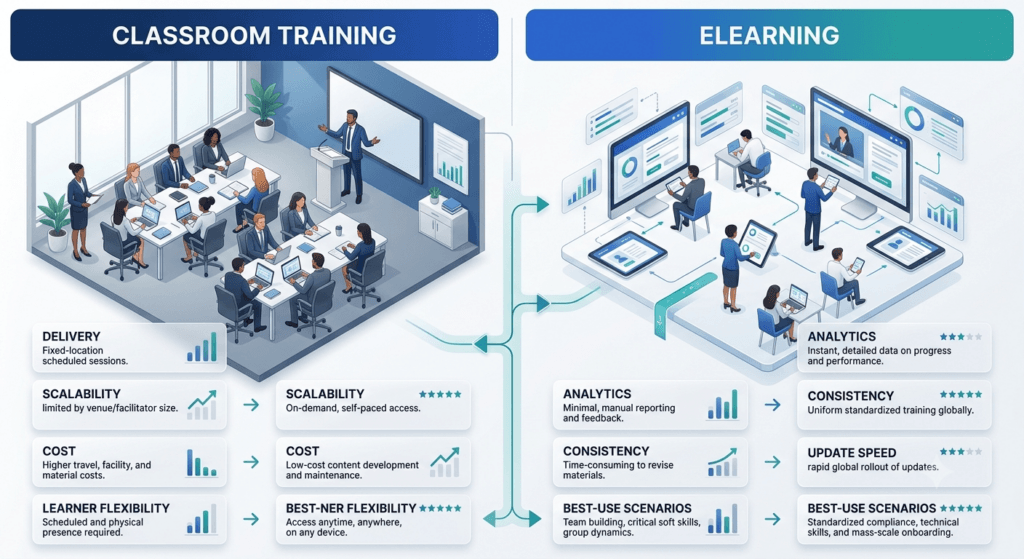
Classroom Training vs eLearning: A Quick Comparison
| Factor | Classroom Training | eLearning |
| Delivery | Instructor-led, live | Self-paced or virtual |
| Cost structure | High travel, venue, and printing cost per session | Higher upfront build cost, lower cost per additional learner |
| Scalability | Limited by room size and facilitator availability | Scales to large, distributed audiences at near-zero marginal cost |
| Schedule | Fixed date and time | Learn anytime, anywhere |
| Consistency | Facilitator-dependent — varies session to session | Consistent delivery every time |
| Analytics | Difficult to track beyond attendance and feedback forms | Rich, granular learning analytics (completion, scores, time-on-task) |
| Update speed | Requires re-training facilitators and re-running sessions | Update once, live everywhere immediately |
| Best for | Interpersonal skills, hands-on tasks, team-building | Knowledge transfer, procedural content, compliance, reference material |
When NOT to Convert Classroom Training
Before you convert anything, ask whether it should be converted at all. Not every classroom program is a good eLearning candidate, and forcing the wrong content online wastes budget and damages trust in digital learning generally.
Classroom training is usually still the right call when:
- The learning objective is fundamentally interpersonal. Negotiation practice, difficult-conversation role-play, conflict resolution, and coaching skills rely on real-time human reaction. You can simulate some of this with branching scenarios or virtual role-play tools, but high-stakes interpersonal skill-building often needs a live human on the other side.
- Psychomotor or hands-on skills require physical supervision. Operating machinery, hands-on lab work, or safety-critical physical procedures usually require in-person observation and correction, at least for the initial certification.
- Team cohesion is the actual goal. If the real business objective of the session is relationship-building, culture-setting, or cross-functional trust (common in onboarding and leadership offsites), the room is the product. Converting it to eLearning removes the thing you were actually trying to achieve.
- The content changes too fast to justify build costs. If the subject matter will be materially different in eight weeks, the time and cost of a full eLearning build may not pay back before it’s outdated. A live session or a lightweight job aid may be more appropriate until the content stabilizes.
- The audience is very small and one-time. Building a polished eLearning module for 15 people who will never take it again rarely clears the ROI bar. Save conversion effort for content with repeat or ongoing audiences.
In many of these cases, the right answer isn’t “classroom OR eLearning” — it’s [Internal Link: Blended Learning Design: How to Combine Online and In-Person Training] — keep the parts of the classroom experience that need a human, and convert the parts that don’t (knowledge transfer, procedural steps, compliance content, pre-work, and reinforcement) into digital formats. Blended design is often the more honest, more effective outcome of a conversion project than a fully digital replica.
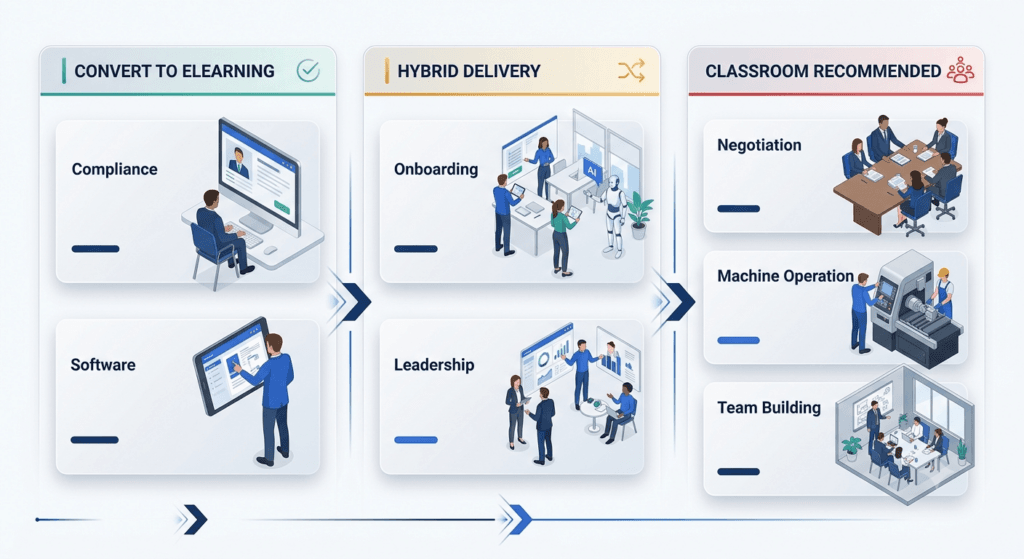
“Can You Convert This?” — A Quick Decision Matrix
Use this as a fast gut-check before scoping any conversion project. It’s a starting filter, not a final verdict — every organization has exceptions.
| Training Type | Convert to eLearning? |
| Compliance / policy training | ✅ Yes |
| Software / systems training | ✅ Yes |
| Product knowledge | ✅ Yes |
| Process and procedural training | ✅ Yes |
| Onboarding (knowledge components) | ✅ Yes |
| Leadership coaching | ⚠️ Hybrid |
| Negotiation skills | ⚠️ Hybrid |
| Sales role-play | ⚠️ Hybrid |
| Difficult conversations / conflict resolution | ⚠️ Hybrid |
| Team building | ❌ Usually no |
| Machine operation / safety-critical physical tasks | ❌ Mostly classroom |
| New-hire culture immersion | ❌ Usually no |
Common Mistakes During Conversion
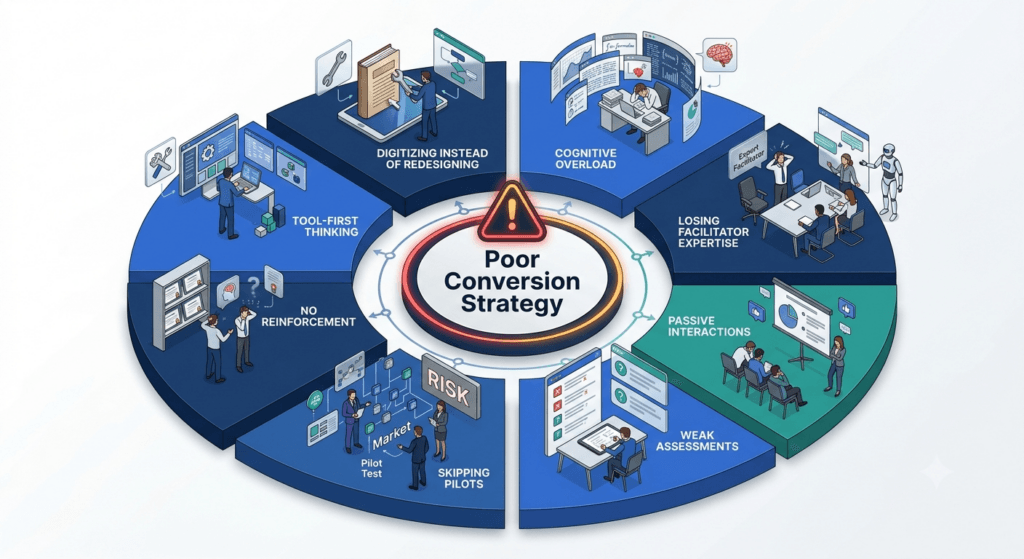
Most failed conversions fail for the same handful of reasons. If you recognize your project in more than two of these, stop and course-correct before you build anything further.
Mistake 1: “Digitizing” instead of redesigning
This is the single most common failure mode. A team takes the facilitator’s slide deck, adds a voiceover, and calls it eLearning. The result is a passive, linear video with none of the interactivity, pacing control, or engagement mechanics that make digital learning work. Classroom slides were built to support a live human explaining them — they were never meant to stand alone.
Mistake 2: Ignoring cognitive load
Classroom sessions have a built-in pacing mechanism: the facilitator, who reads the room and slows down or speeds up. eLearning has no such safety net. Cramming 45 minutes of dense classroom content into a 45-minute module without breaking it into digestible chunks overwhelms working memory — a well-documented problem described by Cognitive Load Theory for Instructional Designers, one of the foundational models every instructional designer should understand before touching a conversion project.
Mistake 3: Losing the facilitator’s expertise
The best part of many classroom sessions is the facilitator’s war stories, on-the-spot examples, and ability to answer “but what about…” questions. Conversion projects often lose all of this because nobody captures it. Before you convert, interview the facilitator and mine their delivery for the anecdotes, analogies, and FAQ-style tangents that actually made the session land — this is genuinely valuable Instructional Design Model Playbook raw material.
Mistake 4: No interaction beyond “click next”
Passive page-turners are the reason eLearning has a bad reputation in some organizations. If a learner can complete your module without making a single meaningful decision, you haven’t built eLearning — you’ve built a slideshow with a progress bar.
Mistake 5: Treating the final quiz as “assessment”
A five-question multiple-choice quiz at the end, testing recall of definitions, rarely measures whether the learning objective was actually met. Assessment needs to be designed against the actual outcome — application, judgment, or decision-making — not just fact recall.
Mistake 6: Skipping the pilot
Teams under deadline pressure often skip piloting the converted course with a small representative group before full rollout. This is how organizations discover, post-launch, that a video doesn’t play on certain devices, that a scenario doesn’t make sense to frontline staff, or that the course takes twice as long as planned.
Mistake 7: No plan for reinforcement
Classroom training benefits from social reinforcement — colleagues who sat through it together, referencing it afterward. eLearning, taken in isolation, is more vulnerable to the [Internal Link: The Forgetting Curve: What It Means for Training Reinforcement]. If there’s no follow-up, spaced practice, or manager reinforcement built into the plan, retention drops fast regardless of how well the module itself was built.
Mistake 8: Choosing tools before defining strategy
Many conversion projects start with “which authoring tool should we buy?” before anyone has answered “what should the learner be able to do differently afterward?” Tool selection should always follow instructional strategy, never lead it.
If you notice several of these warning signs in your own project, pause development before you build any further. Fixing instructional strategy on paper — in a storyboard, a script, a prototype — is dramatically cheaper than rebuilding a finished course after the fact. Every one of these mistakes is easy to catch before production and expensive to catch after.
The C.O.N.V.E.R.T. Framework: A Step-by-Step Conversion Process
Most conversion advice online tells you to “analyze content, then build.” That’s true, but it’s not a process — it’s a to-do list with no order, no ownership, and no checkpoints. We built the C.O.N.V.E.R.T. Framework at TrainerCentric specifically to give L&D teams a repeatable, memorable sequence for classroom-to-eLearning conversion projects, from first content audit to post-launch improvement.
| Letter | Stage | Core Question |
| C | Catalogue your content | What do we actually have, and what’s worth keeping? |
| O | Outline digital-first outcomes | What should the learner be able to do differently — in this format? |
| N | Navigate the instructional strategy | How should this be taught online, not just shown online? |
| V | Vary media and modality | What mix of media serves this objective best? |
| E | Engineer interaction points | Where does the learner make decisions, not just clicks? |
| R | Reinforce with assessment | How will we know — and how will they practice? |
| T | Test, launch, and Transfer | What happens in the pilot, and after go-live? |
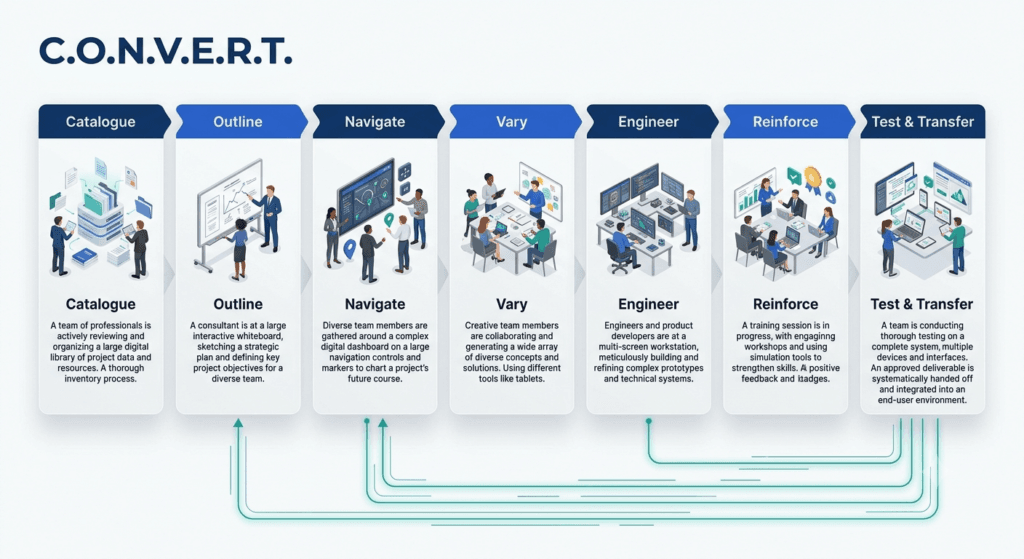
Let’s walk through each stage.
C — Catalogue Your Content
Before you redesign anything, take a full inventory of what the classroom program actually contains. This includes the facilitator guide, slide deck, handouts, activities, videos, case studies, and any pre/post materials.
For each asset, categorize it into one of three buckets:
- Core content — directly supports a learning objective and must survive the conversion.
- Supporting content — nice-to-have context, examples, or “for your interest” material.
- Classroom-only content — icebreakers, in-room logistics, energizer activities, and anything that exists purely to manage a live room, not to teach.
This step alone typically eliminates 20–40% of the original content volume — most of it classroom-only material that has no digital equivalent and doesn’t need one. Cutting it isn’t a loss; it’s the first real design decision of the project.
If the classroom program was never built against a formal How to Conduct a Training Needs Analysis (TNA), this is also the moment to run a light one retroactively — it’s the fastest way to confirm which content is actually solving a performance gap, versus content that’s simply “always been in the deck.”
Also flag anything that lives only in the facilitator’s head. Sit down with the person who has delivered this session the most and record them talking through their favorite examples, common misconceptions they correct live, and questions they get asked every time. This raw material becomes some of your richest eLearning content later.
O — Outline Digital-First Outcomes
Resist the urge to simply copy the classroom program’s learning objectives into your eLearning storyboard. Classroom objectives are often written assuming a facilitator will be present to clarify, demonstrate, and coach in real time. Digital objectives need to stand on their own.
For each objective, ask: Can a learner achieve this with no human in the room, using only what’s on the screen? If the answer is no, either redesign the objective to be achievable digitally, or flag that piece of content for a blended, facilitator-led component instead of full conversion.
Use a recognized framework like How to Write Learning Objectives Using Bloom’s Taxonomy to make sure your outcomes are written at the right cognitive level — “understand the five-step process” behaves very differently in a course than “apply the five-step process to a live customer scenario,” and the second version demands far more interactivity from your design.
It also helps to revisit Adult Learning Theory (Andragogy) for Corporate Trainers at this stage. Adult learners need to understand why something matters before they’ll invest effort in learning it — a need a live facilitator can address on the spot with context and reassurance, but which an eLearning module has to build into the opening screens deliberately, or risk losing the learner in the first two minutes.
N — Navigate the Instructional Strategy
This is where most conversions succeed or fail. Digitizing means recreating the classroom experience on a screen. Redesigning means asking, “given this outcome and this format, what is the best way to teach it?” — and the answer is very often not a lecture-style video.
Consider these strategy options against your objective:
- Scenario-based learning for judgment and decision-making objectives — closer to real classroom role-play than a video ever gets. TrainerCentric’s guide to Scenario-Based Learning: How to Write Branching Scenarios for Corporate Training is a good next stop if this fits your content.
- Worked examples with practice for procedural, step-by-step objectives.
- Simulation for software or system training where the learner needs to practice the actual interface.
- Microlearning sequences for discrete, reference-style knowledge that doesn’t need a narrative arc — see TrainerCentric’s Microlearning: What It Is, When to Use It, and How to Design It for design guidance.
- Social/collaborative learning (discussion boards, peer review, cohort-based components) where the classroom’s peer interaction was doing real instructional work, not just adding energy.
This is also the stage to apply a recognized instructional design model rather than freelancing the structure. Many conversion teams use How to Apply the ADDIE Model Step by Step for its rigor on larger, higher-stakes conversions, or The Successive Approximation Model (SAM) Explained when speed and iteration matter more than a fully linear process. ADDIE vs SAM: Which Instructional Design Model Should You Use? can help you decide which fits your conversion timeline.
Two other models are worth having on hand at this stage: Gagné’s Nine Events of Instruction Explained is particularly useful for sequencing a single module (it maps almost directly onto a screen-by-screen storyboard), and Merrill’s Principles of Instruction: A Practical Guide is a strong fit when the objective is skill-based and practice-heavy, since it centers the whole design around real-world problem-solving rather than content delivery.
V — Vary Media and Modality
Once the strategy is set, choose the media that actually serves it — not the media that’s easiest to produce. A common conversion trap is defaulting to “record a video of someone talking” for everything, because it’s the closest digital analogue to a live facilitator. It’s also frequently the least effective and most expensive-to-maintain option.
| Media Type | Best For | Watch Out For |
| Short video (2–5 min) | Modeling behavior, storytelling, facilitator presence | Expensive to update; avoid long “talking head” segments |
| Interactive scenario | Judgment, decision-making, soft skills | Requires strong branching logic and writing |
| Simulation / software demo | Systems, tools, procedural software tasks | Needs frequent updates if the underlying system changes |
| Infographic / job aid | Reference material, quick-lookup content | Not a substitute for practice-based learning |
| Audio / podcast-style | Passive reinforcement, commute-friendly learning | Weak for content requiring visual demonstration |
| Text with knowledge checks | Policy, compliance, dense factual content | Needs strong chunking to avoid wall-of-text fatigue |
| Live virtual session (synchronous) | Content that still needs a facilitator, Q&A, discussion | Loses “anytime access” benefit of eLearning |
Most well-converted courses use three or four of these in combination, sequenced deliberately rather than uniformly.
E — Engineer Interaction Points
A classroom session is interactive by default — the facilitator asks questions, learners discuss in small groups, hands go up. None of that happens automatically in eLearning. You have to engineer it in, deliberately, at regular intervals — a general rule of thumb is a meaningful interaction every 3–5 minutes of content, not just at module end.
Interaction doesn’t mean “click to reveal.” Genuine interaction asks the learner to make a decision with a consequence:
- Branching scenario choices that change the outcome
- Drag-and-drop categorization tasks tied to real content, not trivia
- “What would you do next?” prompts before revealing the model answer
- Reflective prompts that get saved and referenced later in the course
- Peer discussion boards for cohort-based programs
If you can’t identify what the learner is actively doing on a given screen — beyond reading and clicking “next” — that screen needs a redesign.
R — Reinforce with Assessment
Assessment in a converted course should test the same cognitive level as your learning objective, not a lower one. If your outcome is “apply the escalation policy to a real customer complaint,” a multiple-choice question about the policy’s five steps doesn’t assess that — it assesses recall. A scenario-based question asking the learner to choose the correct escalation path for a described situation does.
Build assessment for three purposes, not just one:
- Formative checks throughout the course, so learners (and your analytics) catch misunderstanding early, not at the final exam.
- Summative assessment at the end, tied directly to the stated objectives.
- Spaced reinforcement after the course — a short follow-up quiz or scenario sent one to two weeks later, which does more for retention than almost anything inside the module itself, given how steeply unreinforced learning decays.
T — Test, Launch, and Transfer
Never launch a converted course to the full population without piloting it first. Run it with a representative sample — different devices, different roles, different levels of digital fluency — and collect structured feedback, not just “did you like it.”
Ask pilot learners specifically:
- Where did you get confused or lost?
- Where did you feel like you were just clicking through?
- Did the pacing feel right, or rushed/dragging?
- What would you have asked a live facilitator that the course didn’t answer?
After launch, “Transfer” means your job isn’t done at go-live. Build a plan for how learning transfers back to the job — manager conversation guides, follow-up nudges, or a simple 30-day check-in — because a beautifully built course that nobody applies on the job hasn’t actually converted anything except a delivery format.
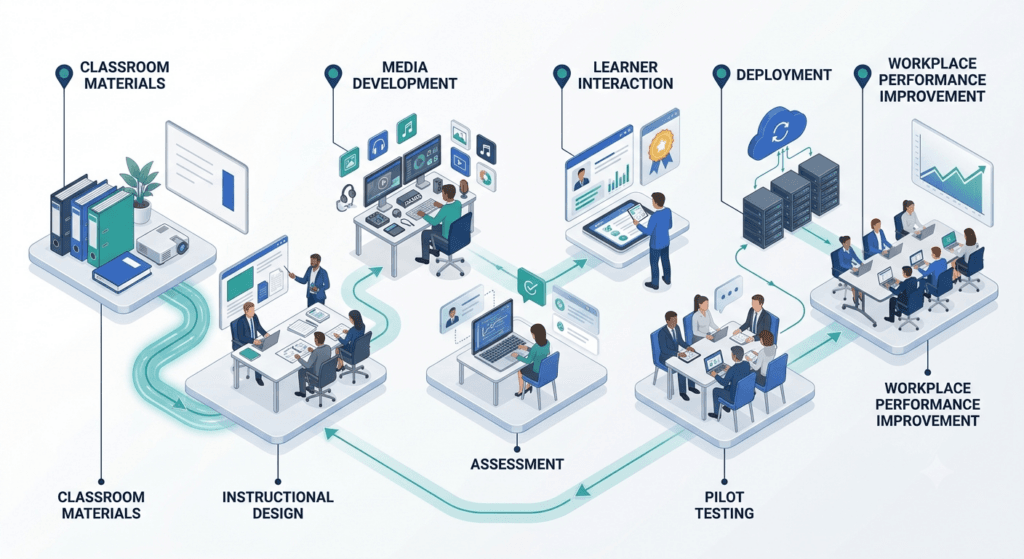
| Expert insight: “Piloting isn’t a nice-to-have step you cut when the deadline is tight — it’s the cheapest insurance policy in the entire project. Every conversion disaster I’ve seen traces back to a skipped or rushed pilot.” |
Choosing the Right eLearning Format
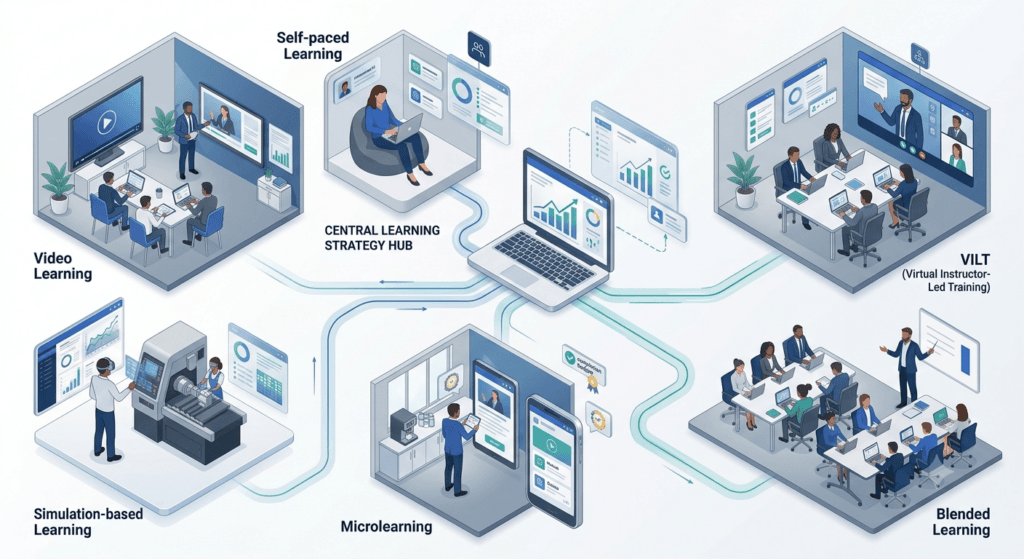
Not every converted course should look the same. The right format depends on the content type, the audience, and the objective. Use this comparison as a starting filter.
| Format | Good Fit When… | Typical Build Effort | Learner Experience |
| Self-paced eLearning module | Content is stable, audience is large/distributed | Medium–High | Anytime, own pace |
| Microlearning series | Content is discrete, reference-based, or needs spaced reinforcement | Low–Medium | Bite-sized, on-demand |
| Virtual Instructor-Led Training (VILT) | Facilitator interaction still adds real value | Low (leverages existing facilitator) | Scheduled, live |
| Blended program | Some content needs a human, some doesn’t | Medium | Mixed sync/async |
| Simulation-based training | Software, systems, or procedural tasks | High | Practice-heavy, hands-on |
| Video-based learning path | Storytelling, modeling behavior, facilitator presence matters | Medium | Passive-to-semi-interactive |
A useful rule of thumb: if you find yourself unable to choose between formats, it’s usually a sign the content should be blended rather than forced entirely into one format. [Internal Link: Blended Learning Design: How to Combine Online and In-Person Training] exists precisely for this situation — combining online and in-person or synchronous elements so each piece of content gets the delivery method it’s actually suited to.
Tools That Can Help
Tool choice should always come after your instructional strategy (Stage N of the C.O.N.V.E.R.T. Framework), not before it. That said, once your strategy is set, the right tooling makes execution dramatically faster.
Authoring tools are where you build the actual eLearning module — interactions, branching, quizzes, and media assembly. Articulate (Storyline and Rise) and Adobe Captivate are the two most widely used authoring platforms in corporate L&D, each with different strengths: Storyline for highly custom interactivity, Rise for fast, responsive, template-driven builds.
Learning Management Systems (LMS) host, track, and report on your converted courses. Open-source options like Moodle and enterprise platforms like Totara are common choices, particularly where organizations want control over customization and data ownership. TrainerCentric’s How to Choose the Right LMS for Your Organisation walks through the selection criteria in more depth.
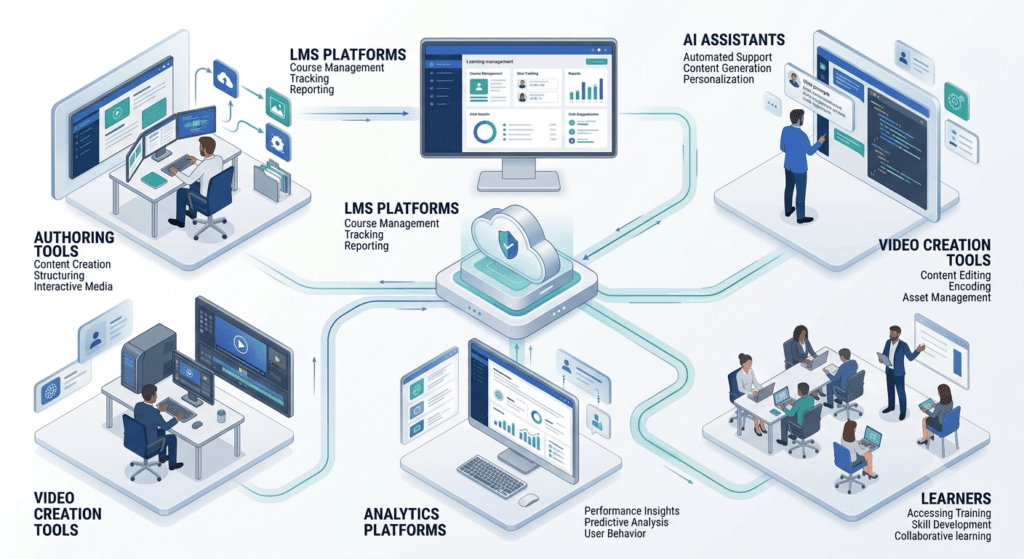
Video and screen-capture tools are essential for simulation-style conversion, especially software and systems training, where learners need to practice inside a realistic replica of the actual interface.
AI-assisted content tools are increasingly used to accelerate the conversion process itself — turning facilitator guides into first-pass storyboards, generating draft quiz questions from source content, and speeding up voiceover script iteration. AI in L&D: What Corporate Trainers Need to Know Right Now covers this in more detail, and it’s worth treating AI output the same way you’d treat a junior instructional designer’s first draft: useful, but requiring expert review before it ships.
For fast builds specifically, TrainerCentric’s Rapid eLearning Development: Tools, Tips, and Best Practices is a strong companion resource — much of classroom conversion work benefits from rapid-development principles, especially when you’re converting a large existing curriculum against a tight deadline.
Whatever stack you choose, make sure your output is compatible with your organization’s tracking standard — SCORM vs xAPI vs cmi5: Which Tracking Standard Do You Need? — decided in partnership with your LMS administrator before development begins, not discovered after the first module is built.
How Long Does It Take to Convert Classroom Training to eLearning?
As a planning benchmark, a single finished hour of self-paced eLearning typically takes somewhere between 40 and 100+ development hours, depending on interactivity level — branching scenarios and simulations sit at the high end, straightforward content-and-quiz modules at the low end.
Converting an existing classroom program is often faster than building from nothing, since the source content already exists, but don’t mistake that head start for a shortcut on the redesign work itself — the timeline savings come from Stage C (Catalogue), not from skipping Stages N through E.
For a single half-day workshop, expect a realistic build timeline of four to eight weeks, including a pilot. For a multi-day flagship program like the leadership example below, plan for a phased rollout across a quarter or more, converting and piloting one module at a time rather than attempting a single big-bang launch.
Real-World Example: Converting a Three-Day Leadership Program
Take a composite example based on programs we’ve worked on — a regional bank converting a three-day, in-person leadership development program into a digital-first format, driven by a 60% cut to travel and venue budget.
The original program covered five modules: situational leadership theory, difficult conversations, delegation, performance feedback, and team motivation — delivered as lecture-and-discussion blocks with role-play exercises between sessions.
Applying C.O.N.V.E.R.T.:
- Catalogue: The team found that roughly a third of the three days was actually classroom logistics — breaks, icebreakers, table group formation, and transitions. None of it needed converting.
- Outline: Objectives were rewritten to be independently achievable. “Understand situational leadership” became “diagnose the right leadership style for four described team scenarios and justify the choice” — an objective that could be assessed digitally.
- Navigate: Situational leadership theory became a short interactive module with scenario-based checks. Difficult conversations — the most human-dependent content — stayed live, converted into a shorter virtual instructor-led session with breakout room practice, rather than forced into a fully self-paced format.
- Vary: Delegation and feedback content became a mix of short video modeling (2–3 minutes each, featuring real managers from the organization, not stock actors) plus branching scenario practice.
- Engineer: Every module included a “what would you do” decision point before revealing model guidance, rather than presenting the guidance first.
- Reinforce: A spaced-repetition follow-up scenario was scheduled two weeks after each module, sent via the LMS, testing the same skill in a new context.
- Test: The team piloted with 40 managers across three regions before full rollout, catching a branching-logic dead end in the delegation module that would have blocked hundreds of learners.
The outcome: the fully digital and blended components together cut delivery cost dramatically compared to the all-classroom original, while completion tracking — impossible to get reliably from the classroom version — showed exactly which modules needed further refinement in the first two cohorts.
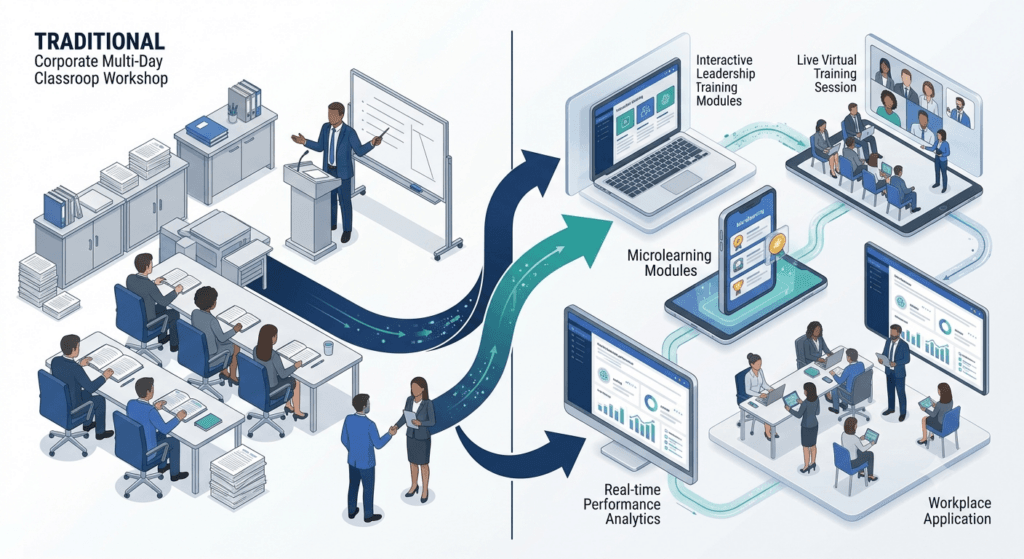
The lesson generalizes well beyond leadership programs: the content that truly needed a human stayed live and got a shorter, sharper virtual format. Everything else was rebuilt around real performance outcomes and genuine learner interaction, not repackaged as a passive recording of the original.
Is Converting Classroom Training Worth the Investment?
This is the question that actually gets a conversion project funded, so it’s worth answering directly rather than leaving it implied.
Development cost is real, and it’s front-loaded. Building genuinely interactive eLearning — not a slide-and-narration recording — typically runs from tens to well over a hundred development hours per finished hour of content, depending on interactivity level (branching scenarios and simulations sit at the high end; straightforward content-and-quiz modules at the low end). That cost is paid once, up front, unlike classroom delivery cost, which repeats every time you run the session.
Classroom delivery cost repeats indefinitely. ATD’s State of the Industry research tracks direct learning expenditure per employee in the thousands of dollars annually across surveyed organizations — a figure driven heavily by instructor-led delivery: facilitator day rates, travel, venue hire, printed materials, and the opportunity cost of employees being out of the business for a full day or more. Every one of those costs recurs each time the session runs again for a new group.
Weigh the two against each other using these factors:
| Factor | Classroom (Recurring) | eLearning (Mostly One-Time) |
| Facilitator/travel cost | Paid every session | Paid once, during build |
| Venue and materials | Paid every session | None, after launch |
| Employee time out of role | Full session length, every cohort | Often shorter, spread flexibly |
| Content updates | Requires re-training facilitators | Edit once, live everywhere |
| Audience ceiling | Limited by room size and scheduling | Effectively unlimited |
| Break-even point | N/A — cost is linear per session | Reached once total classroom-run cost would have exceeded the build cost |
As a rule of thumb: the more times a program will run, and the larger or more distributed the audience, the faster eLearning’s higher upfront cost pays for itself against classroom training’s repeating cost. A program run once for 15 people rarely clears that bar (see “When NOT to Convert” above). A program run quarterly for a distributed workforce of hundreds almost always does.
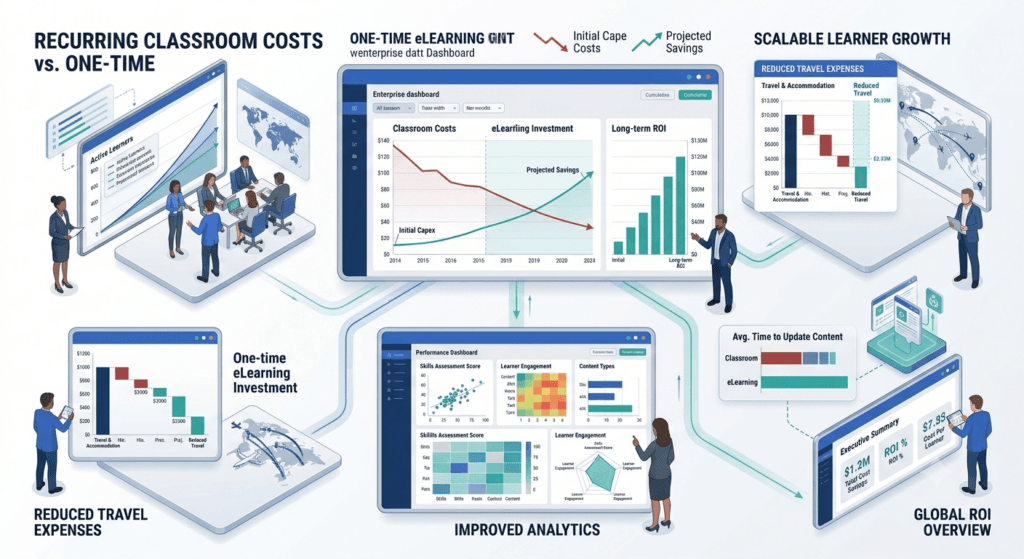
There’s a softer ROI factor too, harder to put a number on but real: faster update cycles mean less time operating on outdated content, and consistent digital delivery reduces compliance risk in regulated industries — both of which show up on a balance sheet eventually, just not on the training budget line.
Best Practices for Classroom-to-eLearning Conversion
Beyond the framework itself, a few cross-cutting practices consistently separate strong conversions from weak ones:
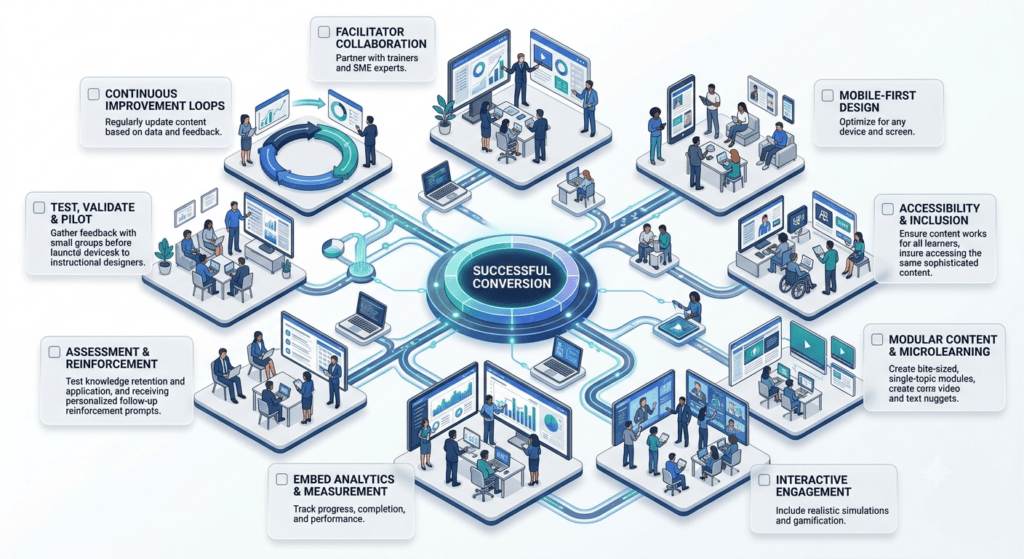
- Involve the original facilitator early. They hold tacit knowledge — examples, objections, common learner mistakes — that never made it into the slide deck.
- Design for mobile from the start, even for a desktop-first audience. Mobile-responsive design forces cleaner, more focused screens.
- Chunk content into 3–7 minute segments. This aligns with realistic attention spans and gives learners natural stopping points.
- Build accessibility in from day one, not as a post-launch retrofit — following WCAG guidance for color contrast, captioning, and screen-reader compatibility.
- Write for the ear as well as the eye if you’re using audio or video narration — spoken sentences need to be shorter and more direct than written ones.
- Set a realistic completion-time expectation and test it with real pilot users, not just your own read-through time.
- Plan for maintenance from the outset. Build content in modular chunks so a policy update means editing one screen, not rebuilding the whole course.
- Align with recognized quality frameworks where relevant — ISO’s guidance on learning technology and quality management and professional standards from bodies like CIPD and SHRM are useful benchmarks for larger, governance-sensitive conversion programs.
- Measure beyond completion rates. Completion tells you people finished; it doesn’t tell you they learned or applied anything. Tie evaluation back to a recognized model like The Kirkpatrick Model so you’re measuring behavior change and business impact, not just clicks.
Classroom-to-eLearning Conversion Checklist
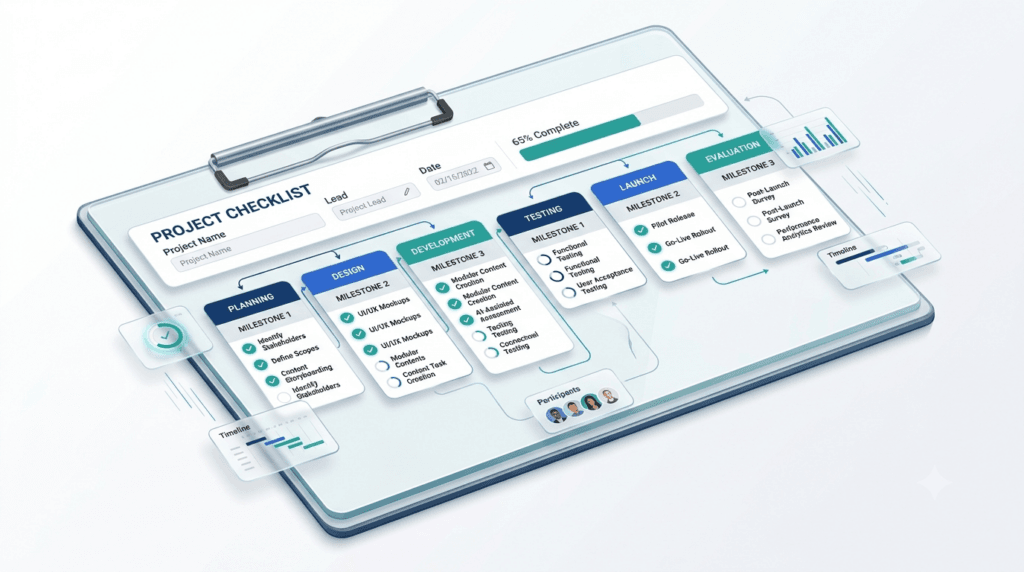
Use this checklist as a final gate before any converted module goes live.
- ☐ Content has been catalogued and classified (core / supporting / classroom-only)
- ☐ Learning objectives are rewritten to be achievable without a live facilitator
- ☐ Instructional strategy is chosen based on the objective, not the easiest media to produce
- ☐ Media mix has been deliberately selected (not defaulted to “record a video”)
- ☐ Every screen includes a genuine decision point, not just “click next”
- ☐ Assessment matches the cognitive level of the objective (not just recall)
- ☐ Spaced reinforcement or follow-up practice is planned post-launch
- ☐ Content is chunked into digestible segments (3–7 minutes)
- ☐ Accessibility (captions, contrast, screen-reader support) is built in
- ☐ The course has been piloted with a representative sample of learners
- ☐ Feedback from the pilot has been incorporated before full rollout
- ☐ SCORM/xAPI/cmi5 tracking has been confirmed with the LMS administrator
- ☐ A maintenance and update plan exists for when content changes
- ☐ Manager or team-level reinforcement plan is in place for on-the-job transfer
Frequently Asked Questions
How long does it take to convert classroom training to eLearning?
See “How Long Does It Take to Convert Classroom Training to eLearning?” above for the full breakdown — as a quick benchmark, budget 40 to 100+ development hours per finished hour of eLearning, and four to eight weeks for a single half-day workshop including a pilot.
How much does it cost to convert classroom training to eLearning?
? It varies widely by interactivity level, but development time is the main cost driver, typically ranging from tens to well over a hundred hours per finished hour of content. A simple content-and-quiz conversion sits at the lower end; branching scenarios, simulations, and custom video sit at the higher end. See “Is Converting Classroom Training Worth the Investment?” above for how that upfront cost compares to classroom training’s repeating delivery cost.
Can PowerPoint slides be converted directly into eLearning
Not directly, and this is one of the most common conversion mistakes. A classroom slide deck was designed to support a live facilitator talking through it — the slides alone are usually too sparse to teach anything on their own, or too dense if they were used as a facilitator’s notes. Slides are a useful source for a conversion project (they tell you what content exists), but they need genuine instructional redesign, not a straight upload into an authoring tool.
Can you fully convert every classroom program to eLearning?
No. Content built around live human interaction — negotiation practice, coaching, hands-on physical skills — usually keeps at least a live or blended component. See the “When NOT to Convert” section above for the specific signals to watch for.
What’s the difference between converting and simply digitizing classroom content?
Digitizing means recording or reformatting existing classroom material with minimal change — slides with a voiceover, essentially. Converting means redesigning the content and instructional strategy specifically for a self-paced, screen-based learning experience, including new interaction points, media choices, and assessment design. Digitizing is faster; converting is what actually preserves learning impact.
Do we need instructional design expertise to convert classroom training, or can subject matter experts do it themselves?
Subject matter experts and facilitators are essential contributors — they hold the content knowledge and delivery experience — but instructional design expertise is what turns that raw material into an effective learning experience. Most successful conversions pair an SME/facilitator with an instructional designer rather than relying on either alone.
What’s the biggest mistake to avoid when converting ILT to eLearning?
Treating conversion as a format change rather than a shift in learning experience design. This shows up most commonly as “digitizing” — recording the classroom slides with narration and calling it done, with no added interactivity, no assessment tied to real performance outcomes, and no accounting for the loss of a live facilitator.
Should we convert everything to self-paced, or keep some live sessions?
For most organizations, the honest answer is blended. Content genuinely dependent on human interaction should stay live (often in a shorter virtual format), while everything else — knowledge transfer, procedural steps, compliance content — converts well to self-paced eLearning.
Who should own a classroom-to-eLearning conversion project?
In practice, ownership works best as a partnership rather than sitting with one function. L&D or the training manager typically owns the project overall — timeline, budget, stakeholder sign-off. The subject matter expert or original facilitator owns content accuracy and the tacit knowledge that never made it into the slides. An instructional designer (internal or external vendor) owns the redesign itself — turning that content into a genuinely digital learning experience rather than a recorded lecture.
How do we measure whether a converted course is actually working?
Go beyond completion rate. Track assessment performance against the stated learning objective, time-on-task relative to expected pacing, and — most importantly — a post-training measure of on-the-job application, using a framework like The Kirkpatrick Model or the Phillips ROI Model for higher-stakes programs.
Conclusion
Converting classroom training to eLearning without losing impact isn’t about finding the right software. It’s about respecting the instructional design work that made the original classroom session effective, and doing the harder job of rebuilding that effectiveness inside a completely different medium.
Start with one program. Apply the C.O.N.V.E.R.T. Framework fully rather than skipping steps under deadline pressure. Pilot it properly. Measure what happens. Then use what you learn to convert the next one faster and better.
Every classroom program doesn’t belong online — but every classroom program deserves to be evaluated through a digital-first lens. Start with one high-impact course, measure the results, refine your approach, and scale what works. Over time, thoughtful conversion isn’t just a training initiative — it’s a competitive advantage for your learning function.
Ready to Start Your Conversion?
Before you scope your next project, run it through the Classroom-to-eLearning Conversion Checklist above — copy it into your project plan and use it as your sign-off gate before any module goes live.
If you’re building out a broader digital learning strategy beyond a single conversion project, explore more of TrainerCentric’s resources on Instructional Design Model Playbook, Rapid eLearning Development: Tools, Tips, and Best Practices, and the Corporate eLearning Playbook: The Complete Guide to Designing, Delivering, and Scaling Digital Learning — each one is built to work alongside this framework as you scale your conversion efforts across your training catalog.
References
- Design for How People Learn || 2nd Edition || Julie Dirksen || New Riders || 2015
- e-Learning and the Science of Instruction: Proven Guidelines for Consumers and Designers of Multimedia Learning || 4th Edition || Ruth Colvin Clark & Richard E. Mayer || Wiley || 2016
- Map It: The Hands-On Guide to Strategic Training Design || 1st Edition || Cathy Moore || Two Waves Books || 2017
- Telling Ain’t Training || 2nd Edition || Harold D. Stolovitch & Erica J. Keeps || Association for Talent Development (ATD Press) || 2011
- The Accidental Instructional Designer: Learning Design for the Digital Age || 3rd Edition || Cammy Bean || Association for Talent Development (ATD Press) || 2025
- Leaving ADDIE for SAM: An Agile Model for Developing the Best Learning Experiences || 2nd Edition || Michael W. Allen || Association for Talent Development (ATD Press) || 2024
Further Readings
- Corporate eLearning Playbook: The Complete Guide to Designing, Delivering, and Scaling Digital Learning
- How to Choose the Right LMS for Your Organisation
- Rapid eLearning Development: Tools, Tips, and Best Practices
- Microlearning: What It Is, When to Use It, and How to Design It
- [Coming Soon: Blended Learning Design: How to Combine Online and In-Person Training]
- AI in L&D: What Corporate Trainers Need to Know Right Now
- How to Choose eLearning Authoring Tools: A Framework for L&D Teams
- What Is a Learning Experience Platform (LXP) and Do You Need One
- How to Make eLearning Accessible (WCAG 2.1 for L&D)
- Scenario-Based Learning: How to Write Branching Scenarios for Corporate Training
- How to Apply the ADDIE Model Step by Step
- The Successive Approximation Model (SAM) Explained
- Instructional Design Model Playbook
- How to Write Learning Objectives Using Bloom’s Taxonomy
- Cognitive Load Theory for Instructional Designers
- The Kirkpatrick Model Explained
- SCORM vs xAPI vs cmi5: Which Tracking Standard Do You Need?
- The Complete Guide to Facilitation Skills for Corporate Trainers
Author Details

Soumyadeep Sen is a Learning & Development professional with over 14 years of experience across training, coaching, quality, and performance improvement. Currently serving as Assistant Manager – Training at 24/7.ai, he specializes in designing practical learning solutions that drive employee performance and support business objectives. When he’s not designing learning programs, Soumyadeep enjoys exploring emerging trends in workplace learning, talent development, and instructional design. Reach out to him via Linkedin.