Introduction – How to Choose eLearning Authoring Tools
A mid-sized manufacturing company decides to move its safety induction program online. The L&D manager, under pressure to launch before the next audit cycle, picks a well-known rapid authoring tool because a competitor uses it and the sales demo looked polished. Six months later, the team has forty modules built, a compliance mandate to add branching decision scenarios, and a tool that cannot support them without a rebuild.
The LMS integration throws SCORM errors intermittently. Two instructional designers have left, and the freelancers brought in to cover the gap need a week each just to learn the interface. Nothing about the original purchase was reckless. It was simply made without a framework.
This scenario repeats itself across corporate L&D functions more often than vendor marketing would suggest. Authoring tool selection is treated as a procurement decision when it is, in fact, an instructional and operational one. The tool determines what kinds of learning experiences a team can realistically produce, how fast they can produce them, who can collaborate on them, and what happens when requirements change eighteen months from now.
This article sets out a structured way to evaluate eLearning authoring tools for corporate environments. It is not a feature comparison and it does not name a winner. Different organizations — different budgets, team compositions, content types, and compliance obligations — arrive at different right answers.
The goal here is to give L&D teams a repeatable process: the A.U.T.H.O.R. Framework, six evaluation dimensions that turn an emotional or reputation-driven purchase into a defensible business decision.
What Is an eLearning Authoring Tool?
| Quick Definition An eLearning authoring tool is software used to build digital training content — courses, quizzes, simulations, and interactive modules — and package it in a format (SCORM, xAPI, or cmi5) that a Learning Management System can deliver and track. It sits between instructional design and delivery, turning a storyboard into a trackable learning object learners can complete online. |
Authoring tools sit between instructional design (the thinking) and the LMS (the delivery), and their job is to translate a storyboard into an interactive, trackable learning object.
It is worth distinguishing an authoring tool from three things it is often confused with:
- An LMS, which hosts, assigns, and tracks completion, but does not build content. Many L&D teams conflate the two during procurement and end up evaluating authoring capability against LMS criteria, or vice versa.
- A video or screen-recording tool, which produces a single media asset rather than an interactive, trackable learning object with quiz logic, branching, or completion data.
- A content template or PowerPoint deck, which can be a starting point for authoring but does not, on its own, produce SCORM- or xAPI-compliant packages.
For teams still clarifying how authoring fits into the broader technology stack, it is worth reading alongside How to Choose the Right LMS for Your Organisation, since the two decisions are related but not interchangeable.
Why Choosing the Wrong Tool Is Expensive
The visible cost of an authoring tool is the license fee. The real cost shows up later, and it rarely appears on the same budget line — which is exactly why it gets underestimated during procurement.
Hidden Costs
Template libraries, stock media packs, translation add-ons, advanced interaction packs, and priority support are frequently sold separately from the base license. A tool that looks 40% cheaper than a competitor at the quote stage can end up costing more once a team adds the modules it actually needs to hit its content targets.
Scalability
A tool that works well for one instructional designer producing ten modules a year behaves very differently when six people are producing two hundred. Version control, asset reuse, template governance, and multi-author workflows either exist or they do not — and retrofitting them onto a growing content library is far more disruptive than planning for them upfront.
Maintenance
Courses need updating. A tool with poor content reusability — no shared templates, no global style updates, no master-slide equivalent — turns a one-line policy change into a rebuild of every affected module. This is the single most common source of the ‘unnecessary redevelopment’ L&D teams complain about eighteen months into using a tool.
Learning Curve
Sophisticated authoring tools are sophisticated because they expose more control, not because they are better by default. A tool that takes a new instructional designer six weeks to become productive in has a real cost in ramp-up time, especially in teams with contractor turnover or where authoring is a part-time responsibility layered onto an L&D generalist’s role.
Licensing
Per-seat, per-device, concurrent-user, and enterprise-tier licensing models each suit different team structures. A per-seat model can quietly become expensive as a team scales past five or six authors; a concurrent model can create friction when several people need to work simultaneously during a launch crunch.
Collaboration
Corporate content is rarely built by one person in isolation. Stakeholder review cycles, SME sign-off, and multi-author development all depend on how well a tool supports commenting, version history, and simultaneous editing. Tools built for a single freelance author often handle this poorly.
| Expert Insight In consulting engagements, the authoring tool decision that causes the most regret is rarely ‘we picked something with too few features.’ It is ‘we picked something that couldn’t grow with us.’ Budget for where your content library will be in two years, not where it is today. |
“The best authoring tool isn’t the one with the most features. It’s the one your team can still use effectively two years from now.”
Common Types of Authoring Tools
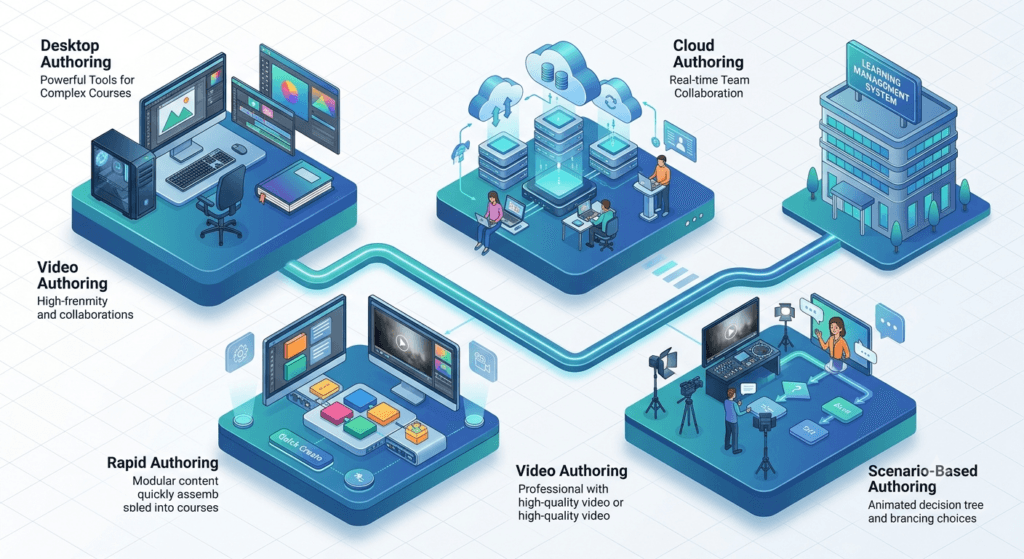
Authoring tools broadly fall into five categories. None is superior in the abstract — each is optimized for a different combination of content complexity, team skill level, and delivery need.
| Category | Best Suited For | Typical Trade-off |
| Desktop authoring tools | Complex, highly customized simulations and interactions built by a dedicated developer | Steeper learning curve; often single-machine or single-author workflows |
| Cloud-based authoring tools | Distributed teams needing real-time collaboration, version control, and centralized asset libraries | Ongoing subscription cost; some feature depth traded for accessibility |
| Rapid authoring tools | High-volume compliance and process training with tight turnaround times | Limited custom interactivity without workarounds or plug-ins |
| Video-based authoring tools | Procedural, demonstration-heavy, or software-simulation content | Weaker for knowledge-check-heavy or highly interactive scenarios |
| Scenario-based / branching tools | Decision-making, soft skills, and judgment-based training | Higher design effort per module; requires strong instructional design input |
Most mature L&D functions do not standardize on a single category. A team producing both compliance refreshers and leadership simulations often runs a rapid authoring tool for volume alongside a scenario-based tool for judgment training — see Scenario-Based Learning: How to Write Branching Scenarios for Corporate Training for how that content is typically structured.
A Practical Framework for Choosing an Authoring Tool
Feature checklists produced by vendors are not a neutral starting point — they are written to flatter the vendor’s own tool. A more reliable approach is to evaluate every option against a fixed set of organizational criteria, in the same order, before a single demo is watched. The A.U.T.H.O.R. Framework structures that evaluation into six dimensions.
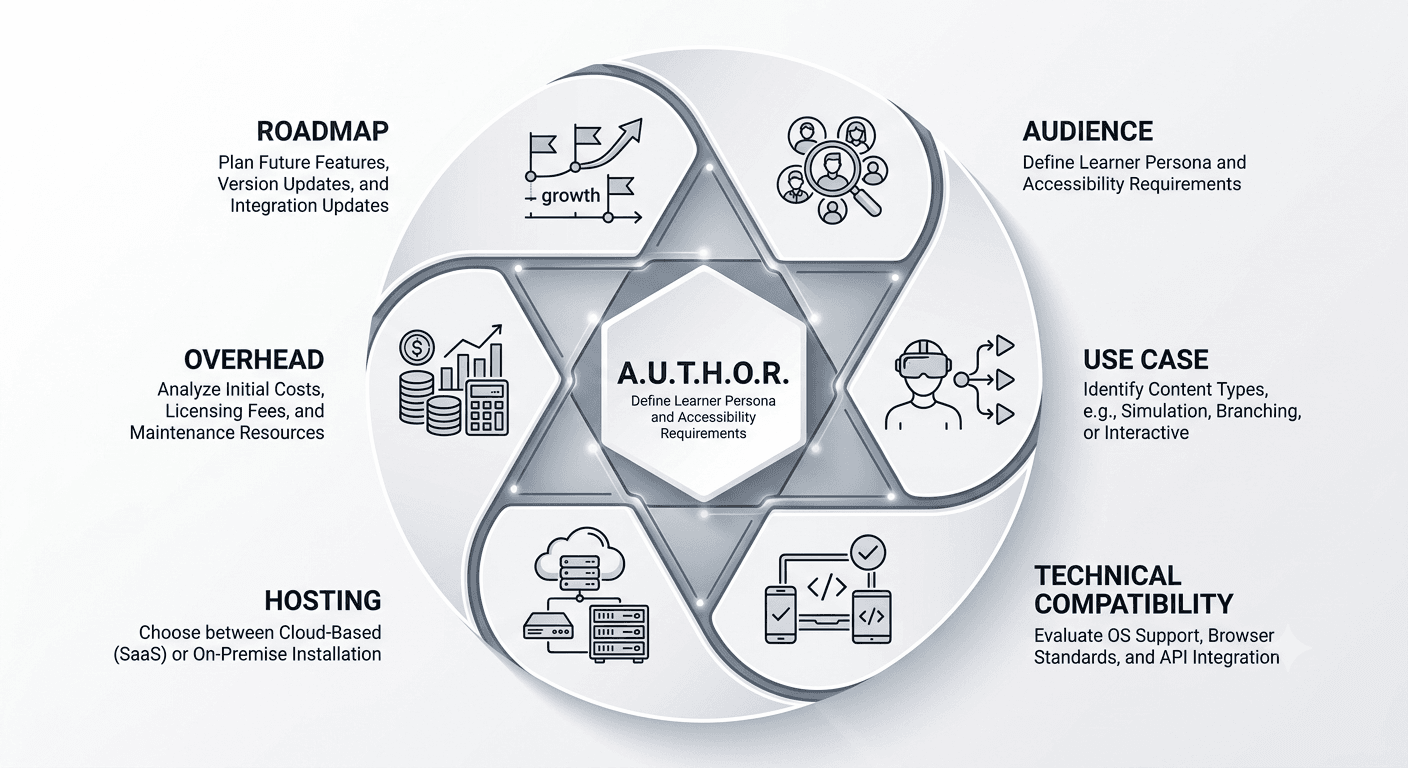
How to Choose an eLearning Authoring Tool in 6 Steps
1. Define your Audience and learning requirements — device access, digital literacy, interactivity needs
2. Map your Use case complexity — content types, branching, assessment depth.
3. Confirm Technical compatibility — SCORM/xAPI version, LMS, accessibility, localization.
4. Evaluate Hosting and collaboration — cloud vs. desktop, multi-author workflows, branding control.
5. Total the Overhead and cost — license, add-ons, learning curve, vendor support.
6. Assess the Roadmap and scalability — AI capabilities and two-year content growth.
| Printable A.U.T.H.O.R. Scorecard Score each shortlisted tool 1 (poor fit) to 5 (excellent fit) on all six dimensions, multiply by the weight your organization assigns, and total the result. Screenshot or copy this scorecard into your own procurement document before any vendor demo. |

| A.U.T.H.O.R. Dimension | Your Weight (%) | Score (1–5) | Weighted Score |
| Audience & Learning Requirements | ___ | ___ | ___ |
| Use Case Complexity | ___ | ___ | ___ |
| Technical Compatibility | ___ | ___ | ___ |
| Hosting & Collaboration | ___ | ___ | ___ |
| Overhead & Cost | ___ | ___ | ___ |
| Roadmap & Scalability | ___ | ___ | ___ |
| Total (out of 500) | 100% | — | ___ |
| Letter | Dimension | What to Evaluate |
| A | Audience & Learning Requirements | Who the learners are, their device access, digital literacy, and the depth of interactivity the content genuinely requires |
| U | Use Case Complexity | Content complexity, branching/scenario needs, assessment types, and how much true interactivity (vs. click-to-reveal) is needed |
| T | Technical Compatibility | SCORM/xAPI conformance, LMS compatibility, mobile responsiveness, accessibility support, and localization workflow |
| H | Hosting & Collaboration | Cloud vs. desktop hosting, multi-author workflows, stakeholder review, branding control, and version history |
| O | Overhead & Cost | Total licensing cost, hidden add-ons, learning curve for the current team, and vendor support responsiveness |
| R | Roadmap & Scalability | AI-assisted authoring capability, future content volume, and how well the tool grows with a maturing L&D function |
A — Audience and Learning Requirements
Start with the learner, not the software. Field-based employees on shared tablets need different interaction patterns than desk-based knowledge workers on laptops. A workforce with low digital literacy benefits from simpler, more linear navigation regardless of how sophisticated the tool’s capabilities are.
U — Use Case Complexity
Map planned content types against interactivity needs before comparing tools. A team that primarily needs quiz-based compliance modules is over-buying if it selects a tool optimized for complex branching simulations — and under-buying in the reverse case.
T — Technical Compatibility
SCORM 1.2, SCORM 2004, xAPI (Tin Can), and cmi5 are not interchangeable, and LMS support for each varies. Confirm compatibility with the receiving LMS before selection, not after the first upload fails. Accessibility conformance to WCAG 2.1 guidelines should be verified against the vendor’s actual VPAT documentation, not marketing copy — a tool advertised as ‘accessible’ does not always mean screen-reader-tested in practice. See [Internal Link: How to Make eLearning Accessible (WCAG 2.1 for L&D)] for a fuller accessibility checklist (planned article — confirm live before publishing).
H — Hosting, Collaboration and Branding
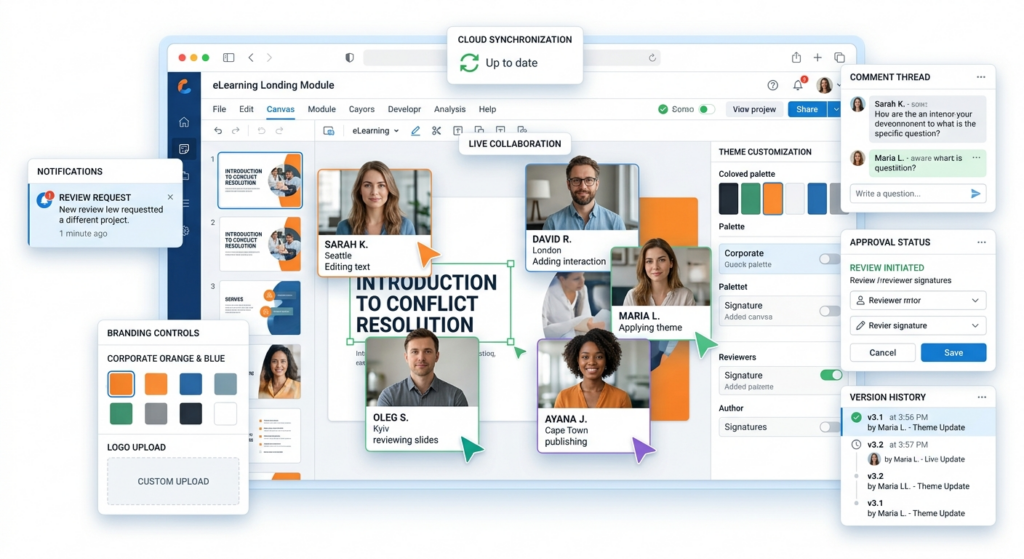
Cloud-based tools generally support real-time co-authoring and centralized template governance more naturally than desktop tools, which matters more as a team grows past two or three authors. Branding control — locking fonts, colors, and templates at an organizational level — protects consistency once multiple people are producing content.
O — Overhead and Cost
Total cost of ownership includes the license, required add-ons, ramp-up time for new authors, and the support tier needed to keep production moving. A cheaper license paired with a two-month learning curve for every new hire is not actually the cheaper option.
R — Roadmap and Scalability
AI-assisted authoring — auto-generating first drafts, translating content, or converting a document into a storyboard — is moving quickly and unevenly across vendors. Evaluate this as a productivity multiplier, not a replacement for instructional design judgment. See AI in L&D: What Corporate Trainers Need to Know Right Now for a broader view of where AI genuinely helps versus where it introduces risk.
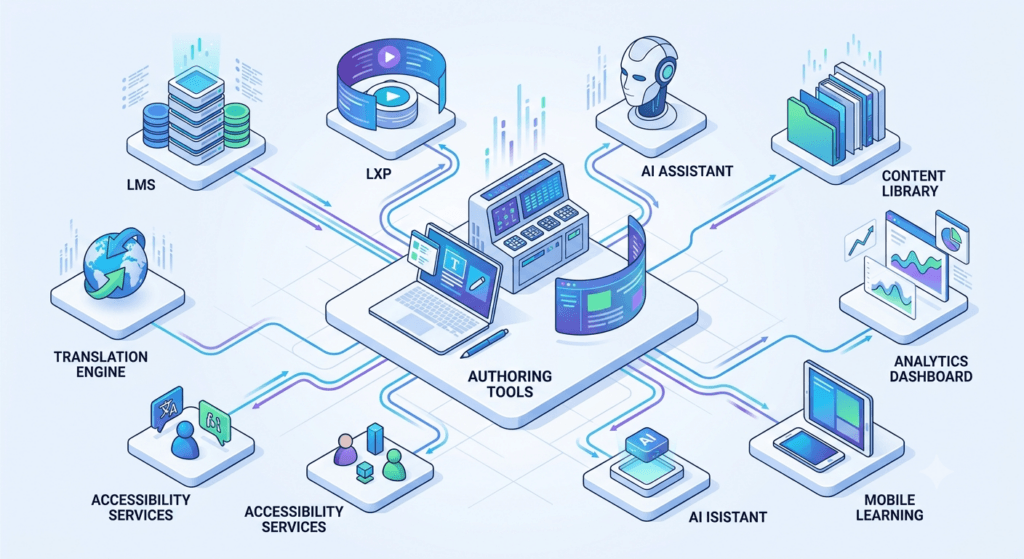
| Expert Insight Score every shortlisted tool against all six A.U.T.H.O.R. dimensions before anyone in the room watches a vendor demo. Demos are designed to showcase strengths; a pre-built scorecard is the only thing that reliably surfaces weaknesses. |
Evaluation Checklist
| Criterion | Must Confirm Before Purchase |
| SCORM/xAPI support | Which version(s), and tested against your specific LMS |
| Mobile responsiveness | True responsive rendering vs. a separate mobile-only export |
| Accessibility | Current VPAT or WCAG conformance report, not a general accessibility claim |
| Collaboration | Simultaneous multi-author editing, commenting, and version rollback |
| Localization | Native multi-language support vs. manual duplication per language |
| AI capabilities | What is automated, what still requires manual instructional design |
| Total cost | License plus every required add-on for your actual use case |
| Vendor support | Response time SLA and whether support is included or a paid tier |
Feature Priority Matrix
Not every evaluation criterion carries equal weight for every organization. Before scoring vendors, classify each criterion as follows for your specific context:
| Priority Tier | Definition | Example (varies by organization) |
| Must-have | Absence disqualifies the tool regardless of other strengths | LMS-compatible SCORM export |
| Important | Strong influence on the decision but not an automatic disqualifier | Multi-author collaboration |
| Nice-to-have | Adds value but can be worked around | Built-in stock image library |
| Not relevant | Irrelevant to your specific use case — do not let it sway the decision | Advanced 3D simulation authoring, for a team producing only compliance quizzes |
Decision Matrix
Once shortlisted tools are scored against each A.U.T.H.O.R. dimension (for example, on a 1–5 scale) and weighted by priority tier, a simple decision matrix makes the trade-offs visible rather than intuitive:
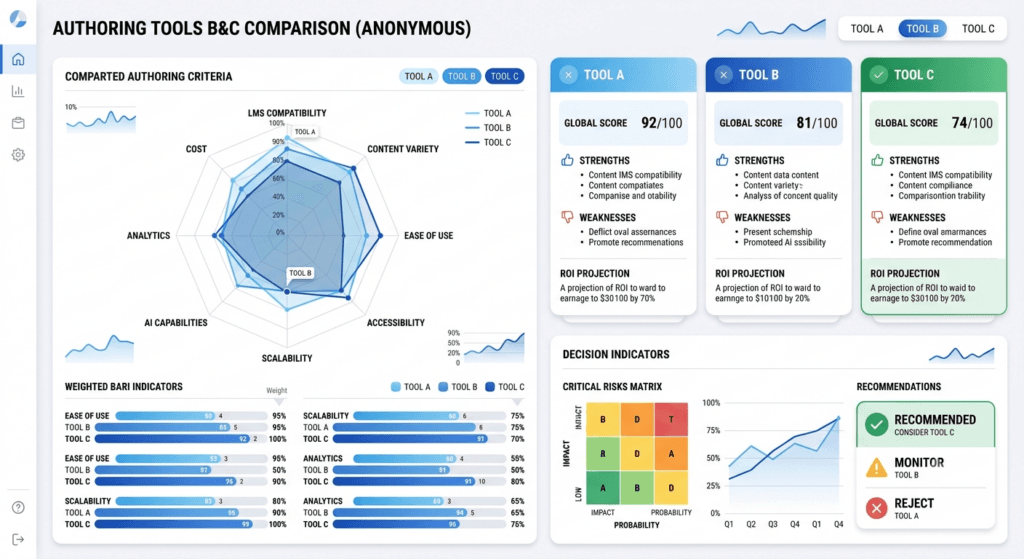
| Dimension | Weight | Tool A Score | Tool B Score | Tool C Score |
| Audience & Learning Requirements | 20% | — | — | — |
| Use Case Complexity | 20% | — | — | — |
| Technical Compatibility | 20% | — | — | — |
| Hosting & Collaboration | 15% | — | — | — |
| Overhead & Cost | 15% | — | — | — |
| Roadmap & Scalability | 10% | — | — | — |
| Weighted Total | 100% | — | — | — |
Weights shown are illustrative. Adjust them to reflect your organization’s actual priorities — a heavily regulated industry may weight Technical Compatibility higher; a fast-scaling team may weight Roadmap & Scalability higher.
Sample Completed Evaluation
To show the matrix in use rather than in the abstract, here is how a 3,000-employee organization scored two shortlisted tools for a compliance-training refresh (the same scenario detailed later in this article) using 20/20/20/15/15/10 weighting:
| Dimension | Weight | Rapid Authoring Tool | Scenario-Based Tool |
| Audience & Learning Requirements | 20% | 4 | 4 |
| Use Case Complexity | 20% | 2 | 5 |
| Technical Compatibility | 20% | 5 | 3 |
| Hosting & Collaboration | 15% | 4 | 4 |
| Overhead & Cost | 15% | 5 | 2 |
| Roadmap & Scalability | 10% | 3 | 4 |
| Weighted Total | 100% | 3.95 | 3.65 |
Read in isolation, the rapid authoring tool scores higher overall — but its Use Case Complexity score of 2 falls below the ‘Must-have’ bar the team set for its ethics-training content in the Feature Priority Matrix above. A single blended score cannot capture a hard requirement; that is why the team ultimately ran both tools in parallel rather than picking the higher-scoring option outright. The scorecard’s value is in surfacing that conflict early, not in producing an automatic winner.
Popular eLearning Authoring Tools at a Glance
A framework is only useful once it has real options to evaluate. The table below orients readers to the tools most commonly shortlisted by corporate L&D teams, organized against the categories and A.U.T.H.O.R. dimensions already covered, including where AI-assisted authoring currently stands for each. This is not a ranking, and it is not exhaustive — it is a starting point for building your own shortlist before scoring candidates against your organization’s specific weighted criteria.
| Benchmark Data Point The Learning Guild’s Authoring Tools research found that 42% of L&D practitioners use three or more authoring tools, while only 28% rely on a single tool — evidence that running more than one tool, matched to different content types, is standard practice rather than a compromise. |
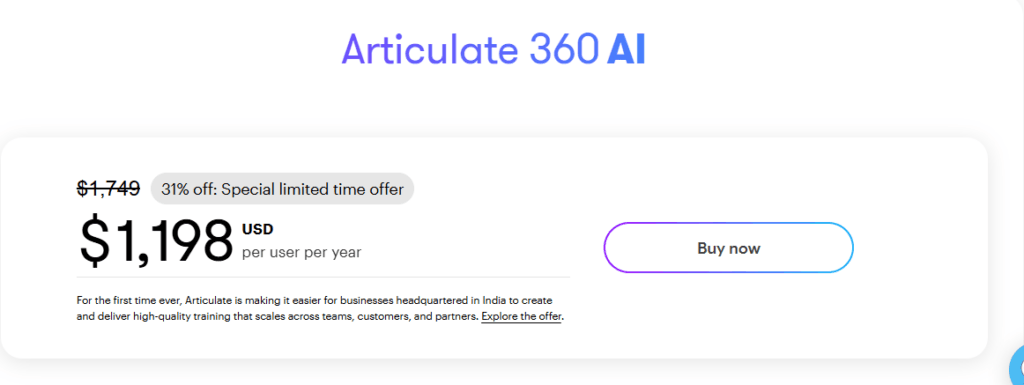
Choosing the right eLearning authoring tool depends on your team’s skills, project requirements, and budget. Here’s a quick overview of some of the most popular options:
Articulate Storyline 360
- Best for creating highly interactive courses, branching scenarios, and software simulations.
- Offers extensive customization, making it a favorite among experienced eLearning developers.
- Includes AI-powered features such as content drafting, image generation, and automatic translation.
- Keep in mind: It has a steeper learning curve, and subscription costs can become expensive for larger teams.
Articulate Rise 360
- Ideal for building responsive, mobile-friendly courses quickly.
- Perfect for teams that want professional-looking courses without extensive design work.
- AI Course Drafts can generate course structures from prompts or existing documents.
- Keep in mind: Custom interactions are limited compared to Storyline.
Adobe Captivate
- A strong choice for software simulations, VR experiences, and 360-degree learning content.
- Integrates well with the Adobe ecosystem.
- Offers AI-powered text-to-speech narration and AI-generated avatars.
- Keep in mind: Many beginners find it challenging to learn.

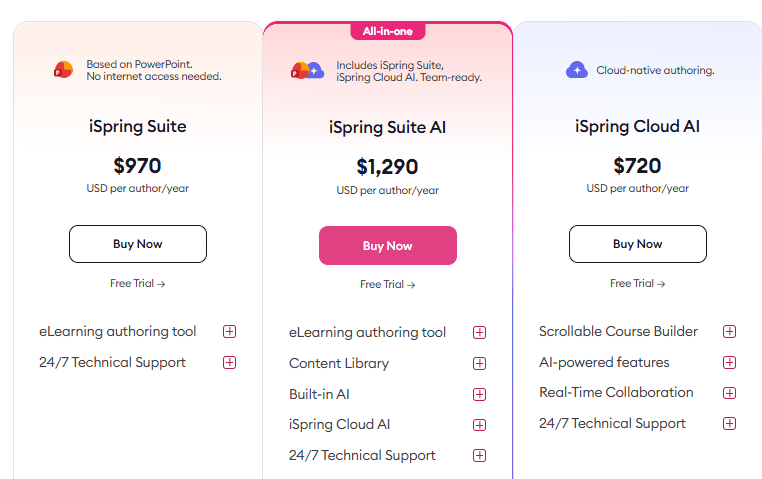
iSpring Suite
- Best suited for teams that already create training content in Microsoft PowerPoint.
- Familiar interface makes it one of the easiest authoring tools to adopt.
- AI-assisted content creation and quiz generation are available in the Suite Max edition.
- Keep in mind: It is Windows-only and offers fewer advanced interactions than dedicated authoring tools.
dominKnow | ONE
- Designed for organizations managing large volumes of learning content with multiple authors.
- Excels at responsive design, collaboration, and content reuse.
- AI capabilities continue to expand alongside its collaboration features.
- Keep in mind: The extensive feature set may feel overwhelming for occasional users.
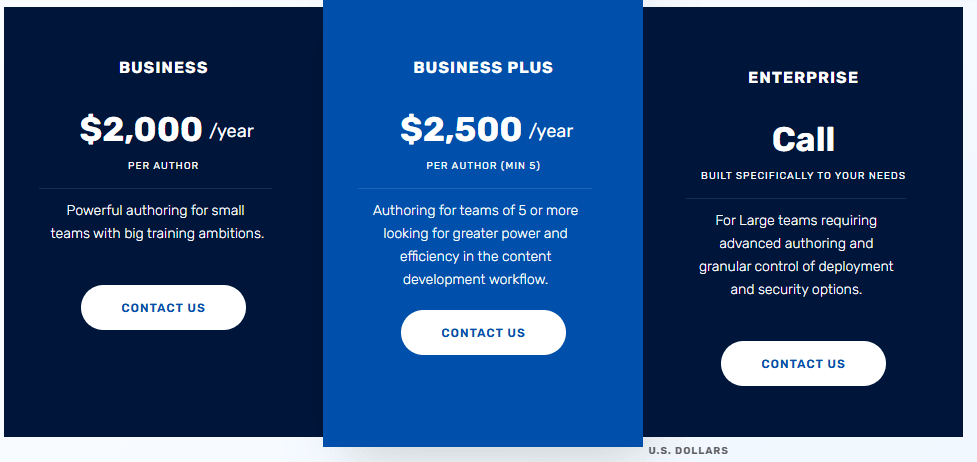
Elucidat
- Well suited for enterprise organizations creating courses at scale.
- Makes it easy to maintain consistent branding across global teams.
- AI-powered shortcuts help speed up template-based course development.
- Keep in mind: Enterprise pricing may not suit smaller organizations.
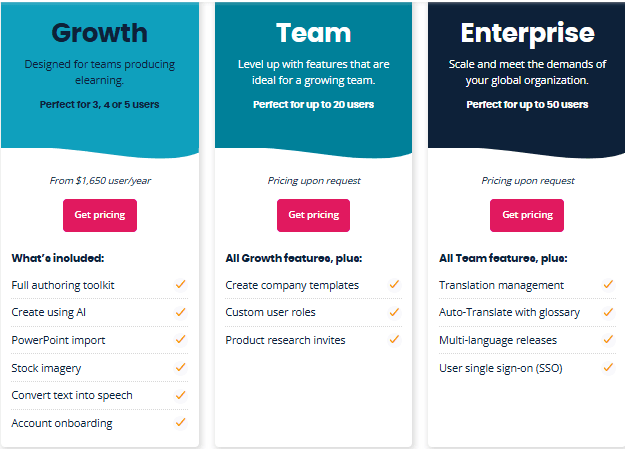
Easygenerator
- A great option for subject-matter experts who want to create courses without technical expertise.
- Simple interface and AI-assisted drafting help accelerate content creation.
- Keep in mind: Not the best choice for advanced branching or highly customized interactions.
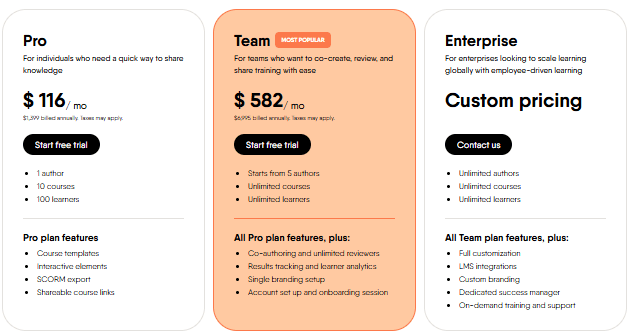
Lectora Online
- Ideal for organizations with strict accessibility and compliance requirements.
- Strong support for WCAG and Section 508 standards.
- Focuses on accessibility rather than extensive AI capabilities.
- Keep in mind: It has a smaller user community and template library than some leading competitors.

Note: Pricing, feature sets, and AI capabilities across these vendors change frequently — confirm current details directly on each vendor’s site before shortlisting.
Common Mistakes L&D Teams Make on Choosing the Best Authoring Tool for eLearning

- Choosing based on what a competitor or a well-known brand uses, without checking whether the underlying content needs match.
- Letting the vendor demo dictate the criteria, rather than testing the vendor against criteria set in advance.
- Ignoring LMS compatibility until after purchase, discovering SCORM or xAPI conflicts during the first upload.
- Underestimating the learning curve for a growing or partly-freelance authoring team.
- Treating accessibility as a post-launch fix rather than a selection criterion, which is significantly more expensive to retrofit.
- Buying for today’s content volume rather than the volume the team will realistically be producing in two years.
- Overlooking collaboration and version-control needs until multiple authors are working on overlapping content simultaneously.
Real-World Selection Scenario
A financial services company with 3,000 employees needs to replace its aging compliance training library. Two requirements dominate: SCORM 1.2 compatibility with a decade-old LMS that the organization is not yet ready to replace, and a shift from static, click-through modules toward scenario-based ethics training that regulators have flagged as a gap.
Running this through the A.U.T.H.O.R. Framework surfaces a tension immediately. Under Technical Compatibility, the legacy LMS constrains the shortlist to tools with proven, tested SCORM 1.2 export — several modern cloud tools default to xAPI-first workflows that would need workarounds. Under Use Case Complexity, the ethics training requirement points toward a tool with genuine branching logic, not a rapid authoring tool optimized for linear content.
No single tool scores highest on both dimensions in this case. The organization’s resolution — common in practice — is to run two tools in parallel: a rapid authoring tool for the high-volume, low-complexity compliance refreshers that make up 80% of the library, and a scenario-based tool for the smaller set of judgment-based ethics modules, with both packaged to the same SCORM 1.2 standard for LMS compatibility.
Overhead & Cost weighed against Use Case Complexity made a single-tool compromise less attractive than a two-tool combination — the kind of trade-off a feature checklist alone would not have revealed.
Frequently Asked Questions
What are the most popular eLearning authoring tools for corporate training?
Articulate Storyline 360 and Rise 360, Adobe Captivate, iSpring Suite, dominKnow | ONE, and Elucidat are among the most widely used tools in corporate L&D, alongside SME-focused tools like Easygenerator and accessibility-focused tools like Lectora Online. See the Popular eLearning Authoring Tools at a Glance section above for how each fits a different combination of team skill, content complexity, and budget.
What is the difference between a rapid authoring tool and a full authoring tool?
Rapid authoring tools prioritize speed and template-driven production for high-volume, lower-complexity content such as compliance refreshers. Full-featured authoring tools support deeper customization and complex interactivity but generally require more design time and a steeper learning curve.
Do I need SCORM or xAPI?
This depends on your LMS and what you need to track. SCORM reports completion and score; xAPI (and cmi5) can capture more granular learning experience data, including activity outside the LMS. Check your LMS’s supported standards before choosing an authoring tool — see SCORM vs xAPI vs cmi5 for a full comparison.
Can one authoring tool cover all our training needs?
Sometimes, but not always, and forcing a single tool to cover every use case is a common source of the ‘expensive workaround’ problem described earlier. Many mature L&D functions run two tools — one for volume, one for complex interactivity — as shown in the scenario above.
How important is AI in choosing an authoring tool today?
AI-assisted drafting and translation can meaningfully speed up production, but capability varies significantly across vendors and is evolving quickly. Treat it as one of six evaluation dimensions, not the deciding factor on its own.
What’s the biggest budgeting mistake teams make?
Evaluating only the license price rather than total cost of ownership, which includes add-ons, the learning curve for new authors, and the cost of rebuilding content when the tool cannot scale with growing requirements.
How do we evaluate accessibility during tool selection?
Request the vendor’s current VPAT (Voluntary Product Accessibility Template) and check conformance against WCAG 2.1 success criteria directly, rather than relying on general accessibility claims in marketing material.
Should budget or capability drive the final decision on how to choose the authoring tool?
Neither in isolation. The A.U.T.H.O.R. Framework is designed to weigh both simultaneously — a tool with excellent capability but unsustainable cost fails the Overhead dimension; a cheap tool that can’t meet Use Case Complexity fails just as clearly.
Before You Buy Any Authoring Tool
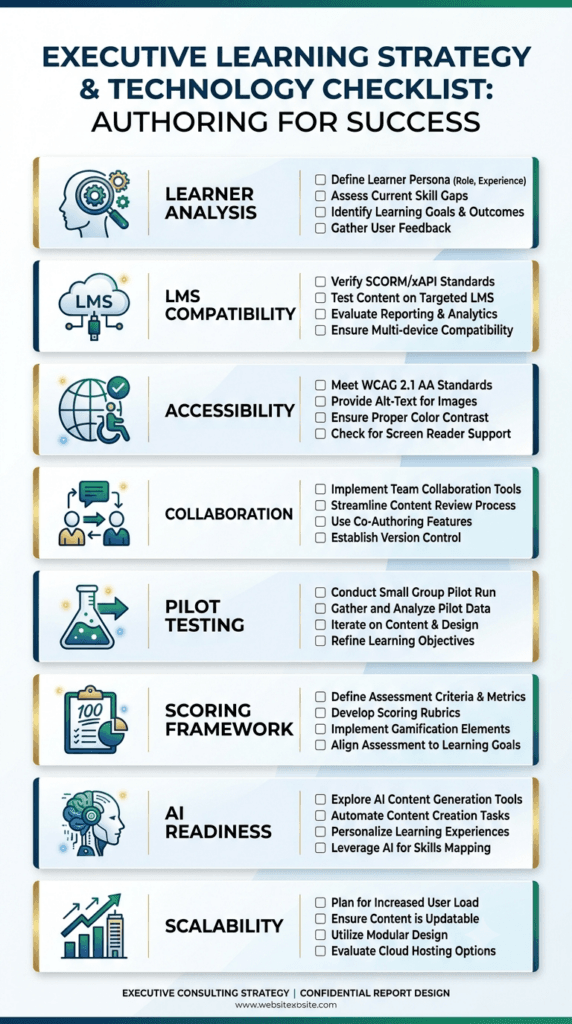
A boxed, bookmarkable summary of the process covered in this article — use it as the final gate before signing a contract or requesting a purchase order:
| ☐ Define learner profiles — device access, digital literacy, and audience needs ☐ Confirm LMS compatibility — SCORM/xAPI/cmi5 version tested against your actual LMS ☐ Validate accessibility — current VPAT or WCAG 2.1 conformance report, not a marketing claim ☐ Test collaboration workflows — simultaneous multi-author editing and stakeholder review ☐ Run a pilot project — build one real module before committing to a full license ☐ Score against the A.U.T.H.O.R. Framework — use the printable scorecard above, weighted to your priorities |
Conclusion
Choosing an eLearning authoring tool is a decision with a long tail — it shapes what a team can build, how fast, and at what ongoing cost, often for several years. The A.U.T.H.O.R. Framework does not produce a universal winner because there isn’t one: the right tool depends on audience, content complexity, technical environment, collaboration needs, budget, and where the organization expects to be in two years, not just today.
Before the next authoring tool purchase, run every shortlisted option through all six dimensions, weight them against your organization’s actual priorities, and resist the pull of a polished demo until the scorecard is filled in. For teams building out the wider technology stack this decision sits within, How to Choose the Right LMS for Your Organisation and What Is a Learning Experience Platform (LXP) and Do You Need One? cover the adjacent decisions worth making in parallel.
The right authoring tool is rarely the one that impresses you most in a demo — it’s the one that still supports your learners, your designers, and your business two years after the contract is signed.
References
- Design for How People Learn || 2nd Edition || Julie Dirksen || New Riders || 2016
- e-Learning and the Science of Instruction: Proven Guidelines for Consumers and Designers of Multimedia Learning || 4th Edition || Ruth C. Clark & Richard E. Mayer || Wiley || 2016
- Michael Allen’s Guide to e-Learning: Building Interactive, Fun, and Effective Learning Programs for Any Company || 2nd Edition || Michael W. Allen || Wiley || 2016
- Map It: The Hands-On Guide to Strategic Training Design || 1st Edition || Cathy Moore || Association for Talent Development (ATD Press) || 2017
- Telling Ain’t Training || 2nd Edition || Harold D. Stolovitch & Erica J. Keeps || Association for Talent Development (ATD Press) || 2011
- E-Learning by Design || 2nd Edition || William Horton || Wiley || 2011
- The Accidental Instructional Designer: Learning Design for the Digital Age || 3rd Edition || Cammy Bean || Association for Talent Development (ATD Press) || 2021
Further Readings
- Corporate eLearning Playbook: The Complete Guide to Designing, Delivering, and Scaling Digital Learning
- Rapid eLearning Development: Tools, Tips, and Best Practices
- Microlearning: What It Is, When to Use It, and How to Design It
- How to Choose the Right LMS for Your Organisation
- How to Write a Learning and Development Strategy
- How to Design a Learning Programme From Scratch
- Instructional Design Model Playbook,
- Training Needs Analysis Hub
- How to Calculate Training ROI
- Facilitation Skills for Corporate Trainers
- AI Prompt Library for Trainers
- Learning Experience Platform (LXP): Features, Benefits, Examples and Whether You Need One
- SCORM vs xAPI vs cmi5: The Complete Guide
- A practical WCAG 2.1 Guide to eLearning Accessibility for L&D Teams
Author Details

Arindam is a learning and development entrepreneur. He has designed and delivered learning solutions across leadership development, sales enablement, customer experience and digital learning initiatives over the past 15 years. Reach out to him at arindam@trainercentric.in or via his Linkedin Profile: Linkedin