# Gagne’s 9 Events of Instruction: A Practical Guide for Trainers with Real Examples
| Most training programs fail for a simple reason: they deliver information in the wrong sequence. Learners are asked to apply skills before they’ve understood them, assessed before they’ve practiced them, and expected to remember content long after training ends. Robert Gagné’s Nine Events of Instruction were designed to solve exactly this problem. |
That’s not a theoretical critique. It shows up in your post-training data: low knowledge retention scores, skills that don’t transfer to the job, managers who still can’t tell whether the training worked. The sequence matters — and Gagné mapped it out decades ago.
This guide is built for instructional designers and corporate trainers who want to apply the framework with precision, not just awareness. You’ll find a full breakdown of each event, real workplace examples, a ready-to-use lesson plan template, a comparison with competing models, and an expanded FAQ that covers the questions practitioners actually ask.
If you’ve been designing training for a while, you already know the frustration: content that looked excellent in development that never made it off the slides and into actual performance. That gap is what Gagné closes.
Is Gagné’s Model Right for Your Training? (Quick Guide)
Before diving into the full framework, here’s a fast way to assess fit. More detailed analysis appears in the Strengths and Limitations section later.
| Use Gagné’s 9 Events when… | Consider an alternative when… |
| You have a clear, observable performance target | The goal is discovery, exploration, or emergent insight |
| The skill must be applied consistently on the job | The outcome is deeply personal or values-driven with no measurable behavior |
| You’re designing onboarding, compliance, technical, or safety training | You’re running an innovation sprint or design thinking workshop |
| You need a blueprint that scales across ILT, eLearning, and blended formats | The learning is entirely self-directed with no performance standard |
| You want a model you can evaluate and improve over time | Rigid sequencing would inhibit the creative or social process |
Bottom line: Gagné is the most reliably effective framework for structured skills training in corporate settings. Its limitations are real but narrow.
Who Was Robert Gagné and Why Does His Work Still Matter?
Robert Mills Gagné (1916–2002) was an American educational psychologist who spent the bulk of his career trying to answer a deceptively simple question: What conditions need to exist for learning to actually happen?
His early work was done for the U.S. Air Force in the 1940s and 50s, where he designed training programs for pilots and technicians. Unlike academics who studied learning in controlled labs, Gagné was wrestling with real stakes: if a pilot didn’t learn correctly, people died. This practical pressure shaped everything about his approach. He wasn’t interested in elegant theory for its own sake. He wanted a system that worked.
In 1965, he published The Conditions of Learning, which remains one of the most cited works in educational psychology. In it, he argued that learning isn’t a single, monolithic process — it’s a family of related processes, each requiring different instructional conditions. He identified nine specific instructional events that, when executed in sequence, created the optimal conditions for learning to take place.
Half a century later, Gagné’s Nine Events of Instruction remain arguably the most operationally useful framework in instructional design. Here’s why:
- They’re grounded in how the brain actually processes and stores information.
- They’re prescriptive, not just descriptive — they tell you what to do, not just what to think about.
- They scale across formats: instructor-led training, eLearning, blended learning, microlearning, on-the-job training.
- They work at the lesson level, the module level, and the course level.
The Psychology Behind the Model: Conditions of Learning Theory
Before you can apply the nine events intelligently, you need to understand the cognitive science they’re built on. Gagné’s Conditions of Learning Theory draws from three pillars: behaviorism, cognitive psychology, and information processing theory.
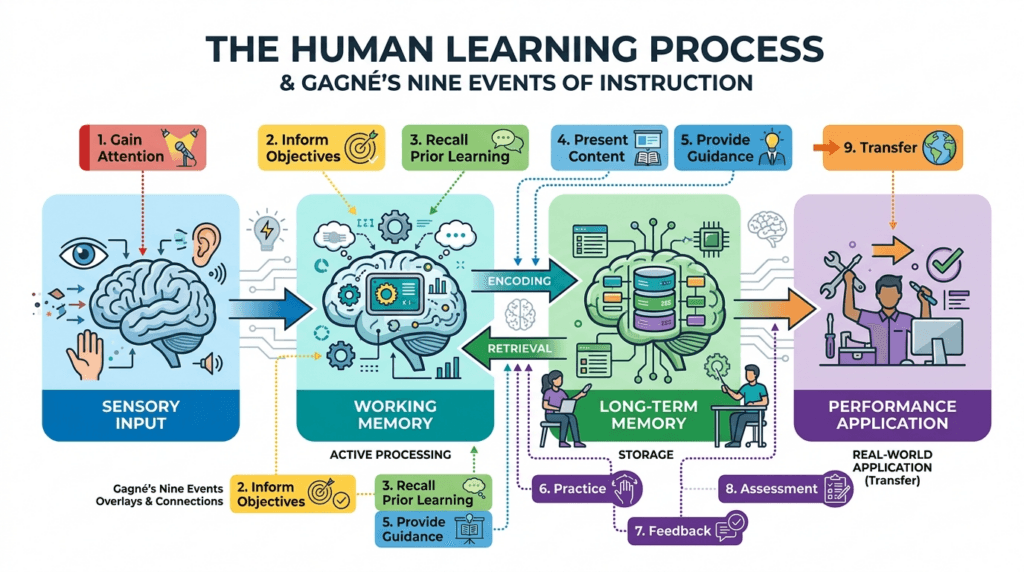
Gagné drew heavily from the information processing model of memory, which describes how the human brain receives, encodes, stores, and retrieves information. The bottleneck is working memory. It’s where learning either happens or doesn’t. If you overload it, nothing gets encoded into long-term memory. If you never engage it, nothing gets processed at all. Gagné’s nine events are, in essence, a systematic protocol for managing working memory efficiently and ensuring that information makes the journey into long-term memory where it can actually be used.
Five Categories of Learning Outcomes
One of Gagné’s most important contributions is his taxonomy of learning outcomes. He argued that different types of learning require fundamentally different instructional conditions:
- Verbal Information — stating facts (e.g., “The return window is 30 days”)
- Intellectual Skills — applying rules and concepts (e.g., calculating a refund)
- Cognitive Strategies — self-regulating one’s own learning and thinking
- Motor Skills — physical performance (e.g., operating equipment)
- Attitudes — choosing to act in certain ways
| Design Tip: Before mapping your content to the nine events, identify which of Gagné’s five outcome categories your training is targeting. This single decision will shape every instructional choice you make downstream. |
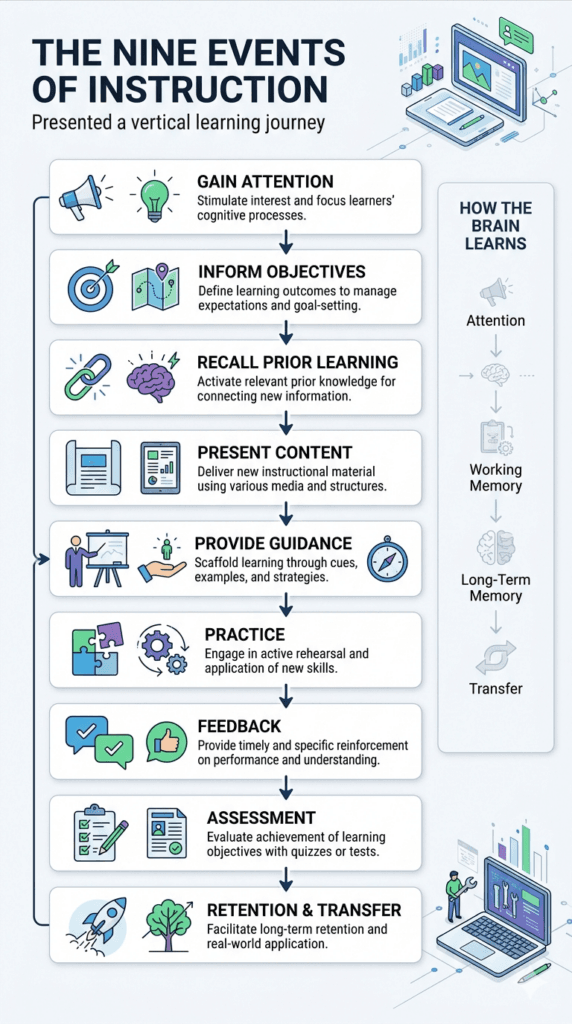
Gagne’s Nine Events of Instructions at a Glance
| Event | Cognitive Function | It Makes the Brain… |
| 1. Gain Attention | Activates sensory register | Pay attention |
| 2. Inform Learners of Objectives | Sets executive control | Know what to look for |
| 3. Stimulate Recall of Prior Learning | Activates long-term memory | Connect new to known |
| 4. Present the Content | Selective perception | Receive and process |
| 5. Provide Learning Guidance | Semantic encoding | Store meaningfully |
| 6. Elicit Performance (Practice) | Retrieval and responding | Demonstrate understanding |
| 7. Provide Feedback | Reinforcement | Correct and refine |
| 8. Assess Performance | Retrieval | Confirm mastery |
| 9. Enhance Retention and Transfer | Generalization | Apply in real contexts |
The events are sequential by design, but not rigid. In longer programs, you’ll cycle through them multiple times. In microlearning, you may compress several events into a single interaction. The key is understanding why each event exists before you decide whether — or how much — to modify it.
Gagné’s 9 Events of Instruction — Examples and Deep Dives
Each section below covers what the event means cognitively, why it matters in practice, and two concrete examples: one for classroom/instructor-led training and one for eLearning. These are the examples most designers and trainers search for — organized so you can jump directly to the event you’re working on.
Event 1: Gain Attention — Examples and How-To
What it means: Before any learning can happen, the brain must be aroused from its default state and focused on what’s coming. This isn’t optional or decorative — it’s neurologically prerequisite. An unattended stimulus simply doesn’t enter the information processing system.
Why it matters: In corporate settings, learners arrive with full mental queues: emails they haven’t answered, meetings they just left, problems they’re trying to solve. Your training is competing with all of that. If you don’t actively seize attention in the first 60–90 seconds, you’ve already lost a significant portion of the room.
Attention can be captured through novelty, relevance, conflict, humor, or surprise. What it cannot be captured with is a slide that says “Welcome to today’s training on Compliance Policy Updates.”
Corporate Training Example: A financial services firm opens its anti-money-laundering training with a 90-second video clip: a compliance officer walks through the aftermath of a real (anonymized) regulatory failure — the fines, the job losses, the reputational damage. No introduction. No agenda slide. Just immediate, visceral stakes. Attendance is mandatory, but engagement from that moment is not — and it doesn’t have to be forced, because the opening earned it.
eLearning Example: A cybersecurity awareness module opens with a simulated phishing email appearing in a replica email interface. The learner is prompted to click “check your messages.” If they click the suspicious link, the screen briefly locks with a message: “In a real attack, this is where your credentials would have been stolen.” No lecture needed. The learner is now intensely motivated to understand what just happened.
Common mistakes:
- Opening with housekeeping, fire exits, or course objectives before doing anything to earn attention
- Using shock tactics that create anxiety without creating relevance
- Confusing “elaborate” with “attention-getting” (a fancy animated intro that runs for 3 minutes is not attention — it’s impatience)
Trainer tips:
- Lead with a problem, not a topic. “We’re going to talk about workplace harassment” is a topic. “Eighteen months ago, a manager at a company identical to ours made one bad decision. Here’s what happened next.” is a problem.
- Use the learner’s own job context as the hook. People pay attention to things that affect them directly.
- In eLearning, make the attention-grabber interactive, not passive.
Event 2: Inform Learners of Objectives — Examples and How-To
What it means: Tell learners exactly what they’ll be able to do by the end of the training — in concrete, observable terms. Not vague aspirations. Not topics that will be “covered.” Specific, behavioral outcomes.
Why it matters: Objectives activate what Gagné called executive control processes — metacognitive functions that direct where the brain pays attention during learning. When a learner knows they’ll need to apply a rule, they process content differently than if they think they’ll just need to remember it.
Corporate Training Example: In a sales training program, the facilitator presents three clear objectives on a flip chart: (1) Identify at least three buying signals in a prospect conversation; (2) Use the SPIN framework to move a prospect through discovery; (3) Handle the “we’re happy with our current vendor” objection using the reframe technique. Each objective is something a manager could observe during a sales call.
eLearning Example: An eLearning course on performance review conversations shows a brief “scenario preview” at the start: three video clips of the same feedback conversation, each with a different outcome. The narration says: “By the end of this module, you’ll be able to tell exactly why conversation #3 went differently from conversations #1 and #2 — and replicate it.” The objective is delivered through demonstration rather than bullet points.
Common mistakes:
- Writing objectives for the designer (“This module covers…”) rather than the learner (“After this module, you will be able to…”)
- Using vague verbs: “understand,” “appreciate,” “be aware of” — these are invisible outcomes
- Listing so many objectives that working memory is immediately overwhelmed
Event 3: Stimulate Recall of Prior Learning — Examples and How-To
What it means: Deliberately activate relevant knowledge, skills, or experiences the learner already possesses before presenting new content.
Why it matters: Learning is associative. The brain encodes new information by linking it to existing knowledge structures (schemas). If you don’t activate those existing schemas before presenting new content, you force the brain to store the new information in isolation, where it’s much harder to retrieve later.
Corporate Training Example: Before a module on advanced Excel pivot tables, the facilitator asks: “How many of you have used a basic pivot table before — even just to sort data?” Most hands go up. “Good. Everything we’re doing today is built on that same logic. We’re just going to add three new moves to what you already know.” That single sentence reduces anxiety and prepares the brain to attach new knowledge to existing scaffolding.
eLearning Example: A module on giving constructive feedback opens with a three-question diagnostic: “Think about the last time you gave feedback that didn’t land well. What happened? What did you do? What did the other person do?” The learner types brief responses — which aren’t scored or judged. The act of retrieving that memory activates the neural networks associated with feedback situations, making the new content that follows far more sticky.
Common mistakes:
- Skipping this event entirely and jumping straight to content
- Using irrelevant “ice-breakers” that don’t actually activate relevant prior knowledge
- Assuming everyone has the same prior knowledge
Event 4: Present the Content — Examples and How-To
What it means: Deliver the actual instructional content — the concepts, facts, procedures, attitudes, or skills you’re teaching.
Why it matters: Gagné did not say “present lots of content.” He said present content in a way that facilitates selective perception — helping learners identify what’s most important and filter out what’s noise. The key principle is chunking: breaking information into digestible pieces that don’t exceed the capacity of working memory.
Corporate Training Example: A compliance training on GDPR data handling principles breaks the regulation into seven core scenarios rather than presenting the legal text. Each scenario is a two-paragraph mini-case: here’s the situation, here’s what GDPR requires, here’s what happens if you get it wrong. The legal principle is extracted from the case at the end of each scenario, not at the beginning. Context first, principle second — this is the sequence that actually encodes.
eLearning Example: A software training module uses a “layered reveal” approach. The learner first sees the interface with hotspots that can be explored. Clicking each hotspot reveals a brief explanation. Then a demonstration plays showing a complete workflow. Finally, a summary card condenses the workflow into a five-step reference guide. The learner has encountered the same content four times, in four different modes, with each layer adding depth — not repetition.
Common mistakes:
- Treating “presenting content” as synonymous with “talking at people for 45 minutes”
- Using dense text slides as a script rather than a visual aid
- Front-loading theory before the learner has any context for why they need it
Event 5: Provide Learning Guidance — Examples and How-To
What it means: Offer additional support to help learners encode and understand the content more deeply. This is different from presenting content — it’s about helping learners process what they just received.
Why it matters: This is one of the most underutilized events in corporate training. Most programs move directly from content presentation to practice, skipping the cognitive scaffolding that makes practice meaningful. Guidance can take many forms: worked examples, analogies, mnemonics, demonstrations, concept maps, comparison tables, expert commentary, or “here’s how I think about this” narration.
Corporate Training Example: After presenting the principles of active listening in a manager training, the facilitator plays two video clips of the same conversation — one with active listening, one without. Then she walks through each clip and explicitly names the behaviors: “Notice how in the second clip, Marcus mirrors her language there — he picks up the word ‘overwhelmed’ and reflects it back. That’s not accidental, and here’s why it matters…” She’s not presenting new content; she’s helping learners decode what they just watched.
eLearning Example: After a module explaining a multi-step financial approval workflow, the course provides an annotated case walkthrough: a real-ish approval request with expert commentary embedded at each decision point. The commentary doesn’t just describe what’s happening — it explains why the decision is made that way, what common mistakes look like at that step, and what to watch for.
Trainer tip:
Worked examples are the single highest-return guidance technique supported by cognitive science. Gradually fade guidance across multiple practice items (the “I do / we do / you do” progression).
Event 6: Elicit Performance (Practice) — Examples and How-To
What it means: Have learners actively perform the skill or demonstrate the knowledge they’ve just acquired. Not passively review. Not watch. Do.
Why it matters: This event is where most of the actual learning happens — not in Event 4, despite what most training programs implicitly assume. Practice drives retrieval, and retrieval strengthens memory in ways that passive exposure simply cannot. Cognitive science calls this the testing effect or retrieval practice effect: the act of pulling information out of memory strengthens the memory trace far more powerfully than re-reading or re-watching it.
Corporate Training Example: A customer service training uses role-play triads: one person plays the customer, one plays the rep, and one acts as an observer with a specific checklist. After four minutes, they debrief in the triad and rotate. Each person plays every role twice. The practice is structured, time-bounded, safe to fail in, and followed immediately by peer feedback.
eLearning Example: A compliance module uses branching scenarios rather than multiple-choice questions. The learner is placed in a realistic situation — a vendor contacts them about a contract that bypasses procurement — and must choose how to respond at each decision point. Choices lead to realistic consequences, not just “correct/incorrect” labels. The learner experiences the downstream effects of their decision, which activates emotional encoding alongside factual encoding.
Common mistakes:
- Treating knowledge-check quiz questions as practice (recalling a fact is not the same as performing a skill)
- Making practice feel like a test rather than a safe failure space
- Using “let’s discuss” as a substitute for individual practice
Event 7: Provide Feedback — Examples and How-To
What it means: Give learners specific, actionable information about how their practice performance compared to the target performance — and why.
Why it matters: Feedback is how practice becomes learning. Without it, learners may practice the wrong thing confidently, reinforcing errors rather than correcting them. The most crucial feature of effective feedback is specificity. “Good job” and “Not quite right” are not feedback. They’re evaluations. Feedback tells the learner what to do differently and why.
Corporate Training Example: During a negotiation role-play, the observer uses a structured observation checklist aligned to the objectives. The debrief follows a specific sequence: (1) Self-assessment from the performer, (2) Observer feedback on observable behaviors from the checklist, (3) Facilitator adds nuance or challenges. The performer gets layered feedback that is specific, evidence-based, and forward-looking.
eLearning Example: In a branching scenario, when a learner makes a suboptimal choice, the feedback screen doesn’t just say “Incorrect — try again.” It shows what happened as a direct result of their choice (a brief video of the consequence), explains which principle was violated and why, then offers a hint before inviting them to try again. The feedback is embedded in consequence rather than delivered as correction — which feels like learning from experience rather than being told you’re wrong.
Common mistakes:
- Providing delayed feedback (feedback given a day after practice has far less impact than immediate feedback)
- “Feedback sandwiches” that bury the corrective message so thoroughly in praise that it never lands
- In eLearning: “That’s correct! Great work!” on every correct answer — which is noise, not signal
Event 8: Assess Performance — Examples and How-To
What it means: Evaluate whether learners have achieved the stated objectives through a formal or semi-formal measurement — distinct from practice.
Why it matters: Assessment tells you two things practice does not: whether mastery has been achieved (not just attempted) and whether the instruction itself worked. It completes the model’s loop: you stated objectives in Event 2, you built toward them through Events 3–7, and now you determine whether you got there.
Corporate Training Example: At the end of a safety training, rather than a written test, learners demonstrate three physical procedures on actual equipment while an assessor uses a criterion-referenced checklist. Each item is rated on a 3-point scale: (0) Not demonstrated, (1) Partially demonstrated with errors, (2) Demonstrated correctly and independently. Anyone who doesn’t achieve a “2” on all critical safety items gets additional coaching and re-attempts. The standard is mastery, not a percentage score.
eLearning Example: A data privacy compliance course uses a final scenario-based assessment with five branching situations. Scoring is weighted by decision criticality — a missed regulatory trigger costs more points than a formatting error. The system tracks not just final scores but the pattern of choices, flagging specific competency gaps for the learner’s manager.
Common mistakes:
- Confusing assessment with evaluation (assessment measures learner mastery; evaluation measures program effectiveness)
- Misaligning assessment tasks with stated objectives
- Setting arbitrary score thresholds (80%) rather than criterion-based mastery standards
Event 9: Enhance Retention and Transfer — Examples and How-To
What it means: Design deliberate experiences that help learners retain what they’ve learned over time and apply it in contexts different from the original training environment.
Why it matters: This is the event that separates instructional designers who think about learning from those who think about training delivery. Everything up to Event 8 happens in the training. Event 9 is about what happens after. And for most organizations, the “after” is where return on training investment is actually generated — or destroyed.
Corporate Training Example: After a management training series, participants receive a 30-day “transfer plan” that includes: (1) Three specific behaviors to practice in the first week, with a reflection journal prompt for each; (2) A peer-coaching pairing with another participant for bi-weekly 20-minute check-ins; (3) A manager conversation guide for their skip-level meeting in week three; (4) A 30-day follow-up survey that feeds into a coaching conversation with the program facilitator. Transfer isn’t assumed — it’s architected.
eLearning Example: An eLearning course doesn’t end at the final screen. It triggers a series of spaced retrieval notifications over 30 days: brief (2-minute) mobile-delivered scenarios sent on days 3, 7, 14, and 30, each presenting a situation slightly different from those in the original course. The learner’s responses are tracked, and if accuracy drops below a threshold on any dimension, a remediation module is automatically assigned.
Common mistakes:
- Treating the end of instruction as the end of the learning designer’s responsibility
- Providing “job aids” that are never actually used on the job because no one explained when or how to use them
- Failing to involve managers in transfer support — the single biggest predictor of training transfer is manager reinforcement
Gagné’s 9 Events of Instruction Lesson Plan Template
Use this template before building a single slide or screen. Filling it out forces clarity about what you’re actually designing and catches missing events before they become expensive problems in production.
| How to use this template: Complete one row per lesson or module. If you can’t fill in a cell, that’s your design gap. The “Time Allocated” column is especially revealing — most designers discover they’ve allocated 60%+ of their time to Event 4 alone. |
Event Audit Checklist (use when reviewing existing training):
- Is attention genuinely earned in the first 90 seconds, or just announced?
- Are objectives observable and behavioral, or vague and topic-based?
- Is prior knowledge activated deliberately, or assumed?
- Is content chunked, or presented as one undifferentiated block?
- Is there guidance between content and practice, or a jump straight to quizzing?
- Is practice active performance of the target skill, or passive recognition?
- Is feedback specific and corrective, or evaluative (“Correct!”)?
- Does assessment match the cognitive level of the objective?
- Is there a designed transfer plan, or does transfer just “happen”?
Complete Workplace Case Study: Meridian Software
Background: Meridian Software is a 600-person B2B SaaS company that recently promoted 22 individual contributors into people manager roles as part of a rapid expansion. Within three months, HR data showed elevated attrition on the teams led by these new managers, and exit interviews cited “poor management” and “unclear expectations” as top drivers. The L&D team was asked to design a three-day New Manager Essentials program.
| Gagné’s Event | Meridian New Manager Program Example |
| 1. Gain Attention | Day 1 opens with the HR director presenting actual attrition data from new manager teams versus tenured manager teams, using the names of the business units. Two of the 22 new managers are present when their teams’ numbers appear, creating immediate and authentic urgency. |
| 2. Inform Objectives | Participants receive a Manager Effectiveness Card — a laminated reference listing three observable behaviors that Meridian’s internal research has identified as predictors of team retention. Objectives are framed as: “By Thursday afternoon, you’ll be able to do these three things consistently enough that your team notices.” |
| 3. Stimulate Recall | Participants complete a three-minute reflection on the best manager they have worked for and discuss in pairs. The facilitator captures common themes and connects them to the program framework. |
| 4. Present Content | Instruction is organized into three content blocks, each aligned with one target behavior. Every block includes a 20-minute case presentation followed by a 10-minute expert panel. No segment exceeds 30 minutes before learners engage in practice. |
| 5. Provide Guidance | After each content block, participants watch a five-minute annotated conversation video with expert commentary throughout. Participants complete a Deconstructed Behavior Worksheet while viewing. |
| 6. Elicit Performance | Day 2 is devoted primarily to practice. Participants complete four role-play scenarios based on real manager challenges from exit interviews. Each scenario is performed twice: initially without preparation, then again after reviewing guidance materials. |
| 7. Provide Feedback | Feedback follows a structured three-step process: (1) self-assessment using a five-item checklist, (2) peer observer feedback using the same checklist, and (3) facilitator coaching focused on the single highest-impact improvement. |
| 8. Assess Performance | Day 3 morning: each participant conducts a 12-minute live conversation with a role-play actor. Two assessors evaluate using Meridian’s Manager Effectiveness Rubric. Participants who don’t demonstrate critical behaviors receive targeted coaching and a 30-day follow-up. |
| 9. Retention and Transfer | Participants leave with a 90-day transfer plan developed jointly with their direct manager. The plan includes weekly action commitments, peer coaching partnerships, and three scheduled HR check-ins. A 30-day pulse survey measures behavior change. |
Results at 90 Days: Voluntary attrition on new manager teams dropped 31% against the pre-program baseline. Qualitative feedback from direct reports showed significant improvements in “I know what’s expected of me” and “My manager gives me useful feedback.” The L&D team attributed results not to the content — which was broadly similar to what they’d offered before — but to the intentional sequencing of Events 6, 7, and 9, which previous programs had treated as afterthoughts.
Strengths, Limitations, and Best Use Cases
Strengths
- Research grounded: The nine events map to well-validated cognitive science principles derived from decades of empirical work.
- Prescriptive: Unlike many frameworks, Gagné tells you what to do, not just what to think about.
- Flexible: The framework applies equally to face-to-face instruction, eLearning, blended learning, microlearning, and performance support design.
- Universal: It works across all five outcome categories.
- Evaluable: Because objectives are stated explicitly and assessment is built into the model, it’s straightforward to measure effectiveness.
Limitations
- Can feel formulaic: In the hands of a mechanical designer, the nine events become a checklist that produces technically compliant but experientially flat training.
- Less suited to exploratory learning: For learning outcomes that require discovery, experimentation, or emergent knowledge construction, the linear structure can constrain rather than facilitate.
- Event 9 is chronically underinvested: Organizations frequently fund Events 1–8 and then expect transfer to happen organically. It doesn’t.
- Assumes a clear performance target: The nine events work best when you know what you want learners to be able to do.
Best Use Cases
| Training Type | Fit Rating |
| Onboarding programs | ★★★★★ Excellent |
| Compliance training | ★★★★★ Excellent |
| Software / systems training | ★★★★★ Excellent |
| Safety training | ★★★★★ Excellent |
| Technical skills training | ★★★★☆ Very Good |
| Sales skills training | ★★★★☆ Very Good |
| Leadership development | ★★★☆☆ Good with adaptation |
| Culture / values programs | ★★★☆☆ Good with adaptation |
| Innovation / design workshops | ★★☆☆☆ Limited fit |
How Gagné Compares With Other Instructional Design Models
Gagné vs. ADDIE
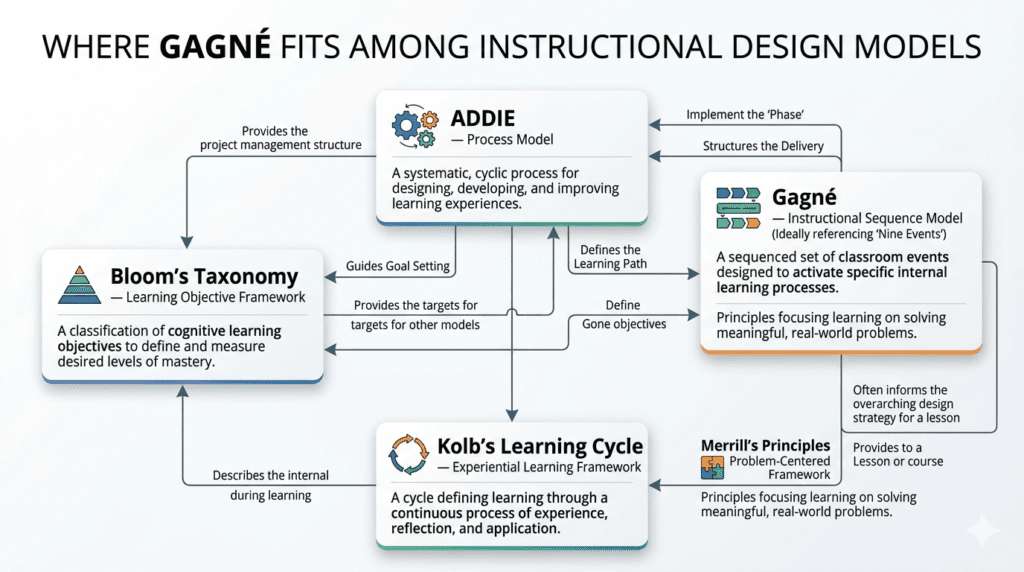
ADDIE (Analyze, Design, Develop, Implement, Evaluate) is a process model — it describes the workflow of instructional development. Gagné’s Nine Events is an instructional model — it describes the structure of the learning experience itself. They are complementary, not competing. ADDIE tells you how to build training; Gagné tells you what to put inside it. Learn more about ADDIE: A Complete Framework Guide.
Gagné vs. Bloom’s Taxonomy
Bloom’s Taxonomy is a classification system for learning objectives and cognitive levels. It answers: “At what cognitive depth should this learning happen?” Gagné’s events answer: “In what sequence should instruction be delivered?” Use Bloom to write and align your objectives and assessments (Events 2 and 8), and use Gagné’s events to sequence the instruction that builds toward those objectives. See our guide to Bloom’s Taxonomy Levels with Instructional Design Applications
Gagné vs. Merrill’s First Principles of Instruction
David Merrill’s Principles (Problem-centered, Activation, Demonstration, Application, Integration) share considerable conceptual territory with Gagné’s events — Merrill was heavily influenced by Gagné. The key differences: Merrill’s model is more explicitly learner-centered and problem-driven; it places the real-world problem at the center of instruction rather than at the beginning. Gagné is more linear and sequential; Merrill is more iterative and cyclical. For problem-based learning designs, Merrill may be a better primary framework. For structured skills training, Gagné tends to produce more reliable results. Explore Merrill’s First Principles: A Design Comparison
Gagné vs. Kolb’s Learning Cycle
Kolb’s Experiential Learning Cycle describes how adults learn from experience. Gagné describes how to design instruction. They operate at different levels. In a well-designed blended learning program, you might use Kolb’s cycle to structure a post-training coaching session while using Gagné’s events to structure the pre-work eLearning module. Explore How Kolb’s Learning Cycle Can Transform Your Training Design.
Gagné vs. Dick and Carey Systems Model
Dick and Carey is a full systems approach that includes components for instructional analysis, learner analysis, goal analysis, and detailed sequencing guidance. Gagné’s events are, in fact, embedded within Dick and Carey’s instructional strategy component. For large-scale, high-stakes instructional systems design, Dick and Carey provides more comprehensive scaffolding. For most corporate training applications, Gagné’s events offer a more efficient path to effective design. Read our comprehensive guide on Dick and Carey Systems Model: When to Use the Full Approach.
Actionable Takeaways and Implementation Guide
For Instructional Designers
Use Gagné’s Nine Events as your lesson-level blueprint. Before building a single slide or screen, fill in the lesson plan template above. Conduct an “event audit” on your existing training materials: for each lesson, ask which events are well-designed and which are missing or weak. In most programs, Events 3, 5, and 9 will need the most work.
For Corporate Trainers and Facilitators
You don’t need to tell learners you’re using Gagné’s framework. But you do need to use it. Pay particular attention to the opening sequence (Events 1–3): how you start a session determines how much learners engage with everything that follows. Invest in feedback quality (Event 7) — this is where your expertise as a facilitator has the highest leverage.
For L&D Managers
Build event coverage into your instructional design standards and review processes. Fund Event 9. Post-training transfer support is chronically defunded because its effects aren’t visible at the moment of delivery. But it’s where your training ROI actually lives. Allocate design budget for spaced retrieval, manager enablement, and post-training performance support as standard practice.
For eLearning Developers
Map every screen and interaction to a specific Gagné event. If you can’t identify which event a screen is serving, that’s a signal it either needs to be redesigned or removed. Invest in branching scenario design for Events 5 and 6 — multiple-choice questions that ask learners to recall content are not the same as scenarios that ask learners to make decisions.
Frequently Asked Questions about Gagné’s 9 Events of Instruction
What are Gagné’s 9 Events of Instruction?
Gagné’s 9 Events of Instruction are a sequence of instructional activities — gain attention, inform learners of objectives, stimulate recall of prior learning, present the content, provide learning guidance, elicit performance, provide feedback, assess performance, and enhance retention and transfer — developed by educational psychologist Robert Gagné to optimize conditions for human learning. Each event corresponds to a specific cognitive process and, together, they create the conditions for effective encoding, retrieval, and transfer of knowledge and skills.
Do the nine events need to be used in order?
The events are sequenced intentionally, because each event prepares the cognitive conditions for the next. However, they are not inflexible. In longer programs, you’ll cycle through multiple times. Some events (particularly Events 3, 5, and 6) can be revisited throughout a lesson. What you should not do is omit events entirely — especially Events 6, 7, and 9, which are most commonly sacrificed when time is short, and which have the largest impact on actual learning transfer.
Is Gagné’s model still relevant today?
Yes — arguably more so than when it was first published. The cognitive science underpinning the nine events has been extensively validated over the past 60 years. Research on retrieval practice, spaced learning, worked examples, cognitive load, and transfer of training has consistently supported the sequencing Gagné proposed. The framework has survived the shift from classroom to eLearning to mobile learning because it describes how human memory works, not just how classrooms work. The tools change; the brain doesn’t.
Can Gagné’s Nine Events be used with AI-based learning?
Yes, and AI-based learning environments are particularly well-suited to executing several events with greater precision than traditional formats. AI tutors and adaptive learning systems can dynamically calibrate Events 3 (recall activation), 5 (guidance), 6 (practice difficulty), 7 (personalized feedback), and 9 (spaced retrieval) based on individual learner performance in real time. Conversational AI can also deliver Event 7 feedback in natural language rather than pre-authored responses. The nine events provide a useful design brief for AI learning system architects: whatever the technology, these nine functions need to be present and sequenced correctly.
What industries use Gagné’s model?
Gagné’s Nine Events are applied across virtually every industry that invests in formal training, but they’re most prominent in sectors where performance standards are high and errors are costly. Healthcare uses the model extensively for clinical skills training, simulation-based learning, and patient safety programs. Financial services applies it to compliance, product knowledge, and advisor certification. Technology companies use it for technical onboarding, software training, and developer enablement. The military and defense sector — where Gagné himself first developed the framework — continues to use it for procedural and operational training. Manufacturing and safety-critical industries rely on it for equipment operation and hazard prevention. In each case, the appeal is the same: the model produces reliable, measurable results when applied systematically.
What is the difference between Gagné and Merrill’s First Principles?
Both models descend from the same cognitive science tradition — Merrill studied under Gagné and was heavily influenced by him. The primary differences are structural and philosophical. Gagné’s model is event-driven and sequential: nine discrete steps that build on each other toward a defined performance outcome. Merrill’s First Principles are principle-driven and cyclical: five principles organized around a real-world problem that sits at the center of the learning experience. Gagné is better suited to structured skills training with clear performance targets. Merrill is better suited to problem-based or project-based learning where the problem itself is the organizing spine. In practice, many experienced designers use both: Gagné’s events to structure individual lessons and Merrill’s principles to frame the overall learning arc.
How is Gagné’s model different from ADDIE?
ADDIE is a project management and development process for instructional design. Gagné’s Nine Events is a framework for structuring the instructional experience itself. ADDIE describes how to create training; Gagné describes what that training should contain and in what sequence. They work best in combination.
Can Gagné’s Nine Events be applied to eLearning?
Yes — in fact, the model is particularly well-suited to eLearning design because it provides a clear screen-by-screen and interaction-level blueprint. Each screen or interaction in an eLearning module can be mapped to one or more of the nine events. The most commonly under-designed events in eLearning are Event 3 (prior learning activation), Event 5 (learning guidance), and Event 9 (transfer enhancement).
What are common mistakes when applying Gagné’s Nine Events?
The five most common mistakes in corporate training design are: (1) spending 70%+ of design time on Event 4 (content presentation) at the expense of Events 5–9; (2) skipping Event 3 entirely; (3) using passive quizzes as a substitute for genuine practice in Event 6; (4) providing non-specific feedback in Event 7; and (5) treating the end of delivery as the end of the designer’s responsibility, with no investment in Event 9.
References
- Gagné, R. M. (1965). The Conditions of Learning. New York: Holt, Rinehart and Winston.
- Gagné, R. M., Briggs, L. J., & Wager, W. W. (1992). Principles of Instructional Design (4th ed.). Fort Worth: Harcourt Brace Jovanovich.
- Gagné, R. M., Wager, W. W., Golas, K. C., & Keller, J. M. (2005). Principles of Instructional Design (5th ed.). Belmont, CA: Thomson Wadsworth.
- Merrill, M. D. (2002). First principles of instruction. Educational Technology Research and Development, 50(3), 43–59.
- Roediger, H. L., & Karpicke, J. D. (2006). Test-enhanced learning. Psychological Science, 17(3), 249–255.
- Kirschner, P. A., Sweller, J., & Clark, R. E. (2006). Why minimal guidance during instruction does not work. Educational Psychologist, 41(2), 75–86.
- Clark, R. C., & Mayer, R. E. (2016). e-Learning and the Science of Instruction (4th ed.). Wiley.
Further Reads
- Bloom’s Taxonomy
- Instruction Designing Models
- ADDIE Model of Instructional Designing
- Successive Approximation Model (SAM): Complete Guide + 8 Free Templates
- Kolb’s Learning Cycle: Using Experiential Learning in the Workplace
- Gagné’s 9 Events of Instruction: A Practical Guide for Trainers with Real Examples
- ADDIE vs SAM: Which Instructional Design Model Should You Use in 2026?
- ARCS Model of Motivation — The Complete Guide for Corporate Trainers [2026]
- Adult Learning Theory (Andragogy): Knowles’ 6 Principles Explained with Workplace Examples
- Cognitive Load Theory Explained: A Practical Guide for Trainers & Instructional Designers
- Backward Design – The Complete Framework for Planning Learning
- Action Mapping: A Step-by-Step Guide with Examples
- Story-Based Learning Design: A Practical 5-Step Framework
Author Details

Arindam is a learning and development entrepreneur. He has designed and delivered learning solutions across leadership development, sales enablement, customer experience and digital learning initiatives over the past 15 years. Reach out to him at arindam@trainercentric.in or via his Linkedin Profile: Linkedin
A note on this guide from the Author: “I’ve spent years watching well-designed training programs fail in the room — not because the content was wrong, but because the “sequence” was off. Learners were thrown into procedures before they cared about them. They were assessed before they’d had a chance to practice. They left without knowing what to do Monday morning. This guide is the one I wish I’d had at the start of my career. I hope this had helped you!